
xAI MCP: How to Connect MCP Servers and Tools (2026)

Nov 17, 202614 min read
XAI MCP is remote tool access for Grok
The short answer
Nobody sells "xAI MCP", and there is no switch to turn it on.
It's xAI's support for the Model Context Protocol in its API, which lets a Grok model such as Grok 4.7 call tools hosted on a remote server, whether that's one you built yourself or one from a platform like Activepieces.
Nodeflare checked this against docs.x.ai on 17 November 2026. Read the docs page for the current request format, because parameter names are the part of an integration that gets edited without notice.
What MCP is, independent of xAI
A model needs some way to discover and call external tools, and the Model Context Protocol is the open standard for that. A server publishes a list of tools, each with a name, a description and an input schema.

A client reads that list and sends calls back.
Because the contract is the same everywhere, a server written once serves any client that speaks the protocol.
Activepieces shows the payoff: a integration connected there is both a step in a flow and a tool on the project's MCP server, so each of its 750 integrations is something Grok can call without a second catalogue to publish or re-integrate.
The action behind both is the same one in packages/integrations in the open source repo.
Follow the request through the picture below. An application sends it to the xAI API, Grok decides a tool is needed, and the call goes out to a remote MCP server. That server sits outside xAI and fronts the data, ticketing and CRM tools.

What xAI MCP is not
It's not a catalogue of ready-made connectors, so nothing is pre-wired to your ticketing system or CRM. It's not a hosted server either: xAI doesn't run the tools for you.
Whatever access you grant to the server, Grok's calls inherit it, because xAI MCP isn't a free-standing permission layer.
And it isn't exempt from billing, because a tool call is still a model request that you pay for.
Whatever access you grant to the server, Grok's calls inherit it, because xAI MCP isn't a free-standing permission layer.
This takes minutes, not a project: automate it in Activepieces free.
Grok request flow through MCP servers
- Declare the remote MCP tool in the API request, with the server URL.
- Set the allowed-tools list.
- Add the auth header.
- Grok discovers the server's tools and chooses which to call.
- Results return in the response.
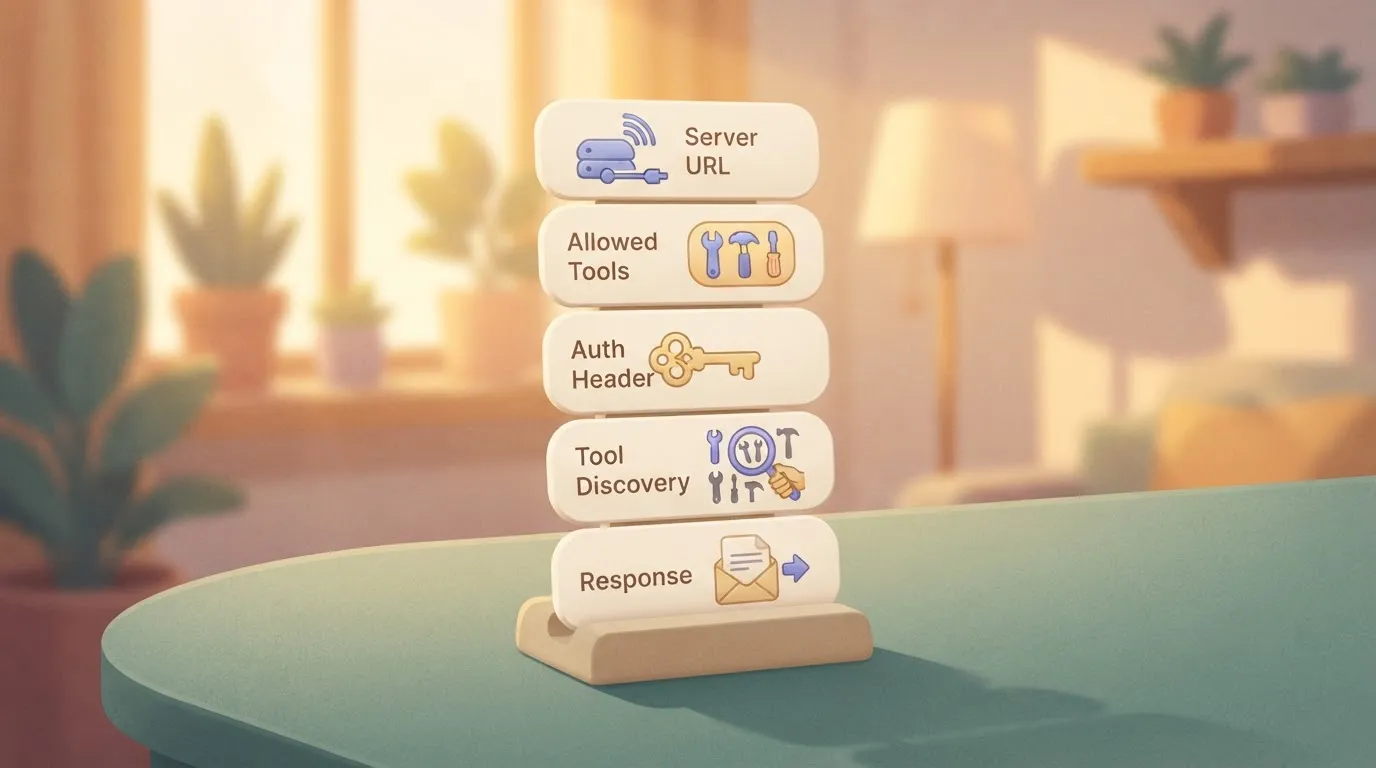
You own steps one to three; four and five happen after you send the request.
Start with the server URL, which says where Grok connects. The allowed-tools list says what it may call there, and leaving it broad hands Grok every tool the server exposes.
The auth header carries the credential, so scope that token to what the allowlist permits.
How Grok discovers and calls MCP tools
You don't script the calls. Grok asks the server what tools it offers, then decides for itself which to call and with what arguments.
Tool output returns in the response, and xAI bills the calls and their tokens like any other tool use. Read the response for what Grok actually called, because the server's own logs only show that something connected.
Limits stated in xAI's docs
A server running only on your machine isn't reachable this way, because xAI's documentation describes support for remote MCP servers. Docs lists Grok 4.7 as the xAI model for agentic tool calling.
I haven't confirmed which other models accept MCP tools, so check xAI's tool documentation for your model before you build, and note the date you checked.
Where teams use xAI MCP today
Where Grok needs live data or an action from a system someone else already runs, teams reach for xAI's MCP support.
Data lookup and support workflows
Mostly it is read-only lookup. Grok queries an internal knowledge base, an order system or a ticket queue through an MCP server and answers from the result instead of from training data.
A support team might expose "find order by ID" and "list open tickets for customer" as tools, and Grok drafts a reply from what comes back.
Start read-only. A write tool, such as "issue refund" or "close ticket," runs under whatever credentials the server holds, and the model decides when to call it.
Remote MCP versus function calling
When you control one application and have a handful of tools, function calling is simpler. You describe each function in the request, Grok returns a call, and your own code runs it with your own credentials.
Remote MCP pays off when the same tools must serve several clients, or when another team already maintains the server.
How it compares with other vendors' MCP support
| Where the tool runs | Who hosts the server | Auth handling | Setup effort | |
|---|---|---|---|---|
| xAI remote MCP | On the MCP server, called by xAI's platform | You or a third party, reachable over the network | You supply credentials the server accepts; they pass through xAI's request | Moderate: server, access rules and tool permissions |
| xAI function calling | In your own code | No server; your application executes | Your code holds the keys | Low for a few tools |
| Other vendors' MCP support | Varies by vendor | Varies by vendor | Varies by vendor | Check each vendor's documentation |
Prices and plan limits checked against docs.claude.com and claude.com and openai.com and gemini.google on November 17, 2026.
I haven't verified the other vendors' behavior, so the last row is deliberately open; confirm it before you plan a migration. What follows from the table is a decision rule: choose by who must own the credentials and the uptime.
What xAI MCP costs and requires
Whoever owns the credentials also owns the bill. That bill is Grok tokens plus whatever the MCP server costs to run; xAI lists no separate fee for the MCP call itself.
xAI MCP account, API key and server requirements
You need an xAI account with an API key and a remote MCP server that xAI's side can reach over the network. A server on your laptop won't work.
If a pilot hits rate limits, the fix is more spending, not a settings change.
xAI's limits follow cumulative spend: Tier 0 is $0, Tier 1 $50, Tier 2 $250, Tier 3 $1,000 and Tier 4 $5,000, meaning you need $5,000 in cumulative charges to access the highest tier. A new account starts at Tier 0.

Published token and tool-call prices
On xAI's pricing page, grok-4.7 costs $2.00 per 1M input tokens and $6.00 per 1M output tokens.

For comparison, the older grok-4.3 was priced at $1.25 to $2.50, and grok-build-0.1 at $1 to $2.
| Item | Price | Source |
|---|---|---|
| grok-4.7 tokens | $2.00 in / $6.00 out per 1M | xAI pricing page |
| Web search | $5 per 1,000 calls | xAI pricing page |
| Collections search | $2.50 per 1,000 calls | xAI pricing page |
| MCP tool fee | Not listed | xAI pricing page |
| Server hosting | Set by your host | Your provider |
If your agent mixes web search into an MCP workflow, those $5 per 1,000 calls add up faster than the tokens.
"Not listed" isn't "free." Hosting, uptime and any fees from the service your MCP server wraps land on your own invoices, and xAI's dashboard won't show them.
You can follow the rest of this with the builder open. Start free, no card.
Why xAI MCP is not ready for business
Make the strongest case and it is this: adoption outran hardening, and Grok, not you, decides when a tool runs.
The case against xAI MCP adoption
From 13,822 monthly downloads of the MCP TypeScript SDK in Nov 2024, the count reached 1,874,545 in Mar 2025, per Gravity, representing roughly 135-fold growth in just four months. It reached 35,008,987 by Nov 2025 and 217,328,148 in Aug 2026.

Much of the server code you might connect to is therefore under two years old and has had little time for review.
Of the 30,402 hosts Spellwarden probed, 26,548 responded as MCP, and 16,470 of those needed no sign-in, about three in five. Another 9,691 hosts exposed unsafe tool lists.

A server picked from a public directory is more likely than not to accept anyone, so check authentication before trusting it.
Because the model chooses the calls, and remote-only means xAI's side must reach your server over the internet, a poisoned tool result can steer Grok into a call you never intended.
Why scoped xAI MCP use still works
For a young protocol, pin one server you have read, rather than browsing a directory. For remote-only exposure, require authentication on your endpoint, and refuse anonymous access.
For model-chosen calls, set an allowed-tools list, so Grok can only invoke the named tools. For prompt injection, expose read-only servers, so a hijacked call can't write or delete anything.
For over-broad tokens, issue least-privilege tokens limited to one dataset or scope. For lack of visibility, log every call on your server, because xAI's dashboard won't show your side.
None of this makes the protocol mature. It limits the damage of a bad call to what the token and allow-list permit, and that's a limit you set yourself.
Five mistakes people make with xAI MCP
Miss that limit and you land in one of five mistakes: exposing every tool, over-privileged credentials, assuming local servers work, ignoring token cost of tool output, and not rechecking docs and prices.
Exposing every tool
Set the allow-list to the tools the task needs and nothing more. Without one, Grok receives descriptions of the server's full tool catalogue on every request.
In the chart, the GitHub MCP server, which exposes repository operations, costs 8,218 tool-definition tokens per request with 43 tools in TARE-Bench, 11,207 at default settings, and 22,524 with all toolsets on.
Issue the token with the narrowest scope the task allows. A read-only job gets a read-only token. The allow-list restricts what Grok may call, but the token restricts what the remote server will actually do, and only one of those survives a misconfigured list.
Local servers and tool output
If a server runs on your laptop over stdio, xAI's infrastructure can't reach it. The remote MCP tool calls a server over the network, so it needs a reachable endpoint with authentication in front of it.
Once tool results come back into the context, they count as billed tokens. A search that returns whole files costs far more than one that returns matching lines.
Before a rollout, read the current MCP documentation and pricing page rather than relying on an earlier test run, because MCP support, tool-call billing and model pricing are set by xAI and can change.
Connect xAI MCP to business apps with Activepieces
Once you have re-read the limits, Activepieces covers the case where Grok needs several business apps: its 750 integrations each become a tool on the project's MCP server once connected.
It runs as one MCP server in front of many app connectors, while a single custom server is simpler to connect directly.
Activepieces is an automation platform whose connectors, called pieces, you can expose as MCP tools, and its core is MIT-licensed with roughly 60% of the integrations contributed by the community, so the ecosystem grew out of real use cases rather than a vendor roadmap alone.
You point Grok at one endpoint instead of wiring up each app separately.
What it does about this article's problem is narrow: the Free plan includes MCPs alongside unlimited flows and 1,000 credits a month, so a read-only trial costs $0 on the platform side. MoneyGram, Moneypenny, Alan and FundingSocieties run Activepieces.
When xAI MCP replaces separate tool stacks
It fits when the work spans a CRM, a ticketing tool and a spreadsheet, and you would otherwise maintain three servers with three sets of credentials, so you're essentially running three separate technology stacks.
If you have one custom server you already control, Activepieces doesn't fit, because none of its 750 integrations are relevant to a tool you already host.
There the extra layer adds another place for permissions to drift and another system to debug when a call fails.
Be clear about what the admin view buys you. You can see which connections exist and what ran.
It doesn't decide what Grok should be allowed to do, and a published tool is callable by anything holding the endpoint's token. The allowed-tools list is still your job.
Start small enough that a mistake costs nothing, and do these in order:
- Pick one read-only use case, such as looking up a record, so no call can change data.
- Write the allowed-tools list: only the tools that use case needs, by name.
- Create a scoped token limited to those tools, not an account-wide key.
- Check current prices on xAI's pricing page and on your Activepieces plan, because Activepieces bills each tool call as activity.
- Turn on call logging, so you can see what Grok actually called.
Only after a week of clean logs is it worth widening the list.
Frequently asked questions
What the docs leave open
Widening the list raises questions the docs settle unevenly, and four of them are still open after the body above.
Point Grok's MCP tool at a remote server URL, not a process on your machine (docs.x.ai, remote MCP tools page). No separate per-call MCP fee figure is stated, so assume tool calls are billed and watch your usage (unpublished).
Supported models are listed per model, so check before assuming (docs.x.ai, models page). What xAI keeps from tool results is not stated for MCP (unpublished).
Until the unpublished items are answered, log every call and treat the retention gap as a reason to keep sensitive data out of the connected server.
Cost and availability
Is xAI MCP free to use? No. Model tokens are billed as usual, and a per-call MCP fee is unpublished, so test on a small budget. Your MCP server may also carry its own costs.
Does Grok support MCP in the consumer app? The documented feature is in the API. Consumer-app support is unpublished, so don't build a workflow on it.
Servers and function calling
Can I connect a local MCP server to Grok? Not directly. The request originates from xAI's side, so the server needs a reachable URL. If you tunnel a local server, require authentication, because anyone who finds the address can call it.
Is xAI MCP the same as function calling? No. With function calling, your code runs the function and returns the result. With MCP, xAI's infrastructure calls the remote server for you. That's why permissions and logging live on the server, not in your application.
Model support
How do I check which models support MCP? Read the models page on docs.x.ai, then make one real tool call against the model you intend to use.
Grok 4.7 is the model xAI positions for agentic tool calling, but a listing isn't proof your configuration works.
Related reading
References
Build it
Set this up in minutes.
No code required. Connect your accounts, and Activepieces runs it from there.
Start free Talk to sales