




Your AI agent will break something important today
Activepieces
Jul 10, 20269 min read

The take
AI agents fail most spectacularly when they touch external systems. Not because the reasoning breaks down, but because a single malformed API call can delete production data, trigger thousands of duplicate emails, or rack up cloud bills that make your CFO question your judgment.
The industry talks about prompt engineering and model selection, but the real engineering challenge is building safe boundaries around agent actions. After watching teams deploy agents that work beautifully in isolation and catastrophically in production, the pattern is clear: successful agent deployments treat external system integration as a security and reliability problem first, an AI problem second.

The briefs
1. Start with read-only operations and explicit approval gates
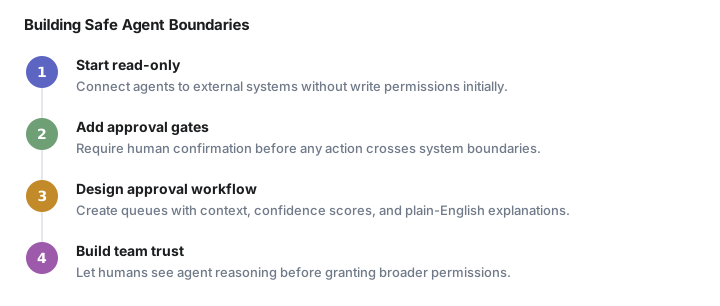
Every agent should begin life unable to modify external state. Connect it to your CRM in read-only mode first. Let it analyze lead data, suggest next actions, and generate personalized outreach drafts without touching the actual records. Build confidence in its reasoning before granting write permissions.
When you do enable writes, require human approval for any action that crosses system boundaries. An agent can draft the email, but a human clicks send. It can suggest the database update, but a human confirms the change. This approval layer catches edge cases your testing missed and builds team trust in the agent's judgment.
The approval workflow itself needs careful design. Create a queue where proposed actions wait for human review, with clear context about why the agent chose each action. Include the confidence score, the data inputs that drove the decision, and a plain-English explanation of the expected outcome. A good approval interface shows not just what the agent wants to do, but why it believes this action will improve your metrics.
2. Implement circuit breakers and rate limits from day one
Agents can trigger API calls faster than any human ever would. Without rate limits, a reasoning loop can exhaust your API quota in minutes or trigger anti-abuse systems that lock your account.
Set hard limits on actions per minute, per hour, and per day. If your agent normally processes ten leads per hour, cap it at fifteen and alert when it hits that ceiling. The goal is not to prevent all possible failures, but to contain the blast radius when something goes wrong.
Build circuit breakers that pause agent execution when error rates spike. Three failed API calls in a row should trigger a pause and human review, not three hundred.
Consider implementing progressive backoff strategies where agents slow down their request rate when they encounter resistance from external systems. An agent that hits a rate limit should wait longer between subsequent requests, not immediately retry at full speed. This prevents cascading failures where your agent's aggressive retry logic triggers additional rate limiting or account suspension.
3. Log everything, especially the reasoning chain
When an agent makes a bad decision, you need to understand why. Standard application logs capture what happened, but agent logs need to capture the reasoning process that led to each action.

Log the input data the agent received, the reasoning steps it followed, the confidence scores for each decision, and the final action it chose. When reviewing failures, this reasoning chain is often more valuable than the error message itself.
Store these logs in a queryable format. You will need to search for patterns across multiple incidents, filter by confidence scores, and track how reasoning quality changes over time.
The logging strategy should capture decision trees, not just final outcomes. When an agent evaluates a lead and decides to send a follow-up email, log the scoring criteria it applied, the threshold values it used, and any alternative actions it considered. This granular visibility helps you tune the agent's decision-making process and identify systematic biases in its reasoning.
4. Test failure modes, not just success paths
Traditional software testing focuses on happy paths and edge cases. Agent testing requires a third category: adversarial inputs and system failures.
What happens when your agent receives malformed data from an upstream system? How does it behave when an API returns unexpected error codes? Does it gracefully handle rate limiting, or does it retry aggressively and make the problem worse?
Test these scenarios in staging environments that mirror production constraints. Simulate API timeouts, partial data corruption, and authentication failures. The agent's response to these conditions often determines whether a minor glitch becomes a major incident.
Create test scenarios that mirror real-world data quality issues. Feed your agent leads with missing email addresses, phone numbers in inconsistent formats, and company names that do not match any database records. Observe how it handles ambiguous or contradictory information, and whether it fails gracefully or makes dangerous assumptions.
Build chaos engineering practices specifically for agent workflows. Randomly inject delays, errors, and partial failures into your test environment to see how agents adapt. The most robust agents continue operating effectively even when external dependencies become unreliable.
5. Design for rollback and recovery

Agents will make mistakes. The question is whether you can undo them quickly and completely.
For database operations, wrap agent actions in transactions that can be rolled back cleanly. For API calls that cannot be undone, implement compensation logic that reverses the effect. If an agent creates a duplicate customer record, have a process ready to merge or delete it safely.
Maintain audit trails that link every agent action to its triggering event and reasoning chain. When you need to roll back agent decisions, these trails let you identify all affected records and verify that the rollback completed successfully.
Recovery procedures should be automated where possible. If an agent sends duplicate emails to the same contact list, have scripts ready to identify affected recipients and send appropriate apologies. If it miscategorizes leads in your CRM, build tools that can bulk-update records based on the original reasoning data.
Document your rollback procedures and test them regularly. The middle of an incident is not the time to discover that your recovery scripts have bugs or that your backup data is incomplete.
6. Monitor business metrics, not just technical metrics
Technical monitoring catches system failures, but agent failures often look like business problems. An agent that successfully processes every API call but consistently misclassifies high-value leads is technically working and commercially broken.
Track business outcomes that agent actions should improve: lead conversion rates, response times, data quality scores, customer satisfaction metrics. Set up alerts when these metrics deviate from expected ranges, even if all technical systems report healthy.
Compare agent performance to human baselines on the same tasks. If your agent processes leads faster but converts them at lower rates, the speed improvement may not justify the deployment.
Segment your monitoring by lead source, company size, and geographic region. Agents often perform well on certain types of inputs while struggling with others. An agent that excels at qualifying inbound leads from your website might perform poorly on leads imported from trade show lists or partner referrals.

Set up cohort analysis to track how agent decisions affect long-term customer outcomes. A lead qualification agent might appear successful based on immediate conversion metrics, but if the leads it approves have higher churn rates six months later, the overall business impact is negative.
7. Build human oversight into the workflow design
The most successful agent deployments do not replace human judgment entirely. They augment human decision-making by handling routine tasks and surfacing edge cases that require human attention.
Design workflows where agents handle the bulk of standard cases while escalating unusual situations to human reviewers. Define clear escalation criteria based on confidence scores, data quality indicators, and business impact thresholds.
Train your team to work effectively with agent recommendations. Humans should understand what the agent is optimizing for, how it weighs different factors, and when its recommendations are most likely to be wrong. This partnership approach produces better outcomes than either pure automation or pure manual processes.
Watching next
The next frontier is multi-agent systems where individual agents coordinate through shared external systems. Early implementations are showing promise for complex workflows like lead qualification pipelines that span multiple tools and require handoffs between specialized agents.
The integration challenges multiply when agents need to coordinate state changes across systems while maintaining consistency and avoiding conflicts. Teams that master single-agent integration patterns now will be positioned to tackle these coordination problems as the tooling matures.
Reply if you are running agents in production and have integration war stories to share. The failure modes are still being discovered, and the community learns fastest when teams share what broke and how they fixed it.
Frequently asked questions
What are the biggest risks when deploying AI agents in production?
AI agents fail most spectacularly when they touch external systems, potentially deleting production data, triggering thousands of duplicate emails, or racking up massive cloud bills through malformed API calls.
How should you start integrating AI agents with external systems?
Start with read-only operations and explicit approval gates. Connect agents to systems like CRMs in read-only mode first, let them analyze and suggest actions, then require human approval before any writes.
Why do AI agents need rate limits and circuit breakers?
Agents can trigger API calls faster than humans, potentially exhausting API quotas in minutes or triggering anti-abuse systems. Rate limits and circuit breakers contain the blast radius when something goes wrong.
What should you monitor when AI agents are running in production?
Monitor business metrics like lead conversion rates and customer satisfaction, not just technical metrics. Agents can be technically functional while being commercially broken if they consistently make poor business decisions.
How do you recover from AI agent mistakes in production?
Design for rollback and recovery by wrapping agent actions in transactions, implementing compensation logic for irreversible operations, and maintaining audit trails that link every action to its reasoning chain.
Automate your work without writing code
Create an Activepieces account in seconds.
Written by
Activepieces
