

Benefits
- Centralized Management: Store all credentials in one secure location
- Enhanced Security: Credentials are managed by dedicated secret management systems
- Audit & Compliance: Track access and changes to secrets
- Rotation Support: Easily rotate credentials without updating flows
- Access Control: Use your existing secret manager access policies
Supported Providers
- HashiCorp Vault - Enterprise-grade secrets management
- CyberArk Conjur - Centralized secrets management with host-based authentication
- AWS Secrets Manager - Managed secrets storage on AWS
- 1Password - Consumer and team password manager with Secrets Automation
How to Connect
- Go to Platform Admin → Security → Secret Managers
- Click New Connection
- Select the secret manager provider you want to connect
- Enter a Name for the connection
- Choose a Scope (see Connection Scopes below)
- Follow the provider-specific setup instructions in the provider documentation
- Enter the required connection details
- Click Save to test and save the connection
Connection Scopes
Each secret manager connection has a scope that controls which projects can use it:
When creating or editing a connection, select Project scope and choose the projects that should have access. Platform-scoped connections are always visible to all projects.
Using Secret Managers in Connection Dialogs
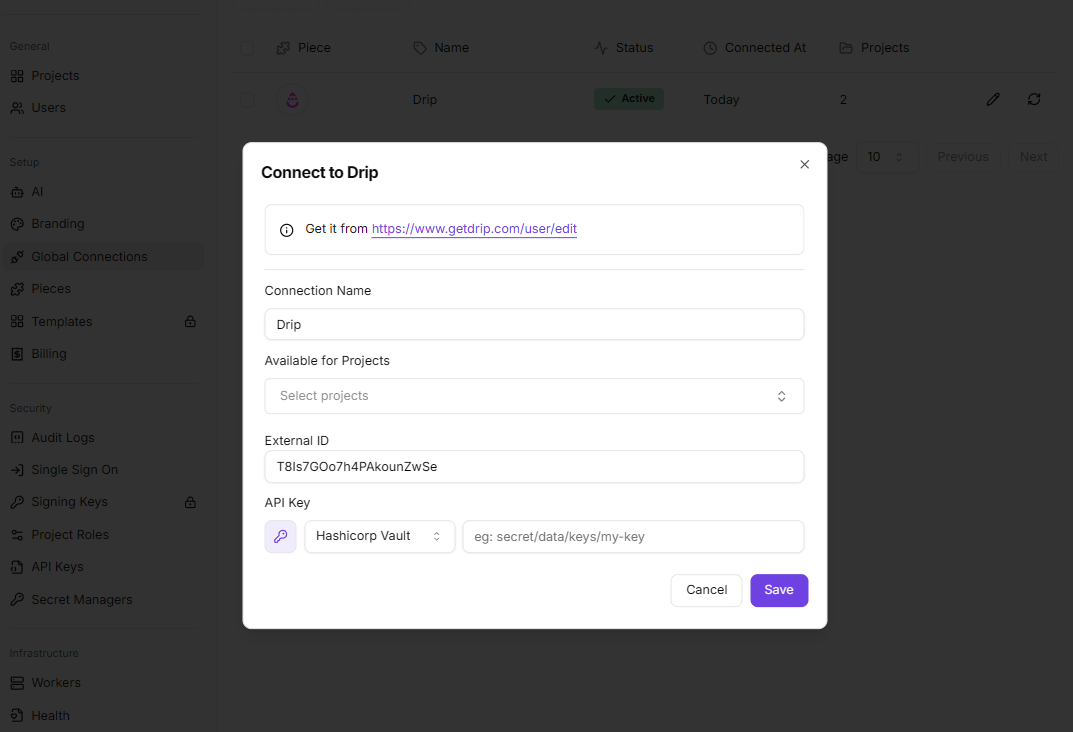
Once connected, you can reference secrets from your secret managers when configuring piece connections:- Open a connection dialog (either a global connection or one inside the flow builder)
- Click the key icon (🔑) next to a credential field
- Select a secret manager connection from the dropdown
- Enter the secret path/identifier required by your provider (see provider-specific documentation)
- The connection will automatically retrieve the secret from your secret manager when needed
How It Works
When you use a secret manager in a connection:- The global connection stores a reference to the secret (not the actual credential)
- When the flow runs, Activepieces authenticates with your secret manager and retrieves the secret
- Secrets are fetched on-demand and never stored in Activepieces
- If the secret is updated in your secret manager, flows will use the new value after the cache expires (up to 1 hour), or immediately after clearing the cache
Caching
Connection checks and retrieved secrets are cached in Redis (encrypted) for 1 hour to reduce latency and provider API load. To force a refresh (e.g. after rotating credentials or updating secrets), platform admins can clear the cache per connection using the refresh icon next to each connection row in the Secret Managers page.
connectionId to clear all cached entries for the platform, or pass a connectionId to clear only that connection’s cache:
Security Considerations
- Encryption: Secret managers authentication configuration is encrypted
- Access Control: Use your secret manager’s access policies to control who can access secrets
- Network Security: Ensure your secret manager is accessible from your Activepieces instance
- Credential Management: Regularly rotate authentication credentials for secret managers
Troubleshooting
Connection Failed:- Verify the connection details are correct and accessible
- Check that authentication credentials are valid
- Ensure network connectivity between Activepieces and your secret manager
- Review provider-specific troubleshooting guides
- Verify the secret path/name is correct
- Check that the secret exists in your secret manager
- Ensure the authentication credentials have permissions to read the secret
- Verify the authentication credentials have the necessary permissions
- Check your secret manager’s access control policies
- Review audit logs in your secret manager for detailed error information