Configure S3-compatible storage for files and run logs
Run logs and files are stored in the database by default, but you can switch to S3 later without any migration; for most cases, the database is enough.It’s recommended to start with the database and switch to S3 if needed. After switching, expired files in the database will be deleted, and everything will be stored in S3. No manual migration is needed.
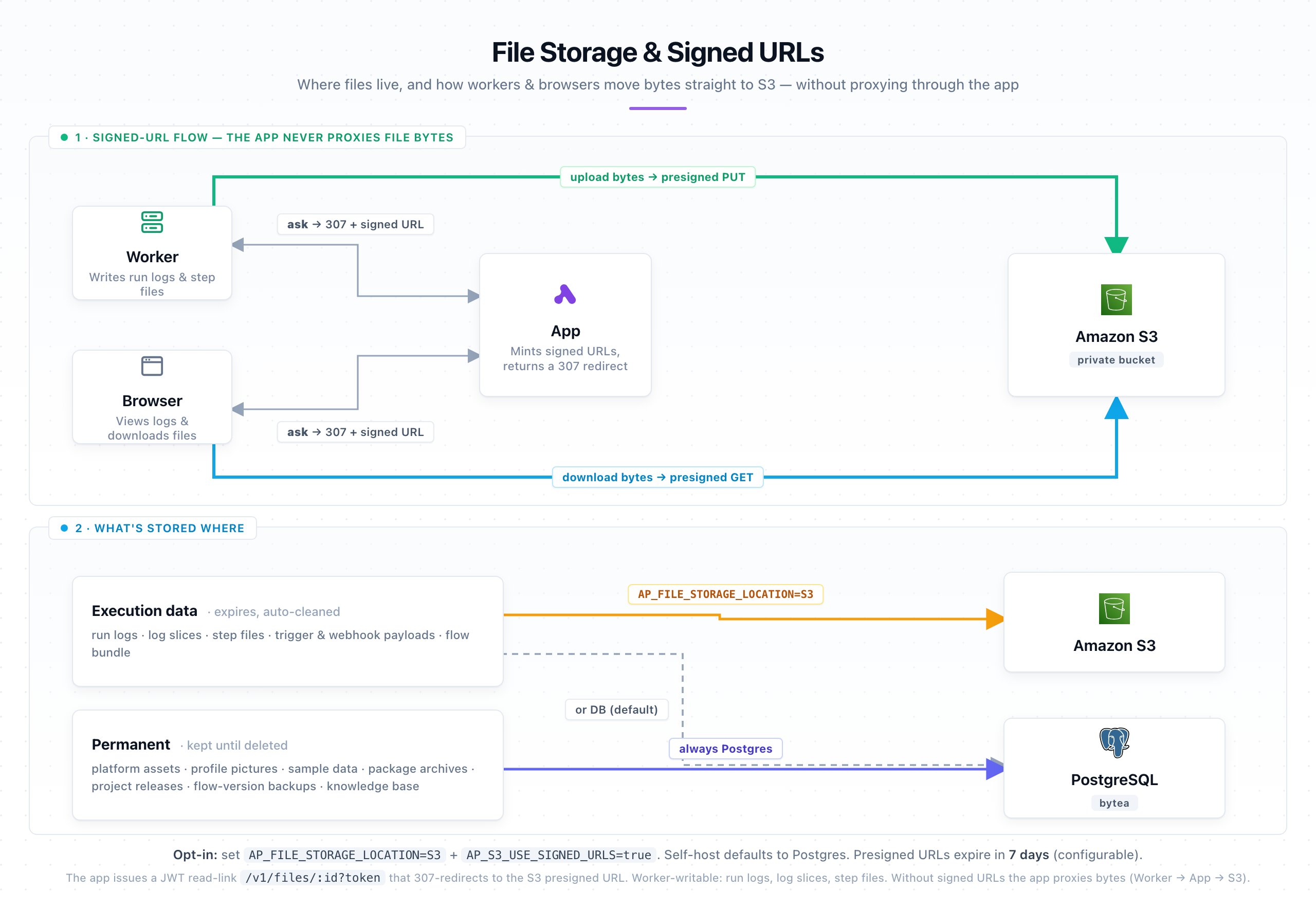
When AP_S3_USE_SIGNED_URLS is enabled, the app never proxies file bytes. It mints a short-lived pre-signed URL and returns a 307 redirect, so the worker uploads (and the browser downloads) directly to S3. This keeps heavy file traffic off the API server. Without signed URLs, the app streams the bytes itself (worker → app → S3).Files split into two groups:
Execution data (run logs, step files, trigger & webhook payloads, flow bundle) — expires and is auto-cleaned. Its location follows AP_FILE_STORAGE_LOCATION (S3 or DB).
The location to store files. Set to S3 for S3 storage.
S3
AP_S3_ACCESS_KEY_ID
The access key ID for your S3-compatible storage service. Not required if AP_S3_USE_IRSA is true.
AP_S3_SECRET_ACCESS_KEY
The secret access key for your S3-compatible storage service. Not required if AP_S3_USE_IRSA is true.
AP_S3_BUCKET
The name of the S3 bucket to use for file storage.
AP_S3_ENDPOINT
The endpoint URL for your S3-compatible storage service. Not required if AWS_ENDPOINT_URL is set.
https://s3.amazonaws.com
AP_S3_REGION
The region where your S3 bucket is located. Not required if AWS_REGION is set.
us-east-1
AP_S3_USE_SIGNED_URLS
Routes file traffic directly to S3 using pre-signed URLs, bypassing the API server. The bucket should remain private; signed URLs provide temporary authenticated access.
true
AP_S3_USE_IRSA
Use IAM Role for Service Accounts (IRSA) to connect to S3. When true, AP_S3_ACCESS_KEY_ID and AP_S3_SECRET_ACCESS_KEY are not required.
true
AP_MAX_FILE_SIZE_MB
The maximum allowed file size in megabytes for uploads including logs of flow runs.
10
Friendly Tip #1: If the S3 bucket supports signed URLs but needs to be accessible over a public network, you can set AP_S3_USE_SIGNED_URLS to true to route traffic directly to S3 and reduce heavy traffic on your API server.
Google Cloud Storage works through its S3-interoperability endpoint: set AP_S3_ENDPOINT to https://storage.googleapis.com and use HMAC keys as the access key ID and secret.The AWS SDK (>= 3.729) defaults to CRC32 checksums and aws-chunked payloads on PutObject, which GCS’s S3-interop endpoint rejects with SignatureDoesNotMatch. Set these two environment variables on the app and worker containers to restore the old behavior: