
Anyscale Pricing: Plans and Instance Costs (2026)

Nov 9, 202615 min read
Read Anyscale pricing as a usage meter on compute, not a flat plan fee.
You pay for the cluster time your Ray workloads consume, whether they run training jobs or the Activepieces flows that trigger them, and the tier you sign decides support, security and contract terms more than the rate.
Anyscale pricing is a usage-based charge for the compute time your Ray clusters consume, billed as a metered rate on instances, with the plan tier setting support, security and contract terms rather than the underlying price.
Anyscale pricing plans and rates
How Anyscale charges: compute meter versus platform fee
Whether or not a job is using it, every hour a node is up is billable, because the metered unit is compute time on the instances your clusters run.
The plan table, checked 2026-11-09
Where a figure isn't published, it says "contact sales" rather than carrying an estimate. The plans below are what the pricing page shows. The price tells you the unit being metered, not a total you can budget from.
The usage-based self-serve plan charges metered compute, billed per instance-time, and includes managed Ray clusters and the Anyscale platform.
Its stated limits are contact sales. Enterprise pricing comes from contacting sales, with committed-spend terms and security and support options, and its limits are also contact sales.
Anyscale plans as shown on its pricing page, checked 2026-11-09.
What the pricing page does not state
You will not find a single all-in price for a representative workload on the page, and it leaves limits and discounts to a sales conversation.
If you are running this arithmetic for your own team, see what the same workload costs on Activepieces.
Anyscale rates for CPU, GPU and serverless
Pick a GPU instance type and you are effectively picking how much to spend per hour.
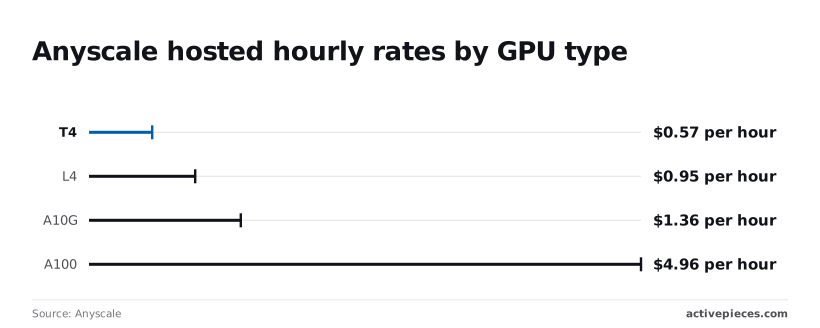
Anyscale meters compute by the hour per instance type, and its published GPU rates run from $0.5682 an hour for a T4 to $4.9591 for an A100, as read on the Anyscale pricing page on 2026-11-09, which means GPU selection is a critical cost lever.
Pick a GPU instance type and you are effectively picking how much to spend per hour.
Instance and GPU hourly rates
At $0.5682 an hour, the T4's the entry point. The L4 costs $0.9542, about 1.7 times as much, and the A10G costs $1.3635, so each step up adds well under a dollar.
Then comes the A100 at $4.9591, roughly 3.6 times the A10G and nearly nine times the T4, making the choice between GPUs a decision between substantially different cost profiles, which means budget becomes the primary constraint in model selection.
If your job fits in an A10G's memory, the A100's a large premium for capacity you may not use.
These are Anyscale's rates, not the cloud provider's. Price the same GPU directly on your cloud account, and the gap is the platform margin you're paying for managed scheduling. I have no CPU instance rates I can confirm, so ask sales for them in writing.
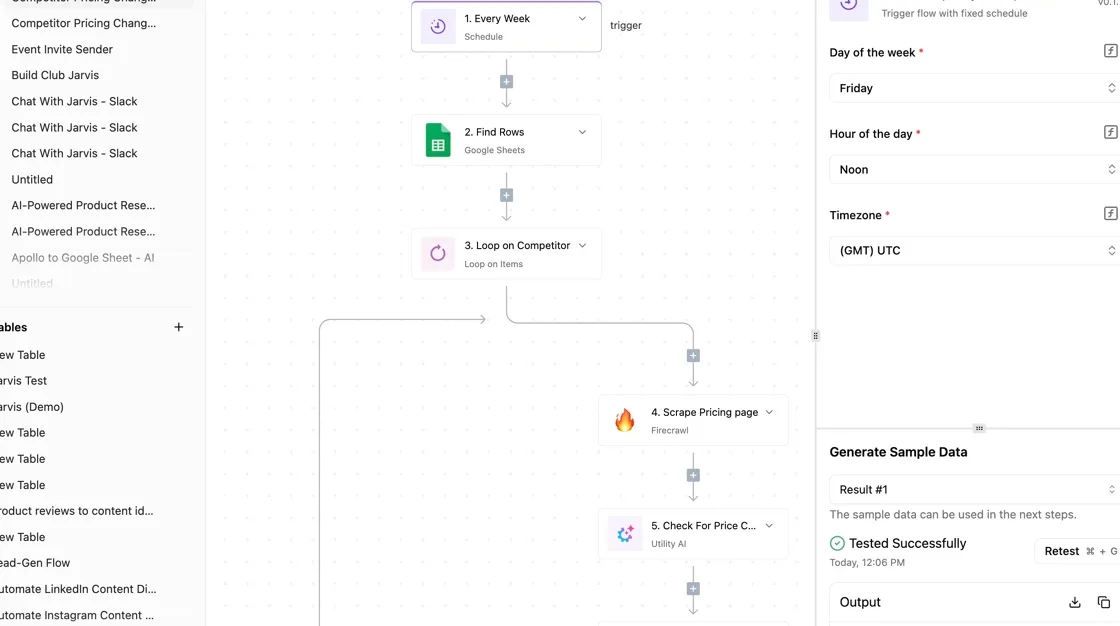
Size the cluster to the smallest GPU that holds your model, then multiply by hours of real use plus idle time.
I haven't confirmed a per-million-token rate or any other token-priced product, so treat serving as hours of replica time until Anyscale states otherwise in writing.
Anyscale free credits and trial terms
I have no confirmed credit amount or trial length to quote, and a number you can't check should not drive a budget. Ask sales for the credit value, its expiry and which instance types it covers.

Worked Anyscale bill walkthrough
Of the six lines on the bill for one workload, the one that moves most is idle compute, not the GPU rate. Confirm first that every product and instance type is still sold.
The workload and its assumptions
Picture nightly batch inference over 5 million documents, plus a small always-on endpoint on Ray Serve, the model-serving library built on Ray. Anyscale meters compute by instance time, so every line below is hours multiplied by an instance rate.

Assume the batch runs once a night on GPU workers, the endpoint holds a CPU replica around the clock, and one head node, the machine that coordinates the cluster, stays up whenever workers do.
Because rates differ by instance type and region, this section gives no dollar figures. Multiply each line's hours by the rate Anyscale quotes you.
To see which lines to price first, read the table, which ranks each line's weight in the three outcomes.
| Bill line | Well-tuned | Typical | Left idle |
|---|---|---|---|
| GPU | Largest line, billed only while batches run | Larger, from slow scaling and unbalanced batches | Same work, plus GPUs held after it ends |
| CPU | Small, one endpoint replica | Small | Small, but replicas stay at peak |
| Head node | Small, tied to cluster lifetime | Small | Grows with every extra hour |
| Idle | Near zero | Visible, from slow shutdown | Rivals the GPU line |
| Egress | Low, data stays in one region | Moderate | Moderate |
| Storage | Low | Low | Low |
Tuning storage and CPU saves little, because they barely change between columns. Pricing the GPU and idle lines first gets you most of the way to the real bill.
Anyscale idle cluster costs and auto-termination
A cluster with no auto-termination keeps billing its GPUs and head node until someone shuts it down, so the idle line grows to match the GPU line.
Setting a short idle timeout and right-sizing workers to the batch is what separates the first column from the last.
Undisclosed Anyscale costs and limits
Look past the rate card and you find a second bill from your cloud provider, head-node time, data egress, storage, GPU quotas and support access.
- Separate cloud-provider bill
- Idle and head-node time
- Autoscaling over-provisioning
- Egress
- Storage
- GPU quotas
- Support-tier gating
When clusters run in your own cloud account, the cloud provider invoices the virtual machines, disks and network, not Anyscale. Your finance team sees two invoices, and the Anyscale one's the smaller story.
While a cluster exists, the head node must stay up, so a cluster left waiting between jobs still bills for it. Autoscaling adds a second leak: workers added for a burst keep billing until the idle timeout releases them.
Activepieces can sit beside Anyscale for that nightly batch: a flow calls Anyscale's API or a webhook to start the job, then posts the spend or failure notice to Slack. Its meter is the run, not the steps inside it.
A run is 1 credit whether the flow has two steps or ten, and the Free plan carries 1,000 credits a month with unlimited flows.
Splitting the start, the status check and the notice into separate steps therefore costs nothing extra, which is why the routine around the cluster never changes the Anyscale meter.
Anyscale quotas, data egress and storage fees
Pulling 5 TB of results to an outside system costs about $450 before any compute, so data egress is a budget line item that must be carefully planned.
The reason is the egress rate: data leaving AWS to the internet costs $0.09 per GB for the first 10 TB, meaning even modest data pulls incur meaningful egress charges.
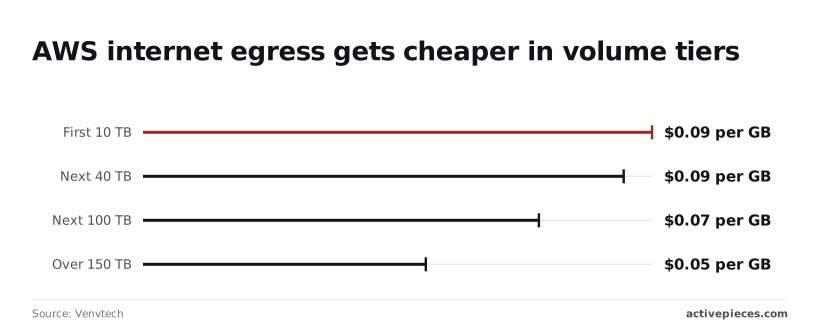
Past that first 10 TB, the rate falls to $0.085 per GB for the next 40 TB, $0.07 for the next 100 TB and $0.05 beyond 150 TB.
Volume discounts only reach teams already moving very large datasets, so small teams should budget at the top rate.
Whether or not a job runs, stored checkpoints and datasets bill monthly. GPU capacity's capped by your provider quota, and a quota increase request can take time, so a launch that needs 64 GPUs may wait on an approval.
When a cluster fails at 2 a.m., a team on a lower tier running production jobs has no contractual response time. Support response commitments and SLAs sit on the higher tiers, so the real price of that tier includes the outage risk.
Worth checking against a plan that does not meter every step: one credit covers a whole run on Activepieces.
Anyscale compared with Ray self-hosted, Databricks and Modal
Self-hosted Ray's cheapest for steady, predictable load, Modal for bursty work, and Anyscale or Databricks when engineers cost more than compute. Each one meters a different unit, and that unit decides your idle bill.
Comparison table
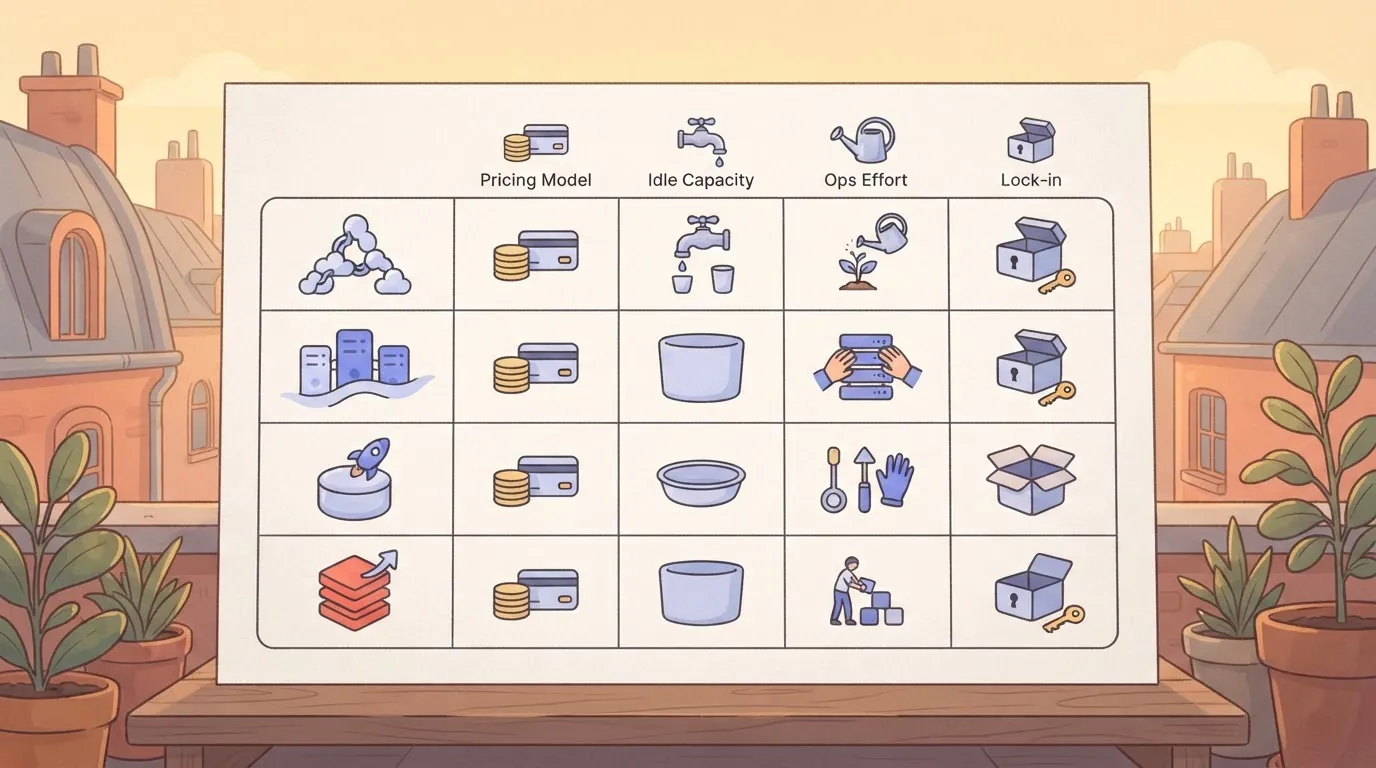
To compare the four on billing unit, where to find rates, what idle capacity costs, ops effort and lock-in, use the table below. It records billing structure only, taken from each vendor's public pricing page; compare current rates there before committing, because they change.
| Pricing model | Published rates | Idle capacity | Ops effort | Lock-in | |
|---|---|---|---|---|---|
| Anyscale | Metered compute on managed Ray clusters | Vendor pricing page | Billed while nodes run, so idle clusters cost money | Low | Moderate; workloads are Ray code, but the platform tooling is Anyscale's |
| Self-managed Ray on Kubernetes | Free software; you pay for nodes | Your cloud provider's instance prices | Yours to absorb unless autoscaling is tuned | High | Low |
| Databricks | Platform usage units plus underlying cloud machines | Vendor pricing page | Billed while clusters run | Moderate | Higher; data and jobs tie to the platform |
| Modal | Per-second serverless compute | Vendor pricing page | Near zero when nothing is running | Low | Moderate; code uses Modal's SDK |
When utilization is high and steady, self-hosting's cheaper, because you pay raw instance prices with no managed-service margin on top. It also suits teams that already run Kubernetes, since the platform skills exist.
When jobs are short, spiky or rare, Modal-style per-second billing wins. A cluster that sits idle between runs still bills, while a serverless function stops billing when the work ends.
The catch's portability: code written to Modal's SDK must be rewritten to move, so price that migration before you commit.
Anyscale cost controls that actually cap the bill
Four settings cap an Anyscale bill: a maximum worker count, an idle termination timeout, spot capacity, and a usage view you check yourself. The first two do most of the work.
Settings inside Anyscale
A cluster can't grow past its maximum worker count, which makes that setting the only hard ceiling on compute, because the meter runs on nodes. Set the minimum to zero where startup delay is acceptable, so a quiet cluster stops billing for workers.
How long an unused cluster keeps running comes down to the idle termination timeout. A long timeout turns a forgotten workspace into a standing charge.
In the screenshot below, a cluster configuration shows the autoscaling minimum and maximum, the idle timeout and the spot setting, next to the usage view.
Read the settings against the usage view: if usage shows spend outside working hours, the timeout or the minimum's too generous.
Run work as queued jobs rather than on an interactive workspace, which also helps. A job's cluster exists for the length of the run, then goes away.
Anyscale's built-in alerting is thin. I couldn't confirm a budget alert that stops spending when you cross a threshold, so assume the worker ceiling's your only automatic brake. If you want committed-use pricing, ask the vendor directly, because the rate card doesn't settle it.
Anyscale spot instance pricing and interruption risk
Because the cloud provider can reclaim them, spot nodes cost less than on-demand nodes. For retryable work such as batch inference or data preprocessing, an interruption costs you a re-run of a small integration.
For a long training run without checkpoints, one reclaim can discard hours of paid compute and erase the saving. Checkpoint frequently, or keep the head node on-demand.
Anyscale scheduling and spend alerts via workflows
Because the console lacks spend alerts, put them in a separate workflow tool, such as the flow described earlier. Have it start jobs on a schedule through Anyscale's API, so clusters exist only when work is due.
Have it poll job status and post a message to your team chat when a run exceeds its expected duration. That catches the runaway job the console won't flag.
Managing your Anyscale compute bill
Start with last month's compute usage, find where clusters sat idle, put a timer on them, rerun the worked bill with your own numbers, and only then talk to sales. The order matters because each step feeds the next:
- Pull last month's usage, broken out by cluster and by node type.
- Find the idle hours: time a cluster was up but running no job.
- Set termination timers on every cluster that can idle.
- Rerun the worked bill from earlier with your measured hours and sizes.
- Ask sales about commit discount, quota increases and support tier.
Compare each cluster's up-time to the hours its jobs actually ran. The gap's your idle cost, and it's usually the first line worth fixing.
Setting Anyscale idle timeouts and worker limits
Set an idle termination timeout on every interactive and development cluster, short enough that a forgotten notebook can't run overnight. Cap maximum worker counts so a misconfigured autoscaler can't grow past what you meant to pay for.
Then rerun the worked bill with the real hours and node counts. If the total moves a lot, your earlier assumptions were the problem, not the tier.
Bring the rerun bill to sales and ask three things:
- Whether a commit discount applies at your measured usage, and what happens to unused commitment.
- How quota increases are requested and how long they take, since a blocked scale-up can stall a deadline.
- Which support tier is included, and what the next one adds in response times.
What Activepieces does about this
Activepieces doesn't change an Anyscale rate, and it can't read your bill for you. What it does is put the idle-time controls that the console lacks into a flow you own.
The flow described earlier starts the nightly batch on a schedule through Anyscale's API, polls the job's status, and posts to Slack when a run goes past its expected duration.
A cluster that exists only while work is due is the first column of the worked bill, not the last.
The cost of that routine is small and easy to model. Activepieces meters the run, and a run is 1 credit whether the flow has two steps or ten, so adding more steps doesn't increase your costs.
The Free plan carries 1,000 credits a month with unlimited flows. A nightly flow uses about 30 runs a month, so the start, the status check and the alert fit well inside the free allowance.

Adding a step to catch a runaway job doesn't add a line to your bill.
The core is open source under the MIT licence, so you can self-host the flow engine in your own cloud account instead of paying for a hosted one.
That is a fair option for teams already running Kubernetes, and it keeps job metadata out of a third party's hands. It also means you can price the orchestration the same way you price self-hosted Ray, as raw infrastructure.
There are limits. A flow can only warn you or stop work through whichever Anyscale API endpoint you've confirmed supports it, so check that before you rely on it. The maximum worker count is still your only hard ceiling on compute.
Treat the flow as the early warning that tells you to look at the usage view before the idle line grows to match the GPU line.
Frequently asked questions
Put these five questions in that written request, because the rate card leaves each of them open. Answers reflect Anyscale's public pricing page and billing documentation as checked on 2026-11-09.
Free use and cloud bills
Is Anyscale free to use? Signing up costs nothing as a plan fee, but anything you run is metered compute, so the bill starts when a cluster does.
Any trial credit's a promotion listed on the pricing page, not a free tier, so confirm what it covers before you plan around it.
Does Anyscale charge on top of my AWS or Google Cloud bill? It depends on where the clusters run.
If they run in your own cloud account, the cloud provider bills you for the machines and Anyscale bills for its platform layer, so you carry two invoices. If they run in Anyscale's account, the charge's consolidated. Ask which applies before comparing totals.
Anyscale versus self-hosting
Is Anyscale cheaper than running Ray myself? Only if the engineering time and idle capacity you remove outweigh the platform charge.
Self-hosting's cheaper in raw compute and costlier in the people who keep it running. Run both through the same three lines (idle time, cluster sizing, data movement) and compare totals, not rates.
Invoices and price changes
Can I get an Anyscale invoice instead of paying by card? By default, self-serve means paying by card. Invoiced billing and committed-spend contracts are handled through Anyscale's sales team, so request terms there and ask what a commitment obliges you to spend.
How often does Anyscale change its prices? Do not expect a schedule: the pricing page doesn't promise one, so treat every rate as valid only on its check date.
Ask for the notice period on changes in your agreement. Without one, a rate can move under a budget you have already approved.
Related reading
Running the numbers
See what the same workload costs here.
Free forever plan, and every paid plan self-hosts at no extra cost.
See pricing Talk to sales