
Automation Platform Support SLA Europe: Compared 2026

Nov 22, 202613 min read
Keep the shortlist to platforms whose own pages or contracts name a support response time, a plan and a support-hours window. We've left everything else unconfirmed as of 22 November 2026.
An automation platform support SLA is the contract term in which a vendor commits to a named response time, for a specific plan, within a stated support-hours window, as written in its own pages or agreement.
Automation platform support SLA in Europe, in short
Best automation platforms for SLA in Europe
I'm not naming winners from pricing-page badges. A platform earns a place only when the vendor's written the commitment down, so the comparison table later in this article is the picks list.

Zapier, Make, n8n, Workato, Power Automate and Activepieces all face the same test, and for Activepieces an MIT-licensed core and 750 integrations don't pass it. A buyer who needs guaranteed help during European working hours should read only the rows that pass it.
What a support SLA covers and what it does not
When a vendor quotes an uptime SLA, it is promising that the service is reachable:
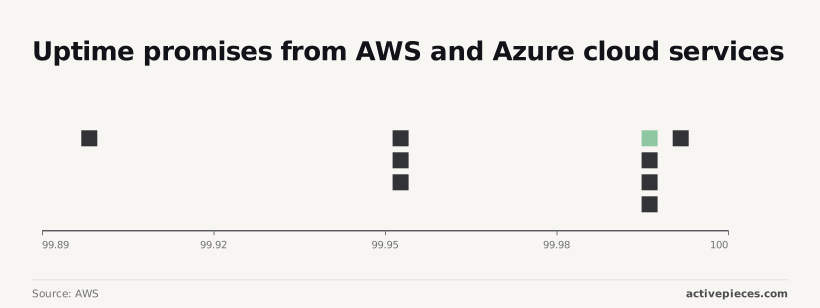
- AWS commits to 99.99% monthly uptime for an EC2 region, an ELB Multi-AZ load balancer and DynamoDB. That allows about 4 minutes of downtime in a 30-day month.
- According to AWS, RDS Multi-AZ and Lambda are at 99.95%, about 22 minutes.
- Per AWS, Azure VM zones also sit at 99.99%.
- These promises say nothing about whether anyone answers your ticket, so a platform can run on infrastructure with a 99.99% promise and still leave a stuck workflow waiting days.
Then there's the support SLA, which is a different commitment. It counts only when it has four elements:
- a response or resolution time, stated by severity level
- stated support hours, with a CET/CEST window
- a named plan that the commitment applies to
- the written document it sits in, such as an order form or support policy
Miss any of the four and a platform goes in the unconfirmed column, because a promise you can't cite in a dispute isn't one you can enforce.
Why European buyers ask for it before signing
When a window is quoted in US Pacific time, it starts at 18:00 CET, so a Berlin team's morning incident has no cover at all.
A resolution target that exists only on a plan you didn't buy gives you nothing. Procurement teams ask for the document before signing, because a vendor's reply after an outage doesn't show what it promised.
A resolution target that exists only on a plan you didn't buy gives you nothing.
The fastest way to settle a shortlist is to try one. Activepieces is free to try, no credit card.
Comparison table of six platforms on SLA terms
We haven't confirmed a written support SLA for any of the six platforms below. As of 22 Nov 2026, none has a response time, a named plan and support hours that we can cite, so each unconfirmed cell reads "not confirmed" rather than a guess.
| Platform | SLA stated on vendor pages | Plan | List price | Strength | Limit | Best for | Self-hosted |
|---|---|---|---|---|---|---|---|
| Zapier | Not confirmed, 22 Nov 2026 | Not confirmed | Not confirmed | Wide app catalogue | No written response time confirmed | Quick app-to-app automations | Not confirmed |
| Make | Not confirmed, 22 Nov 2026 | Not confirmed | Not confirmed | Visual scenario builder | No written response time confirmed | Multi-step visual workflows | Not confirmed |
| n8n | Not confirmed, 22 Nov 2026 | Not confirmed | Not confirmed | Self-hosting option | No written response time confirmed | Teams that want control of hosting | Not confirmed |
| Workato | Not confirmed, 22 Nov 2026 | Not confirmed | Not confirmed | Enterprise integration focus | No written response time confirmed | Large-scale integration programmes | Not confirmed |
| Power Automate | Not confirmed, 22 Nov 2026 | Not confirmed | Not confirmed | Fit with Microsoft tooling | No written response time confirmed | Organisations already on Microsoft | Not confirmed |
| Activepieces | Not confirmed, 22 Nov 2026 | Not confirmed | Not confirmed | Open-source codebase | No written response time confirmed | Teams wanting an open codebase | Not confirmed |
Read the strength and best-for cells as positioning, not support. They aren't evidence of a support commitment.
Because "not confirmed" repeats down the SLA, plan, price and self-hosted columns, none of these vendors has yet written the three terms the article requires.
It also means you can't assume self-hosted coverage inherits a hosted plan's support. The next step is to ask each vendor for the document itself, plan by plan.
One short verdict per platform
Where the vendor has written nothing, the verdict below reads "unconfirmed"; each one stops at what the vendor has put in writing.
Zapier and Make
On its Professional plan, Zapier names a first-response time, counted in business hours. A business-hours clock means an outage on Friday evening waits until the working week resumes.
Lower plans carry no equivalent commitment in the material I can cite, so the commitment applies to Professional only.
We haven't confirmed Make's support terms. Ask for the page that ties a response time and a support-hours window to each plan, plus the EU hosting option in writing.
n8n and Workato
You can run n8n as a hosted service or on your own servers, and support terms may differ between the two. Ask which deployment a stated response time covers. A commitment for the hosted plan says nothing about a self-hosted install.
Because Workato sells on enterprise contracts, the support terms most likely sit in the order form and not on a pricing page. Request the agreement and read the response-time and hours clauses. A sales call isn't a term.
Power Automate and Activepieces
Because Power Automate's a Microsoft product, you may buy its support through a wider Microsoft support plan. If so, the response time belongs to that plan, not to the automation licence. Ask which plan your licence sits on.
We haven't confirmed Activepieces on response time, plan or support hours, and those stay unconfirmed until the vendor writes them down.
What a security review doesn't have to wait for is the MIT-licensed core: the source is public, so your team can read how jobs are queued and handed to workers, load-test it on its own hardware, and run it self-hosted or fully air-gapped before anyone signs.
MoneyGram and Moneypenny run Activepieces in production. A codebase you can inspect closes a review on evidence, where a closed vendor's word only reopens it.
Reading a table only gets you so far. Build the same workflow in Activepieces and compare it yourself.
Vendor SLA verification before signing
Ask for the SLA, the order form it attaches to and a written self-hosting answer; a pricing-page badge is none of those, so request them in the order below.
Send these eight requests in sequence, because each one narrows what the next can claim:
- The SLA or support policy
- The order form or plan it attaches to
- Severity definitions
- Response versus resolution time
- Support hours in CET/CEST
- Service credits and exclusions
- The DPA and data region
- A written answer on self-hosting
Whether a promise exists, and which plan carries it, is answered by the first two. Whether it's worth anything is answered by the other six.
SLA clauses to check in support contracts
If a "one-hour response" applies only to severity 1 outages, it isn't your response time for a broken workflow, so get the severity definitions. Response means someone acknowledged the ticket; resolution means the workflow runs again. Only the second ends your outage.
Check the hours too: if support is staffed 09:00 to 17:00 CET, a Friday-evening failure waits until Monday.
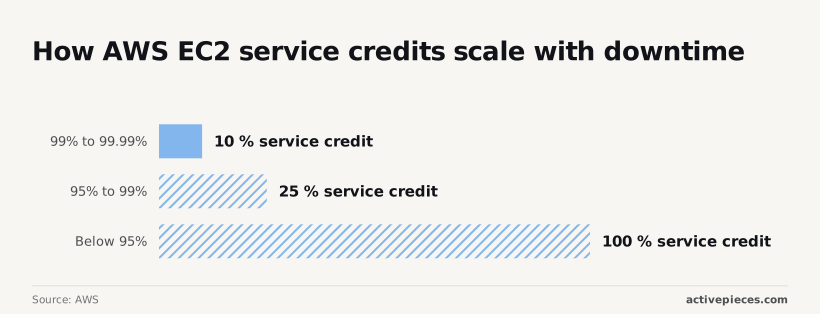
For credits, take AWS's EC2 SLA as a model of a published schedule:
- Uptime from 99% to 99.99% earns a 10% credit.
- Uptime from 95% to 99% earns a 30% credit.
- Uptime below 95% earns a 100% credit.
- In a 30-day month, 99% still allows about seven hours of downtime for only a 10% credit, meaning customers lose a full business day of service for merely 10% compensation.
- Read the exclusions before trusting any band.
Look at the configuration behind the percentage, too. Dev-Toolbox's Azure breakdown lists 99.9% monthly uptime for a single VM, 99.95% in an availability set, 99.99% across zones and 99.995% for SQL Business Critical, which means your deployment choice determines your maximum achievable uptime.
Finally, request the DPA and a named data region in writing, not a regional logo.
If you self-host, the infrastructure is yours, so a vendor's uptime commitment typically stops at software you run yourself. Ask in writing whether support and any response time apply to self-hosted installs, and on which plan. Until that answer arrives, mark the self-hosted column unconfirmed.
Where Activepieces fits an SLA-driven shortlist
Keep Activepieces on the shortlist as a vendor to question.
It's not a platform with a confirmed support SLA: its pricing page lists email support on the $200-a-month Team plan and dedicated support on Ultimate, yet none of the material behind this article names a response time and a support-hours window for either.
What its own pages confirm
On its own pages, Activepieces presents itself as an open-source automation platform with an MIT-licensed core and 770+ integrations that you can self-host, with a hosted cloud product alongside. That tells you how you can deploy the software.
It doesn't tell you who answers the phone when your self-hosted instance fails.
Run the software on your own servers, and patching, uptime and incident response sit with your team. That's why the distinction matters for the self-hosted column.
Whether the vendor sells support for that setup, and on what terms, is a separate commercial question, and a deployment option doesn't answer it.
What is not confirmed and who to ask
Four things aren't confirmed here, even though the Team plan's email support and Ultimate's dedicated support appear on the pricing page, so they stay marked that way until Activepieces writes them down:
- Whether a paid or enterprise support plan exists, and which plan it sits on.
- Whether that support covers self-hosted installations or only the hosted cloud.
- Where the vendor stores hosted customer data, and whether you can select an EU location.
- Any SLA terms: a named response time, severity definitions and the hours the window covers.
Ask the sales team for the order form or master agreement, not a feature page. A support clause that appears only in marketing copy can change without notice. One in your signed contract can't.
Some teams should open that conversation. Those include teams that want to self-host and need the vendor on the hook for incidents, and teams with EU data-location requirements that must be documented.
Teams that can run their own infrastructure and accept community-level help can trial it now.
If your procurement rules demand a written response time before signature, pick a platform whose own pages already name one.
You can return to Activepieces when its answer arrives in writing; its DPA and sub-processor list are sent on request, so ask for the support schedule alongside them.
Shortlisting checklist by SLA criteria
Work through the steps below in order, because each one produces a document you can file, and a vendor without one stays unconfirmed, however its pricing page reads.
The order matters. Your requirement has to exist in writing before any vendor sees it, or you'll end up grading each vendor against its own wording.
- Write down your required response time and support hours. Put the response time, the severity it applies to and the hours window (business hours in your time zone, or around the clock) on one page. Without it, "priority support" on a pricing page has nothing to be measured against, and every vendor looks like a match.
- Send identical written questions to every vendor. Ask the same things in the same words: which plan carries a named response time, what the hours window is, and whether the same terms apply to a self-hosted deployment. Identical wording means the answers can sit side by side, and a vendor that dodges one question stands out against the others that answered it.
- Get the SLA attached to the quote. A reply in a sales email is a statement of intent. A support schedule that is attached to or referenced by the order form is a contract term. If a vendor won't attach it, treat the commitment as unconfirmed whatever the email says.
- Date every page you rely on. Record the URL and the day you read it, and save a copy. Support terms change on vendor pages without notice, so a dated copy is your evidence if the page later says something different from what you bought.
- File a low-severity ticket during the trial and time the reply. Use a real but minor question, and note when you sent it and when a human answered. A trial ticket won't prove the contractual commitment, but it shows how the support queue treats you before money changes hands.
Whatever survives all five steps is your shortlist. The rest stays unconfirmed until the vendor writes it down.
Frequently asked questions
Free plans and the two kinds of SLA
Do free plans of automation platforms include a support SLA? Not on anything a vendor has written down for this article.
Free plans typically come with community forums or documentation, which are help channels rather than commitments. Until a vendor's own page or contract names a response time for the free tier, treat it as unconfirmed.
Is a support SLA the same as an uptime SLA? No. An uptime SLA promises the service's available, and the remedy is usually a credit. A support SLA promises how fast a human responds to your ticket, and for which severity.
Check that the schedule you sign names the right one, because a vendor can offer one and not the other.
Self-hosting
Does self-hosting remove the need for a vendor SLA? No. Self-hosting moves uptime and patching onto your own team, but the question of who answers when something breaks remains.
For a self-hosted edition, ask whether the paid support terms cover it, because a vendor's hosted-plan SLA doesn't automatically extend to software running on your servers.
Plans, hours and changing terms
Can I get European-hours support without an enterprise plan? Only if the vendor's own page or contract says so. A support-hours window is usually tied to a named plan, and when the window isn't stated, assume it isn't promised.
Ask in writing which plan includes European business hours and in which time zone they're measured.
How often do vendors change their support terms? Often enough that a screenshot isn't evidence. Pricing and plan pages are edited without notice, and a contract only protects you if the SLA schedule's attached to it.
Date any page you rely on, and ask what notice the vendor owes you before it changes support terms mid-term. Without that clause, a renewal is the point where terms quietly shift.
Related reading
References
Still comparing
The fastest way to settle it is to build something.
Open source under MIT, so you can self-host the same thing later.
Start free Talk to sales