
Resend MCP Server Safe Setup for AI Agents

Nov 16, 202614 min read
Resend's MCP server lets any MCP-capable AI client, including workflow tools such as Activepieces, call Resend's email API as tools, so a chat message can become a real sent email. We checked the facts below against Resend's docs on 2026-11-16.

Resend MCP is an AI-to-email bridge
What MCP means in one paragraph
MCP, the Model Context Protocol, is a standard way for an AI client to discover and call tools that a separate server offers.
The client lists what the server can do, the model picks a tool and fills in its arguments, and the server executes the call.
The model never touches Resend directly. It only emits a structured request, and the server decides what happens next.
What the server exposes to the model
Whatever the server exposes, the model can attempt. It wraps Resend's API as callable tools, with sending email as the headline one. Nothing in the protocol asks "are you sure?" before a send.

Follow one request from the chat window through the server, which holds your API key, to Resend and out to an inbox, as the next diagram does.
The point is that the key sits behind the server, so the model inherits every permission that key has.
Because the key's permissions are the model's permissions, the damage from a bad tool call is set at key-creation time, not in the prompt.
Local server versus hosted endpoint
A local server runs as a process on your machine, launched by your MCP client, with the API key in its environment. A hosted endpoint runs on someone else's infrastructure, so the key and the calls pass through a remote service.

Neither changes the core problem: either way, the model can send. What differs is where the key lives and who can see the traffic.
If you want a fixed path instead of open-ended tool access, Activepieces can sit between the model and the send as a fixed workflow, with Resend among its 750 integrations, which means your use case is probably already supported. MCP itself doesn't give you that.
Everything below works on Activepieces' free plan. Start without code or a credit card.
Where teams use Resend MCP in practice
When a person starts the task and watches it from Cursor or Claude Desktop, teams reach for Resend MCP:
- one-off emails
- contact and audience edits
- delivery checks
- domain setup
- broadcast drafts
The table separates that from production sending.
| Task | Ad-hoc or production | Who triggers it | Safe unattended? |
|---|---|---|---|
| One-off email | Ad-hoc | You, in the chat | No |
| Contacts and audiences | Ad-hoc | You | No |
| Delivery status | Ad-hoc | You | Yes, it only reads |
| Domains | Ad-hoc | You | No |
| Broadcasts | Production | A person approves | No |
| Editor use | Ad-hoc | The developer | Reads yes, sends no |
Delivery checks and read-only editor use can run without a person watching, but everything else needs a human present.
In Cursor, you send yourself a test message, then ask whether it landed. That's the cheap, useful case: you read the draft, and the recipient is you.
In Claude Desktop, someone cleans up an audience or drafts a broadcast. The Hostinger study as reported by Lite14 found:
- 72% of email is AI-generated: - 13% is human-written
- 13% is human-written
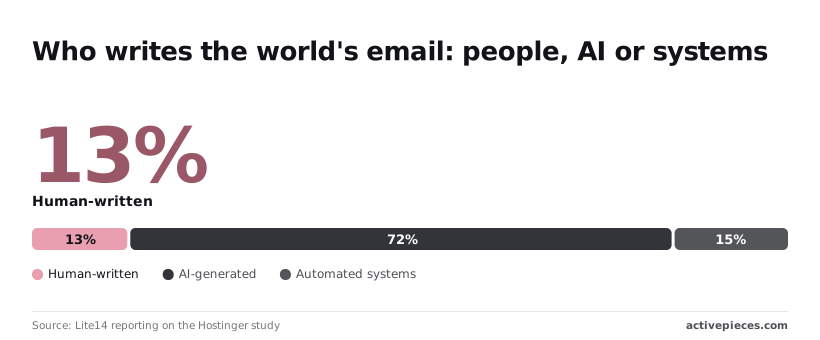
Since a model is already in the loop for most mail, the real question is who approves the send. A contact edit is the quiet risk: it changes who receives every later message.
Don't use it for recurring or triggered mail such as receipts, resets or scheduled digests. Those need a fixed workflow with a fixed template and a scoped key, not a model deciding each time what to send and to whom.
What Resend MCP costs and requires
You need five things to run Resend MCP, and it adds no cost of its own that I can confirm; you pay Resend's normal plan price for whatever the model sends.
- A Resend account, because every send is billed and logged against it.
- An API key, which is the only credential the server holds, so its permissions are your real limit.
- A verified domain, so mail goes out from an address you own instead of bouncing.
- An MCP-capable client, the assistant app that calls the server's tools.
- Node.js, only if you run the server locally.

Scope the key before anything else. The model can do whatever that key can do.
Plan limits and per-email pricing
When a model gets stuck in a loop, it gets more expensive as your plan gets bigger, and the price steps below show cost climbing with volume.
Resend's pricing page lists $20 a month for 50,000 emails, so cost scales with the plan you pick. That's the entry point for real volume.
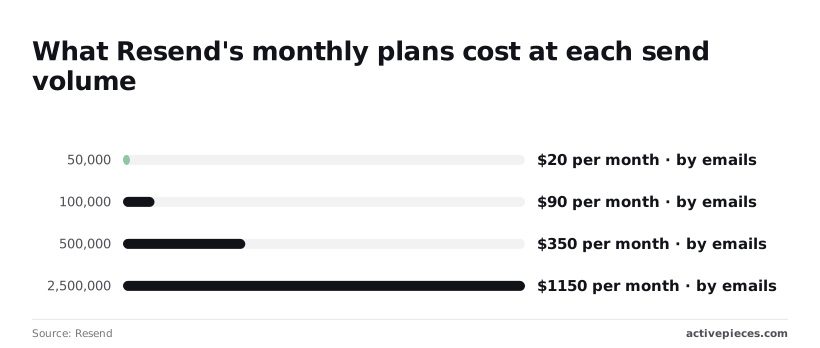
At 100,000 emails it's $90 a month, so doubling the volume more than quadruples the bill. At 500,000 emails it's $350 a month, and at 2,500,000 it's $1,150 a month, so your per-email cost does not necessarily improve as you scale higher.
Those totals are the ceiling on a runaway agent. Pick the plan that fits your workflow, not one with headroom for mistakes.
API rate limits that agents hit first
You will usually hit 429 Too Many Requests first, not a billing problem. A model looping over a recipient list fires calls faster than any person would.
I have no verified per-second figure to quote here, so check the current number in Resend's docs before you build around it.
Treat a 429 as a design signal. If the model needs to retry its way through a list, that list belongs in a fixed workflow, not in a prompt.
Mistakes people make with Resend MCP
It is the same mistake every time: the model gets more reach than the job needs. Each fix takes minutes. The table pairs six failures with their fixes, and the paragraphs after it add the detail.
| What goes wrong | The fix | |
|---|---|---|
| Full-access key | The model can change account settings, not just send | Sending-only key |
| Real-domain testing | Test mail reaches real people | Throwaway domain or test addresses |
| No send confirmation | Drafts go out unreviewed | Approve every send |
| Prompt injection | Text in an email steers the model | Fixed recipients, untrusted content |
| Quota burned in loop | Retries drain the limit | Fixed workflow with a cap |
| Key in shared config | The key lands in git | Environment variable, rotate |
Most rows reduce to the first one: a narrow key limits the damage from all the others.
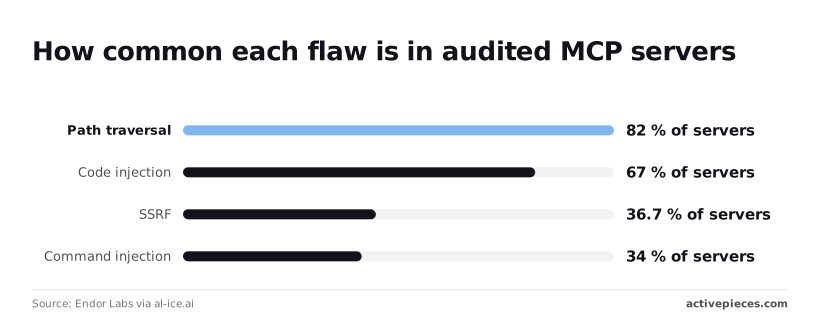
Create a sending-only key. Endor Labs found path traversal in 82% of scanned MCP servers, so assume your server can be pushed off-script and cap what its key can do.
Make the client ask before every send call. Until you trust the output, point it at a throwaway domain, not the one your customers read.
67% of servers had code injection, and 34% had command injection. Untrusted input rarely gets cleaned before it reaches the model, so an inbound email can carry instructions.
When a model retries a failed batch, it will happily burn your quota. Cap attempts and run lists through a fixed workflow.
36.7% of servers were affected by SSRF, so a tricked server may reach places holding credentials. Only 6% had a critical flaw, about one in sixteen, which is reason enough to pin your server version, so each uncontrolled version update carries that flaw risk.
Keep keys in environment variables.
Easier to see it running than to read about it: set it up free, no card.
Resend MCP compared with the alternatives
Agent access versus API versus workflow
Of the three ways to send through Resend, only MCP lets a model decide on its own whether an email goes out. An environment variable keeps the key out of your repo but does nothing about who uses it.
The table compares Resend MCP, the Resend API or SDK called from your own code, and a no-code workflow tool. Read the "who decides" and "risk" columns first, because setup effort and cost barely separate the options.
| Setup effort | Who decides to send | Auditability | Cost at 10,000 emails/month | Risk if the model errs | |
|---|---|---|---|---|---|
| Resend MCP | Lowest: add the server and a key to your assistant | The model, per conversation | Weakest: depends on the assistant's chat log and Resend's own sent-email records | Resend's normal sending charges; no extra layer | Highest: a wrong recipient or body is already sent |
| Resend API/SDK in code | Highest: you write and deploy the integration | Your code, on fixed triggers | Strongest: your logs and version control show what ran | Resend's normal sending charges; hosting is yours | Low: the model can't send unless your code lets it |
| No-code workflow tool | Moderate: build the flow in a visual editor | The workflow's trigger and rules | Good: run history shows each step | Resend's charges plus the tool's own plan or per-run fees | Low to moderate: limited to what the flow permits |
Sending cost is set by Resend's pricing page whichever route you pick. Only the workflow tool adds a second bill.
What follows is the practical split. Use MCP to draft and inspect, and put anything that reaches real recipients behind code or a fixed flow.
Fix repeatable sends with Activepieces
Run repeatable emails as a fixed Activepieces workflow that ends in a Resend step, so the model never decides whether to send. That covers any email that goes out every time something happens, such as a signup, a failed payment, or a shipped order.
A fixed workflow for the send
Activepieces counts Resend among its 750 integrations, all of which sit in the open source monorepo under packages/pieces/community, beside an MIT-licensed core, which means you can audit or fork any of them.
A trigger fires on an event, the steps run in the order you set, and the last step sends through Resend.
The recipient comes from the event data, the template is fixed, and the sender is whatever you configured. Nothing in that path improvises.
That's the point. An assistant with a raw send tool can be talked into the wrong recipient by a pasted email or a vague instruction.
A workflow has no instruction to misread. If it misfires, the run detail view lists each step with its input and output, so you can see the exact recipient the Resend step received, and you fix a step, not a prompt.
A workflow has no instruction to misread.
An assistant that triggers approved workflows only
Because Activepieces also has MCP support, an assistant can start workflows you have exposed to it. Check its docs for the current setup and what it can and cannot expose, because I wouldn't assume the details.
Keep the design narrow: the assistant gets a "start this workflow" capability and no Resend send tool at all.
Compare the two paths. An event flows straight into a fixed workflow that ends in a send, while the assistant can only call an approved workflow and has no route to the send step except through it.
Take from it that the model can ask for an email but can't compose a new way to deliver one.
This doesn't fix everything. If an approved workflow accepts free-text fields, the model still controls what goes in them, so keep the inputs few and validated.
Setting up Resend MCP safely on Monday
Probe free-text fields hardest, so set up in this order: sending-only key, test address, one client, approval on send tools, then prompts and logs. For install syntax, follow Resend's own MCP server documentation rather than a blog's copy of it.
- Create a sending-only API key.
- Use a test domain or sandbox address.
- Add the server to one client.
- Require approval on send tools.
- Run five test prompts.
- Review Resend logs.
- Decide what stays manual.
Skip ahead and the later safeguards protect less than you think, because each step caps the damage of the one after it.
Resend MCP safety steps before connecting
Before the model sees a single real recipient, steps one to four are done. A sending-only key means a confused or manipulated model can send mail but can't manage the rest of your account.
Point it at a test domain or sandbox address so the worst outcome lands in your own inbox.
Add the server to one client only, because every extra client is another place to audit. Then turn on approval for send tools. That setting lives in the client, not in Resend, and MCP gives you no policy layer of its own.

Write prompts that try to break it. Use an ambiguous recipient, a request to email a long list, pasted text containing an instruction, a subject line the model has to invent, and something it should refuse.
Read the actual "to" field in every approval prompt, not the model's summary of it.
Open the Resend logs after a week and look for recipients you didn't expect, duplicates, and bounces. Then decide what stays manual. Anything with a new recipient or a bulk send should, until the logs say otherwise.
Frequently asked questions
Is Resend MCP free to use?
There's no price on the server itself, since it is software you run yourself. Every email it sends counts against your Resend plan, so the limits that matter are the ones on your account.
A model in a loop can burn through them faster than you would by hand. Check Resend's pricing page for your tier before you hand an agent the key.
On whether it's official: Resend publishes its own MCP server. Several community forks and lookalikes also exist under similar names. Confirm the repository belongs to Resend's organization before you paste a key into any config, because the key is the whole attack surface.
On which clients work: any client that speaks MCP and can launch a local server should work, including Claude Desktop and editor-based assistants.
Setup differs per client, but it's usually a JSON entry with a command and an environment variable for the key. Approval prompts for tool calls also differ per client, so test yours before you rely on them.
On reading incoming emails, don't assume it can. The server only does what its tool list says, and that list changes between releases.
Read the tools your client shows after connecting. If there's no inbound or read tool, the model can't read replies, and you shouldn't build a workflow that expects it to.
How do I stop an AI from sending emails I did not approve?
Don't rely on the model's judgment. Use a key limited to sending, scoped to one verified domain where your plan allows it. Keep your client's per-call tool approval switched on.
For anything routine, put a fixed workflow between the model and the recipient, so the model fills in a template and a human or a script decides who gets it.