
AWS Transcribe Pricing: Batch, Streaming Rates (2026)

Nov 4, 202616 min read
AWS Transcribe pricing table, checked November 2026
Direct answer and what Amazon Transcribe is
Ask what Amazon Transcribe costs and the answer is that there is no single price: each plan has a separate rate, tiered by monthly volume, with add-ons billed on top.
Amazon Transcribe is AWS's speech-to-text service, which turns recorded or live audio into text that teams can then pass along to other tools, whether through custom code or a workflow builder like Activepieces.

AWS Transcribe pricing is the pay-as-you-go billing model for Amazon Transcribe, in which audio is charged per second of processed time at a rate set by the plan used, reduced by monthly volume tiers, with optional features billed as separate add-ons.
To cost one run, multiply billable audio duration by the rate for your plan, then add every optional feature you switch on. That formula holds on day one, but the rate inside it changes as volume climbs through tiers.
The table below uses the $0.006 batch and $0.01 streaming per-minute rates, so check them against the pricing page. Rates vary by region and move over time, so read the number for your own region on the AWS pricing page.
Every plan, price, inclusion and limit
Read the table for how each plan is priced, what the rate covers, and where the hard caps sit. The main thing to take from it is that Call Analytics and Medical each carry their own rate, so a standard-rate estimate understates them.
| Plan | Price per minute | What's included | Limits (file size and duration) |
|---|---|---|---|
| Standard batch | Billed on audio duration, with the rate falling as monthly volume rises | Transcripts of stored audio files; optional features priced separately | Caps on file size and duration per job, set in AWS quotas |
| Standard streaming | Its own rate, separate from batch | Real-time transcripts over a live connection | Caps per stream session and on concurrent streams |
| Call Analytics post-call | A separate rate from standard transcription | Transcript plus call-specific analysis such as sentiment and summaries | Per-file caps that differ from standard batch |
| Medical | A separate rate from standard transcription | Transcription tuned for clinical vocabulary | Its own per-file and per-session caps |
| Free tier/credits | No charge within the allowance | A limited allowance of standard usage for a limited period | Ends when the window closes; usage beyond it bills at normal rates |
Because the limits are quotas, you can usually request higher ones, but you have to plan for that before a large backlog arrives, not after jobs start failing.
Activepieces, whose core is MIT-licensed, can chain transcription into a workflow, and the same rule applies: price the steady-state run, not the trial.
How the free tier works and when it ends
Think of the free tier as a trial, not a pricing plan: it is an allowance with an expiry date.
Once the window closes or the allowance runs out, every minute bills at the standard rate for your volume tier. Treat any estimate built on free usage as a lower bound only.
Think of the free tier as a trial, not a pricing plan: it is an allowance with an expiry date.
Activepieces has its own free plan, with 1,000 credits a month and unlimited flows, so the same rule applies there: price the steady-state run, not the trial.
If you are running this arithmetic for your own team, see what the same workload costs on Activepieces.
Transcribe costs at 10, 100, 1,000 hours
$3.60, $36 and $360 are what batch transcription at $0.006 a minute costs at 10, 100 and 1,000 hours a month, so a team can forecast its transcription costs with simple multiplication. Streaming at $0.01 a minute costs $6, $60 and $600.
Streaming is always 67% dearer, so the real question is how much of your audio truly needs to be live.
Read down the table and each row is the one above it multiplied by ten at a flat rate, though volume tiers lower the per-minute rate at higher usage.
| Volume | Minutes | Batch at $0.006/min | Streaming at $0.01/min |
|---|---|---|---|
| 10 hours | 600 | 600 × $0.006 = $3.60 | 600 × $0.01 = $6 |
| 100 hours | 6,000 | 6,000 × $0.006 = $36 | 6,000 × $0.01 = $60 |
| 1,000 hours | 60,000 | 60,000 × $0.006 = $360 | 60,000 × $0.01 = $600 |

Simple as the arithmetic is, it assumes those two rates apply. The sections below test that against the tiers.
For a small team at 10 hours a month, which is 600 minutes, the gap between batch and streaming is $2.40 a month, meaning feature differences matter more than this cost gap.
For a support operation at 100 hours a month, which is 6,000 minutes, streaming costs $24 more than batch. Run overnight QA review as batch and keep streaming for live agent assist, and you pay the premium only where latency earns it.
A call center: 1,000 hours a month
At 60,000 minutes, the month runs $360 batch or $600 streaming, making batch far more economical for high-volume transcription. The cheaper tiers are further off than they look:
- The first tier covers 250,000 minutes, about 4,167 hours.
- Only past that does the rate drop to $0.015 a minute, 37.5% below $0.024.
- The next 4 million minutes bills at $0.0102 a minute.
- Anything beyond 5 million minutes bills at $0.0078 a minute.
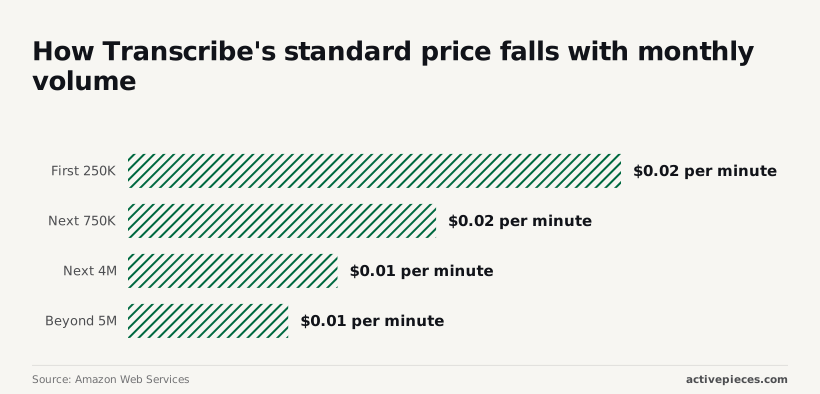
A 1,000-hour shop never reaches any of them.
If your billed rate differs from the ones used here, these numbers fail. Multiply your minutes by the rate on your own invoice, and trust that result over the table.
Hidden Transcribe costs and limits
Beyond the rate on your invoice, which is only the base charge, Transcribe adds several others that no per-minute table shows. Five of them account for most of the gap between a quoted price and a real one:
- Minimum billing per request
- Per-minute add-ons such as redaction, custom language models and toxicity detection
- S3 storage and transfer
- File size and duration limits
- Concurrency and streaming quotas
Check all five against your own workload before comparing vendors, because each either raises the cost of a run or decides whether the run can happen at all.
Feature add-ons priced per minute
On top of the base rate, every add-on is billed per minute. Turn on redaction, a custom language model or toxicity detection for all traffic and you pay the surcharge on every minute, including the calls that never needed it.
Multiply each feature by only the minutes that use it. If a fraction of your audio is sensitive, route that fraction through a separate job configuration.
Transcribe minimum billing and rounding for short clips
Each request carries a minimum billable length, and durations are rounded up, so a pile of brief voice messages makes the effective rate per real minute higher than the table says.

Where your use case allows it, combining short clips into one request narrows the gap.
Quotas on file size, duration and concurrency
When a recording is above the file size or duration limits, it must be split before submission, and splitting can bring the minimum back on every integration.
Concurrency and streaming quotas cap how many jobs or live sessions run at once. Raising a quota means a request to AWS, so ask before a launch rather than during one.
Surrounding AWS charges
Before transcription, batch audio sits in S3, and the output lands there afterward; S3 bills storage and transfer separately from Transcribe.
Keep the bucket in the same region as the job to avoid cross-region transfer, and set lifecycle rules to delete source audio you no longer need.
Worth checking against a plan that does not meter every step: one credit covers a whole run on Activepieces.
The case for and against Transcribe
For clean audio, yes: at a few cents a minute Transcribe's rate is rarely what hurts, though the charges around it can be.
The strongest case that the rate card is fine
At WhipScribe's figure of $0.36 an hour, an hour of audio through Transcribe costs $0.36. The same source lists human services at:
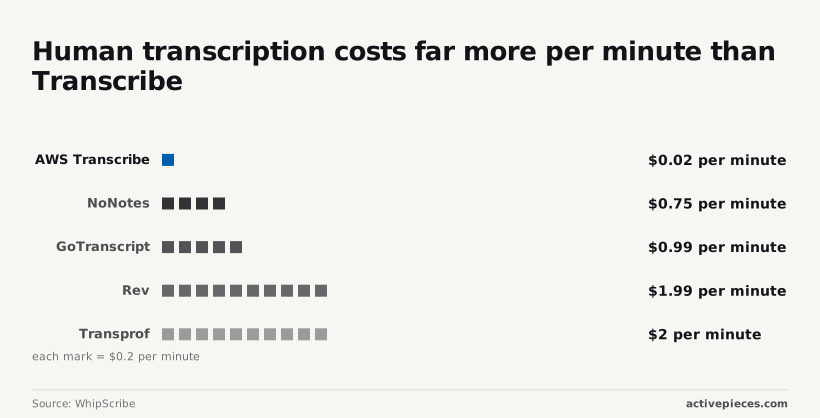
- NoNotes costs $0.75 a minute.
- LetsTranscript costs $0.80 a minute.
- GoTranscript costs $0.99 a minute.
- QualTranscribe costs $1.20 a minute.
- Rev costs $1.99 a minute.
Run an hour through Rev and it comes to $119.40, about 83 times the machine cost. Even the cheapest human option, NoNotes, is roughly 31 times higher. A team replacing human transcription saves far more than any add-on is likely to claw back.
Transcribe against Google, Azure, OpenAI and AssemblyAI
Compare all five vendors on the same four things: per-minute price, free allowance, billing granularity and included features. Note the date you checked each, because vendors revise all four. I haven't verified the competitors' current pages, so I quote no rival rates here.
Pay the most attention to granularity. If a vendor rounds each request up, a workload of thousands of short clips pays well above the headline rate.
Weigh features just as heavily: if diarization or redaction is a paid add-on at one vendor and bundled at another, the cheaper rate card may be the dearer bill.
Accuracy on harder audio and the cost of rework
A 5.8% word error rate on clean audio, 8.9% on accented speech and 11.3% on noisy recordings: that is where Voxclar's benchmarks put Transcribe. Noisy audio therefore produces almost twice the errors of clean audio.
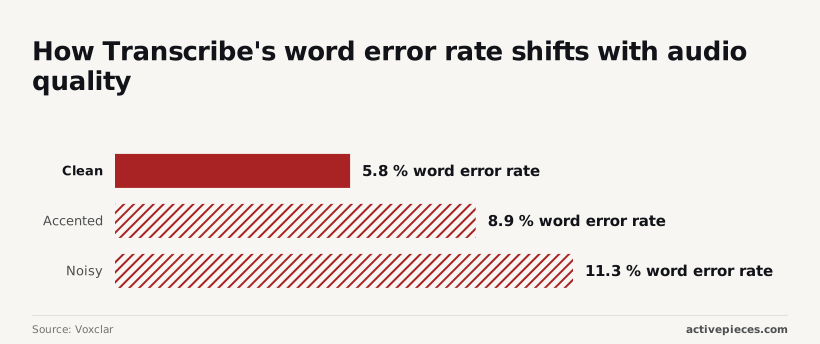
On a 10,000-word transcript that is about 1,130 wrong words against 580, and every one needs a person to find and fix it. If a reviewer's time is billed at all, rework can outweigh the $0.024 a minute you saved.
The cheapest option changes with workload
No vendor is cheapest everywhere. Long, clean recordings reward the lowest rate. Short clips reward fine billing granularity. Noisy or accented audio rewards the lowest error rate, since rework is the largest cost there.
So run a sample of your own audio through each vendor and price it with your real clip lengths and features before trusting any headline rate.
Automating the work around Transcribe with Activepieces
Transcribe itself gets no cheaper with Activepieces: AWS sets that price, and the tool only moves files and results around it.
What it can do is automate the steps before and after a Transcribe job, and because every plan includes unlimited flows, the number of such pipelines you build adds nothing to the bill.

What the workflow does
Think of Activepieces as a workflow builder.
You chain a trigger and a series of steps on a canvas, and each step can call an app from the 747 integrations in its open source monorepo, apply a condition, loop over items, or hand a task to an AI agent.
Nothing about the homepage example below has to do with audio; it is a sales-lead flow.
It shows the shape of the thing: a trigger at the top, an AI qualification step, a yes/no condition, then actions such as adding a record, posting a notification and sending an email, joined by vertical lines that show the order.

Swap the lead for an audio file and the same pattern fits a transcription pipeline. A new file landing in an S3 bucket or a Drive folder triggers the flow. The next step starts a Transcribe job.
Once the transcript is finished, a later step picks it up and sends it onward, to a document, a message or a database.
You should check whether a ready-made step exists for your exact Transcribe call before assuming it does. Where one doesn't, a generic request step can usually cover it, at the cost of more setup.
What it does not change
However you automate it, every minute Transcribe bills is still billed by AWS at AWS's rates. The tiers, the rounding of short clips, the add-on charges and the quotas all apply exactly as before.
Activepieces, whose Free plan costs $0, gives no discount on them, and it doesn't tell you what your audio will cost.
It also adds a second bill. Activepieces has its own pricing, separate from AWS, so automating the plumbing means pricing two things instead of one.
That second bill is easy to price, though: the Activepieces pricing page lists 1 credit per flow run, whatever the number of steps, set against the per-task billing on Zapier's pricing page and the per-module billing on Make's.

A pipeline of S3 trigger, Transcribe job, Slack message and CRM update therefore costs the same credit as a two-step version of it.
If a workflow saves an hour of manual handling a week, that saving is real. It belongs in your cost model next to both invoices, not in place of the per-workload estimate the earlier sections argued for.
Validating before commitment to Transcribe
Price your own workload in six steps, in this order, so the hours-saved estimate sits next to a bill you've actually projected rather than a headline rate.
- Measure monthly audio minutes, and split them between batch and streaming.
- List every add-on the workflow needs.
- Check service quotas against your longest file.
- Run a pilot inside the free tier.
- Set AWS Budgets alerts.
- Recheck the pricing page.
Measure your Transcribe minutes and features first
Pull a real month of audio from your recording system, not an estimate from the team. Total the minutes, then separate files you can queue from audio that must be transcribed live.
Batch and streaming are billed as different workloads, so a blended average will misprice both.
Next, write down every feature the output depends on: speaker labels, redaction, custom vocabularies, language identification. Each one that applies to your audio belongs in the model as its own line.
Then compare your longest file against the service quotas. A file over the limit means splitting it, which adds engineering work and can change how minutes are rounded.
Pilot inside the free tier
Run a representative sample through the free tier with every add-on switched on. You're not testing accuracy alone. You're checking that the usage report matches your arithmetic.
If the billed minutes differ from your own count, you've found a rounding or feature effect before it was multiplied by a full month of audio.
Set AWS Budgets billing alerts for Transcribe
Create alerts in AWS Budgets, the account-level tool that notifies you when spend crosses a threshold you set. Put one below your projected figure and one above it. The first tells you the model is drifting, and the second tells you it has failed.
A backlog replay or a loop that resubmits files can spend a month's budget over a weekend, and an alert is cheaper than finding out from the invoice.
Finally, recheck the pricing page on the day you sign off, and again on a schedule. Rates, tiers and free-tier terms change, and your estimate is only as current as the last time you read them.
Frequently asked questions
Is Amazon Transcribe free? Only briefly and only within limits: new accounts get a capped free tier for a limited period, and everything beyond the cap is billed at standard rates.
Treat it as a trial for testing your pipeline, not as a line in your production budget, and read AWS's current terms before relying on it.
Does Transcribe charge for silence?
Yes, in effect. Billing follows the duration of audio you submit, not the amount of speech detected, so hold music, dead air and long pauses cost the same as dialogue.
Many tiny clips can cost more than one long file with the same total audio, because each request also carries a minimum billable length. Trimming silence before upload and batching short clips are the cheapest optimizations you can make.
Is Transcribe cheaper than self-hosting Whisper?
It depends on how busy your GPU would be. You pay nothing per minute for Whisper, OpenAI's open-source speech-to-text model, but you pay for hardware whether or not audio is flowing, plus engineering time for queueing, scaling and monitoring.
Keep the GPU busy and steady, and self-hosting often wins. Spiky or modest volumes usually favor the managed service, because idle servers are the expensive part.
Divide your monthly infrastructure and maintenance cost by the minutes you actually process, then compare that number with your Transcribe bill.
Can I get a discount on Transcribe at high volume?
Partly automatically and partly by negotiation. As monthly usage climbs through the pricing tiers, per-minute rates fall with no action on your part.
Beyond that, AWS offers committed-spend and private pricing arrangements, but those terms come from a sales conversation rather than a public rate card.
Bring your own measured monthly volume to that conversation, because a vague forecast gets a vague discount.
How accurate is Transcribe compared with alternatives?
There's no single answer, because accuracy shifts with audio quality, accents, background noise, language and domain vocabulary. Competing services include GPT-Transcribe, Gemini 3.5 Transcribe and Voxtral Small Transcribe 3. Vendor benchmarks rarely match your recordings.
Run a sample of your own audio through each candidate, measure word error rate against a hand-corrected transcript, and then price the winners. A cheaper service that needs more manual correction costs more overall.
Related reading
References
Running the numbers
See what the same workload costs here.
Free forever plan, and every paid plan self-hosts at no extra cost.
See pricing Talk to sales