
Azure AI Foundry Pricing: Cost Breakdown (2026 Guide)

Nov 7, 202617 min read
Your bill is the sum of what each model you call meters, because Azure AI Foundry has no platform fee.
A 02:10 budget alert is what that sum looks like when no one set limits beforehand, per Azurespeed, and it's the kind of thing a team might catch sooner by routing alerts through a workflow tool like Activepieces.
Picture a team whose support-triage workload, which reads incoming tickets and sorts them by urgency, trips an Azure budget alert in the middle of the night. The headline token price they budgeted was correct, but it's only one of the meters running.
Azure AI Foundry pricing and budget alerts
Azure AI Foundry is Microsoft's service on Azure for deploying, calling and managing AI models from several vendors in one place.
As of 2026-11-07, Microsoft's pages describe no separate charge for using the platform itself. That sounds like good news, and partly it's. But it means there's no single line on the invoice to point at.

Deploy a model and you get its own meter, and each meter has its own unit, whether tokens, images or audio time.
Budgeting for one model's token price is like pricing a kitchen remodel by the cost of the tile. The tile's real, but so are the plumber, the permits and the dumpster, and they arrive on separate invoices.
Budgeting for one model's token price is like pricing a kitchen remodel by the cost of the tile.
What happened between 02:10 and the morning
At 02:10 the alert fired, and it reached an inbox, not a person. An alert only tells you spending crossed a line. It doesn't stop anything.
With no cap in place, the workload kept calling its models until someone woke up and shut it off, and every call in that gap was billed.
They treated the alert as the safeguard, and that was the team's ordinary mistake. A cap or a reservation has to exist before the first invoice, because afterward you're only deciding who explains the number.
Compare that with Activepieces' pricing page, where Plus is $20 a month flat with 10,000 credits and Team is $200 a month flat with 50,000, so the allowance a month includes is printed before you commit.
The screenshot below shows that shape: plans laid out side by side, so you can read the limit before you sign up.
You will not find an equivalent single page for your whole bill on Foundry. What follows lays out the per-model meters one at a time, so you can set each limit yourself before the invoice does it for you.
If you are running this arithmetic for your own team, see what the same workload costs on Activepieces.
Azure AI Foundry pricing verified November 2026
Before you budget, know that each model on Azure AI Foundry bills on its own meter, so the price that matters is the one attached to the model you deploy. I couldn't confirm any of the six rates below.
Pay-as-you-go token prices by model
As checked on 7 November 2026, the table lists the six meters. Every rate is marked unverified. Read each row as a question to settle on Microsoft's pricing page before it goes into a budget.
| Model | Input $/1M | Output $/1M | Batch/cached rate | Check date | Status |
|---|---|---|---|---|---|
| GPT-6 Astra | Not confirmed | Not confirmed | Not confirmed | 2026-11-07 | Unverified |
| GPT-6.1 Sol | Not confirmed | Not confirmed | Not confirmed | 2026-11-07 | Unverified |
| GPT-6.1 Terra | Not confirmed | Not confirmed | Not confirmed | 2026-11-07 | Unverified |
| GPT-6 Luna | Not confirmed | Not confirmed | Not confirmed | 2026-11-07 | Unverified |
| GPT-5 nano | Not confirmed | Not confirmed | Not confirmed | 2026-11-07 | Unverified |
| Claude Haiku 5.5 | Not confirmed | Not confirmed | Not confirmed | 2026-11-07 | Unverified |
What the price history shows
Don't fill the gaps from memory. The one history I can confirm shows how quickly memory goes stale.
From $30 to $1.25 per 1M tokens: that is how far a flagship model's input price fell by 2025, according to the Azure OpenAI price tracker, before it rose back to $10 by September 2026.
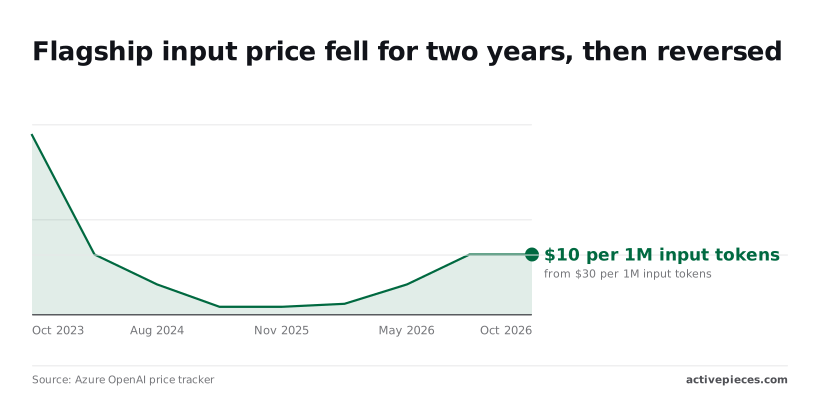
It was $30 in October 2023, $10 in January 2024, $5 in August 2024, $2.50 in November 2024, and $1.25 in August 2025.
That took the cost of processing one billion tokens from $30,000 to $1,250. It was still $1.25 in November 2025.
About 96%: that is the fall from $30 to $1.25, so a budget built on the 2023 figure overstates input cost twenty-four times over. The last two readings are flat, so don't assume the fall continues either.

Azure AI Foundry free allowances and quotas
I found no confirmed free allowance or default quota for these models, so assume none. Doing nothing means a test deployment bills from its first request, and a script stuck in a loop becomes an invoice line.
The quota shown on your own deployment is the number to trust, and you should set it before anyone starts testing.
Azure AI Foundry batch and cached-input discounts
Nothing in the last column of the table, for batch and cached-input discounts, is confirmed. Before you go looking, work out what share of your traffic can wait for an answer and what share repeats the same opening text.
Those two shares are where a discount could apply. Without that estimate, any rate you find is only a number.
Azure AI Foundry provisioned throughput and reservations
If you want capacity reserved for a fixed charge instead of billed per token, that is provisioned throughput. Reserve before you know your steady volume and you pay for idle capacity.
Skip it entirely and you pay per-token rates with no ceiling. Run one measured month on pay-as-you-go, then decide.
With the meters laid out, the next job is putting them against one named workload and adding up a month.
Azure AI Foundry monthly cost example
At 360 million tokens a month, the ticket classifier and summariser costs $2,400 on Standard, $1,200 on Batch and $3,900 on Reserved PTU. Those figures come from a 2026 Azure OpenAI pricing breakdown.
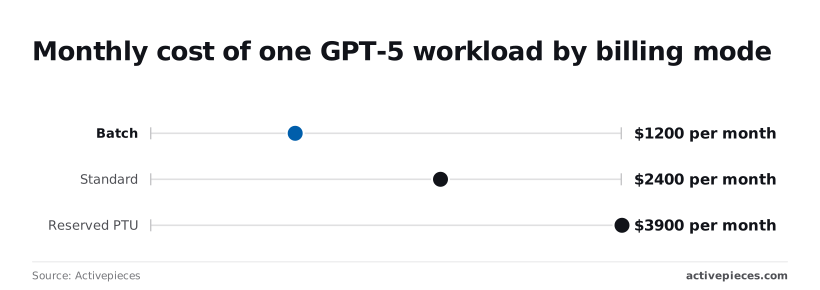
Pick the wrong tier and the monthly cost moves by up to $2,700. The same work can cost more than three times as much depending on how you buy it.
Budget versus invoice, line by line
Only the first two lines show up in the headline price. The table below sets each against what a team usually budgets, and the other five arrive on the invoice anyway, so the budget column is where the surprise starts.
| Bill line | Budgeted | Invoiced | Same month with Batch, caching and reservation |
|---|---|---|---|
| Input tokens | Counted | Billed per million | Batch halves the rate; caching cuts repeated prompt text |
| Output tokens | Counted | Billed per million | Batch halves the rate |
| Retries | Not counted | Billed as fresh tokens | Still billed; fewer failures at steady capacity |
| AI Search | Not counted | Billed as its own meter | Unchanged by any of the three |
| Content safety | Not counted | Billed per call | Unchanged |
| Logging | Not counted | Billed by data stored | Unchanged |
| Egress | Not counted | Billed by data leaving Azure | Unchanged |
You can't discount away the five side meters, because Batch and caching only touch the token lines. Budget for them separately, or they become the overrun.
Azure AI Foundry cost with Batch and caching
Choose Standard instead of Batch and the monthly expense doubles, since Batch cuts the $2,400 Standard month to $1,200. That's half, in exchange for waiting on results instead of getting them instantly.
Some work can wait and some can't: overnight ticket summaries can, a live agent-assist reply can't. Split the work by that test and only pay Standard rates for what truly needs speed.
Azure AI Foundry reservation break-even point
At $3,900 a month, Reserved PTU, a block of capacity you pay for whether or not you use it, costs $1,500 more than Standard at 360 million tokens, and $2,700 more than Batch.

Doing nothing about this is the expensive option: reserving at this volume means paying for idle capacity.
By simple arithmetic, Standard scales with usage at roughly $6.67 per million tokens. A $3,900 reservation therefore only breaks even near 585 million tokens a month, and only if the reserved capacity can actually absorb that load.
Decide that threshold before the first invoice, not after it.
Only if something watches it does a cap help. Activepieces, an open-source tool for chaining automated steps together, can do that watching on a schedule and alert a person, or ask for their approval, when spend crosses your line.
The LICENSE file in its GitHub repository shows an MIT-licensed core, the pricing page lists unlimited flows on the free plan, and a run costs 1 credit however many steps it has, so a check on a timer draws on the free plan's 1,000 monthly credits one run at a time.
Open the run detail view for any run and each step is listed separately with its own input and output, so the spend figure the check read and the branch it took are on record, and the enterprise RBAC docs show access policies applying to what a workflow may connect to.
Worth checking against a plan that does not meter every step: one credit covers a whole run on Activepieces.
Hidden costs and limits in Azure AI Foundry
Five things caused the overrun, and the order below is the order we found them, so the list also shows where to look first on your own bill. Each one has a fix that costs less than the surprise it prevents.
- A retry loop that re-sent a failed request until something succeeded, billing every attempt that completed.
- Long prompts resent in full on every turn of a conversation, so the same text was paid for again each time.
- 429 throttling, where the service refused requests for exceeding a limit and our code answered by retrying harder.
- Separately metered services around the model: search, content safety, logging and data leaving the region.
- A mis-sized reservation, paid for whether or not anyone used it.
We have no confirmed dollar figure for any of these, so none is quoted here. Pull the real number from your own invoice and Microsoft's pricing page before you set a cap.
Without a ceiling, a retry loop is a meter with no off switch. Set a maximum attempt count and a pause between attempts.
Then trim what you resend: a long instruction block repeated every turn is billed every turn, so keep it short or summarize older turns.
When the service answers with a 429, it is saying "too many requests, wait." Quotas are set per model and per region, so a limit you never hit in testing can stop you in production.
Ask for more quota before launch, and make your code wait instead of hammering the door.
Outside the token price, Azure AI Search, the safety filtering service, the logging workspace and network egress each bill on their own meters. Budget them as line items next to the model, because on a quiet model they can outweigh it.
Lower rate, less flexibility: a reservation trades one for the other, and an unused one still bills. Size it to the load you have measured for a few weeks, not the peak you hope for, and leave the spikes on pay-as-you-go.
Azure AI Foundry versus OpenAI and Bedrock
Not every model is cheapest on Azure, so price your measured load at each vendor before you commit to a reservation.
25% more on Azure for the same words: that is what a heavy Opus user pays. For Claude, Google Cloud's partner model pricing page puts Opus input at $4 per million tokens on Vertex AI against $5 on Azure.
Read across each row of the table, which shows Claude input prices per million tokens on the three clouds that sell it, to see whether the cloud you already picked is the one charging you extra.
| Claude model | Azure AI Foundry | Vertex AI | Bedrock |
|---|---|---|---|
| Haiku | $0.10 | $0.10 | $0.25 |
| Sonnet | $2 | $2 | $3 |
| Opus | $5 | $4 | $15 |
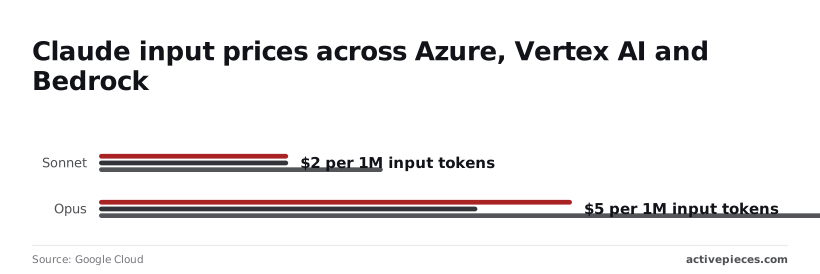
On Haiku and Sonnet, Azure and Vertex AI tie, so for those two the choice rests on everything except the token price.
On Haiku, Bedrock costs 2.5 times as much, and 50% more on Sonnet. On Opus, Bedrock's $15 is three times Azure's, so a team that budgeted from the Azure figure and landed on Bedrock would see the bill triple.
Get output prices, batch discounts, free tiers and check dates from each vendor's own page before you compare further. I have none for these vendors, and none for the OpenAI API's equivalent models.
With no platform fee, Foundry's bill is the sum of each model's own meter, so the token price in the table is only the headline.
Anything else a deployment uses, such as storage or network traffic, arrives as its own line. Budget for those lines too, because the token price alone will understate the invoice.
Picture a script that starts retrying at 02:10 and nobody is awake to stop it. Every retry is a billed call, and the meter doesn't care that the answers are useless.
Without a spending cap, you find out when the invoice lands. With one, the job stops at the limit and you lose a night of work instead of a month of budget.
Set the cap before the first invoice, because the cost of not having one is the whole overnight run.
Fix runaway Azure AI Foundry spend with Activepieces
Five rules are now in place, and each closes a different way the bill gets away from you:
- Budget alert thresholds, so a person hears about a climbing bill while it's still a conversation and not a dispute.
- A quota cap on each model deployment, so one runaway job can only burn through its own allowance.
- A retry limit, so a failing call stops after a few attempts instead of billing you for the same mistake all night.
- Batch for overnight jobs, so work that can wait runs at the cheaper rate.
- A reservation sized to baseline use only, so you prepay for the traffic you're sure of and leave the spikes on pay-as-you-go.
Those are settings inside Azure. None of them reads your spend and acts on it, which is the gap the next integration fills.
Monitor Azure AI Foundry spend with approval workflow
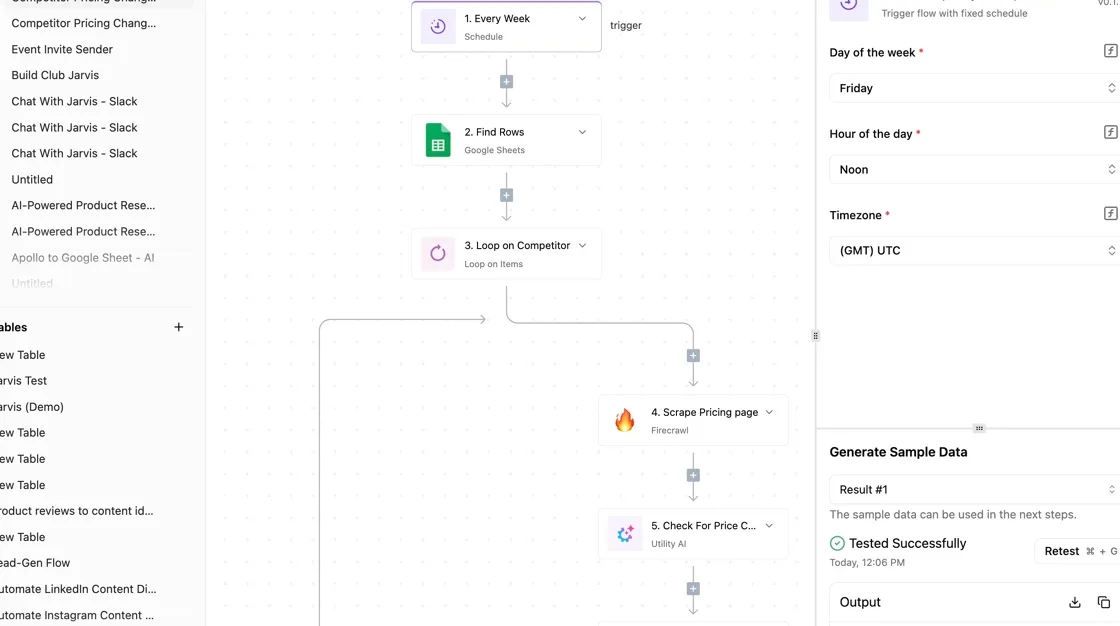
Start it on a timer; an hourly schedule is about 720 runs a month, and at 1 credit a run that sits inside the free plan's 1,000 credits.
Its first step reads spend so far this period from Azure Cost Management, the part of Azure that reports what you have spent. If no existing Activepieces integration covers that call, one can be generated and added privately.
Next, a branch compares that number with your threshold. Below it, the workflow ends quietly. Above it, the workflow posts to the channel your team actually reads, whether that's email or chat.
For the second stage, add a human-in-the-loop approval step that asks a named person to decide what happens next, such as revoking the key your application uses or disabling the job that sends the requests.
What that action looks like depends on how your application is wired, so test it on something harmless first. An approval path that has never been rehearsed is a hope, not a control.
Activepieces doesn't replace the caps above.
Checked every five minutes, the workflow makes about 8,640 runs a month, inside the 10,000 credits of the $20 Plus plan, and that covers the hours between the caps and the human who would otherwise find out on invoice day.
Azure AI Foundry cost control checklist
Set budget alerts at more than one threshold, so the first warning arrives early. Put a quota cap on every deployment, starting with the ones that run unattended. Set a retry limit in the code that calls the model.
Move any job nobody is waiting on to Batch. Size the reservation to your quietest steady week, not your busiest. Then build the scheduled workflow, and rehearse the approval once before you trust it.
Frequently asked questions
Is Azure AI Foundry free to use?
Opening Foundry costs nothing, but using it does. There's no platform fee, so your bill is the sum of the meters on whatever you deploy: tokens, hosting hours, storage, and the other Azure services you connect.
Leave a deployment running and forget it, and that meter keeps turning.
Does a PTU reservation expire if I don't use it?
No, and that's the problem: unused capacity is still paid for. A reservation for provisioned throughput (PTU, a block of model capacity set aside for you) is a commitment for its term, not a balance you draw down. Idle hours aren't refunded or carried forward.
If traffic is lower than you sized for, you pay the same. That's why the reservation comes last on Monday's list, after you know your baseline.
Why did my Azure OpenAI bill rise with no extra traffic?
Usually the same number of requests now carries more tokens, or more of them are being repeated.
The common causes are retries that fire again after a timeout, prompts that grew as someone added instructions or documents, longer answers, a switch to a pricier model, and hourly-billed deployments left running.
Look at tokens per request before you look at request counts.
Can I set a hard spending cap on Azure AI Foundry?
Not through a budget alone. An Azure budget sends alerts when spending crosses a line you set, but by itself it doesn't stop anything.
Two controls are firmer: the quota you assign to each deployment, which limits how much one deployment can consume, and the retry limit in your own code.
Pair those with the budget alert so a person hears about it within hours rather than on invoice day.
Are Foundry prices the same in every region?
Not necessarily. Price can differ by region and by deployment type, such as a single-region deployment compared with a global one. Don't assume the price you saw for one region holds for another.
I haven't restated any prices here, so check Microsoft's pricing page for your exact model, region, and deployment type before you commit to a reservation. This page was last checked on 2026-11-07.
Related reading
References
Running the numbers
See what the same workload costs here.
Free forever plan, and every paid plan self-hosts at no extra cost.
See pricing Talk to sales