
Best AI Agent Templates to Run Today Without Code

Oct 15, 202616 min read
When the goal is a working AI flow this week and nobody on the team writes code, Zapier is the fit, even though open-source options like Activepieces exist for teams who want to self-host later, which is why it suits teams at the early-adoption stage.
Its template library covers a very wide range of apps, so the first draft of almost any workflow already exists.
You will find the real work in the template below: the app connections arrive done, but every prompt, label and field mapping is yours to edit. Treat that right-hand column as the measure of the template's value.
1. Zapier: best for non-technical teams starting fast
| Step | App | What you must still edit after copying |
|---|---|---|
| Trigger: new lead email | Gmail | Filter to the inbox or label that actually receives leads, or every newsletter becomes a "lead" |
| AI classify | Zapier's built-in AI step | Rewrite the prompt and category list (hot, warm, spam) to match your own sales definitions |
| CRM update | HubSpot, the customer database | Map the AI's category to your own properties and decide whether to create or update contacts |
| Slack post | Slack, the team chat | Change the channel and message text, and route hot leads to the right owner |
Prices and plan limits checked against docs.claude.com and claude.com and openai.com and gemini.google on October 14, 2026.
Expect four edits across four steps. Anything beyond that means the template fits you poorly.
Checked 2026-10-15: Zapier has a free plan and paid tiers that scale with usage. Because each step in a flow counts toward usage, a four-step triage flow consumes allowance faster than its single trigger suggests.
Check the current limits on Zapier's pricing page against your lead volume before you rely on the free tier.
Editing stays small because your CRM and chat tool are very likely supported, and that app coverage is the main draw. The editor is visual, which lets a marketing or operations team own the flow without engineering help.
Heavy branching and long multi-step flows also grow costly in usage terms, so test volume early.
Everything below works on Activepieces' free plan. Start without code or a credit card.
2. n8n: best for technical teams wanting control
If your team is comfortable editing nodes and self-hosting, and will spend setup time to get control over every step, n8n is the fit.
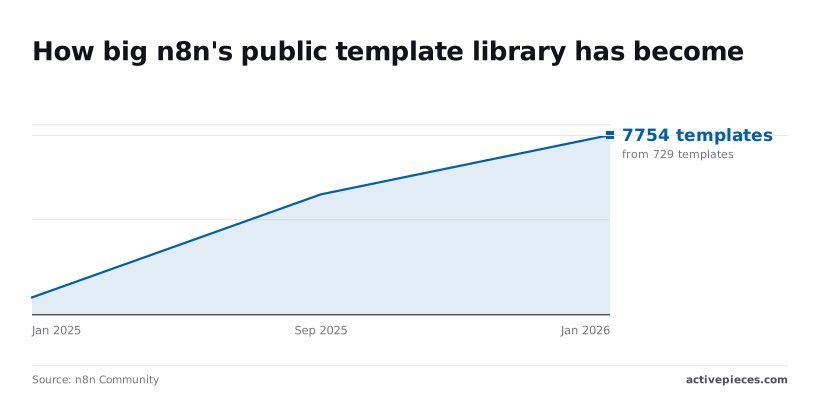
Roughly tenfold in a year is how far the n8n library grew. According to the n8n Community dashboard, the public library held 729 templates in January 2025, 5,191 in September 2025 and 7,754 in January 2026.
A search therefore returns far more candidates and far more unvetted ones.
Per FlowRecipesHub, Operations leads with 1,131 templates, then Marketing with 826, Productivity with 618, Sales with 569 and Content & Social with 559.
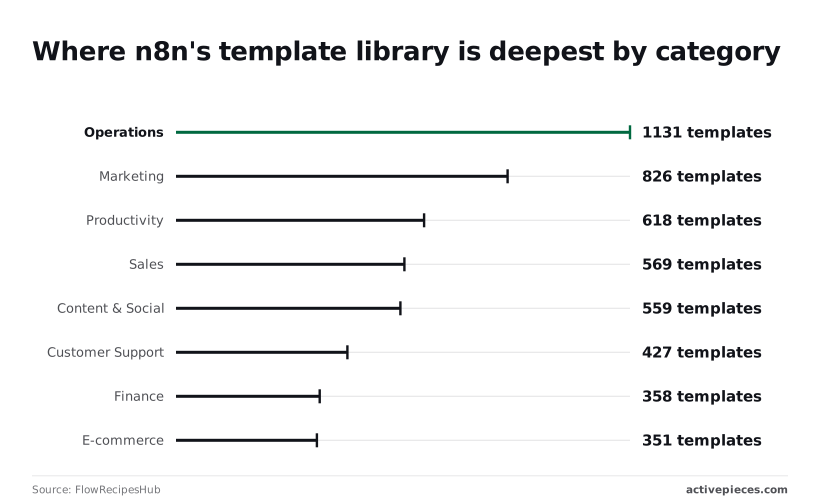
Customer Support has 427, under 40% of Operations, so check the support shelf before assuming it's covered.
Expect the knowledge tool and credentials, not the trigger, to take most of your editing time. The build below shows the order of work for a support inbox.
- Add an email trigger node (IMAP or Gmail) so each new message starts a run.
- Connect an AI Agent node and give it a system prompt covering tone and escalation rules.
- Attach a knowledge tool, such as a vector store tool pointing at your help articles.
- Add a draft reply node (Gmail's create-draft action), so a person approves before anything is sent.
- Set credentials for the mailbox and the model provider.
- Test with a real email from a past ticket, and check the draft against the answer your team actually gave.
Skip past steps 1 and 4, which are plain connectors; the agent and its knowledge tool are where templates diverge from your reality.
Checked 2026-10-15: I haven't recorded plan prices here, so read n8n's own pricing page before budgeting.
The structure matters more: n8n's cloud plans meter workflow executions, and the self-hosted edition runs under n8n's fair-code Sustainable Use License, which limits offering n8n to others as a service.
Internal support automation sits comfortably inside that.
You get node-level control, self-hosting and a deep library in operations and marketing, which suits a pilot run by someone technical.
Don't mistake catalog size for fit: the support shelf is thinner, and every template still needs its knowledge source and credentials rebuilt.
3. Activepieces: best for open-source agent workflows
Why it suits you
If you expect to rebuild credentials and knowledge sources anyway, Activepieces suits you. Its core is MIT-licensed and its 740 integrations sit in the open repo, so you can read every step you'll edit and the fix-after-copy cost is visible before you commit.
It's an open-source automation builder with AI steps, aimed at teams past the pilot stage who want to measure editing time per template.
Pick Zapier instead if your apps are long-tail and you want the widest app coverage. Pick Lindy if you'd rather configure a prebuilt agent than edit a flow.
The template in practice
When a new email lands in Gmail, an AI step classifies it as urgent, routine or noise. A Slack message alerts the owner of urgent items, and Google Sheets logs every classification.
The free plan on Activepieces Cloud costs $0 with no card needed, and it includes unlimited flows and 1,000 credits a month, so you can run this flow before paying anything.
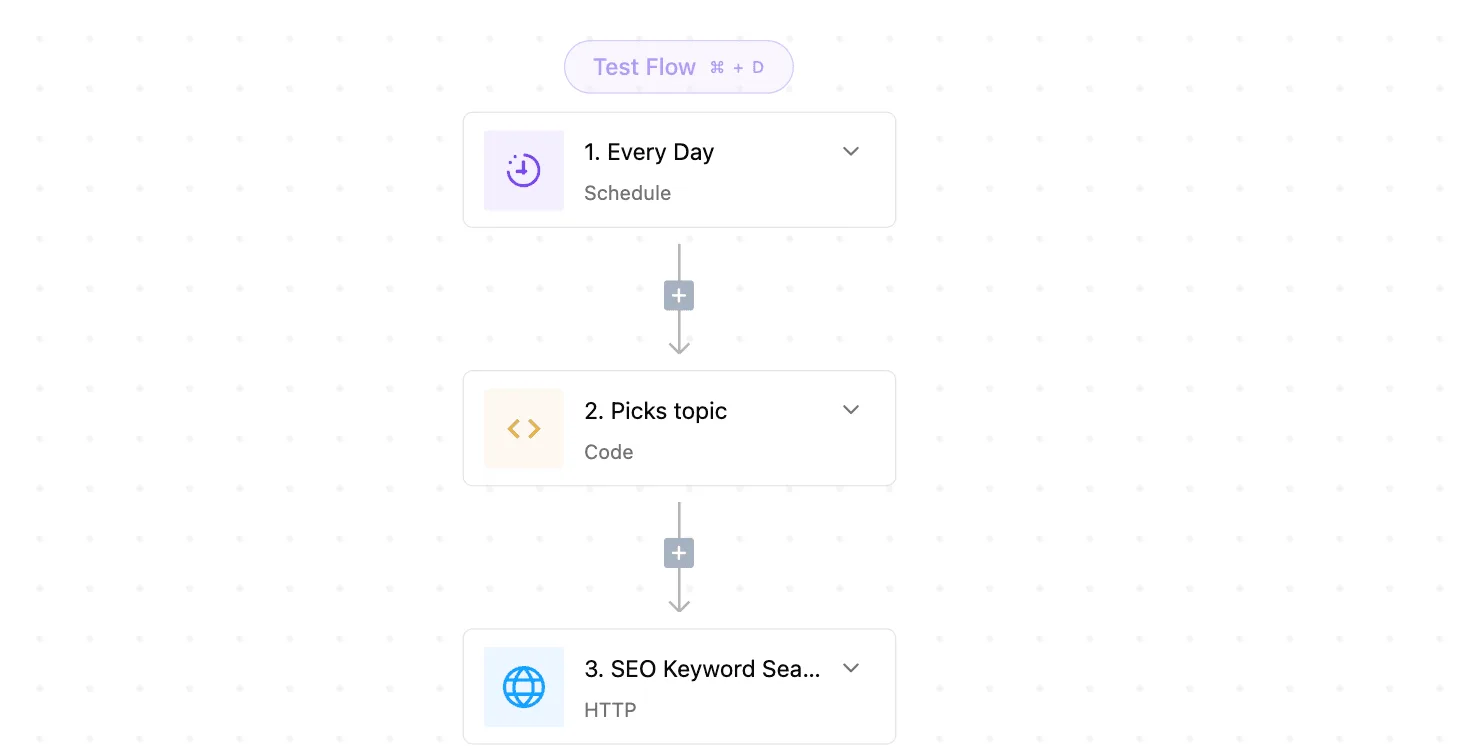
Open the builder and you see what you'll actually touch.
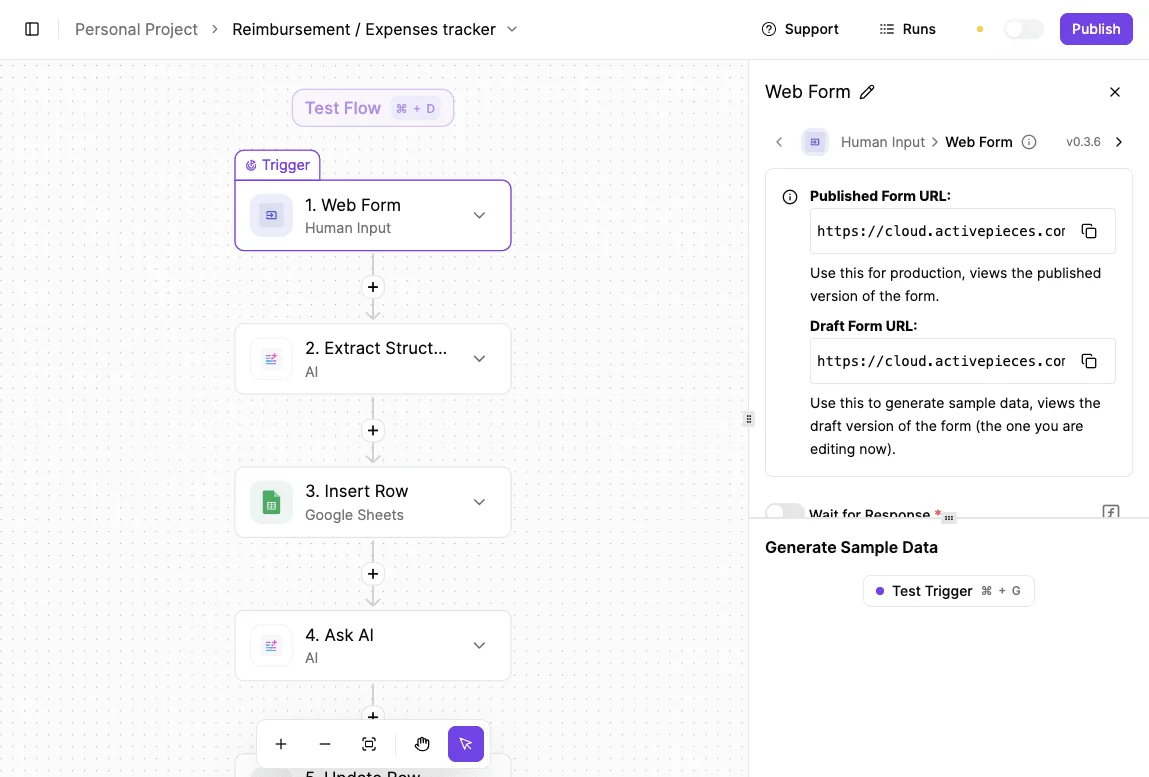
It has a Schedule trigger set to Every Hour, an integration picker listing Google Sheets, Microsoft Excel 365, AITable and Retable with actions such as Insert Row and Find Rows, and a test run returning sample data.
That's your edit list, and the logging step is where the sheet connection gets swapped.
Once that connection exists, the edit is not repeated for agents: the same Google Sheets integration that runs as a step here is also a tool on Activepieces' per-project MCP server, so Claude, ChatGPT, Cursor or an agent you wrote can call it.
The packages/integrations/community directory of the open source repo holds 740 integrations, each written once as an action, and the Integrations Framework and MCP Server documentation describe that same action as the one a flow runs and the one the MCP server exposes as a tool.

Cost and trade-offs
Checked 2026-10-15: Activepieces lists Free at $0 a month, Plus at $20 and Team at $200, meaning users can start without paying to evaluate it. The free tier lets you run the triage flow before spending anything.
The Team step is ten times Plus, so move up only when your edit and run volume justifies it.
You can see and change every step, the open-source base gives you a way out of lock-in, and the free tier makes a measured pilot cheap.
Before it runs, a template still needs your credentials and your classification rules. Expect to tune the AI step's prompt against real mail before trusting it, and expect a smaller pool of ready-made agent flows than the biggest catalogs offer.
Easier to see it running than to read about it: set it up free, no card.
4. Make: best for visual multi-step scenarios
Because every branch of a scenario is drawn on screen and a non-developer can follow it, Make suits teams whose editing happens on a canvas.
Picture a hosted automation platform where each workflow, called a scenario, is a chain of modules joined by lines. Make's templates include AI modules that call a language model mid-flow.
It fits teams in the early-adopter stage, typically operations or support, who need to see why a request went down one path. Those are also the people who'll edit the branches after copying.
When a form is submitted, the AI step summarizes it, a router sends it down a path, and the result lands in a spreadsheet and a chat channel.
The table shows which condition you'll change on each step; the router row is where most of your edits will go.
| Step | Module | App | Branch condition to edit |
|---|---|---|---|
| Form submission trigger | Watch responses | Google Forms, the intake form | None; confirm the form fields it reads |
| AI summary | Create a completion | OpenAI, the language model provider | None; rewrite the prompt for your wording |
| Router | Router with filters | Make's built-in flow control | Category or urgency text from the summary, per route |
| Spreadsheet row | Add a row | Google Sheets, the log | Column mapping per route |
| Chat message | Send a message | Slack, the team channel | Target channel per route |
Next, test the router with real submissions, since a filter keyed to the model's wording breaks when that wording drifts.
Checked 2026-10-15: Make runs on a usage-based model with a free plan and paid tiers above it. I don't have confirmed limits or prices to quote, so read the current figures on Make's pricing page before you budget.
Make is a proprietary hosted service, not open source.
You can audit a route without reading code, because branching is visible. A failed module is easy to spot and rerun.
Add a branch and you add another filter to maintain. Heavy routing logic also becomes harder to read on the canvas than in a short script.
5. Lindy: best for ready-made assistant agents
If you want a finished assistant rather than a canvas to read, Lindy suits you. That sidesteps the routing problem above, though you pay for it in how little of the logic you can see.
Its value is the prebuilt agent you adopt, review and run.
On Lindy, a hosted platform, you start from an agent template, such as meeting follow-up or sales outreach, and adjust its instructions.
It fits a team at the first stage of adoption: a sales or customer-success group that wants a working assistant this week and has no one to maintain a flow diagram. Teams needing branching logic or custom code will feel the ceiling sooner.
Compare the two templates most buyers start with in the table below. It shows that both are short, single-trigger agents, and that the review burden, not the build, is where your editing time goes.
| Meeting follow-up | Sales outreach | |
|---|---|---|
| Trigger | A calendar meeting ending | A new lead or prospect list entry |
| Steps | Pull the notes, draft a recap, draft the email | Research the prospect, draft a message, queue it |
| Apps | Google Calendar (fires the trigger), Gmail (sends the email) | A lead source such as a spreadsheet or CRM, plus Gmail |
| Credit use | Rises with each step and model call | Higher, because research adds steps per lead |
| Review before sending | Action items, names, anything promised on your behalf | Claims about the prospect, tone, who is on the list |
Outreach costs more per run because every lead repeats the research step, so a large list multiplies spend. The follow-up template is the safer first pilot: one meeting, one recipient group, and an error is visible immediately.
Checked 2026-10-15: Lindy meters work in credits, which agent runs consume. I'm not reproducing plan prices, the free allowance or its open-source status here, because I couldn't confirm them.
Read Lindy's own pricing page before committing. The practical rule holds regardless: count the steps in the template you copy, because that count drives your bill.
Lindy gets you to a working agent fast, with little setup. The instructions are plain language you can edit without touching a diagram, and the templates are aimed at common business jobs, so there's less rework when yours matches.
Try to express complex branching and you'll find it harder, and you see less of what the agent decides. Outreach drafts need a human read before anything leaves your inbox, and credit-based billing makes costs less predictable at volume.
6. How to coordinate multi-agent sales operations
When it fits
When several agents must hand work to each other, Relevance AI is the library to pick, and that's also where the credit meter from the previous section bites hardest.
It suits sales and operations teams at the stage where single-agent pilots work and the next step is a chain: research, then drafting, then routing. Outbound sales is usually the first team to outrun its guardrails, so start there with a review step in place.
The starter workflow
When a new lead lands in your CRM, the system that holds your lead records, the trigger fires. A research agent looks up the company and the contact, then a second agent scores fit against your criteria.

A third drafts a first-touch email and writes it back to the CRM as a draft, not a sent message. A rep reads it before anything leaves.
Expect to edit the scoring criteria and the tone instructions, because those are specific to your market.
Cost and Limits
Checked 2026-10-15: Relevance AI bills in credits, and it has a free plan. I don't have confirmed plan figures from its pricing page for this date, so check the live page for credit allowances and whether paid tiers add seats or agents before you commit.
You edit a working team instead of wiring one, because roles, handoffs and tool use are built into the templates. That is the point of the multi-agent design, and for sales and ops it shortens the path from pilot to a measurable workflow.
On a small budget, four limits matter, and each one compounds the others.
- Credit consumption rises across cooperating agents, because every agent in the chain spends its own.
- Free plan caps can end a test before you've seen a realistic week of leads.
- Setting up agent roles takes real editing time, and weak role instructions waste credits on bad output.
- Per-run cost multiplies with each handoff, so adding a fourth agent costs more than the line item suggests.
Run the starter on a small batch of leads first and measure credits per finished draft before you scale it.
How to choose an AI agent template library
Choose the library whose ready-made workflows already match your trigger, your apps and how much editing your team will tolerate. A template is worth only what you must still fix after copying it.
Credits per finished draft is the same test applied to a catalog: a large library full of near-misses costs more than a small one that fits.
A template is worth only what you must still fix after copying it.
Match your situation to a pick
Start with your adoption stage. A team on its first automation should favor hosted libraries such as Zapier or Make, whose templates are built around common business apps and need little setup.
If a team already has an engineer and wants control over where data runs, it should look at n8n, which can be self-hosted.
A team that wants an agent acting like an assistant, handling email and scheduling, should compare Lindy and Relevance AI, which are built around agents rather than step-by-step flows.
In every case, open three templates for your actual trigger and count the edits each needs before it runs.
Most failures start with a skipped stage of the rollout, and the team that automates outbound messaging usually breaks the guardrails first. These are the mistakes that break copied templates:
- Running a template unreviewed, so its default prompts and field mappings reach real customers.
- Testing with invented data, which hides the messy inputs your business produces.
- Ignoring per-run cost until the first invoice arrives.
- Leaving out human approval, so a bad draft is sent rather than caught.
- Pasting credentials into a shared template, or connecting a personal account instead of a service account.
To start on Monday:
- Pick one task that someone on your team repeats weekly.
- Choose one template that matches its trigger and apps.
- Gather ten real items from that task, including the awkward ones.
- Add an approval step before anything leaves your systems.
- Record the edits and the cost per result, then decide whether this library earns a second template.
FAQ on AI agent templates
Think of an AI agent template as a prebuilt workflow that already has its trigger, steps and app connections laid out. You copy it and edit it instead of building from a blank canvas.
What you still have to change afterward, such as field mappings, prompts and approval points, is the real measure of how useful it is.
Are AI agent templates free?
You pay nothing to copy templates on most platforms, but running them is a separate cost. Each run can use paid platform tasks and model calls, so a free template that fires on every incoming email can still produce a bill.
Before you roll one out to a wider team, estimate the cost of a single run and multiply it by the volume you expect.
You don't need to code for the common cases. Templates built on visual builders usually need only a connected account, a few edited fields and a rewritten prompt.
Code becomes useful when your data has an unusual shape or when a step needs custom logic the template didn't anticipate, and many platforms offer a code step for that situation.
Is it safe to run one on company data?
It's safe only if you review the template before it touches real records. Check which accounts it connects to, what it can write or send, and where your data goes when a model processes it.
Start with test data, keep a human approval step on anything that messages customers or changes records, and give the connection the narrowest permissions that still let the flow work.
Your security team should confirm that the platform's data handling meets your own policies before you widen access.