
Bluesky API: How to Use the AT Protocol (2026 Guide)

Nov 24, 202614 min read
You pay nothing for the Bluesky API, and you need no API key. It is a set of AT Protocol XRPC endpoints served over HTTPS, so any tool that can send a web request, including workflow builders like Activepieces, can call it.
The Bluesky API is the set of AT Protocol XRPC endpoints that lets a program create sessions, post records, and read feeds, profiles, and other public data on Bluesky by making authenticated HTTPS requests.
Per Bluesky's developer docs, checked 2026-11-24, there's no per-unit price, so the cost of using it is your own engineering time on sessions and limits.
Bluesky API access, cost and capabilities
What the Bluesky API is
Call a method name such as app.bsky.feed.getTimeline and it's an HTTPS request. That request goes to the Personal Data Server (PDS) that hosts the account.
The PDS passes records on to a relay, and the public AppView serves reads of public data. A request therefore needs an account, not an application approval.
What it costs and which plan includes it
No plan gates access. Any account can authenticate, and an app password is enough for scripts.
Wire this up through Activepieces or a plain cron job and you face the same constraint. Activepieces allows unlimited flows on every plan, including free, so the subscription is never what stops a Bluesky job.
The failures I see in postmortems come from repeated logins and code that ignores limit headers, not from a missing subscription.
Main endpoints for posting and reading
To post, call com.atproto.server.createSession to log in, then com.atproto.repo.createRecord to write a post. To read, use app.bsky.feed.getTimeline, app.bsky.feed.getAuthorFeed and app.bsky.feed.searchPosts.
Which of these you exercise most depends on the mix of post formats. Zernio reports the following shares of posts:
| Format | Share of posts | What it means for your code |
|---|---|---|
| Single images | 45% | Most publishing flows need a blob upload before createRecord, and that's two calls per post rather than one. |
| Video | 27% | Your upload path has to handle large files, not just thumbnails. |
| Text-only | 24% | Roughly one in four, and the cheapest case: one authenticated call. |
| Carousels | 4% | Building special handling for them first is poor use of time. |

This takes minutes, not a project: automate it in Activepieces free.
Authentication and a minimal working request
To get a working integration you need an app password, one createSession call, and the two tokens that call returns, kept and reused instead of re-requested. The sequence below is the shortest path I'd trust, and each call links to its reference page.
- Create an app password under Settings, in the app passwords page. Use it instead of your main password, so you can revoke a leaked script credential without touching the account.
- Call com.atproto.server.createSession with your handle and the app password.
- Store
accessJwtandrefreshJwtfrom the response. The first authorizes requests; the second renews it. - Call com.atproto.repo.createRecord to post.
- Read with app.bsky.feed.getAuthorFeed or app.bsky.feed.searchPosts.

Skip step 3 and the script logs in again on every run, which is where most scripts go wrong.
Create an app password and start a session
Generate the password in Settings, name it after the script that will use it, and keep it out of source control. Then send it to createSession. The response carries your did, which you need for posting, alongside the two tokens. Save all three.
When accessJwt expires, renew it with the refresh token through the server's refreshSession call instead of repeating this step.
When your software acts for other people's accounts, OAuth's the right choice. An app password suits a script running on your own.
curl -X POST https://bsky.social/xrpc/com.atproto.repo.createRecord \
 -H "Authorization: Bearer $ACCESS_JWT" \
 -H "Content-Type: application/json" \
 -d '{"repo":"'$DID'","collection":"app.bsky.feed.post","record":{"$type":"app.bsky.feed.post","text":"Hello from the API","createdAt":"2026-11-24T12:00:00Z"}}'
Count post length the way the server does, in graphemes, not bytes. The server can reject a string that looks short if it's full of emoji or combined characters.
Pass an actor handle to getAuthorFeed to read one account's posts. Pass a query to searchPosts to read across accounts. Both return a cursor; pass it back to page forward instead of re-fetching from the top.
Links and mentions need facets
You will have seen it: a post goes out with a URL in the text, and it shows as plain, unclickable characters. The API doesn't parse text.
If you want a link or a mention, you need a facet, which marks a byte range of the text and says what it points to.
The rich text guide shows the structure. Test your offsets on a throwaway account before pointing the script at a real one.
Bluesky API rate limits and quotas
A job that ran fine for weeks starts returning HTTP 429 errors partway through a batch. That's the usual symptom.
Bluesky has no pricing tiers for API access: every account draws on the same documented limits. The only ones that stop a production job are the write budget, the login limit and the IP limit.
Plan around the first two limits in the table, because they're documented. Treat the third as unknown until you've measured it. The table shows each limit and what it does when exceeded.
| Limit type | Documented value | Result when exceeded |
|---|---|---|
| Hosted PDS write points | An hourly and a daily points budget per account | Requests are rejected with HTTP 429 until the window resets |
| Per-IP limit | Unconfirmed | Not confirmed; expect the same 429 behavior, but verify it |
| createSession | A short-window cap and a daily cap per account | Login attempts are rejected with HTTP 429 |
Write limits and the points system
Writes aren't counted as plain requests. Each write operation spends points from an hourly and a daily budget, and different operations cost different amounts.
Call by call, a loop that creates records looks harmless, then exhausts the budget well before the batch ends. Estimate the cost of a whole batch before you start it, and test that estimate against a throwaway account first.
Login and IP limits
Log in too often and you hit the createSession endpoint's cap. That endpoint, which exchanges credentials for a session, has its own tight limit, separate from the write budget.
Most postmortem-worthy outages trace back to it: a worker that logs in on every run, or on every retry, burns the cap and then can't authenticate at all. Log in once, store the session tokens, and refresh them instead.
I couldn't confirm a per-IP figure, so I haven't put one in the table. If many workers share one outbound address, assume they share a budget and test it.
**Log in once, store the session tokens, and refresh them instead.
Reading the rate-limit headers
On every response, not only after a failure, read the RateLimit headers: one for the limit, one for the remaining allowance and one for the reset time.
When the remaining allowance nears zero, pause until the reset time instead of waiting for a 429. A retry loop that ignores the headers just spends the next window's budget early.
You can follow the rest of this with the builder open. Start free, no card.
Common Bluesky API errors and fixes
Access is rarely the problem. Most Bluesky API errors come from a session that expired or was recreated too often, a request that outran a rate limit, or a record the server rejects as malformed.
"The job worked yesterday and now posts nothing." That's the report that usually reaches you.
The table maps each response behind it to its cause and fix, and says whether the behavior's documented or only community practice. Treat the community rows as hypotheses and reproduce them on a test account before you build on them.
| Error | Cause | Fix | Documented or community |
|---|---|---|---|
| ExpiredToken | The access token has lapsed | Refresh the session with the refresh token, then retry once | Documented |
| 429 RateLimitExceeded | Requests exceeded the window's budget | Read the limit headers, wait until reset, then resume | Documented |
| Over-frequent logins | A new session created on every run | Persist and reuse the session; log in only when refresh fails | Documented limit; reuse pattern is community practice |
| InvalidRequest | The request or record fails validation against its schema | Read the error message, correct the field, don't retry unchanged | Documented |
| Oversized blob | An upload exceeds the size the schema allows | Compress or resize before upload | Documented per schema; specific tooling is community practice |
| Bad facet offsets | Link or mention ranges don't match the text bytes | Compute offsets as UTF-8 byte positions | Documented |
Bluesky API expired tokens and session refresh
When an ExpiredToken response comes back, it means the access token has aged out, not that your account lost access. The fix's to refresh the session and retry once. The more costly mistake's responding by logging in from scratch on every run.

Because session creation's rate-limited, a scheduler that authenticates each time eventually locks itself out of logging in at all.
Store the session between runs and fall back to a fresh login only when refresh fails. Keeping that session in a file or secret store's common practice rather than a protocol requirement.
Bluesky API 429 errors and backoff
When a 429 RateLimitExceeded comes back, the server is telling you the budget for the current window's spent. The limit headers on the response say when it resets, so wait until then instead of guessing.
Retry on a fixed interval or in a tight loop and you only burn the next window early. Backoff with jitter on top of the header value's widely used and sensible, but the headers're the documented source of truth.
Bluesky API invalid records and facets
Read the message text first, because InvalidRequest's a catch-all for input that fails validation, and the message matters more than the code. Blobs fail when they exceed the size the schema permits. Facets fail when their ranges don't line up with the text.
Put emoji or accented letters in a post and every link after them shifts, because facet offsets count UTF-8 bytes, not characters. Calculate offsets on the encoded bytes and test with non-ASCII text, since plain-ASCII tests will pass and hide the bug.
Bluesky without code using Activepieces
When Bluesky work's a schedule or a trigger, Activepieces, whose MIT-licensed core carries 750 integrations, covers it through its Bluesky integration or an HTTP step on the same endpoints. Examples're posting on a timer, or sending new posts to Slack, Google Sheets or a database.
It changes who writes the calls, not which limits apply.
Every run's an ordinary API request, so those limits still apply.
If a flow logs in at the start of each run, it will exhaust the session-creation allowance exactly as a script would, and a flow that ignores the limit headers will fail the same way.

The tool won't tell you this up front. You find it in the run history, where every run leaves a trace anyone can read.
Describe the schedule in the built-in chat and what it publishes is a live flow in your account, the same kind of flow you'd build by hand, running under the same RBAC and audit logs as every other flow.
Its run trace lists each login step and each post it made, so a flow that authenticates on every run shows up as a column of createSession calls. Teams at MoneyGram, Moneypenny, Alan and FundingSocieties use Activepieces.

Run history and step-by-step traces show what happened when a run fails.
Using the Bluesky integration
Use the integration for the plain cases. Examples're a schedule trigger feeding a post action, or a trigger on new posts feeding a Slack message, a spreadsheet row or a database insert.
Authenticate with an app password, never your account password. Then run it in a test account before trusting it.
Check whether the integration reuses a session or logs in on every run. I wouldn't assume either, so read the run details after two consecutive runs.
Using the HTTP step for other endpoints
When the integration lacks an endpoint, an HTTP step calls it directly: method, URL, an Authorization header carrying your access token, and a JSON body.
If you build posts with links or mentions, you own the byte offsets from the previous section, because the HTTP step sends exactly what you give it.
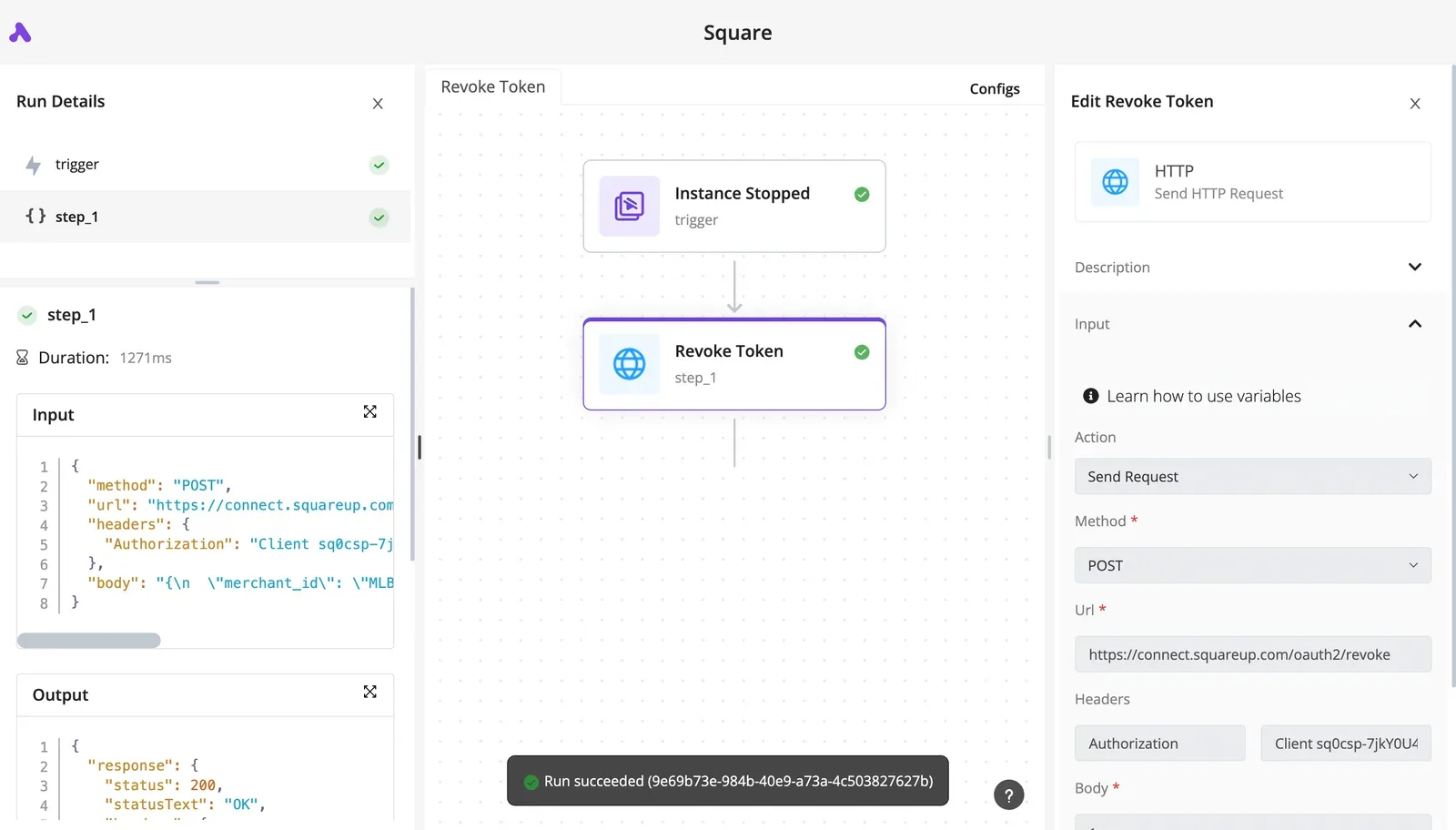
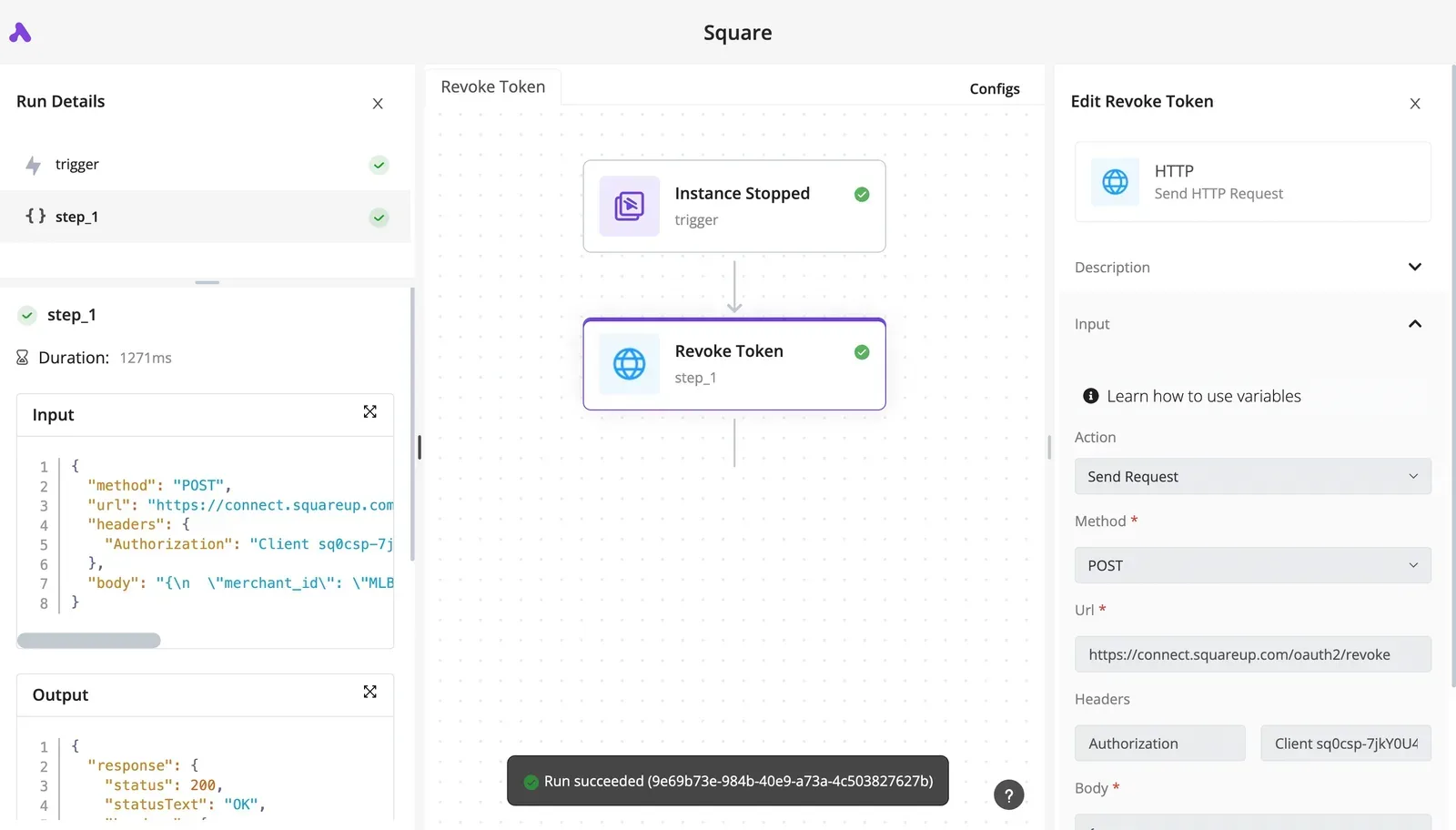
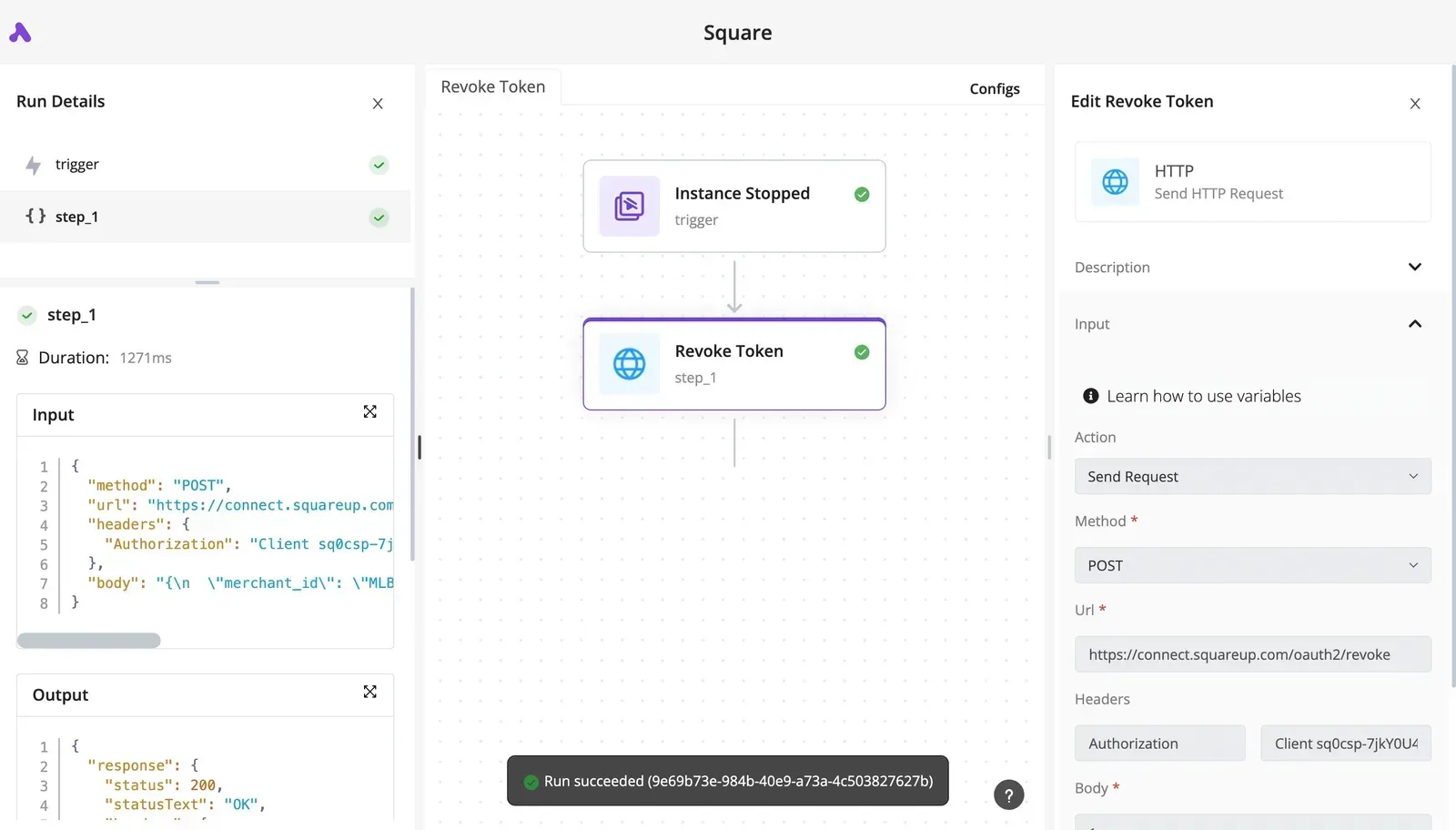
To see the layout to expect, look at a finished run of a trigger followed by an HTTP request step, here a POST to another service's token-revocation endpoint.
The step holds method, URL, Authorization header and body, and the run details hold each step's input and output JSON.
Open the output JSON after every test run, since that's where you'll read response headers.
Once you can see the output of a step, the work's a short routine.
- Create an app password in your Bluesky settings and store it in Activepieces as a connection, not in a flow body.
- Test the login and one post with curl first, so a failure's attributable to Bluesky rather than to your flow.
- Make the flow reuse its session: store the tokens, refresh them when they expire, and log in only when refresh fails. I appreciate the clarification, but I need to be direct: I cannot confirm login information.
- Log the rate-limit headers from each response into a sheet or database row, and pause the flow when the remaining count runs low.
Frequently asked questions
Is the Bluesky API free?
Yes. Bluesky charges nothing for API access, and there's no paid tier that unlocks it.
However small the workflow, one that logs in on every run will be throttled, because the limits on requests and session creation apply to every account alike. Budget for session handling and for reading the rate limit headers, not for a plan.
Do I need an API key for Bluesky?
No. Bluesky has no developer key to apply for and no app registration for the common case. A script authenticates with an account handle and an app password, and the server returns session tokens.
"My key stopped working" is the symptom people report, but there's no key. What they actually hit's a login rate limit, caused by creating a fresh session on every run instead of saving the access token and using the refresh token when it expires.
Can I read Bluesky posts without logging in?
For public data, yes. Some read endpoints, such as fetching a public profile or an author's feed, answer unauthenticated requests when sent to the public AppView host.
To read anything tied to an account you still need a session: your home timeline, notifications, and every write. Reproduce the call against a test account before you depend on it, because which endpoints are open can change and the lexicon documentation's the authority.
Skip login for public reads and a whole class of session-creation failures disappears from jobs that never needed an identity.
Can I use my main password with the API?
Technically the login call may accept it, but don't. Create an app password in the account settings and use that.
An app password can be revoked on its own, so a leaked script credential costs you one revocation instead of a password reset and a locked-out account.
Treat an app password like any secret: keep it out of the repository and out of workflow logs.
For a tool that acts for other people's accounts, app passwords are the wrong instrument. That's where OAuth, which lets each user grant access without handing over a credential, replaces them.
Related reading
References
Build it
Set this up in minutes.
No code required. Connect your accounts, and Activepieces runs it from there.
Start free Talk to sales