
Business Process Automation: What It Is and How It Works (2026)
Business process automation (BPA) uses software to run repeatable business tasks automatically, cutting manual work and errors.

Jan 20, 202613 min read
Business process automation (BPA) is the use of software to run a repeatable, multi-step business task—like an approval, an onboarding request, or a data handoff—without a person pushing each step forward by hand. It replaces scattered manual work with workflows that follow rules, move data between your systems, and finish steps in order, which is why a stuck approval, an unsigned contract, or a delayed access request stops happening as often.
In this article, you'll learn how business process automation operates, the types of BPA software available, and how to apply it to your own repeatable processes.
Put structure around the work that keeps falling apart. Use Activepieces to automate it!
TL;DR
- Business process automation uses software to run repeatable work automatically.
- It replaces manual tasks with workflows that follow rules, move data between systems, and finish steps in order.
- Core pieces like triggers, logic, and actions keep work consistent and easy to track.
- Tools like Activepieces connect apps, people, and AI so that complex processes run without constant follow-ups.
Everything below works on Activepieces' free plan. Start without code or a credit card.
What Is Business Process Automation?
Business process automation (BPA) is the use of software to run a defined, repeatable business process—such as an approval, an onboarding request, or a data handoff—without a person pushing each step forward by hand. Teams sometimes call this "business automation", since it covers automation of complex business processes and functions that go beyond simple data entry or record-keeping.
Every automated process starts with an event: a form is submitted, a record changes, or a scheduled time arrives. A trigger watches for that event and starts the workflow. Rules then check the details against conditions you've set, and actions run in order—updating systems, sending messages, or creating records—until the process reaches its outcome.
Unlike robotic process automation (RPA), which copies clicks and keystrokes on a single screen, BPA coordinates the whole process end-to-end: the systems involved, the people who need to approve something, and the data that moves between them. Business process management (BPM) steps back further, focusing on modeling and continuously improving how that process runs over time.
Modern BPA tools add visibility on top of this structure. Dashboards and run logs show exactly where a process is at any moment and where it tends to stall, which helps you optimize the process rather than just automate it once and forget it. Increasingly, platforms also fold AI into these steps—reading a message, classifying a request, or drafting a reply—so automation can handle work that doesn't follow a single fixed rule.
With that structure in place, BPA applies to a wide range of work: supply chain management, data entry, employee onboarding, inventory management, invoice processing, and customer support routing, among others.
Why Is Business Process Automation Important?
Once you understand how automation works, your next question would probably be: Why and how does it change daily work so much?
- Operational efficiency improves when software handles steps in the right order on its own.
- Automating an entire process end-to-end removes gaps where work often stalls or gets forgotten.
- Automating routine tasks speeds up daily work, in turn avoiding delays that build up during busy weeks.
- Manual errors drop since systems follow the same rules every time and don't rush or guess.
- Cost savings appear when bottlenecks disappear, and end-to-end process automation runs between applications without extra staff.
- Customer satisfaction rises as requests, approvals, and updates move faster.
- Clear tracking helps you better direct your automation effort and allows you to accurately evaluate its effectiveness.
- Data from logs and dashboards supports decision-making and process optimization.
How to Implement Business Process Automation
Getting from manual work to a running automation follows a fairly consistent path, regardless of which tool you use:
- Identify repetitive processes. Look for work that happens the same way every time, has clear rules, and currently takes up hours that could go toward higher-value tasks—things like invoice approvals, onboarding checklists, or ticket routing.
- Map and standardize the workflow. Document each step as it happens today, including who's involved and what triggers the next step, so there's a clear process to automate rather than a vague idea of one.
- Select the right tool. Match the tool to the complexity of the process: simple, single-step tasks can often run on no-code tools, while processes that span several systems or need AI judgment call for a more complete automation platform.
- Implement and integrate. Connect the tool to the systems the process already touches, build the workflow, and test it against real cases before turning it on for everyone.
- Monitor and optimize. Use run logs and dashboards to see where the process slows down or fails, then adjust the rules, add a missing condition, or bring in AI for steps that need judgment rather than a fixed rule.
Most teams don't automate everything on the first try. Starting with one process that causes visible pain—like a stuck approval or a missed handoff—makes it easier to show results and build the case for the next one.
The Building Blocks of Business Process Automation
Business process automation works because a system follows a chain where one step causes the next step to happen without you pushing it forward.
Triggers and Events
Automation starts when something changes, and that change always comes first. That change is the event.
The trigger watches for it and tells the system to begin. Without triggers, nothing moves, even if the workflow looks complete.
Different triggers exist:
- Time-based triggers help with work that must happen on a schedule, such as daily checks or weekly summaries.
- Manual triggers wait for a person to click approve before anything continues.
Then, a condition checks the details before work continues. This step keeps automated tasks limited to the right cases and avoids unnecessary runs.
Once the condition passes, the system passes data to the next step.
Process Logic and Rules
After work starts, logic decides how it should move. Logic gives automated systems a way to react based on data rather than repeating the same step every time.
Some flows move in a straight line. Others branch when values change, such as price, location, or status.
Loops repeat actions for each item in a list, which helps when handling multiple tasks like ordering items. Timing rules let your work pause or run steps at the same time when needed.
After the logic chooses a path, the system follows it consistently.
Decision Points and Conditions
Decision points appear when work should choose a direction. At these moments, the system checks data and picks the next step.
Some decisions lead to "yes" or "no" outcomes. Others route work into several paths.
Approval workflows rely on this setup. A request may move forward on its own until it reaches a level that needs review.
Waiting conditions pause work until something changes, such as a signature or payment. These pauses prevent steps from running too early.
Actions and Outcomes
Actions do the actual work. They update records, send messages, or create files inside connected tools. Systems can run many actions in order without stopping.
Let's say language actions handle text like summaries or replies.
Outcomes show what changed at the end, such as a payment logged or access granted. Tracking failures and retries keeps work from stopping halfway and leaves results behind.
Types of Business Process Automation Software
The following are the common types of BPA solutions, from simple task automation to AI-driven, end-to-end orchestration:
Robotic Process Automation
Robotic process automation (RPA) copies what a person does on a screen. A software robot opens apps, clicks buttons, types values, and moves files the way you would, and a central system runs and monitors many bots at once—attended, unattended, or mixed setups. Some tools now handle unstructured data like emails or scanned files, though changes in screens can still cause issues.
Business Process Management
Business process management (BPM) focuses on how work moves from start to finish rather than how clicks happen. It starts by mapping the current process, then designing an improved version; once live, the system routes tasks to people or tools, tracks progress, and records timing. Human review stays part of the process for decisions software shouldn't make alone.
Workflow Automation
Workflow automation connects steps between people and platforms to automate repeatable processes: a trigger starts the flow, rules guide decisions, and actions move work forward. Tasks follow the same path every time, which keeps things consistent as volume grows.
Digital Process Automation
Digital process automation focuses on automating repetitive tasks while connecting user-facing forms with back-end systems, usually as part of a larger digital transformation effort. Information enters through a portal or app, systems handle processing, and updates keep users informed as work continues.
Hyperautomation
Hyperautomation combines RPA, AI, machine learning, and low-code or no-code platforms to automate an entire process end-to-end rather than one task at a time. It's typically used by larger organizations with complex, cross-system needs, where several of the automation types above have to work together inside a single process.
Intelligent Automation
Intelligent automation pairs AI—including machine learning, natural language processing, and computer vision—with RPA so a system can handle cognitive, judgment-based work, not just fixed, rule-based steps. It suits data-heavy processes where requests vary in format or wording, such as reading a document or classifying an open-ended support request, and is the closest fit for AI agents that reason over context rather than follow a single script.
Easier to see it running than to read about it: set it up free, no card.
Business Process Automation vs. RPA vs. BPM
These three terms get used interchangeably, but they answer different questions:
| Scope | Best for | |
|---|---|---|
| RPA | A single task on a screen, like copying data between two apps | High-volume, repetitive clicks and data entry |
| BPA | A full process across systems, people, and rules | Coordinating approvals, onboarding, and handoffs end-to-end |
| BPM | How a process is designed, modeled, and improved over time | Organizations that need to continuously refine how a process runs, not just run it |
In practice, these overlap rather than compete: a BPA workflow might call an RPA bot for one step that needs to interact with a legacy screen, while BPM provides the map that both are built from. A platform like Activepieces sits at the BPA layer—connecting apps, people, and AI agents into one workflow—while still supporting the kind of approval steps and process logic that BPM thinking is built around.
How Activepieces Supports End-to-End Business Process Automation

Activepieces is an open-source automation platform that connects apps, people, and AI agents.
Core features that make this possible:
- Visual workflow builder that shows the entire flow of work step by step, so anyone can see how a process runs.
- Simple setup that lets you create automation solutions with minimal coding knowledge, while still allowing deeper customization when needed.
- Built-in AI support so automated processes and AI agents can remember past interactions and use that context in later steps.
- Integration library (of 597 pieces) that connects existing systems like finance tools, support platforms, developer tools, HR, customer relationship management (CRM) software, and more.
- Human approval steps that pause workflows until someone reviews or confirms an action.
- Secure deployment options, including self-hosting, for teams that need full control over data.
- Clear logs and run history so you can see how automation behaves in business operations.
Connect tools, AI agents, and human approvals in one workflow. Start with Activepieces!
Common BPA Examples in Activepieces
These are the manual processes and complex tasks in your business that you can automate in Activepieces:
Client Onboarding
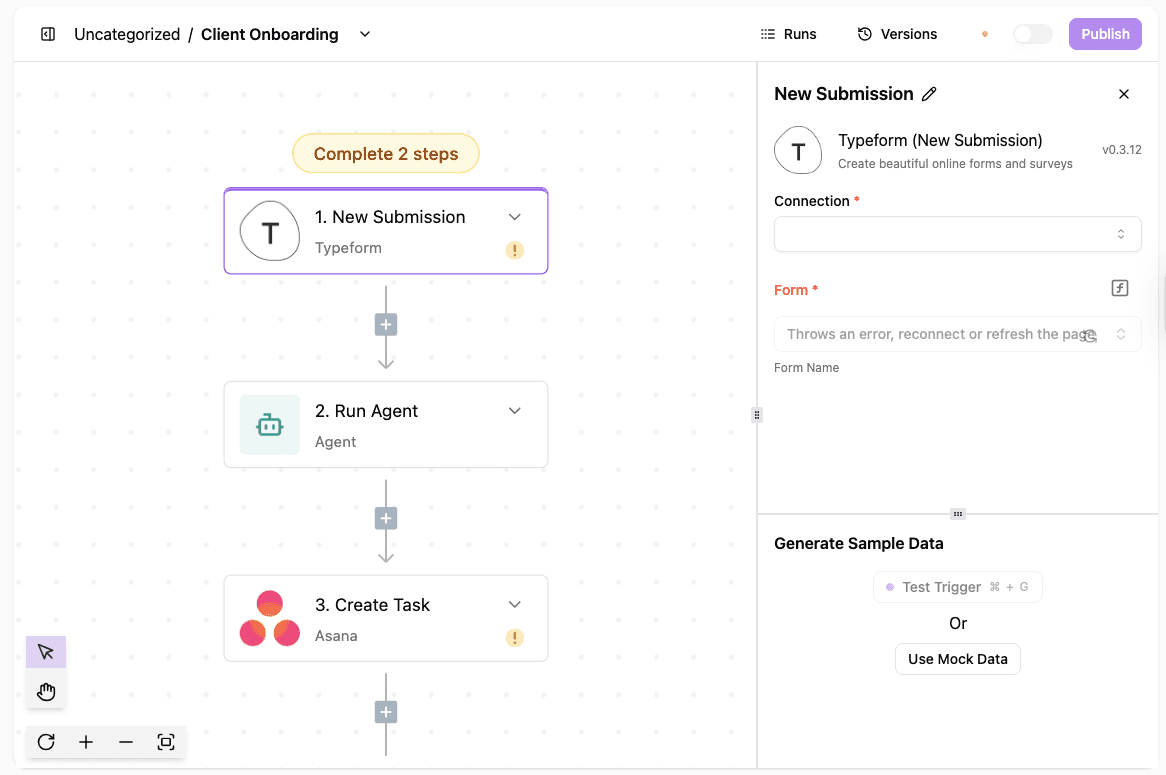
Client onboarding in Activepieces starts when a form is submitted and continues without breaks or manual handoffs.
The same structure works for employee onboarding, which means you can reuse the flow for any onboarding process with small edits that match your own processes.
What happens in the workflow:
- A form trigger captures new client details as soon as they submit
- An email action sends a welcome message with the next steps
- A CRM step creates the client record automatically
- Task creation assigns follow-ups to the right people
- A Slack message alerts the team that onboarding has started
This setup removes back-and-forth emails and cuts down administrative tasks tied to setup work.
Get the template here: Client Onboarding
Customer Support Ticketing
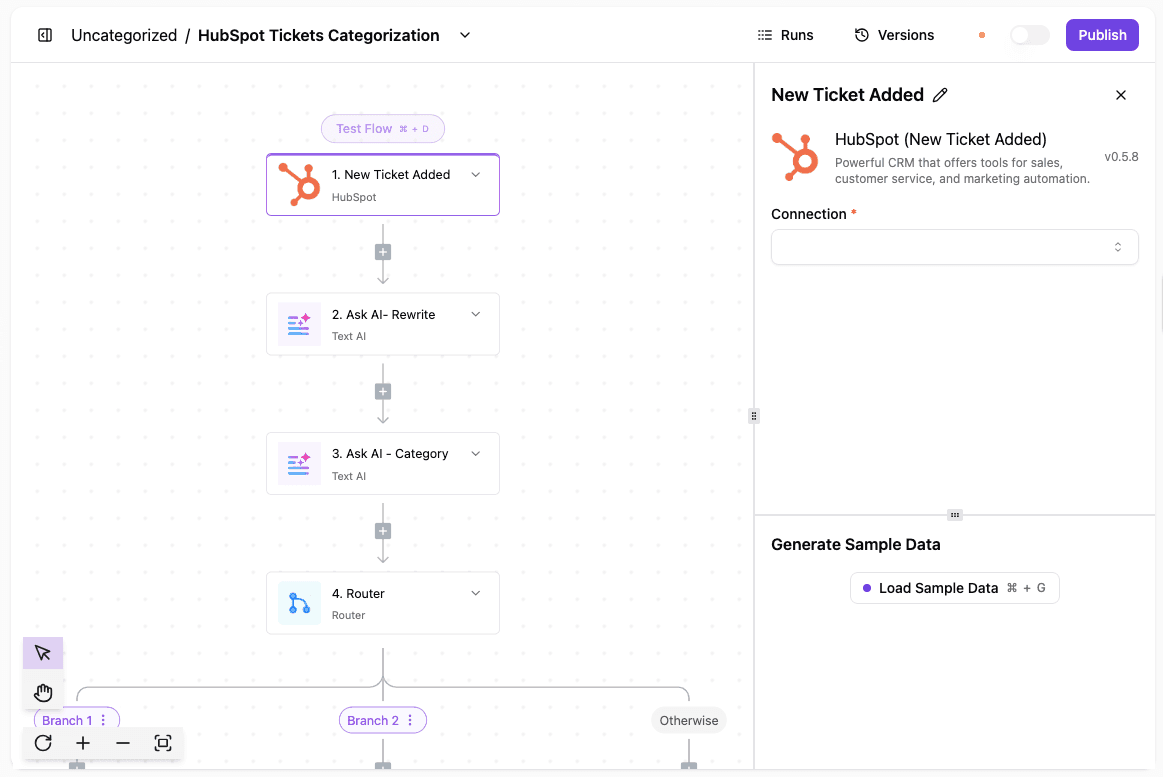
Support requests move faster when routing happens right away. Activepieces watches for new tickets and handles sorting before a human ever opens the message.
How the ticket flow works:
- A trigger detects a new ticket in HubSpot
- AI rewrites the description so it reads clearly
- AI assigns a category based on the request
- Routing sends the ticket to the correct team
- Slack notifications alert the team instantly
Sorting happens automatically, which keeps requests from sitting in the wrong queue.
Get the template here: Customer Support Ticketing
Invoice Reminder
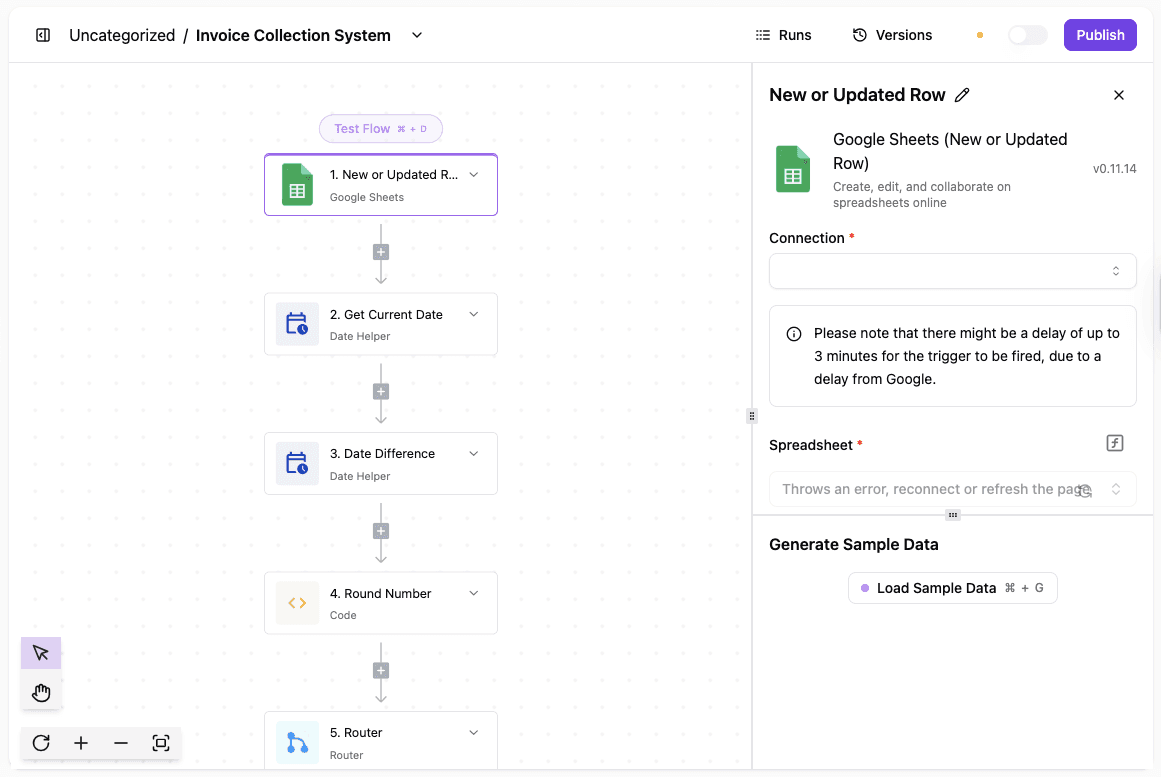
Invoice processing often stalls when reminders depend on memory. Activepieces tracks overdue payments and handles follow-ups based on timing rules.
Steps inside the reminder flow:
- Payment data gets pulled from a source like Stripe or Sheets
- The system calculates how long each invoice is overdue
- Messages go out based on the delay length
- Records update once payment arrives
Get the template here: Invoice Collection System
Run AI-Assisted Business Process Automation Using Activepieces

Activepieces supports intelligent automation by letting AI take part in workflows rather than acting as a separate add-on.
AI agents inside Activepieces can read messages, understand intent, and act based on past context, which makes it possible to automate complex workflows that don't follow strict rules.
A single flow can move data through multiple systems, such as forms, databases, chat tools, and internal apps. Context stays available, so the system reacts consistently when similar requests appear again.
Besides that, human approval is available when judgment is needed, while routine steps run on their own.
All of these let your teams streamline tasks that normally require constant switching between tools and follow-ups.
Keep AI, approvals, and systems in one automation layer. Explore Activepieces now!
FAQs About Business Process Automation
What is business process automation?
Business process automation means using software to run repeatable work without manual handling.
BPA is the use of software to automate repeatable, multistep business transactions such as approvals, updates, and handoffs, using automated workflows to support core processes.
What are the five stages of BPM?
The five stages are mapping the current process, designing improvements, running the process, monitoring results, and adjusting steps to improve efficiency over time.
What is AI automation of business processes?
AI automation adds analysis to automation.
Intelligent process automation uses AI and machine learning to analyze data, apply natural language processing, and guide workflow orchestration when fixed rules are not enough, using modern automation technologies.
What is the difference between RPA and BPA?
RPA copies user actions on screens, while BPA manages full processes. RPA handles tasks, while BPA coordinates systems, logic, and decisions end-to-end.
What are the main types of business process automation?
The main types are task automation, workflow automation, robotic process automation (RPA), business process management (BPM), digital process automation, hyperautomation, and intelligent automation. Each handles a different amount of complexity, from a single repetitive task to an AI-driven process that spans several systems.
How is digital process automation different from BPA?
Digital process automation (DPA) is a form of business process automation that focuses specifically on connecting user-facing forms and portals with back-end systems, usually as part of a digital transformation project. BPA is the broader term that covers DPA along with RPA, BPM, and workflow automation.