
Chatbase Pricing 2026: Plans, Credits and Costs

Oct 22, 202615 min read
According to HeyDeacon, whose pricing breakdown I read while comparing it with Activepieces, Chatbase's paid plans cost:
Chatbase pricing is the tiered subscription structure for Chatbase, an AI chatbot builder, in which a monthly plan sets the included message credits, chatbots and features, while add-ons and overage usage determine what a team actually pays.
- Hobby plan costs $40 per month or $32 per month billed yearly
- Standard plan costs $150 per month or $120 per month billed yearly
- Pro plan costs $500 per month or $400 per month billed yearly

You save $96 to $1,200 per year by paying annually. Chatbase is an AI agent builder: you train an agent on your own content, such as help articles and policy pages, and it answers customers from that material.
Price table, checked 22 October 2026
The table below, checked against chatbase.com/pricing on 22 October 2026, shows what each paid plan costs on monthly and yearly billing.
| Plan | Monthly billing | Yearly billing (per month) | Saved per year |
|---|---|---|---|
| Hobby | $40 | $32 | $96 |
| Standard | $150 | $120 | $360 |
| Pro | $500 | $400 | $1,200 |
Pay yearly and every paid plan comes out 20% cheaper. On Hobby that's $8 a month, which won't change anyone's budget.
On Pro it's $100 a month, but you're paying $4,800 up front, locking you into the full year, so canceling before the year ends leaves you with sunk cost.
Annual billing suits a team whose volume has been flat for a year, not a team still guessing.
Two things aren't priced in the table: the 7-day trial and Enterprise. The trial is too short to see a real month of tickets.
Enterprise is a separate conversation with sales.
What a message credit is and how it's counted
Each time your agent answers a customer, Chatbase spends a message credit, and the plan price buys a fixed pool of them. That's why the sticker price misleads: the plan names say nothing about how fast a busy week drains the pool.
Count your last month's tickets before you pick a tier.
Chatbase meters the reply, but once a ticket has to reach a person, Activepieces meters the run: 1 credit per flow run, however many steps sit inside it, so a ten-step routing flow costs what a two-step shortcut does.
Zapier bills per task and Make per module, so every extra safeguard you add to a routing flow shows up on the invoice.
There is no permanent free plan; Chatbase's entry point is the 7-day trial. Use it with real questions from your inbox, including the awkward refund and complaint emails, and see what the agent does with them.
Why Chatbase's list price understates the real bill
On the pricing page, the monthly price is often the smallest part of what a team pays. The model you pick, the plan you buy credits on, the add-ons you bolt on and the features that only higher tiers include all push the total up.
Credits consumed by model choice
Depending on the model you choose from those Chatbase lists, a reply costs one credit or two.
According to Chatbase's models comparison guide, Auto, GPT-6 Luna, and Claude 5.5 Haiku use 1 credit per reply, while GPT-6.1 Sol, Claude 5.5 Sonnet, and Gemini 3.8 Flash use 2 credits per reply.


At 5,000 refund and complaint emails a month, a bot burns 5,000 credits on a cheap model and 10,000 on the stronger ones.
The angry, tangled emails are the ones you most want a better model for, and those are the replies that cost double.
What credits really cost on each plan
Divide each plan's price by its credits and the Hobby plan is the most expensive way to buy them. Per the Chatbase pricing page, Hobby works out to $57.14 per 1,000 credits ($40 for 700), Standard to $37.50 and Pro to $33.33.
Run out of credits and extra ones cost $40 per 1,000.
That means a Hobby user who runs out is better off buying add-on credits than the plan itself. A Standard or Pro user pays slightly less than the overage rate only while inside the allowance.

Paid add-ons listed on the pricing page
Add-ons are billed on top of the plan, so the figure you budget from isn't the figure on the invoice.
Extra credits at $40 per 1,000 are the one that bites first, since a bad week of complaints can trigger them without warning, which means a bad week costs you more than the complaints alone suggest.
Start on a cheaper plan and the first real need may force an upgrade, because some features sit only on higher tiers. Check which plan holds each feature before you build workflows around it, because moving up resets the whole cost calculation above.

If you are running this arithmetic for your own team, see what the same workload costs on Activepieces.
Chatbase pricing by usage tier
Whatever the volume, the Chatbase bill is a plan price plus credit use and add-ons, and it only beats human handling if the bot actually resolves the tickets.
Read the last column first: the bot's cost only matters relative to what each unresolved conversation sends back to your team. The table shows the same three volumes against human handling at $8-16 per contact.
| Conversations a month | Plan needed | Credits used | Add-ons | Chatbase monthly cost | Human handling at $8-16 per contact | Assumptions |
|---|---|---|---|---|---|---|
| 500 | Lowest paid tier | Well within the allowance | Usually none | Plan price alone | $4,000-$8,000 | Short, repetitive questions |
| 5,000 | Mid-tier | Close to the allowance | Branding removal or extra credits likely | Plan price plus top-ups | $40,000-$80,000 | Some multi-turn chats |
| 25,000 | Highest self-serve tier or custom | Exceeds standard allowances | Several | Needs a quote | $200,000-$400,000 | Long threads, steady demand |
Assume every conversation became one paid contact and you get those human figures, so they're a ceiling, not a forecast.
At 500 conversations, the plan price is almost the whole bill. The risk isn't overspending but paying for a tier chosen for one feature you barely use.
At 5,000, credits become the number to watch, because a long, angry multi-message thread uses far more than a one-line password question. Budget for top-ups, and read a week of real transcripts before trusting any average.
At 25,000, a standard plan rarely covers the usage, so the cost depends on a negotiated quote. A wrong answer here's expensive twice: the customer escalates angrier, and your agent starts the ticket from behind.

Chatbase's strongest value case
If you need a bot answering from your own help material this week, Chatbase is worth paying for. That holds only with no engineer involved and ticket volume that barely moves from month to month.
Why pay for Chatbase pricing plans
Put a bot in front of an angry customer and the safest kind is one that only answers from your documents, which Chatbase makes easy to build. The best case comes down to these claims:
- You can be live in minutes: point it at your help site, and it's answering questions the same afternoon.
- No engineering is needed: a support lead can train, test and embed the bot with a pasted snippet.
- Tiers are predictable: a flat monthly plan is easy to put in a budget when volume is steady.
- Training comes from sources you already own, such as help pages, uploaded documents and written answers, so the bot repeats what your team has already approved.
- Integrations and handoff are built in, so a question the bot can't settle can go to a human with the conversation attached.
If your tickets are mostly "where is my invoice" and "how do I reset my password", all five hold, and a cheap, quick tool is the right call.
Where the case breaks
Start with predictability, because it fails first. The tier is flat, but message credits aren't: a busy month, a product launch or an outage burns through them, and you pay for the overage or top up.
A bill you can budget only works when volume is genuinely steady.
Then customisation breaks. The moment you need the bot to behave differently for a furious customer, such as escalating on tone, refusing to guess about refunds or following your own routing rules, you hit features that sit behind higher plans or add-ons.
"No engineering" then quietly becomes "no control".
Passing a chat to an agent is easy; passing it with enough context that the agent doesn't start behind is harder. That is the third weak point, handoff.
Worth checking against a plan that does not meter every step: one credit covers a whole run on Activepieces.
Chatbase against Intercom Fin, Botpress, CustomGPT and Tidio
For a team with steady ticket volume, Chatbase fits. Each rival charges for a different thing, so run that same angry email through all of them and see what each one bills you for.
The table shows the unit each vendor counts, which matters more than any entry price.
| Vendor | Pricing unit | What moves the bill |
|---|---|---|
| Chatbase | Message credits | Every AI reply spends credits; add-ons and higher plans unlock features |
| Intercom Fin | Per resolution | You pay when Fin resolves a conversation, not for each reply |
| Botpress | Platform plan plus AI usage | Cost follows how you design the bot |
| CustomGPT | Plan with query and content limits | Limits on questions answered and material indexed |
| Tidio | Plan with conversation limits | Volume handled by its AI assistant, Lyro |
I've left entry prices out on purpose. They change, and a figure copied into an article goes stale. Read each vendor's own pricing page on the day you buy.
Per-credit versus per-resolution pricing
Whether or not the customer got an answer, a credit is spent. Picture a refund request where the bot replies four times and the customer still writes "let me speak to a human." Under credits, you paid for four replies and a failure.
Whether or not the customer got an answer, a credit is spent.
Under per-resolution pricing, as with Fin, a conversation that ends with a handoff shouldn't count as resolved. Check how each vendor defines "resolved," because a loose definition makes the cheaper unit worse.
Botpress pricing and workflow builder control
With Botpress you get the flow builder and are expected to use it. You decide when the bot answers, when it asks a question, and when it passes the ticket to a person. That control helps if your worst complaints follow a pattern.
The cost is staff time: someone has to build, test and maintain the flows, and a badly built escalation costs more than the platform fee.
Which chatbot pricing model fits your team
Pick Chatbase if volume is predictable and you want a working chatbot fast. Pick Fin if you'd rather pay only for solved conversations and can tolerate a variable bill. Pick Botpress if you have someone to build and maintain it.
Pick CustomGPT if the job is answering from a large body of documents. Pick Tidio if you're a small shop that wants chat and automation in one tool.
Connecting Chatbase to the rest of your stack
Beyond a limited set of native channels and tools, Chatbase's webhooks cover the rest. Every connection you build yourself is more of the staff time described above.
What Chatbase integrates with natively
Look at the native list and it's mostly places where customers already talk to you, such as website embeds and messaging apps, plus a few helpdesk and commerce tools.
Check the current list against your plan before you commit, because some connections are gated by tier. A channel you assumed was included can turn out to be an upgrade.
When there's no native connection, webhooks are the fallback. Chatbase can send an event, such as a captured lead or a finished conversation, to a URL you control.
That sounds complete until you picture the angry email: a customer writes "this is the third time my refund has been lost." A webhook sends that message to your endpoint, but it doesn't choose between a billing agent, a manager or a ticket queue.
Someone has to write that logic and keep it working.
Routing Chatbase conversations to external tools
Between Chatbase and your other systems sits Activepieces, a workflow builder. It receives the webhook, applies your rules, and passes the conversation on to a CRM, a Slack channel or a ticketing tool. It complements Chatbase and doesn't replace it.
In the screenshot below, a new lead arrives, an AI step qualifies it, a condition splits the path, and the qualified branch reaches the CRM and Slack while the rest are nurtured by email.
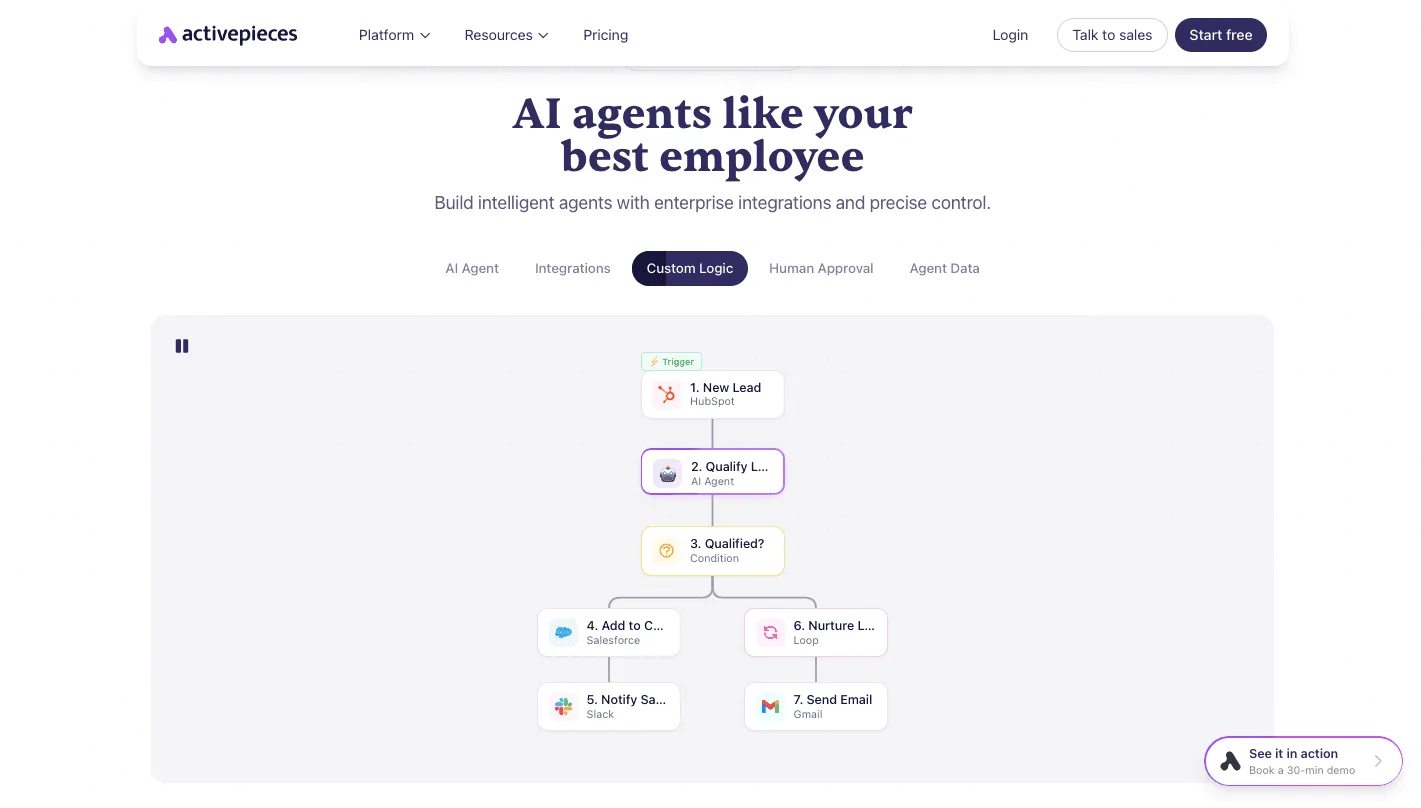
Take from it that routing is a branching decision you design, not a setting you switch on.
A chat handoff follows the same pattern. Start with the costly branch, where an upset customer reaches a person with the full transcript attached, and build the fast automated path only after that works.
What Activepieces does about this
Activepieces can't lower your Chatbase credit bill. What it does is take on the part of the cost that turns up as staff time: the logic that decides what happens after the bot answers badly or can't answer at all.
Chatbase sends a webhook when a conversation finishes or a lead is captured. Activepieces catches it, reads the transcript, and applies your rules, so you don't need a higher Chatbase tier just to get routing control.
For the angry refund email, that means a flow with a webhook trigger, an AI step that scores the tone, and a condition that splits the path.
A furious customer gets a ticket in your helpdesk or a message in a Slack channel with the full transcript attached, so the agent doesn't start from behind. A routine password question gets logged and left alone.
You design the branching yourself, and nothing about it depends on which Chatbase plan you bought.
The pricing is easier to budget than the credit pool. Activepieces charges 1 credit per flow run, however many steps the flow contains, so adding a safeguard such as a second check before a refund escalation doesn't change what the run costs.

The core is open source under the MIT licence, so a team with an engineer can self-host it and keep the routing layer off a metered plan entirely. Teams without one can use the hosted version.
That fits the case this article makes for Chatbase: pay for it when volume is predictable and the chatbot is the product you need.
If you do, put the escalation logic in a tool you control, and keep the Chatbase plan at the size your steady volume justifies.
Frequently asked questions
Does Chatbase have a free plan? Not as a permanent tier. It has a time-limited trial instead.
Treat the trial as a test against your real, ugly tickets, such as a refund demand or a garbled complaint, because a demo with friendly questions tells you nothing about credit use.
Can I cancel or downgrade Chatbase any time?
You manage plans from your billing settings, so you can normally cancel or move down. The catch is what you lose on the way down.
Move to a lower plan and the gated features your support flow depends on can disappear, and a bot that quietly loses its handoff or integration is a worse failure than a bill you could have trimmed.
Before you downgrade, list the features your escalation path uses and check each one is still on the lower plan. Confirm refund and end-of-period terms on the billing page before you rely on them.
What happens when I run out of message credits?
Plan for the bot to stop answering, or to need a top-up or upgrade, until credits renew. Customers don't see a billing problem. They see a silent chat widget, and the ones who wrote in already annoyed become angrier.
Watch usage during the month, set yourself an alert at a comfortable margin, and make sure a human inbox catches anything the bot can't answer.
Is Chatbase cheaper billed annually?
Pay annually and it's normally cheaper per month than paying monthly. It only saves money if your volume is stable enough that you won't outgrow the plan or abandon the tool.
Paying a year up front for a plan that turns out too small, or for a bot your team stops trusting, costs more than the discount saved. Start monthly, and move to annual once a few months of usage show you the pattern.

Does Chatbase charge per seat? Pricing is built mainly around credits, plan tier and add-ons, not around each agent who answers tickets.
That doesn't mean seats are free: team member allowances can be tied to the plan you pick. Check the allowance for the plan you're considering before you invite your whole support team.
Related reading
Running the numbers
See what the same workload costs here.
Free forever plan, and every paid plan self-hosts at no extra cost.
See pricing Talk to sales