
Cursor API: Keys, Rate Limits and Errors (2026 Guide)

Nov 20, 202615 min read
You create keys from the dashboard, and the API they unlock is a set of team-management, analytics and agent interfaces, not a general completions endpoint, so anyone wiring it into Activepieces or a similar workflow tool should expect to call those interfaces directly.

Checked on 20 November 2026.
Cursor API access, plans and what it covers
What the Cursor API is
Think of it as an approval workflow, not a model you call. It lets an administrator manage a team, read usage figures and launch agents.
The table shows the four interfaces a builder might expect, what each does and whether the docs cover it. Only documented rows are safe to build against.
| API | What it does | Who can create a key | Documented on cursor.com/docs |
|---|---|---|---|
| Admin API | Manages team members and settings | Team admin | Yes |
| Analytics API | Reports team usage and activity | Team admin | Yes |
| Agents API | Launches and manages coding agents | Signed-in dashboard user | Yes |
| General completions endpoint | Would return raw model output | No key issued | Not found |
If your design assumes a completions call, it has no supporting document. That is why the last row's the one to audit first.
If your design assumes a completions call, it has no supporting document.
Per seat each month, Cursor's legacy plans page lists these prices:
viz type=stripplot title="What each Cursor plan costs per seat each month" unit="$ per month" source="Cursor - https://cursor.com/docs/account/pricing/legacy-cursor-plans"20, which frames which plans unlock the API." Hobby: 0 Pro: 20 Teams Standard: 40 Teams Premium: 120 Ultra: 200
Creating a Cursor API key in the dashboard
Sign in to the Cursor dashboard and open the settings for your team or account. Create the key there and store it as a secret.
Admin and analytics keys belong to an admin, so one departing employee can leave you with a key nobody owns. If you wire these calls into Activepieces, record who issued the key.
I found no documented general completions endpoint. If you need raw model output, that request goes to a model vendor, not to Cursor.
This takes minutes, not a project: automate it in Activepieces free.
Cursor API authentication and a basic request
Once a team admin creates the key in the dashboard, you send it as the username in HTTP Basic auth with the password left blank. That is how Cursor's Admin API authenticates. Check the current Cursor docs before relying on any detail below.

Treat key creation as an approval step, not a convenience. Only a team admin can issue the key, so a developer without that role will be stopped at the dashboard.
- Have a team admin open the team settings in the Cursor dashboard and create an Admin API key.
- Copy the key when Cursor shows it and store it in a secrets manager, not in the repository.
- Send it as the Basic auth username, with an empty password, on every request.
- Record who created the key and when, so a later rotation has an owner.
If nobody can trace a key to an approver, it won't survive an audit.
Start with the simplest read-only call, which lists the members of your team. The trailing colon after the key's the blank password.
curl --request GET \
 --url https://api.cursor.com/teams/members \
 --user "$CURSOR_API_KEY:"
It changes nothing, so a failure points to access rather than to your payload. A rejection here means checking the key's origin and the plan before touching the request.
Expect a collection of records back from a list endpoint. It's much like an agents dashboard that shows two cards, "Blog Author Enricher" and "SEO blog writer", each with a name and a one-line description.
The point's that you reconcile the list against what you expected rather than reading one answer.
Read the members call the same way:
- A team members array in which each entry carries a name, an email and a role.
- Reconcile that array against your own roster.
- A missing person or an unexpected role's a finding to log, not noise to filter out.
- If the call returns an error body instead of the array, keep the status and message verbatim in your logs, because the next section treats each of them as a design input.

Endpoints, rate limits and pricing
Those logged errors will mostly be rate-limit rejections: Most Admin endpoints allow 20 requests per minute, meaning you'll trigger the rejections if you exceed that rate. Analytics allow 100 requests per minute, which means you're throttled if you exceed that rate.
- No per-request price appears in the sources I used.
Think of three ledgers, each with its own posting limit. The Admin API covers team management and usage events. The Analytics API reports at team level. The Bugbot API runs code reviews, with a dryRun mode for testing.
Each family carries its own ceiling, so a script that treats them as one pool will misjudge its capacity.
Don't put a unit cost in your budget model, because the limits source I used, Latestn, publishes no per-request or per-call price for any of these endpoints. Treat any figure you can't trace to Cursor's own pricing page as unverified.
Rate limits by plan or tier
Per Latestn, the limits are documented by endpoint family, not by plan.
Chart: Cursor rate limits against the 20-per-minute default
Poll every few seconds and a sync job will meet rejection within the first minute, because most Admin endpoints are held to 20 requests per minute.
At 60 per minute, Admin usage events are the exception, which gives a usage-reconciliation job three times the headroom of the other Admin calls. Team-level Analytics allows 100 per minute, the most room of any family listed, so dashboards can refresh often.
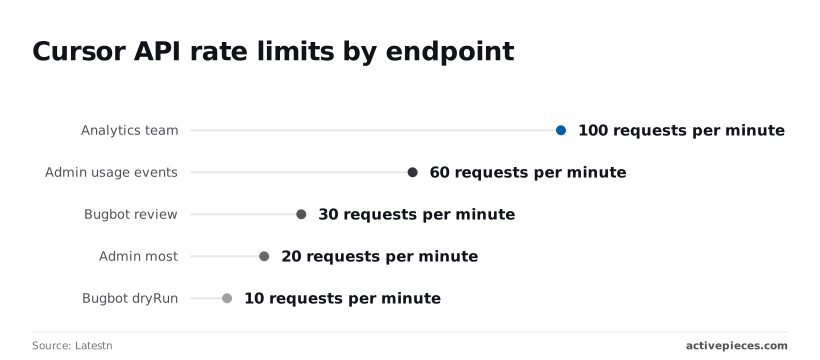
30 per minute is what Bugbot review allows. Bugbot dryRun allows only 10, so a test harness exhausts its budget at one-third the rate of the live review call it's rehearsing.
Space calls to the endpoint's own ceiling, not to the highest number on the page, because each figure implies a queue.
You will not find a per-plan breakdown of these limits in the source, nor unit prices or a burst allowance. Nor does it say whether the counter resets on a fixed minute or a sliding one.
Until Cursor states it, assume the stricter reading and keep your own call log as the audit trail.
Errors builders hit in production and their fixes
Your call log will sort failures into five classes. They tend to appear in order from first key to steady traffic, and each pairs with a fix to apply before any retry.
- 401, bad or revoked key: confirm the key wasn't rotated out, then reissue it and update the stored secret.
- 403, missing admin permission: the key's valid but the account behind it lacks the admin role the endpoint requires, so have an admin grant it or issue the key from an admin account.
- 400 or 404, malformed request or wrong path: compare the body and URL against the endpoint's docs page, and don't retry until they match.
- 429, over limit: slow down and back off.
- 5xx, server fault: retry a bounded number of times, then escalate with your logged request details.
Taken in turn below, these are followed by the changelog entries that turn working calls into failures.
When a 401 comes back, the credential failed; a 403 means Cursor accepted it but you lack authority. Treat them differently: reissuing a key never fixes a 403. Log which key identifier made each call so a revoked key's traceable.
429: rate limits and backoff
Wait before retrying, lengthen the wait on each attempt, and add random jitter so parallel workers don't retry in lockstep. That's general practice, not a Cursor-specific rule. If the response carries a wait hint, honour it.
Some community reports describe false rate-limit errors when using your own model key. These are anecdotal, not measured, so check your own call log before assuming the limit's wrong.
Retry only calls that are safe to repeat. A timeout on an agent launch doesn't prove the launch failed, so list existing agents before resubmitting, or you'll create a duplicate.
Read Cursor's changelog before upgrading anything. A path that worked last month and now returns 404, or a request that suddenly returns 400, is a changelog question first and a code bug second.
You can follow the rest of this with the builder open. Start free, no card.
Calling Cursor endpoints without code in Activepieces
Eventually a changelog will tell you an endpoint moved or a field changed name. The cheapest place to absorb that change is a workflow you can open and read, not a script nobody remembers writing.
If the endpoint you need has no integration in the catalogue, Activepieces can generate one with AI and add it privately to your own instance, and a scheduled flow can then run the usage-reporting calls described earlier.

Its core is MIT-licensed, as the LICENSE file in the open source repo states (the packages/ee/ directories sit under a separate commercial licence), and the free plan costs $0 with unlimited flows and 1,000 credits a month, so a scheduled report like the one below doesn't need a budget line to try.
The 750 integrations it ships are counted from packages/pieces/community in that same repo, so the code behind a step can be read rather than taken on trust.
When to use a no-code Cursor workflow
Use a workflow when the job's a recurring, low-volume read: pulling team usage or spend, appending it to a ledger, and telling a person when something looks off.
You could reach for a generic option, such as a spreadsheet add-on or a scheduled script on a server. Each hides the failure somewhere you have to go looking.
A workflow run keeps every step's input and output on the run record, so when a figure in the report's questioned, you can open the run and see what Cursor returned.
Don't use it for anything interactive or latency-sensitive. Those belong in code you test.
Setting up the HTTP request and API key
Below is the flow, a weekly usage report. It starts with a schedule trigger, reads the list of items to report on from a Google Sheets row, loops over them, fetches the current date, and calls the Cursor endpoint with a Send HTTP request step.

After the HTTP call, two Ask AI steps summarize the response, one row's inserted back into the sheet, a Router splits the result into a "Branch 1" path and an "Otherwise" path, and a Gmail step sends the email.
In the screenshot, all ten steps run in sequence, with the Router at the end, so the Router won't start until nine prior steps complete.
Take from it that the HTTP call's one step among several, and the branching sits after the response, not before it.
Build the HTTP step in this order:
- Store your Cursor key as a connection or secret in Activepieces, never pasted into the step body.
- Set the method and URL exactly as the Cursor docs for that endpoint give them.
- Add the authorization header from the connection, using the scheme the docs specify.
- Run the step once and read the returned body before wiring anything after it.
Retries and alerts for Cursor API errors
Treat the status code as the Router's input. A successful response goes down Branch 1 to the sheet and the summary. Anything else goes to Otherwise, which should email the status code and response body to a named owner, not swallow them.
A 404 or 400 on a call that worked last month then arrives as a prompt to check the changelog, not as a silent gap in the report.
Enable retries on the HTTP step only for transient failures. Retrying a rejected request just repeats the rejection.
Checklist before your first Cursor API call
Because a rejected request's a design input, the order of work matters: confirm what you're allowed to do before you write anything that tries to do it.
The six steps below follow that order, and each step leaves evidence you can point to later, which lets you narrow failures to specific steps.
- Confirm your plan and admin role, and record who granted them.
- Create the key and store it in a secret manager.
- Send one test request and keep the response.
- Read the limit documentation for the endpoint you'll call.
- Add backoff with jitter, and log every failure.
- Put a monthly docs and changelog re-check on the calendar.
Treat steps one through three as a gate. If the plan or role's wrong, the test request returns a refusal, and no amount of code fixes that. Treat the refusal as the answer, then go and change the plan or the role.
Cursor API key security best practices
Create the key under the account that will own the integration, not a personal login, so it survives someone leaving. Put it straight into a secret manager and never into source control, a chat thread or a shared document.
Give each environment its own key. When a key leaks, you then revoke one key and the others keep running.
Keep a short record of who created each key, what it's for and when it was last rotated. That record's your audit trail. Without it, a key that appears in a log has no owner you can ask.
Limits, logging and alerts
Read the limit documentation before you write the retry code, because it tells you which errors are worth retrying. Backoff with jitter suits rate-limit responses.
It does nothing for a permissions failure, which will fail identically each time. Your code should tell the two apart and stop quickly on the second.
Log the endpoint, the status, the time and the request identifier if one's returned. Never log the key itself. Alert on a rise in refusals, not only on outright outages, since a rising refusal count's the earliest sign that a limit or permission has changed.
Checking Cursor docs for API changes monthly
Set a recurring calendar entry to read the developer docs and changelog once a month. Compare what they say against what your logs show.
A mismatch means either your code drifted or the documented behaviour did, and both are cheaper to find on a Monday than during an incident.
Frequently asked questions
After the evidence above, four questions stay open, and each's tagged by whether the docs settle it.
- Is there a general chat completions endpoint? No such endpoint appears in the API reference. Tag: documented 20 Nov 2026.
- Are limits applied per key or per team? Tag: not documented.
- Is API access included on the Pro plan? Tag: not documented.
- Does Cursor publish its rate limits at all? Tag: not documented.
Which questions the docs leave open
Three of the four are gaps, so budget for them in the design: assume the stricter reading and record the response you actually observe.
Models, completions and your own key
Does Cursor have an API for chat completions or models? No. The documented APIs cover team administration, usage reporting and agents, not a model endpoint you send prompts to. If you need raw completions, call a model provider directly.
Can I use my own API key inside Cursor instead? The editor lets you enter a provider key in settings, so your chat requests are billed by that provider.
That's a different thing from a Cursor API key, which authenticates you to Cursor's management and agent endpoints. Which features still depend on Cursor's own plan's not documented here.
Plan eligibility
Is the Cursor API free on every plan? Not documented. Treat plan eligibility as something to confirm against your own account before building, and keep the confirmation with your project notes.
Rotation, revocation and API changes
How do I rotate or revoke a Cursor API key? The rotation procedure's not documented in what this article relies on.
Store the key in one secret location so replacing it's a single change. After you swap it, confirm the old key's rejected before you close the task.
Where do I see API changes and deprecations? No dedicated deprecation feed's documented. Check the official docs and the product changelog on a schedule, and log any unexpected error response as a possible change notice.
Related reading
Build it
Set this up in minutes.
No code required. Connect your accounts, and Activepieces runs it from there.
Start free Talk to sales