Fastbrowse: Browser Automation Tool Review (2026)

Oct 30, 202612 min read
Fastbrowse is a new browser-automation tool from agent-labs-dev. It's published at fastbrowse.ai and in a GitHub repo, both read on 2026-10-30.
I couldn't confirm a release date, so "new" is the maker's framing, and you should test anything you build on it first, much as you would before wiring it into a workflow in a tool like Activepieces.
Fastbrowse is a browser-automation tool from agent-labs-dev that, according to its maker, lets software, including AI agents, control a web browser to carry out tasks such as navigating pages and interacting with sites.

Fastbrowse launched: what agent-labs-dev released and when
What fastbrowse is, per its maker
Per the repo, this is a browser agent that picks from the controls a page actually has, cites the page for every claim, and keeps credentials, irreversible actions and spending under code control.
The site promises a result backed by quoted page text, with credentials kept out of model prompts.
For a team, that makes the quoted text the thing to audit on every run, because the agent's own summary proves nothing.
Before it touches a login, you can read exactly what it does, because the code is MIT licensed.
Ask the maker before pinning a version, since the release date is missing from the box below, which holds only what I could confirm.
- Product: Fastbrowse
- Maker: agent-labs-dev
- Release date: not confirmed in the pages I read
- Sources: fastbrowse.ai and the GitHub repo
- Date read: 2026-10-30
Treat everything that follows as the maker's claims rather than tested results, because it all rests on those two sources.
Fastbrowse pricing, plans and where to get it
For anyone who'd rather run it themselves, the code is on GitHub, and the hosted plans are on fastbrowse.ai. The Free plan costs $0 a month and includes $2.00 of runs, so it's a place to try one workflow, not to run a team's queue.
Starter is $29 a month with $35.00 of runs included, a price a single owner can expense without approval. Pro is $199 a month with $250.00 of runs included, which puts it in line-item territory.
At the Scale tier, $999 a month with $1,400.00 of runs included, the MIT code becomes a serious alternative, provided your own hosting costs less. Each plan has a fixed monthly price, so confirm the exact figure at checkout.
If you drive it from Activepieces, budget for that separately: the Free plan is $0 with unlimited flows and 1,000 credits a month, and a run costs 1 credit however many steps it has.

Everything below works on Activepieces' free plan. Start without code or a credit card.
When fastbrowse earns its place
Because it's a browser-facing step you might add to a cross-app workflow, fastbrowse matters. That step carries its own cost and its own failure modes, separate from whatever orchestrates it.
Whether it earns a place depends on the job, and on what you can confirm rather than assume.
Where it could fit in an automation
When your workflow has to touch a web page that offers no usable API, that is the natural slot. Examples are reading a vendor portal, filling a form, or pulling a value from a page that only renders in a browser.
In that role, an AI step decides what to do on the page and fastbrowse would be the part that actually drives it.
Read the maker's pages for the specific inputs it accepts and the outputs it returns, since they are the only source for what it does. Those decide whether it can feed the next step in your chain.
A browsing tool that returns loose text forces you to write parsing glue. One that returns structured fields can map straight into your next action.
Fastbrowse reliability claims still unverified
Nobody outside agent-labs-dev has run it against your sites. A release this new has a maker's description and little else, so I can't verify any claim about reliability or about how it behaves when a page changes. Before relying on it, confirm four things:

- the licence terms, so you know whether commercial use inside a client workflow is allowed
- the documented interfaces, so you know how a workflow tool can call it and what comes back
- the pricing page, so you know whether usage costs are listed or still to come
- issue tracker activity, so you can see whether people report problems and whether anyone answers
Run those four checks, which take little time, and they tell you whether to pilot it on a low-stakes task or wait for more evidence.
What the maker says is new in fastbrowse
Read everything in this section as a list of claims to test, since it all comes from the maker's own pages, and let the pilot decide which ones hold.
Capabilities the maker states
On 2026-10-30 I checked both sources: fastbrowse.ai and the agent-labs-dev GitHub repository. A capability counts only if one of those pages says it in so many words.
Both the capabilities and the figures in the product copy are the maker's own, taken from fastbrowse.ai on 2026-10-30, and no independent party stands behind either.
The repository README is the second source, and it describes what the code is meant to do, which isn't the same as what it does in your workflow.
Match each stated capability against the specific trigger or field you need. A line like "works with your existing tools" tells you nothing until it names which ones.
Fastbrowse speed and cost figures from the maker
When a speed or cost number appears on these pages, it is the maker's own measurement. Without a named benchmark, a test setup, and a way to rerun it, you can't compare it with your current tooling.
Until you have run your own timing on your own pages, treat such a number as a reason to test, not a basis for a quote.
Check the pages for three gaps:
- supported platforms
- integration with workflow tools you already run
- independent verification of any figure
Where a page is silent, assume nothing. Plan the pilot around what's written, and write down every gap you find. That list tells you what to ask the maker before anything touches production.
Easier to see it running than to read about it: set it up free, no card.
How to connect fastbrowse in an Activepieces workflow today
Starting point and plan limits
As of 2026-10-30, Activepieces, the workflow automation platform, had shipped nothing specific to fastbrowse, so there's no native integration to drop in, and we haven't run fastbrowse ourselves.
Anything below is a general route, ordered from simplest to most involved, and each one depends on what agent-labs-dev documents.
You'll burn credits while testing, so plan size matters. Free carries 1,000 credits a month, Plus 10,000, and Team 50,000.

A Free account is enough to prove one workflow works, but a retry loop against a flaky endpoint could eat it quickly. Check how many credits each step type consumes before sizing anything.
Whichever plan you pick, the three routes follow.
Connect fastbrowse with an HTTP request step
Start with an HTTP request step. If fastbrowse exposes an HTTP API, a single request step is the lightest wiring: one URL, one method, headers, a JSON body.
Confirm in the maker's docs that an API exists at all, how it authenticates, and what the response shape is, because every downstream field mapping depends on that shape.
Connect fastbrowse as a custom AI provider
Next comes an AI step with a custom provider. This works only if fastbrowse speaks an OpenAI-compatible interface, meaning the same request format many model providers copy.
Confirm that claim in the docs, along with the base URL and the model names it accepts. If the docs say nothing, treat this route as unavailable.
Connect fastbrowse through an MCP server
If the first two are closed, the heaviest route is left: an MCP server. MCP, the Model Context Protocol, lets an AI agent call external tools through a server. Confirm whether agent-labs-dev ships one, how it runs, and which tools it exposes.
Activepieces covers the other direction of MCP too.
Once a piece wraps the HTTP call from route one, that same piece action runs as a step in a flow and appears as a tool on the project's MCP server, so Claude, ChatGPT, Cursor or an agent you built can call it without a second integration.

The code lives in packages/pieces of the MIT-licensed repo, next to the 746 integrations counted there, and an action defined in any of those integrations is the very one the MCP server hands to an agent as a tool, as the Integrations Framework and MCP Server documentation lay out.
Fastbrowse cost and speed against current options
Fastbrowse price and cost per task compared
Fastbrowse's hosted runs are priced as a per-run fee plus usage, never below $0.005, and the other costs you can pin down belong to the tools it would sit beside.
The table shows what each option's maker states and where a cell is empty, which is the gap to carry into any budget conversation.
| Price | Stated speed | How it's run or accessed | |
|---|---|---|---|
| Fastbrowse | Per-run fee plus usage, never below $0.005 | 17.0s per task on the maker's 53-task catalog (maker's claim) | Hosted API (POST /v1/runs), CLI, SDKs, MCP server, or local |
| The browser or AI tool your team uses now | Your existing contract | Your own run logs | Already wired into your workflows |
| A hosted flagship model API | Per output token | not published | Vendor API |
Prices and plan limits checked against fastbrowse.ai and github.com on October 30, 2026.
For the hosted row, Quotadex lists output prices per million tokens. Claude Fable 5.1 and GPT-6 Astra are $50, Claude Opus 5.5 is $20, and Claude Sonnet 5.5 and GPT-6.1 Sol are $10, so the most expensive models cost five times more than the cheapest.
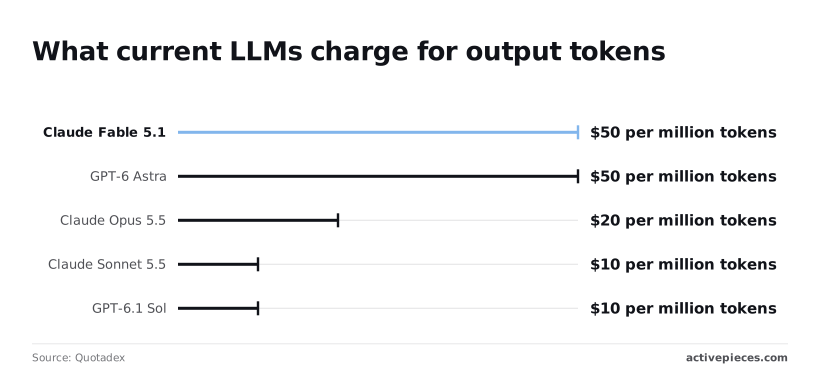
A 2,000-token agent step therefore costs about ten cents at $50 and about two cents at $10, so the $10 models cost one-fifth per operation what the $50 models do.
Across a few thousand daily runs, that fivefold spread matters more than any browser license line.
The maker's material gives speed figures, such as 17.0s a task on its own 53-task catalog, but they are the maker's claims and the name isn't a measurement. Treat "fast" as a product label until a figure with a method behind it appears.
Until then, a faster page load in someone's demo tells you nothing about your login flows or form-heavy pages.
What fastbrowse comparisons are still missing
Fastbrowse's price, speed and access model are all stated by the maker, but only as the maker's own claims. Without the third you can't say whether it runs locally, in a hosted service, or through an API, and that decides who pays for compute.
We ran no tests, so every number above is a maker's or a price list's, not ours. Once the maker publishes those three cells, rerun the comparison against your own logs.
What to watch next after the fastbrowse release
Watch the places where agent-labs-dev has to commit in writing: its GitHub releases, open issues, pricing page and docs. A claim in a launch post is marketing, but a tagged release or a filed bug is a record.
Treat the maker's description as the maker's. Read the README and docs for the interface your workflow would actually touch: a command line, an HTTP endpoint, a library call, or something else.
Then look for the inputs it accepts and the output it returns. Those fields decide whether a step in your automation can call it.
If the docs describe a capability but show no call that triggers it, you have a feature claim and no integration path. Plan around what's documented, and leave the rest as a question for the maker.
To see what's actually shippable, go to GitHub, where agent-labs-dev publishes releases; the releases page shows what's out and the open issues show what's broken. A long list of unanswered issues means you'd be debugging alone.
Reread the pricing page before you build anything, because a free repository and a paid hosted service can sit under the same name. Budget only for what the page states.
On Monday, recheck in the order below, so you can see where support stops.
- Check the GitHub releases page for a tagged version and its notes.
- Read the open issues for reports that match your use case.
- Reread the pricing page for changes.
- Reread the docs for the call your workflow needs.
- Search your automation platform's connector catalog for a fastbrowse entry.
- Record the check date, for example 2026-10-30 if you run it today.
Whatever you find, the date tells you how stale your conclusion is when someone asks.