
Google Search API vs SERP API Options for Builders

Nov 20, 202617 min read
Google has no general open-web search API, and the Custom Search JSON API is closing to new users, so anyone starting a build now, whether a hand-coded script or a workflow wired together in a tool like Activepieces, has to choose a replacement.
This article was checked on 2026-11-20, and Google's own documentation pages are the source for every Google figure in it.
Google's search API product options
What 'Google Search API' means in 2026
Once, the phrase pointed at one thing: you sent a query, you got ranked web results back as JSON. That was the Custom Search JSON API.
Today the phrase is a label people still type into search boxes, and it covers four different products that return four different kinds of answer.
Google's four search API products and their returns
Ask Vertex AI Search a question and it answers from content you point it at, such as your own site or documents.
Grounding in Gemini lets a Gemini model use Google Search while it writes an answer, so you get the answer and its sources, not a list of links.
The Search Console API returns performance data about your own verified site: queries, clicks, impressions. The fourth is the Custom Search JSON API itself, now closed to new users.
Why choosing the right Google search API matters
Pick by name and the cost is real. A developer who grabs "the search API" and builds on the wrong one finds out at integration time, after the code is written. Picking by what you need back avoids that.
Reading the Google search API diagram
It shows your app on the left and the four separate endpoints it can call. Each arrow is its own product with its own setup, and the Custom Search arrow is marked closed to new users.

Once you see the four as separate, the sections that follow sort them by the question each one answers.
What the Custom Search closure changes and when
If you already use the Custom Search JSON API, the closure to new users doesn't by itself break your existing setup. If you are starting fresh, it removes the option, and that's the case this article is written for.
Before you plan around any date, read the closing dates and wind-down terms on Google's Custom Search page, because Google sets them and they can change. A migration scheduled from a guess is a migration that gets redone.
How the Google search API figures were verified
Nothing from a third-party summary or forum answer went in: every Google figure here was read from Google's own documentation. The check date is 2026-11-20.
Docs pages change without notice, so treat the check date as the age of the claim.
Before you commit to a design, open the linked Google page and confirm the limit, price or eligibility rule on the day you build. If Google's page and this article disagree, Google's page wins.
If you wire the chosen endpoint into automation, do the same check first.
A flow built in Activepieces counts a run as 1 credit however many steps it has, but that meter is separate from Google's quota, so a workflow built on a stale limit fails the same way code does.
The fastest way to settle a shortlist is to try one. Activepieces is free to try, no credit card.
Google's official options compared by what they return
Checking limits only helps once you have the right endpoint, and the four return four different things:
- raw web results
- results from content you index
- model answers backed by search
- your own site's performance data
The table shows how they differ on price and dates; the gaps in it are where Google's pages gave no figure.
| Option | What it returns | Access route | Price per 1,000 queries | Free quota | Stated dates | Link |
|---|---|---|---|---|---|---|
| Custom Search JSON API | Web results from a search engine you configure | API key plus a Programmable Search Engine | $5 | No figure in sources used here | Closing to new users; no date in sources used here | Programmable Search Help |
| Vertex AI Search | Results from content you index | Google Cloud project | $1.50 Standard, $4 Enterprise | No figure in sources used here | None in sources used here | SearchLegion |
| Grounding in Gemini | Model answers backed by Google Search | Gemini API request | $14 | No figure in sources used here | None in sources used here | Programmable Search Help |
| Search Console API | Performance data for sites you own | Google account with access to the site | No figure in sources used here | No figure in sources used here | None in sources used here | None cited |
Prices and plan limits checked against docs.claude.com and claude.com and openai.com and gemini.google on November 19, 2026.
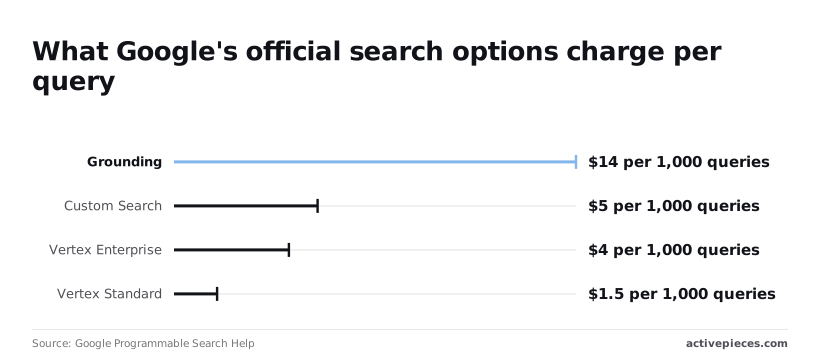
Pick from the "what it returns" column first, then check the prices. The chart that follows puts the per-query costs side by side.
Half a cent per query is what Custom Search costs: $5 per 1,000 queries, per Google Programmable Search Help, making bulk querying economically feasible. That makes it the middle option on price.
It's also the one closing to new users, so a prototype built on it today may have no future.
Vertex AI Search
$1.50 per 1,000 queries buys Vertex Standard, and Enterprise costs $4, per SearchLegion's Vertex pricing page. That page also lists them as Agent Search Standard and Enterprise, meaning high-query-volume deployments face substantially higher costs if they select Enterprise.
At that price, Standard is under a third of Custom Search's. But it searches content you index, so it won't answer a question about the open web.
$14 per 1,000 queries is what grounding costs, the same figure on both pages above. That's 1.4 cents per query, nearly three times Custom Search. A high-volume job that only needs links will pay for model answers it never reads.
For the Search Console API, the sources used here give no price or quota. It returns data about your own sites, not search results, so treat it as a reporting tool and confirm limits in Google's docs.
API access and key setup
Only two of these steps change depending on which endpoint you picked and whether you are a new or existing user. The steps run in the same order for every Google endpoint.
- Create a Google Cloud project.
- Enable the API you chose inside that project.
- Create an API key.
- Restrict the key to that one API.
- Set up billing if the endpoint needs it.
- Custom Search only: copy the search engine ID.
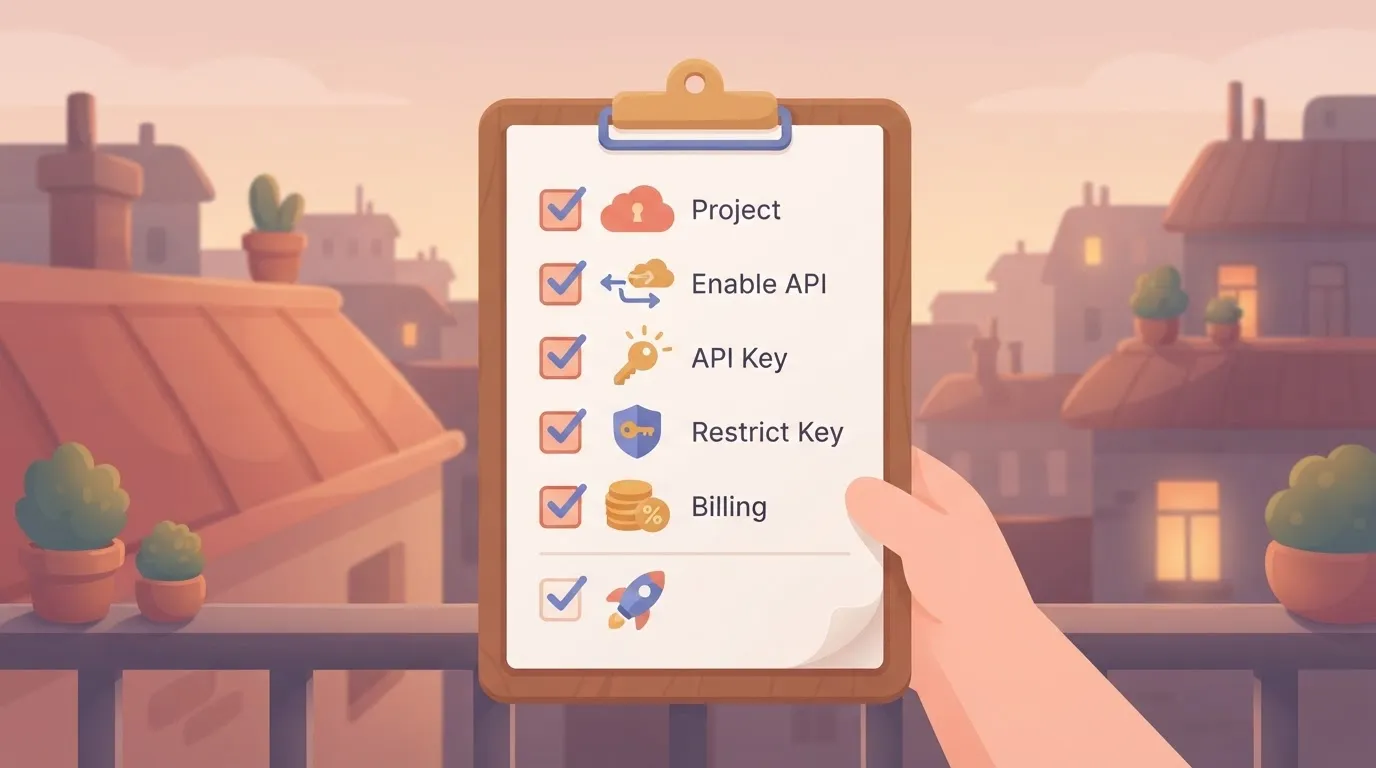
Skip step 6 for the other endpoints. Custom Search is closing to new users, so a new account may be unable to complete it. Confirm that in Google's docs before you build around it.
Create a project and enable the API
Make one project per product, not one shared project for everything. If a key later leaks, you shut down one project and nothing else breaks.
In the API library, find your endpoint and enable it. A key made before this step will return permission errors, and those look like a broken key when the real fault is a switch you never flipped.

Create and restrict your Google API key
Create the key under the credentials page, then restrict it to the single API you enabled before you paste it anywhere.
An unrestricted key that ends up in a public repository can be used against every enabled API in the project, and you pay for that use.
If the key runs from a server, add an IP restriction as well. If it ships in a browser, use a website restriction instead.
Because a key identifies your project but not a person, the Search Console API, which reports on your own sites, needs OAuth consent from a user who owns them, or a service account that has been added as a user on the property.
If you get a permission error with a valid key, this is the usual cause.
Link a billing account if the endpoint you picked requires one. Free allowances and paid tiers differ by endpoint and can change, so read the pricing page for your endpoint on build day.
Existing Custom Search users may keep access under their current terms, but new users shouldn't assume they'll get it.
Reading a table only gets you so far. Build the same workflow in Activepieces and compare it yourself.
Minimal Gemini search grounding API request and response
To get a search-grounded answer back with the least effort, send one POST to the Gemini API's generateContent method with the google_search tool switched on.
It worked if the reply carries groundingMetadata. Treat a reply without it as a failed test, because the model may have answered from memory and you'd be debugging the wrong thing.
Put three things into the request: a model name in the URL, your API key in the x-goog-api-key header, and a body with contents and tools.
Pick the model ID from Google's current models page and set it yourself. Names change, and a stale one costs you an afternoon of confusing errors.
export GEMINI_API_KEY="your key from Google AI Studio"
export MODEL="the model ID you chose"

curl "https://generativelanguage.googleapis.com/v1beta/models/$MODEL:generateContent" \
 -H "x-goog-api-key: $GEMINI_API_KEY" \
 -H "Content-Type: application/json" \
 -d '{
 "contents": [{"parts": [{"text": "What changed in the latest stable release of Node.js?"}]}],
 "tools": [{"google_search": {}}]
 }'
In the response, read three places:
candidates[0].content.parts[0].textholds the answer.candidates[0].groundingMetadata.webSearchQueriesshows what Google actually searched for, so you can see whether it understood the question.groundingMetadata.groundingChunkslists the source pages behind the answer, andgroundingSupportsties sentences to them.
You don't get a ranked list of blue links, as the old Custom Search did. If your product needs raw result rows, stop here and choose a different endpoint.
Rarely does a call like this stand alone.
The workflow below has five steps: a web form trigger, a row inserted into a spreadsheet, text pulled from an uploaded PDF, a summary of that text, and a row update, so a failure at any point halts the entire workflow.
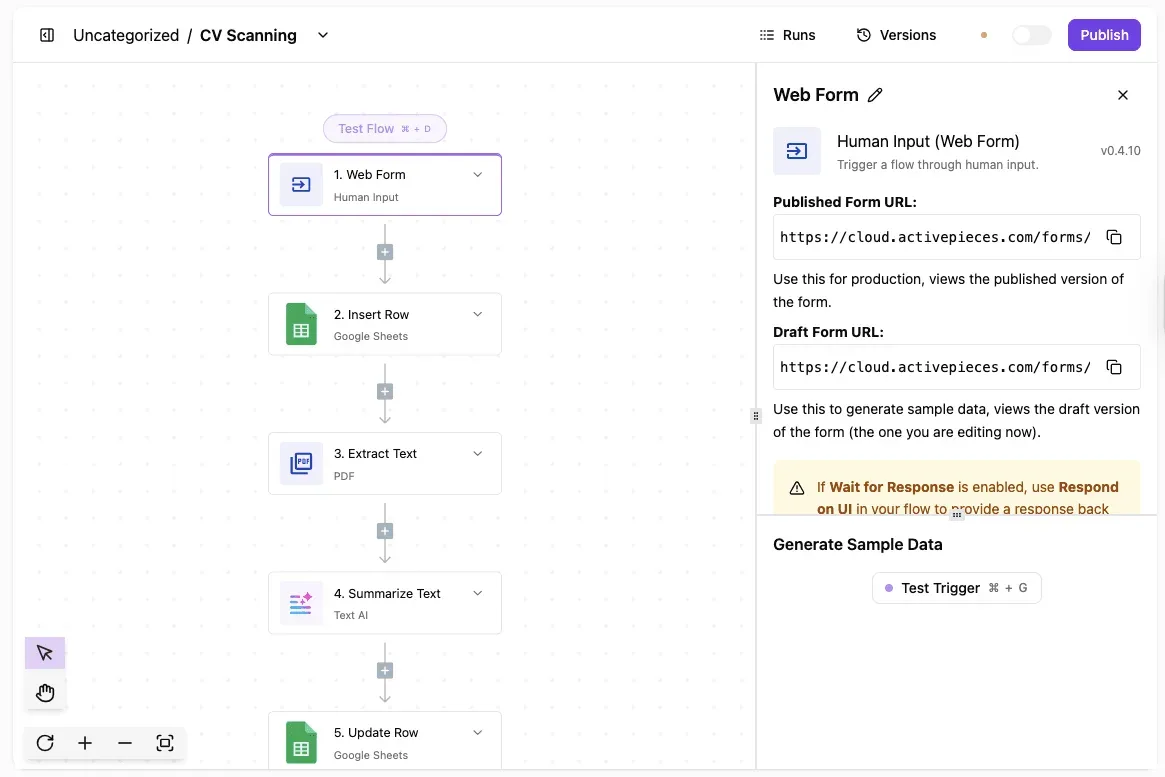
The first step is open, showing its form URLs.
Your search request would sit as one more step in a chain like this.
Activepieces can hold that step as a flow in your account, and if no Google Search integration fits, it can generate one with AI and add it privately to your own instance, so it uses Google's API rather than replacing it.
Describe the process in its built-in chat and what comes out is a live flow, with a run trace for every execution; it sits under the same RBAC and audit logs as a hand-built flow. MoneyGram, Moneypenny, Alan and FundingSocieties run Activepieces in production.
Whatever you chain it into, run the curl command alone first. If the key is wrong, the error body says so, and that's far easier to read before four other steps wrap it. Confirm the field names against Google's reference on the day you build.
API quotas and third-party alternatives
Whichever Google endpoint you chose from those field names, its quota is set per product and per project. Read the limit for your tier in Google's docs before you size any job around it.
I'm not quoting a daily number here, because Google changes them and a stale figure becomes a wrong escalation to your finance lead.
Open the quota page for your endpoint and copy the current limit. A job sized on last year's number fails at 2 a.m., not in testing.
The case for a third-party SERP API instead
Keep the old endpoint while it works, or use a third-party search API instead. The independent OpenBenchmarks chart of company-news lookups (not Google data) scores Exa fast at 99.3 %, so about 7 lookups in 1,000 miss.
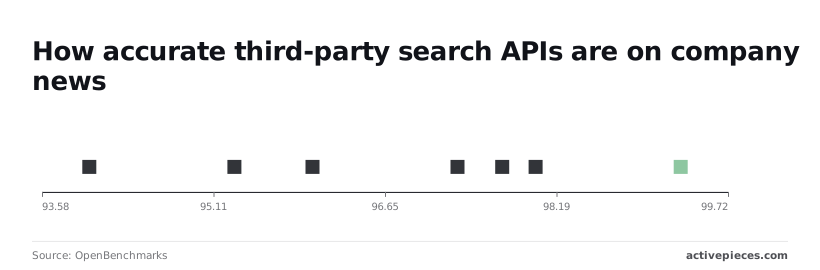
Further down, Context scores 98 %, Exa instant 97.7 % and Perplexity 97.3 %, meaning differentiation between them is minimal. SERP scores 96 %, and Firecrawl 95.3 %, roughly 47 misses per 1,000. The spread is four points, so accuracy alone won't justify a migration.
If you hold no access already, "keep it" is not an option, because the old endpoint is closing to new users. A third-party API brings its own pricing and terms.
Four failures turn up first, and the table lists them; the fix column is the action Google's docs point to, not a guess.
| Error | What it means | Message text | Fix per Google's docs | Doc link |
|---|---|---|---|---|
| 403 quota | Daily quota used up | dailyLimitExceeded or quota exceeded |
Wait for reset or raise the quota | Overview |
| 429 | Too many requests too fast | rateLimitExceeded |
Slow down and retry with backoff | Error model |
| 400 | Request is malformed | badRequest / invalid value |
Fix the parameter named in the response | Error model |
| Key restriction failure | Key blocked for this caller or API | API key not valid or restricted | Match the key's restrictions to your caller | Overview |
Read the reason field, not just the status code: a 403 for quota and a 403 for a restricted key need different fixes.
Retry only 429s, with growing waits. Never retry a 400, because it will fail identically. Cache repeated queries so one angry refresh loop can't burn your daily quota, and set a quota alert at a level that gives you time to react.
Call the same endpoints without code using Activepieces
On a timer, Activepieces can run a flow that calls Google, using an AI-generated private piece on your own instance if no integration fits, and drop the answer into a spreadsheet or a chat message, any of its 750 integrations; the free plan allows unlimited flows, so you can keep one flow per endpoint.
It's an open-source automation tool you build with blocks instead of code. It doesn't replace Google's API.
Because quota and billing stay with Google, a cached, well-behaved flow still depends on the alert you set earlier.
Left to right, the picture below shows the whole flow. A schedule trigger starts the run, an HTTP step attaches your API key, the request goes to Google's endpoint, and the results land in a spreadsheet and a chat message.

Remember the bracket on the endpoint, because every call you make here is counted and billed on Google's side, however friendly the builder looks. What follows is how to set up each stage.
Send the request with an HTTP step
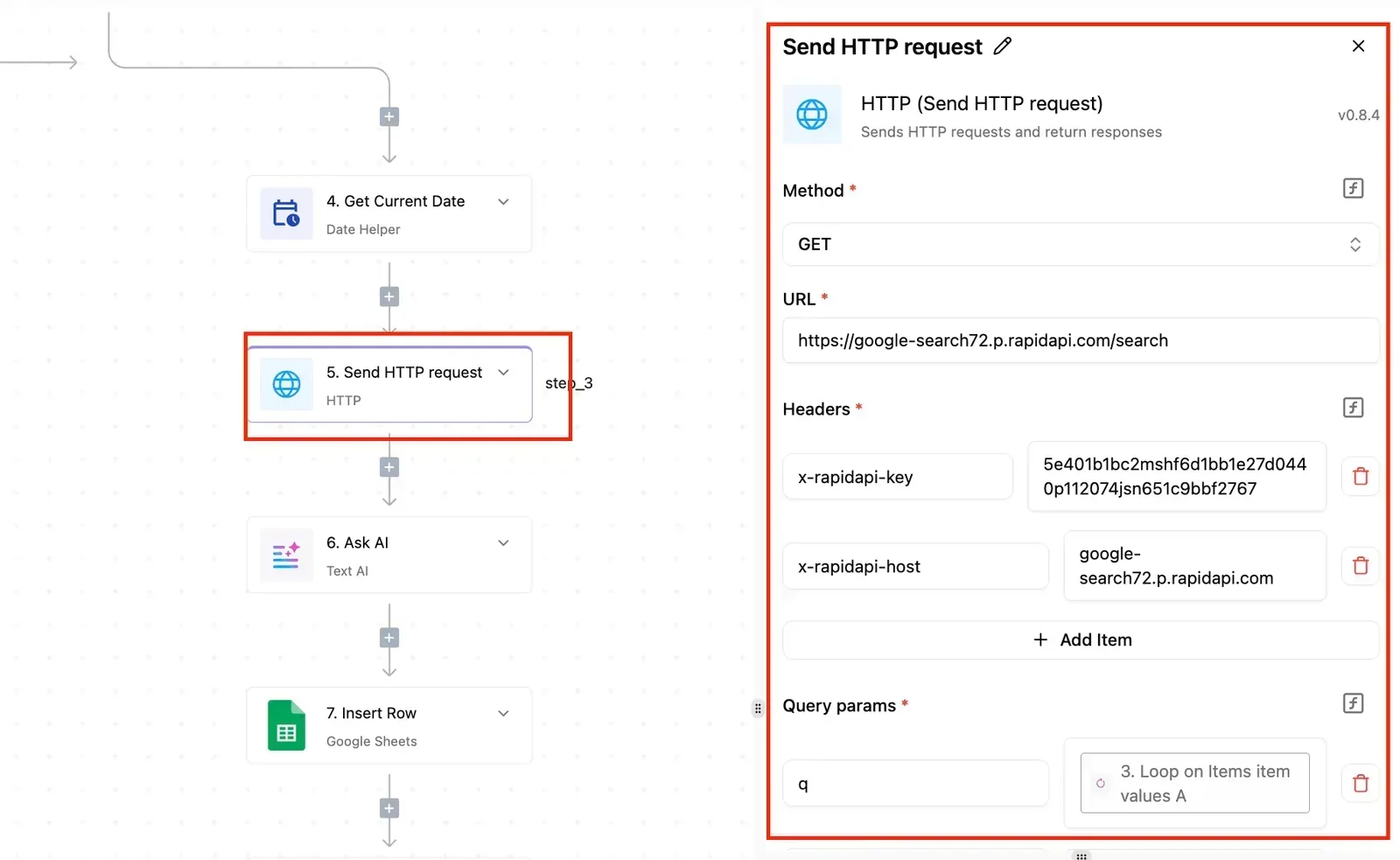
Use the generic HTTP step, not a Google-specific block, because the point is to call the endpoint you chose by what it returns. Copy the method, URL and query parameters exactly from Google's docs for that endpoint.

If the request works in your terminal and fails in the step, compare the two character by character before blaming the tool. The usual culprit is a pasted parameter with a stray space.
Store your API key as a connection
Put the key in a stored connection and reference it from the step. Never paste it into the URL field of a flow you share.
Leave a key visible in a flow and it gets copied into a team chat for help, and that's how it ends up with someone who should never have had it.
The bill arrives on your account. If that happens, revoke the key in Google's console first, then fix the flow.
Schedule search API calls and handle quota errors
Choose a schedule that matches how often the answer really changes. A job that checks every few minutes for results that change daily only spends quota.
Add a branch after the HTTP step that checks the response status.
When Google says you're over quota, stop and send yourself a message instead of retrying in a loop, since retries are exactly the refresh loop the previous section warned about. Check the error codes and their meanings against Google's docs on the day you build.
Frequently asked questions
Not for Custom Search if you are new. Google is closing it to new users, so a fresh project should start on one of the remaining official endpoints.
Existing users can keep calling it until the cutoff Google's docs state. Confirm that date on build day, because building on a closing product means rewriting it soon.
Is there an official API that returns Google's actual web results?
Not as a raw, ranked list of results for a new project, as far as Google's docs describe. Grounding with Google Search in the Gemini API returns a written answer with source citations, not the results page.
If your product needs the list itself, say so before choosing, because swapping an answer for a result list later means changing your parsing and your tests.
How much does Google's search API cost per 1,000 queries?
Which endpoint you pick decides the answer, and Google's pricing pages are the only place to read it. Grounding is billed through Gemini API usage. Custom Search had its own free allowance and paid tier.
Read the current page for the product you chose, and run a day of realistic traffic through it before you promise anyone a budget. A forecast built on the wrong product's pricing is the expensive kind of mistake.
Before you build, read the current terms: Google's terms of service restrict automated querying of its search pages without permission, so scraping is a risk you take on yourself.
Treat a scraper as something that can be blocked without notice. Your customers won't care why their feature stopped working.
Work through these against Google's docs before you move anything:
- The cutoff date for existing users, and whether your project falls under it
- What each replacement returns: raw results, or a generated answer with citations
- Whether you need to search the whole web or only a set of sites you choose
- How the replacement bills, and what a normal day of your traffic would cost
- Which error codes it returns, and whether your retry logic handles them
Related reading
Still comparing
The fastest way to settle it is to build something.
Open source under MIT, so you can self-host the same thing later.
Start free Talk to sales