Gym Membership Automation Software: 2026 Comparison

Nov 24, 202612 min read
We scored every tool on five criteria, and the first, which job costs your gym the most, carries the most weight.
That means a tool that automates a task like Activepieces might with follow-up messages only scores well if follow-ups are where your gym loses time. The list below is what each criterion means in practice. Together they decide where a tool sits in the ranking.
How We Ranked Gym Automation Software
- Which job hurts most: whether the tool handles billing, sign-ups, booking, access, renewals or member messages natively.
- Gym size: which member counts and locations each plan is built for.
- Published pricing: the list price on the vendor's own page.
- Stated limits: caps on members, locations, tasks or features in the vendor's documentation.
- Integrations: whether the tool hands data to the other apps a gym already runs.
Those five checks decide which tool comes first, and the definition and the churn numbers below explain why.
Gym membership automation is software that runs the repeating work of a membership: billing, sign-ups, class booking, door access, renewals and member messages. A gym management system should own those jobs first.
A separate automation tool only earns a place when the management system can't pass data to your other apps.
Match gym software to your biggest problem
Retention weighs differently by gym type. Gym Marketing Pros puts monthly churn at 2–4% of members for personal training, which means a small client list where each lost client is felt personally.
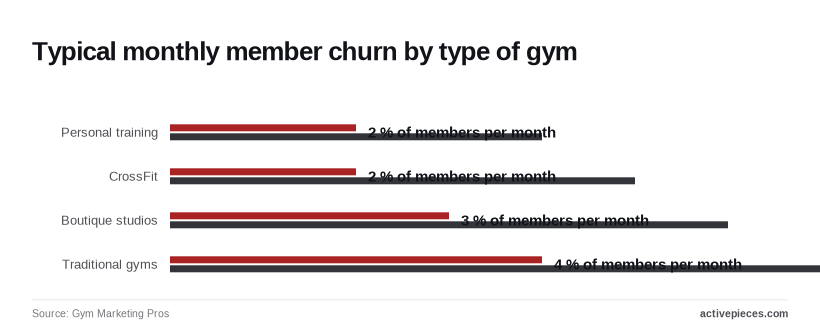
2–5% is what Gym Marketing Pros reports for CrossFit, so a box can still be losing a member or more every month.
According to Gym Marketing Pros, boutique studios sit at 3–6%, which makes renewal reminders and re-engagement messages worth fixing early.
Traditional gyms run 4–8%, so a 500-member gym replaces 20 to 40 members monthly just to stand still, and failed payments and weak renewals cost the most.
We took every price from the vendor's own pricing page on 24 November 2026. Plans change, so confirm the figure on the vendor's page before you buy.
The fastest way to settle a shortlist is to try one. Activepieces is free to try, no credit card.
Mindbody for larger gym studios
Mindbody is a gym management system built for businesses that sell classes, appointments and memberships under one roof. That's why it suits larger studios and multi-service gyms more than a single-room operation.
It handles recurring membership billing, class and appointment booking, a client-facing app, point of sale and staff scheduling in one product.
On the marketing side, Mindbody also runs automation, such as emails and texts triggered by sign-ups, lapsed visits or expiring packages.
That breadth is the draw. A gym running yoga, personal training, a spa and a retail counter needs one client record behind all of them.
If each service has its own booking tool, the front desk becomes the integration layer. Mindbody removes that work by owning billing, bookings and access in the same place, which is the job the rest of this article treats as the default.

Mindbody pricing and setup
I'd slow down at pricing. Mindbody's cost depends on which feature tiers you take and how your business is set up, and I have no figure from its pages that I can stand behind here.
Treat any number you hear in a sales call as a starting point.
Ask what's included at that tier, what payment processing costs on top, and whether marketing automation or the branded app sit in a higher bracket. Those are the lines that move a quote after the demo.
In practice the limit that matters is operational. Executives sign off on a platform this wide because the feature list covers everything. The people who live with it are front-desk and studio managers, and they inherit setup: membership rules, class templates, campaign triggers.
If nobody owns that configuration, half the product goes unused, and you pay for the half you don't use.
If you run a small gym with one location, a handful of membership types and straightforward billing, you may not need that weight.
A lighter gym system, or a simpler booking and payments tool, can cover the same core jobs with less to configure and less to maintain.
Glofox for boutique gym studios
Glofox is the heavier version of that trade, a gym management platform for boutique studios and mid-sized gyms. It puts a branded member app, recurring billing and class booking under one system.
As Glofox presents it, members book and pay through the app, and renewals and reservations run automatically instead of being re-keyed at the front desk.
For a studio whose manager spends evenings chasing failed payments and fixing double-booked classes, Glofox's automation matters most.
The owner usually buys on the app demo, but the person who lives with the product is the studio manager.
The fuller the system, the more setup there is for them to do: class schedules, membership types, payment rules and permissions all need configuring and keeping current.
The owner usually buys on the app demo, but the person who lives with the product is the studio manager.
With a full timetable and several membership types, a boutique gets that effort back. A gym with a short timetable and one membership may never use most of it.
What Glofox costs
Glofox publishes its prices rather than asking you to request a quote.
The entry plan is already a meaningful monthly commitment, and the top plan costs more than twice as much, so the plan you choose matters as much as the vendor.
Glofox lists Essential at $275 a month, with a first-year price of $99 for new studios, Boost at $375 and Elite at $625, so the first-year rate does not carry forward into year two.

For a studio that's just opening, the first-year price helps, but it returns to the full Essential price afterwards. Budget for that figure, not the introductory one.
Before you sign, read each plan's feature allowances and limits, set out on Glofox's pricing page, against your member count and class volume. Glofox can change the price at any time, so confirm it on the vendor's page.
If your needs are simpler, such as a few classes, straightforward memberships and card payments, a lighter gym system or a plain booking and payments tool serves you better. It covers the same core jobs with less to maintain.
Reading a table only gets you so far. Build the same workflow in Activepieces and compare it yourself.
Pick Gymdesk for smaller gyms
Gymdesk is a gym management system aimed at smaller gyms, and it handles billing, member check-in, member records and automated emails from one login.
That's the pitch for an owner with no operations manager: one system owns the money, the door and the member list, so nobody has to reconcile three spreadsheets on Sunday night.
The automated emails are where owners tend to overestimate. A gym system sends the messages its designers anticipated, such as a receipt, a failed-payment notice or a welcome. The owner's actual follow-up habits are rarely on that list.
Gymdesk publishes its plan prices on its own pricing page, along with the limits that apply to each plan. Read those limits against your real membership count and number of locations before you commit, because that's where small-gym software gets awkward as the gym grows.
Where the built-in tools stop
The best fit is a gym that wants billing, bookings and access in one place and can live with the built-in emails and reports.
It weakens in the gap between Gymdesk and everything else: the accounting package, the spreadsheet the head coach actually uses, the group chat where staff coordinate. If Gymdesk can't hand data to those tools, someone retypes it, and that someone is usually the owner.
That's the point at which a separate automation tool earns its place.
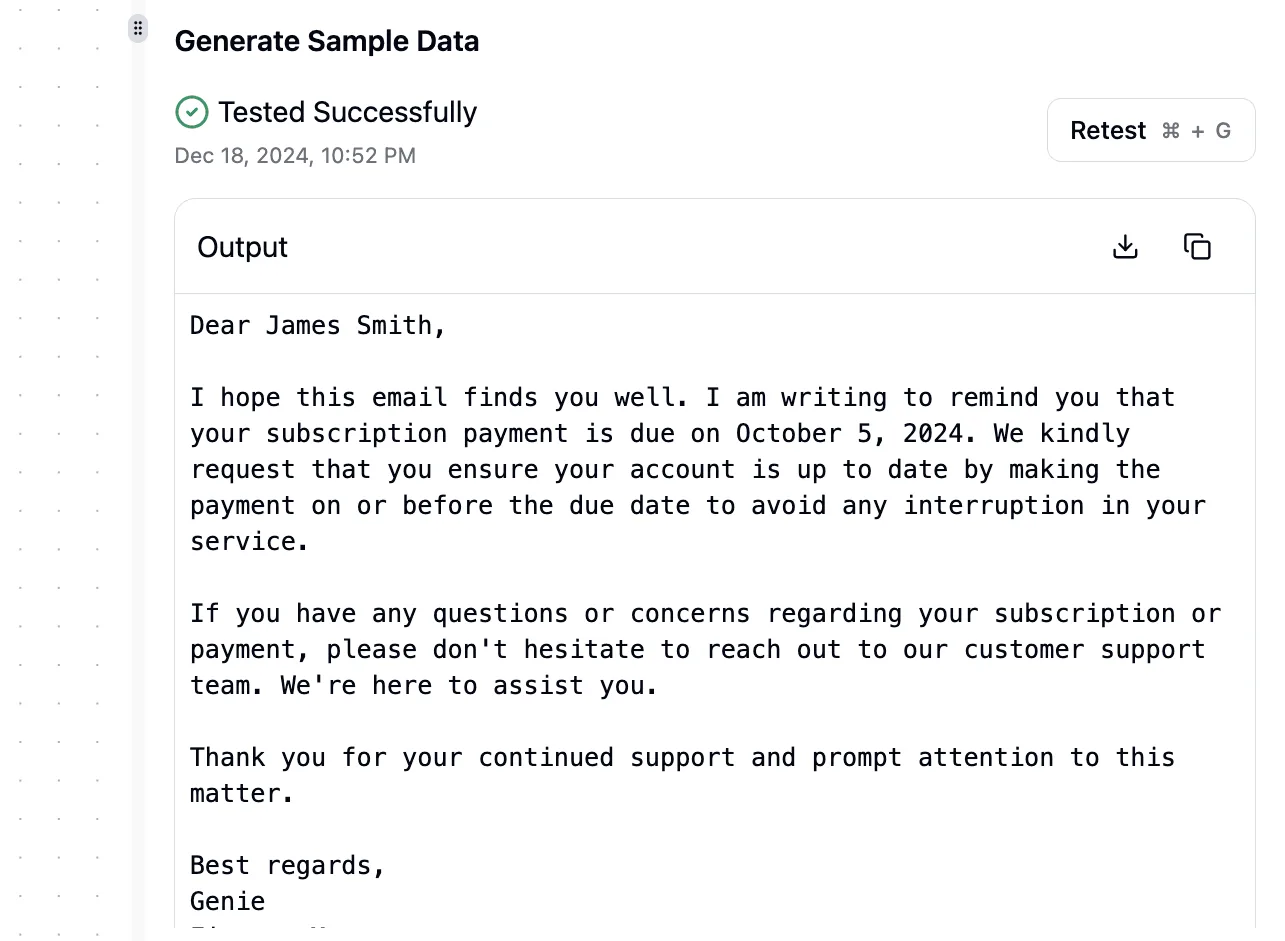
Below, a test run shows the kind of job it takes on: a step called "Generate Sample Data" passed with a "Tested Successfully" status.
Its output is a drafted reminder to a member named James Smith about a subscription payment due on October 5, 2024, signed "Genie".
Read it as proof that the message can be checked before any real member receives it, and that the Retest button lets you rerun the step after changing the wording.
Once a draft like that reads correctly, the next question is what triggers it and where the member's payment details come from. If Gymdesk can supply them, wire that connection first. If it can't, that missing handoff is the job that hurts most.
Activepieces
Activepieces is an open source, MIT-licensed AI automation platform, and it moves data between the apps a gym already uses through its 750 integrations. It's not a gym management system, so it only matters once that handoff is the job that hurts most.
Where it fits
It fits when the gym system holds the member but the spreadsheet and the email tool never hear about them.
If the connector you need isn't there, Activepieces lets you generate it with AI and add it privately to your own instance, with no vendor release to wait on.
Roughly 60% of its 750 integrations were built by the community, counted from the open source monorepo, which means the platform achieved integration breadth well beyond what internal engineering alone could have delivered.
At 10,000 runs a month, Eltherion's pricing comparison puts Activepieces at $20 a month. That's the cheapest of the four it priced, so a busy front desk's volume doesn't become a line item someone has to defend.
| Tool | Monthly cost at 10,000 runs | Compared with Activepieces |
|---|---|---|
| Activepieces | $20 | Baseline |
| n8n | $50 | Two and a half times as much |
| Make | $72 | Three and a half times as much |
| Zapier | $433.50 | Over twenty times as much |
Volume is where the choice of tool turns into real money. Prices change, so check the vendor's page before you commit.
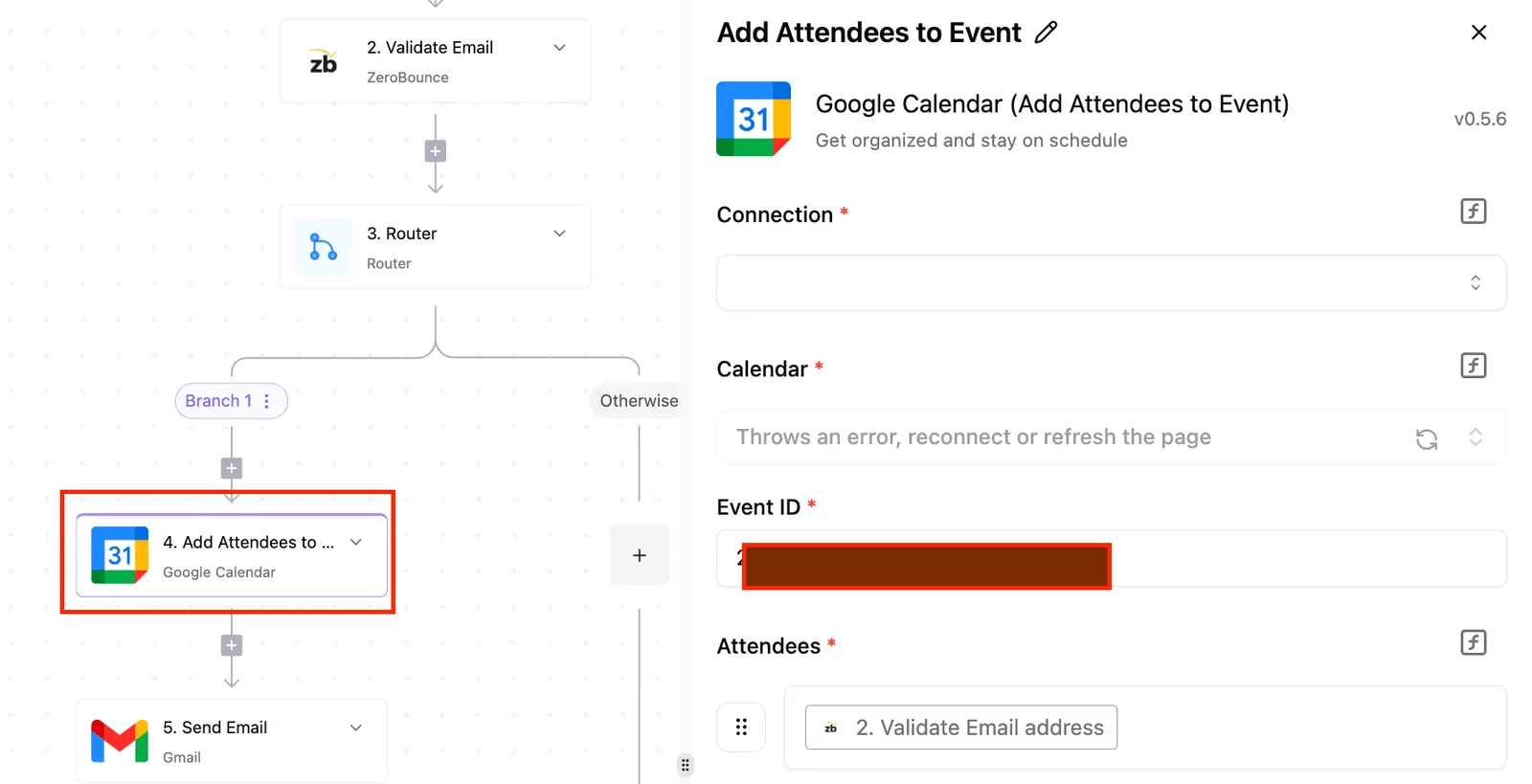
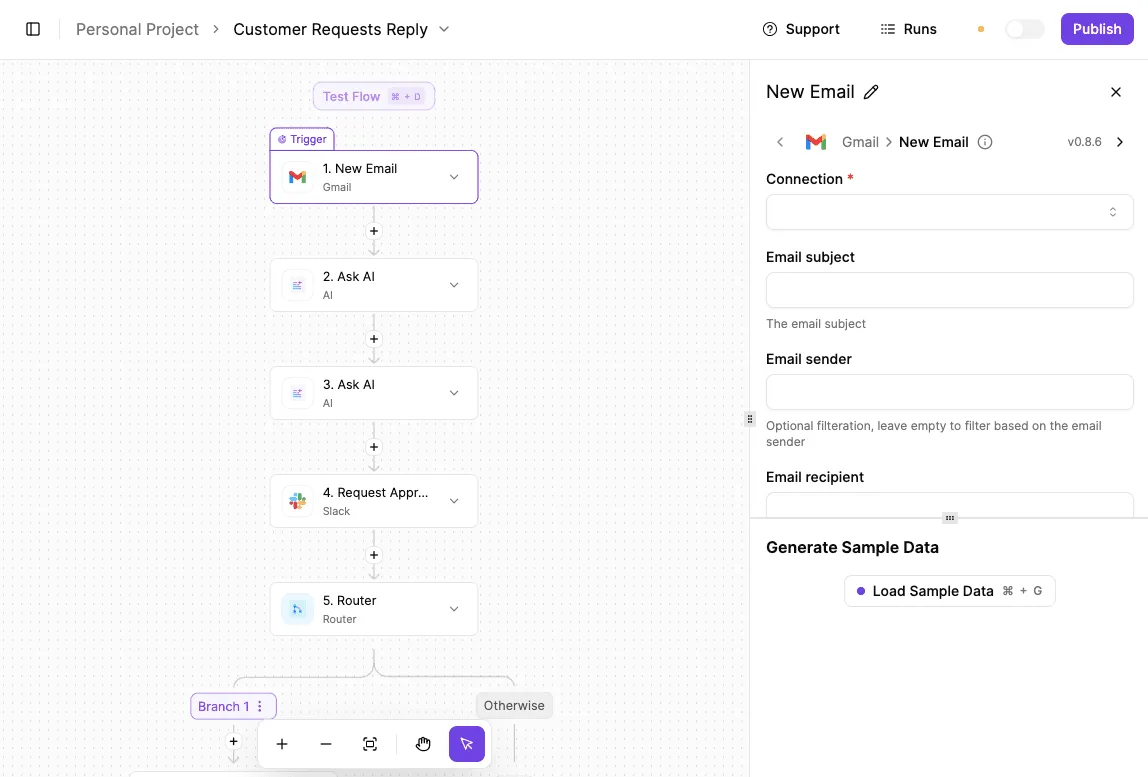
The flow below is the new-member handoff in the order you build it. Each step does one thing, so whoever maintains it can read it without a developer:
- Set the trigger to a new member in the gym system.
- Map the name, email and plan fields from that member record.
- Add a row to a Google Sheets spreadsheet with those three values.
- Add the same person as a contact in the email tool.
- Run a test with a real or dummy member, then read the run log to confirm each step received the right data.
In the run log at step five, mistakes show up, such as a plan field arriving empty, before a real member is affected. Once it passes, the flow runs on its own for every new signup.
What it doesn't do
Activepieces doesn't take payments, control door access or run class schedules. Those stay with the gym system, which is why the two aren't alternatives.
Step one also depends on a connector for your particular gym system, and I haven't confirmed which gym platforms have one. Check that connector list first.
If yours is missing, the flow can't start, and that's a reason to question the tool, not to work around it.
Name your biggest automation pain
Name the one job that hurts most (failed payments, double-booked classes or doors that don't match memberships), then shortlist a single gym system that owns it.
A missing trigger in your current setup is a reason to question the system, so fix the source before you bolt anything on.
While owners tend to be keen on a new platform, the front-desk lead who must retrain staff on it is far less so. Choose the job your front desk complains about most, because that's where adoption'll be won or lost.
Check gym software pricing and data export
Open the vendor's own pricing page and read it for your member count and the add-ons you need, such as door access or a branded app.
Pricing pages change, so treat any figure you saw in a review as out of date until you've confirmed it there.
Then find the export terms in the documentation or the contract. Ask whether you can take members, payment history, attendance and contracts out in a usable file, and whether stored card details can move to a new processor.
If the answer is vague, the cost of leaving later is higher than the monthly fee suggests.
Add an automation tool only if needed
Run the gym system for a few weeks before adding anything. If its built-in messages, reports and integrations cover the apps you use, stop there.
Add an automation tool only when a specific hand-off fails, for example a new member never reaching your email platform or a cancellation never reaching your accounting software.
Name that gap in one sentence first. If you can't, you don't have one yet.
Common questions from small gyms
Does a small gym need an automation tool at all? Usually not at the start, because the gym system already handles billing, bookings and access. The need shows up when data has to cross into apps it doesn't connect to.
What should I check before switching? Price for your setup, export terms, and whether the new system works with the door hardware you already own.
Will switching pay off? It does when it removes the job that costs you the most staff time or lost revenue. If it only moves the problem, it won't.
Related reading
References
Still comparing
The fastest way to settle it is to build something.
Open source under MIT, so you can self-host the same thing later.
Start free Talk to sales