
HeyGen API: Pricing, Features and How to Use It (2026)

Nov 20, 202616 min read
A prototype turns into a surprise invoice when you skip the pricing page before you build, whether it's a weekend automation in a tool like Activepieces or a full app on a metered cloud platform.
HeyGen's API is a REST interface for generating avatar videos and translating existing ones, and you authenticate with a key from your account settings. Getting the key is the quick part.
HeyGen API access, keys and what it does
What the HeyGen API lets you build
Anything you would otherwise do by hand in HeyGen's editor, a program can do through the API. That means picking an avatar and a voice, handing over a script, and receiving a finished video.
It can also translate a video you already have into another language.
Send each request from your own code or from Activepieces, which has a HeyGen integration and an MIT-licensed core you can read. Rendering isn't instant, so what comes back is a job to check on later, not a finished file.

That one fact shapes most of the budgeting questions later in this integration.
Which plan includes API access
If your plan doesn't cover the API, you find out when the first call is refused, which is a poor moment to start a budget conversation.
API access depends on the plan your account is on, and HeyGen's plan and pricing pages are the only place that can settle it. Plans and credit rules change, so don't rely on a blog post, this one included.
The key lives in your HeyGen account settings, and anyone holding it can spend your credits. Treat it like a card number: keep it out of shared documents and public code.

Four things to have in hand before your first call:
- The plan that grants API access, confirmed on HeyGen's pricing page, so you know the spending limits before you test.
- The key's location in your account settings, so you can find it again, and replace it if it leaks.
- The documentation at docs.heygen.com, which is the authority when this article and HeyGen disagree.
- The check date, 20 November 2026, so you know how old every statement here is.
With those four in hand, the next question is what a single video actually costs you.
If you are running this arithmetic for your own team, see what the same workload costs on Activepieces.
HeyGen API endpoints and models compared
Budget for the calls that render something; the calls that list things are bookkeeping. The table shows what each endpoint family does and how it behaves, so you can see which ones belong in a budget.
| Endpoint family | What it does | Required input | Sync or async | Credits drawn | Version note |
|---|---|---|---|---|---|
| Video generation | Renders an avatar video from a script | Avatar, voice, script | Async: returns an ID you poll | Yes, on render | Check changelog for v1 versus v2 |
| Avatars | Lists avatars you can use | None | Sync | Lookup only | Check changelog |
| Voices | Lists voices you can use | None | Sync | Lookup only | Check changelog |
| Templates | Renders from a saved layout | Template ID, variables | Async | Yes, on render | Check changelog |
| Video translation | Dubs an existing video | Video file or link, language | Async | Yes, on render | Check changelog |
| Streaming avatars | Live interactive avatar session | Session request | Real-time | Per session | Check changelog |
Where the table says async, your code must wait and check back, not expect a finished file in the reply.
Assume an instant answer and the script fails in production, because video generation and templates both render asynchronously.
Uploads have ceilings, and HeyGen's usage limits page shows they differ by route. Video caps run from 100 MB down to 50 MB, so plan around the lower number or a file will pass in testing and bounce later.
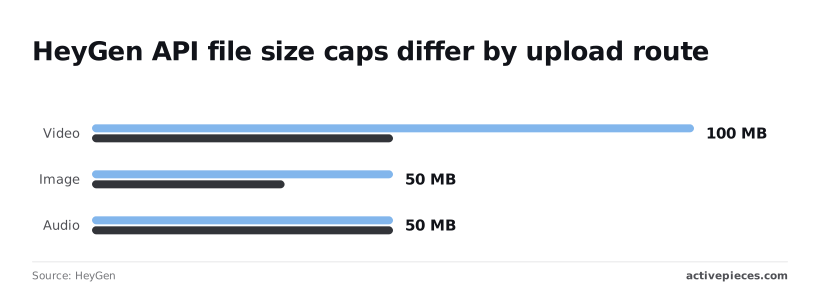
Even though avatars and voices are lookups, they feed uploads. Images run from 50 MB down to 32 MB, so a large photo may be accepted by one route and refused by another.
Audio sits at 50 MB on both routes, which makes it the one limit you can stop worrying about.
Translation is async and starts from a video that must already fit the video cap above. Streaming avatars are live, so you pay for time in session, not a finished file. Verify the current version of each on HeyGen's changelog before you build.
HeyGen API pricing per unit and credit cost
Pick the model before you size the budget, because the avatar model you choose moves the price far more than anything else. HeyGen bills the API by the minute of finished video.

Tiers compared in a table
Twelvefold is the gap in the chart of cost per minute, from Avatar III Digital Twin at $0.60 to Avatar V at $7.20, so avatar selection substantially affects your costs.
Choosing the top model by default therefore multiplies your bill twelve times over the cheapest one.
Here's the same spread at 100 one-minute videos a month:
| Model | Per minute | 100 one-minute videos |
|---|---|---|
| Avatar III Digital Twin | $0.60 | $60 |
| Avatar | $3.00 | $300 |
| Avatar IV | about $4.00 | about $400 |
| Avatar V | $7.20 | $720 |
I'm not quoting monthly plan prices, included credits or top-up rules. They change often, and a stale number here would mislead you more than a missing one.
Read them on HeyGen's pricing page and API documentation the day you commit, and note whether a plan's credits cover API usage at all.
HeyGen API monthly cost example for 100 videos
Don't read the table as a quote from HeyGen. It's arithmetic on the per-minute rates above: 100 videos at exactly one minute each, so the cost is the rate times 100.
Once your videos run longer than one minute, which they probably will, the figures scale with them. Double the length and every figure doubles.
A two-minute script on Avatar IV runs about $800 a month, not $400, which means your actual monthly cost is double the lower amount.
If a video fails or is re-rendered, it may also use credits. Ask HeyGen's support or read its docs on how re-renders are billed, then add a margin for retries to your estimate.
Skipping that margin means the invoice, not the build, is where you find out your budget was wrong.
HeyGen API authentication and a minimal working request
Authentication is one header, X-Api-Key, and the minimal request is a single POST that hands back a video ID, not a video. Everything after that ID is waiting.
Send the key in the header
Put your key in an X-Api-Key header on every request. Keep it in an environment variable on your server, never in front-end code.
A key that ships to a browser is a key anyone can copy, and every render they run lands on your credits. HeyGen's developer docs at https://docs.heygen.com are the place to confirm the current header name and base URL before you build on them.
Create a video with the HeyGen API
Send a POST to the video generation endpoint with your avatar, voice and script in the JSON body. The response doesn't contain a video. It contains a video ID, because rendering happens later on HeyGen's servers.
curl -X POST https://api.heygen.com/v2/video/generate \
 -H "X-Api-Key: $HEYGEN_API_KEY" \
 -H "Content-Type: application/json" \
 -d '{ "video_inputs": [ ... ] }'
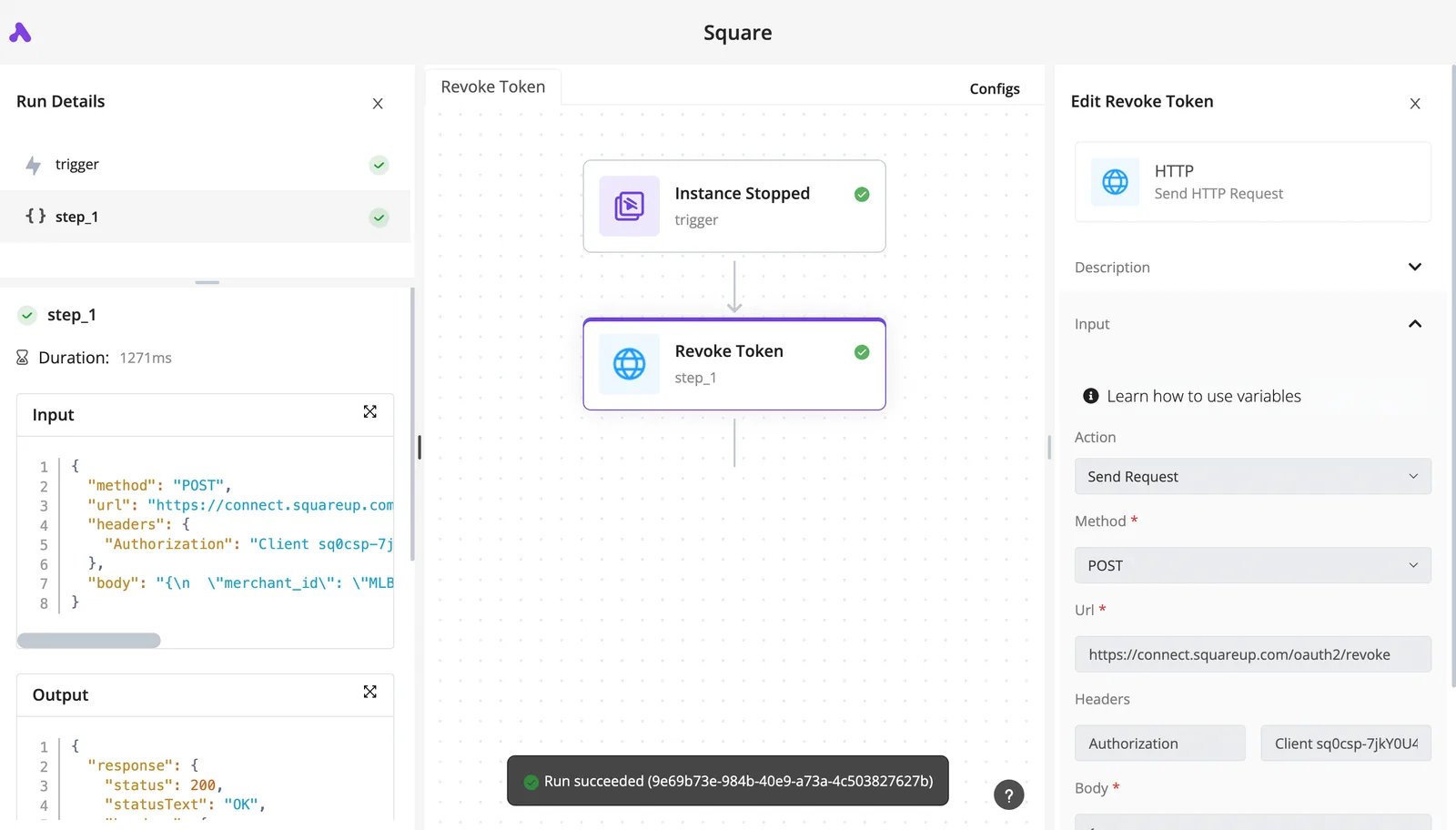
A good call looks like the run record below: a POST carrying the key in a header, answered with a success status and a short body.
Save that ID the moment it comes back. If you lose it, you've paid for a render you can't retrieve.
HeyGen API video status polling and webhooks
Because rendering is asynchronous, you need a way to learn when it finishes. The docs describe a status endpoint you call with the video ID.
The values you'll meet are pending, processing, completed and failed. Only completed carries a download link, so treat the other three as "not yet" or "check the error."
Simple as polling is, a loop that checks too often wastes calls, and one that checks too rarely leaves customers waiting.
A webhook reverses it: you register a URL, and HeyGen notifies you on success or failure. For anything beyond a test, use the webhook and keep one slow poll as a backstop.
Activepieces has a HeyGen integration, one of the 750 counted directly from its open-source monorepo, so the create-then-poll sequence above doesn't have to be code.
Describe it in the built-in chat, say "create a video from this script, check status until it completes, post the link", and what it publishes is a live flow in your account, the same flow a builder would have assembled by hand.
Each run of that flow leaves a run trace showing exactly what happened at the create step and at every status check, under the same RBAC and audit logs as any other flow on the platform.
Worth checking against a plan that does not meter every step: one credit covers a whole run on Activepieces.
HeyGen API rate limits and concurrency by plan
Check each limit on HeyGen's own pricing and API pages before sizing anything, because they differ by plan and I haven't confirmed them. The webhook-plus-slow-poll pattern also protects you from them. Nothing below is a verified figure as of 2026-11-20.
Limits table by tier
Before you trust a plan in production, look at five things, and the table lays them out. Where a cell says to verify, I couldn't confirm HeyGen's docs state it, so treat it as unknown rather than generous.
| Tier | Concurrent workflows | Requests per minute | Max length | Resolution | 429 behaviour |
|---|---|---|---|---|---|
| Pay-As-You-Go | Verify on HeyGen's pages | Not documented | Verify on HeyGen's pages | Verify on HeyGen's pages | Not documented |
| Enterprise | Higher than Pay-As-You-Go, exact cap to verify | Not documented | Verify on HeyGen's pages | Verify on HeyGen's pages | Not documented |
| Enterprise burst | Extra headroom per job type, multiplier to verify | Not documented | Verify on HeyGen's pages | Verify on HeyGen's pages | Not documented |
If the requests-per-minute ceiling is unpublished, you find it by hitting it, and that happens in front of a customer. The gaps matter more than the filled cells. Ask HeyGen's sales or support team in writing before you commit.
Assume a 429 ("too many requests") response will arrive, and build for it before launch. Putting a queue in front of HeyGen costs an afternoon. Skipping it costs failed renders, and you may not notice until a customer asks where their video went.

- Put every render request in your own queue, and release jobs no faster than your plan's concurrency cap.
- On a 429, wait, then retry, lengthening the wait each time and adding a little random delay so retries don't pile up.
- Cap the retries and log what failed, so a stuck job is visible.
- Leave burst capacity for real spikes. Don't build your normal load around it.
HeyGen API errors, causes and fixes
When production fails, it is most often for one of two reasons: credits ran out, or nobody checked on the renders after submitting them.
The table below pairs each error with its likely cause, the fix, and where HeyGen documents it. Check exact codes and messages against HeyGen's own pages, since they change.
| Error | Cause | Fix | Docs link |
|---|---|---|---|
| Bad key | Key missing, mistyped, revoked or sent in the wrong header | Regenerate the key and send it as the docs specify | HeyGen API docs |
| Insufficient credits | Balance too low for the request | Top up, and check balance before submitting | HeyGen API docs |
| 429 | Too many requests or too many renders at once | Slow down and retry with a pause | HeyGen API docs |
| Invalid avatar or voice ID | ID mistyped, removed or not available to your account | Fetch the current lists and use IDs from them | HeyGen API docs |
| 500 | Fault on HeyGen's side | Retry later; contact support if it persists | HeyGen API docs |
| Failed render | Render started but did not finish | Read the status response and resubmit | HeyGen API docs |
| Expired URL | Video link no longer valid | Fetch a fresh link, or save the file on completion | HeyGen API docs |
| Webhook issue | Endpoint unreachable or rejecting calls | Fix the endpoint and confirm registration | HeyGen API docs |
Though every row has a fix, only some of them fix themselves, so the paragraphs below cover the ones that don't.
Nobody misses a bad key, because it fails immediately and loudly. Exhausted credits are the quieter bill: if nothing checks the balance, every job fails until someone notices. Check the balance before each submission and alert well before it hits zero.
When a 429 comes back, you're asking too fast. Retrying instantly makes it worse. Queue your requests and back off between attempts.
When a submission succeeds, all it means is that HeyGen accepted the job, since rendering is asynchronous. Poll the status or listen for a callback, and treat failure as a normal outcome. Download finished videos promptly, because a stored link may stop working.
When a submission succeeds, all it means is that HeyGen accepted the job, since rendering is asynchronous.
If your webhook endpoint is down or rejects the call, you hear nothing, and a finished video looks like a missing one. Keep polling as a backup.
Call the HeyGen API without code in Activepieces
You don't need a developer to create videos and check their status in Activepieces, which has a HeyGen integration and a free plan with unlimited flows and 1,000 credits a month.
It's an automation tool where you chain steps together on a canvas instead of writing code, and a run costs 1 credit however many steps it has.
Polling is just one of those steps, which means the backup you keep is something you drag into place rather than program.
Connect with your key
You paste the same HeyGen API key you would use in code into a new HeyGen connection in Activepieces, and that's the whole setup. Trying it costs nothing, since the free plan is $0 and needs no card.
Because it's the same key, nothing about your account changes. Every video the workflow creates draws from the same credit balance, and every call counts against the same concurrency limit.
When a no-code workflow fires on every form submission, it can burn through credits faster than a developer would, since nobody is watching the meter while it runs.
Set a cap on how often the trigger can fire before you switch it on, and check the current limits and credit costs on HeyGen's own pricing and API pages.
Expect gaps: roughly 60% of Activepieces integrations are community-contributed, so coverage follows what people have built, and the HeyGen integration won't cover every endpoint HeyGen offers.
When one is missing, Activepieces has a generic HTTP step that sends a request to any address you give it, using your key in the header.
That's your way around the gap, and it works the same as calling the API directly.
Example: form submission to finished video
A form submission starts the workflow. A HeyGen step creates the video, a loop checks status until the render finishes, an HTTP step handles anything the integration lacks, and a Slack message posts the finished link.

That placement matters because rendering is asynchronous: the create step returns right away with an ID, not a finished file. Skip the loop and Slack gets a link to nothing.
Add a pause between checks and a limit on how many times the loop may run, so a stuck render ends in an error message instead of an endless loop.
From here, the remaining work is testing with a single submission and watching what it costs.
Frequently asked questions
Is the HeyGen API free to try? Probably not with free credits. Reports say they ended in February 2026, so budget as if your first test render costs real money.
If you assume a free allowance and it's gone, you find out on your first invoice. Check HeyGen's pricing and API pages for what a new account actually receives.
Do unused API credits roll over? I can't confirm that they do, so plan as though they don't. If credits expire and you buy a large batch early, you pay for video you never made.
Buy in amounts you'll use, and read the credit terms on HeyGen's pricing page before committing a larger sum.
Can I use the HeyGen API for commercial videos?
Assume the answer depends on your plan and on HeyGen's terms, not on the fact that the API works. A video that renders fine can still break the license, and finding that out after publishing is the costly way to learn it.
Read HeyGen's terms of service and any usage policy for avatars and cloned voices before you ship anything customer-facing.
Does HeyGen offer a sandbox or test mode? Don't count on one. If there's no free sandbox, every test render draws on your real balance, so testing has a price.
Keep early tests to a single short submission, as described above. Look in HeyGen's API documentation for any test environment, and for whether it bills.
How long does a generated video URL stay valid?
Treat the URL as temporary until HeyGen's documentation says otherwise. If it expires and you stored only the link, your customers will eventually open a dead video.
The safe habit is to download the file as soon as rendering finishes and keep your own copy. Check HeyGen's docs for the stated lifetime of video URLs before you design around it.
Related reading
References
Running the numbers
See what the same workload costs here.
Free forever plan, and every paid plan self-hosts at no extra cost.
See pricing Talk to sales