
How Much Does Slack Pricing 2026 Cost Your Team?

Oct 12, 202614 min read
Slack’s 2026 pricing structure uses data retention ceilings and integration caps, which often impact how teams deploy tools like Activepieces within their workflows, to transition your growing team from zero-cost tiers into high-margin Enterprise agreements.
While the entry-level offering provides basic connectivity, the architectural constraints on message visibility and third-party extensibility function as a mandatory upgrade trigger once your team’s operational history exceeds a fiscal quarter.
Slack pricing plans and feature limits
The 2026 Slack plan comparison table
| Feature | Free | Pro | Business+ | Enterprise Grid |
|---|---|---|---|---|
| Monthly Price (Per User) | $0.00 | $4.38 | $9.00 | $26.18 (Median) |
| Message History | 90 Days | Unlimited | Unlimited | Unlimited |
| App Integrations | Up to 10 | Unlimited | Unlimited | Unlimited |
| SSO (SAML) | Not Included | Not Included | Included | Included |
| Compliance Exports | Not Included | Not Included | Included | Included |
Prices and plan limits checked against slack.com on October 12, 2026.
These tiers dictate the long-term accessibility of your corporate intelligence, as lower levels lack the necessary tooling for legal discovery or cross-workspace auditing.
Slack's 90-day message history limit
90 days is the limit for message history on the Free plan. This means any context, decision, or file shared three months ago becomes permanently invisible to your team.
When this happens, you face a functional expiration date on your internal knowledge.
It forces you to upgrade to Pro at $4.38 per user to maintain a searchable audit trail of your own conversations, so you are effectively paying a premium just to retain access to your organization's historical data.
The Free tier limits you to 10 apps. A standard stack of GitHub for version control and Jira for ticketing quickly hits a ceiling that prevents further operational scaling.
Business+ and Enterprise: The cost of compliance and scale
$9 per user for Business+ is the baseline requirement if you are subject to GDPR Article 30 or HIPAA, meaning compliance mandates a specific minimum spend regardless of whether your team utilizes the plan's other features.
It’s the first tier to offer full corporate data exports for compliance auditing.
The transition to Enterprise Grid, which carries a median cost of $26.18 per seat, often happens because you need Single Sign-On (SSO) via identity providers like Okta for centralized credential management.

This doubles the expenditure to secure user access. Without this tier, you can't implement the mandatory network isolation or automated user provisioning required to meet modern cybersecurity insurance benchmarks.
If you are running this arithmetic for your own team, see what the same workload costs on Activepieces.
Hidden limits that drive Slack costs higher
Technical ceilings are the primary tool Slack uses to force a migration from utility-based tiers to administrative-heavy subscriptions.
While the Pro plan serves per-user operational needs, the transition to Business+ is rarely a choice about features. It’s almost always a response to hitting hard limits on automation, storage, and identity governance.
Technical ceilings are the primary tool Slack uses to force a migration from utility-based tiers to administrative-heavy subscriptions.
Workflow Builder execution caps by plan level
Standardized automation is governed through "Standard runs," and exceeding these thresholds requires an immediate shift to higher-cost tiers to maintain operational continuity.
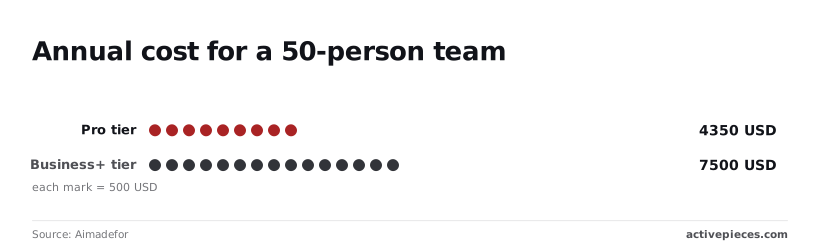
On the Pro plan, a 50-person team pays Aimadefor $4,350 annually, which establishes a fixed baseline expense for basic communication tools.
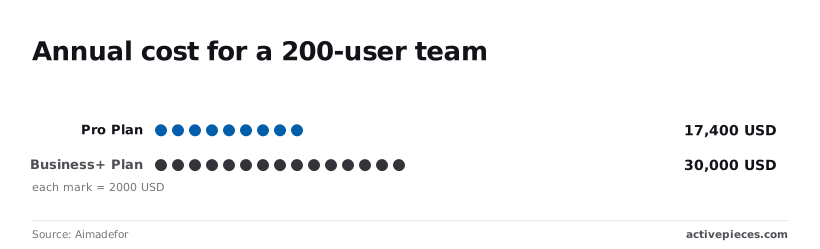
Once your team scales to 200 users, the Pro cost rises to $17,400. At this same 200-user scale, the Business+ price tag hits $30,000. You pay a $12,600 premium primarily to unlock the advanced workflow management and increased execution caps necessary for cross-departmental automation.

Storage limits and the cost of file retention
Data residency and retention policies under GDPR Article 30 require precise control over where files live and how long they persist. Slack monetizes this through tiered storage allocations.
| Plan | Storage Limit | Impact |
|---|---|---|
| Pro Plan | 20GB per member | Slack archives older files when you exceed this, making them inaccessible for legal discovery. |
| Business+ Plan | 1TB per member | This provides the overhead required for media-heavy teams to avoid manual data purging. |
| Enterprise Grid | Unlimited storage | This is the only tier that removes the risk of data loss during a compliance audit. |
Single Sign-On (SSO) as a premium gatekeeper
SAML-based Single Sign-On (SSO) is treated as a high-tier luxury rather than a baseline security requirement. This effectively taxes you for following NIST identity guidelines.
For a small 50-person team, the jump from Pro to Business+ increases the bill from $4,350 to $7,500, which means the company must absorb an additional $3,150 in annual overhead.
This $3,150 security tax is paid to consolidate user access under a central identity provider like Okta or Microsoft Entra ID, so the organization is effectively prioritizing centralized governance over budget efficiency.
A 200-user team pays $30,000 on Business+ compared to $17,400 on Pro, representing a significant financial commitment to enterprise-grade management features, which means the company must justify the upgrade through increased operational efficiency.
That’s a 72% cost increase to gain the automated deprovisioning tools that prevent orphaned accounts from retaining access to sensitive corporate IP, ensuring that security compliance comes at a substantial premium, so the budget must absorb a permanent hike in overhead to mitigate insider threats. You must choose between significant overhead costs and heightened security risks.
Scaling Slack automation without the Pro-tier tax
Enterprise-grade compliance requires rigorous data sovereignty. This often forces you into higher Slack tiers just to access necessary audit logs and residency controls.
Offloading complex workflows to Activepieces
By moving logic-heavy operations out of Slack’s native Workflow Builder, you prevent the automation tax that occurs when every step of a business process consumes internal platform resources.
Activepieces uses a credit-based model where a single flow run consumes one credit regardless of how many steps or AI calls it contains.
This allows teams to build granular, multi-step logic chains without the escalating costs of per-task billing, and administrators can set per-project cost caps to ensure that automated AI agents don't generate runaway expenses.
Regulated and public-sector organisations run the air-gapped edition of Activepieces in production today to maintain this efficiency without compromising on security. The self-hosted build includes SSO, SCIM, and custom RBAC as standard features, matching the managed cloud's enterprise feature list.
This allows teams at MoneyGram and Moneypenny to scale their automation footprint while keeping sensitive data within their own infrastructure.
When you use high-reasoning models like Claude Opus 5.5 for long-horizon agentic work or Gemini 3.1 Pro for advanced coding flagship tasks, running these directly through Slack’s native integrations often triggers rate limits or requires expensive connector add-ons.
Slack becomes a clean presentation interface when you centralize the logic in an external layer. The heavy computational lifting happens in a dedicated environment.
Slack webhooks vs. guest seats for external users
You can maintain strict security boundaries for contractors and partners by using outbound webhooks instead of provisioning Multi-Channel Guest seats. Every guest seat added to a workspace increases your monthly recurring cost.
A webhook can push specific, filtered updates to an external endpoint instead of bringing an external developer into a channel to monitor deployment status. This ensures that sensitive internal discussions remain private while the collaborator receives exactly the data they need.
Reducing Slack API overhead with centralized automation
Consolidating multiple app triggers into a single orchestration point minimizes the number of active tokens and permissions sets that your security team must monitor.
| Dimension | Native Slack Automations | Centralized External Hub |
|---|---|---|
| Billing Impact | Increases with seat count and task volume | Fixed or usage-based independent of seats |
| Security Scope | Requires broad permissions for every app | Single, scoped entry point for all data |
| Maintenance | Managed per-channel and per-workflow | Managed in a single visual logic canvas |
This centralized approach ensures that even if you scale your use of Gemini 3.8 Flash for long-horizon agentic coding, the integration footprint within Slack remains a single, manageable spoke.
Worth checking against a plan that does not meter every step: one credit covers a whole run on Activepieces.
Slack vs. competitors on price and value
Slack’s 2026 pricing model positions the platform as a high-premium workspace where costs scale aggressively with external collaboration and historical data access.
| Platform | Guest Seat Ratio | Searchable History |
|---|---|---|
| Slack ($7.25+) | 5 guests per 1 paid member | Limited to 90 days on free; full on paid |
| MS Teams ($4.00+) | Unlimited guests per tenant | Full history included in base license |
| Discord for Business | Not applicable (Role-based) | Infinite history by default |
| Rocket.Chat | Custom per-workspace ratio | Managed by local retention policies |
Microsoft Teams: The 'free' bundle reality
Microsoft Teams is perceived as a zero-cost addition because it’s bundled with the Microsoft 365 productivity suite.
The true value is the guest access policy. It allows for unlimited external participants without the 5-to-1 ratio restrictions found in Slack. External partners are managed through Azure Active Directory rather than fragmented guest accounts.
Discord for Business as a flat-rate alternative
Discord for Business diverges from the traditional enterprise billing model by focusing on workspace-level features rather than individual seat taxes.
By removing the per-user financial barrier, you can bring your entire community into a single environment without the exponential cost increases associated with Slack’s Pro or Business+ tiers.
Rocket.Chat: Self-hosted cost savings for high-security teams
Rocket.Chat offers a self-hosted deployment model that allows you to bypass per-user licensing in favor of infrastructure-based costs. Because the data resides on your own servers, there’s no recurring data tax for increasing retention periods.
This is particularly relevant for entities governed by GDPR Article 32. By hosting locally, your firm maintains total sovereignty over its encryption keys and access logs.
Monday morning Slack budget optimization checklist
A systematic weekly audit of workspace participation ensures that seat-based billing reflects actual human collaboration rather than forgotten integrations or stale accounts.
This is critical if you're subject to the Digital Operational Resilience Act (DORA). Every active seat represents a distinct access point that must be logged and justified under strict ICT risk management frameworks.
The following checklist provides a repeatable workflow for identifying and offboarding users who no longer contribute to the collective knowledge base:
- Export the 'Inactive Users' list (30+ days) to identify accounts that are accruing costs without providing utility.
- Convert single-channel contractors to Guest seats, as these typically don't count toward the primary billable headcount in most Enterprise Grid configurations.
- Identify 'App-only' users to move to external webhooks so that automated notifications don't consume a paid human seat.
- Set a recurring calendar reminder to de-provision users immediately following project completion rather than waiting for the next billing cycle.
By treating every seat as a compliance liability and a financial line item, you can maintain a predictable budget even as your organization grows.
Following this verification process, you might utilize Gemini 3.8 Flash for long-horizon agentic coding or GPT-6 Luna for high-volume classification tasks to handle the data processing that previously required human oversight within Slack channels.
Moving these workflows to a dedicated API layer ensures that the Slack environment remains a space for high-value human decision-making.
What Activepieces does about this
Activepieces provides a decoupled automation layer that allows teams to bypass the per-seat and per-execution taxes inherent in Slack’s 2026 pricing model.
By shifting complex logic and high-volume data processing to an external engine, you can maintain a lean Slack footprint where you only pay for human seats rather than provisioning accounts for automated agents or hitting workflow execution caps.
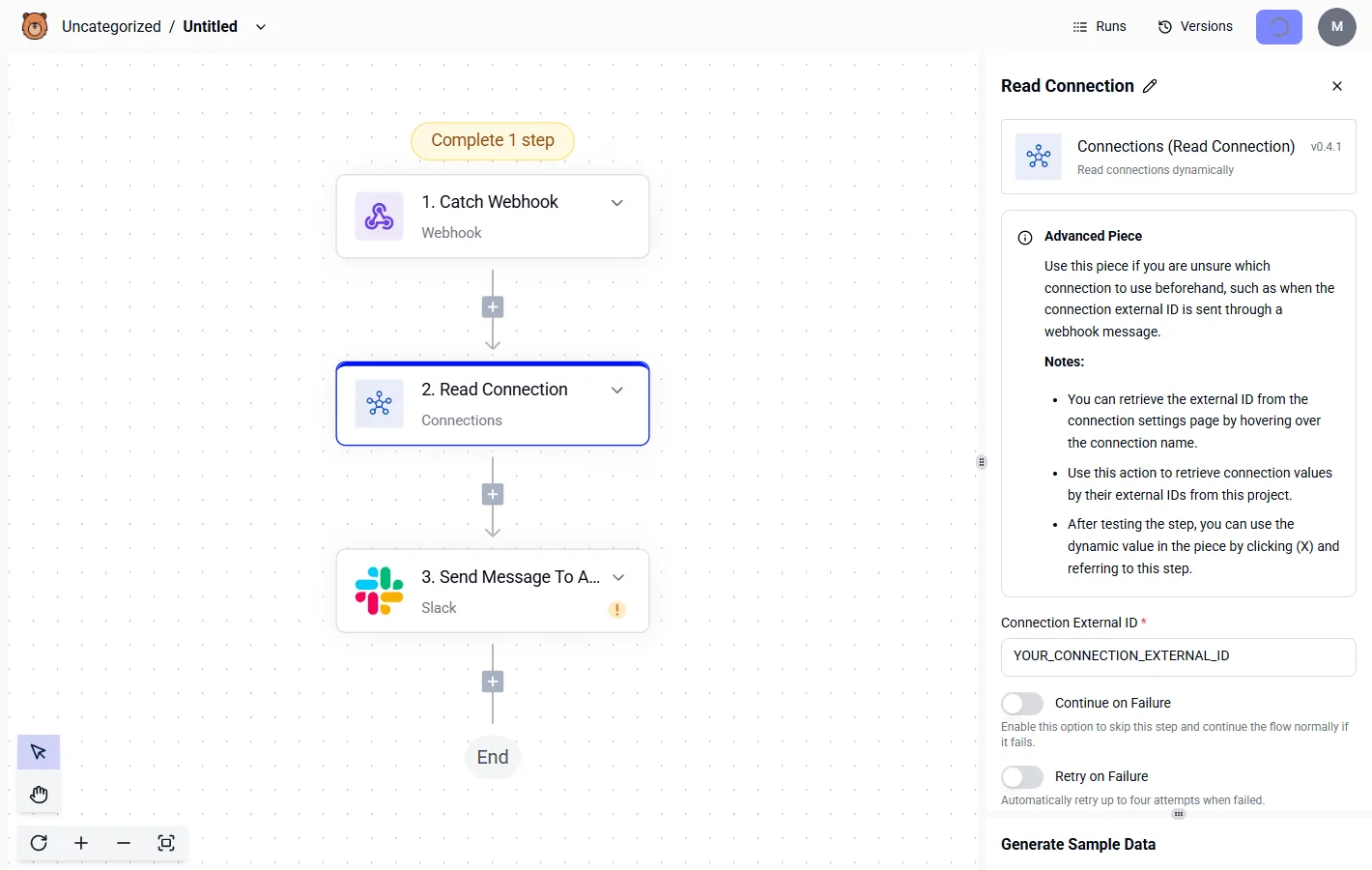
This architectural shift ensures that as your automation needs grow, your communication costs remain flat.
The platform is built on an Open Ecosystem (MIT Licensed), which provides the transparency required for teams to audit their own automation logic without being locked into proprietary vendor limits.
For organizations with strict data residency requirements, Activepieces offers a self-hosted edition that includes Enterprise-grade features like SSO, SCIM, and RBAC as standard.
This allows companies like MoneyGram and Moneypenny to automate sensitive financial workflows while keeping the data entirely within their own private cloud infrastructure.
By using Activepieces to handle multi-step workflows, you avoid the "Standard run" thresholds that Slack uses to force upgrades to Business+ and Enterprise tiers. A single credit in Activepieces covers an entire flow, regardless of how many AI steps or database lookups it performs.
This makes it the ideal orchestration layer for teams using high-reasoning models like Claude Opus 5.5 or Gemini 3.1 Pro, as it centralizes the computational cost and security oversight into one manageable spoke outside of the Slack billing environment.
Frequently asked questions about Slack pricing?
Slack’s billing structure scales directly with your organization’s headcount. Costs fluctuate based on active participation rather than static infrastructure. This per-seat model requires careful management of user accounts to prevent unexpected budget spikes during rapid hiring phases.
Does Slack offer a discount for non-profits?
Eligible non-profit organizations can access significant cost reductions through the Slack for Charities program. This program typically provides the Pro plan at no cost for small teams and offers a deep percentage discount for larger institutions or those requiring the Business+ tier.
To qualify, an entity must hold valid charitable status in its respective country and pass a verification process conducted by a third-party partner. This ensures that subsidized rates are reserved for organizations meeting specific social impact criteria.
Can I pay for only a few users on a Pro plan?
Every member added to a workspace requires a paid seat. You can't selectively upgrade specific individuals while leaving others on a restricted tier. If a workspace is upgraded to a Pro or Business+ plan, the billing reflects the total number of active members.

You can't bypass the per-user fee for employees who only use the platform occasionally.
This all-or-nothing upgrade path ensures that every user has access to the same retention settings and integration capabilities, preventing the data silos that would occur if different users operated under different compliance rules.
What happens if I add users mid-billing cycle?
Slack utilizes a "Fair Billing Policy" to ensure you only pay for the time a user actually occupies a seat.
This prevents overpayment for employees who join late in the month. When a new member is invited, Slack calculates the remaining time in your current billing period and issues a pro-rated charge for that specific duration.
If a user is deactivated, the platform credits the unused portion of their seat back to your account. Your next invoice is automatically reduced by the value of that vacated time.
Is there a limit on the number of Slack channels?
There is no fixed ceiling on the total number of public or private channels a workspace can create. You're free to segment communication by project, department, or client without technical restriction.
While the quantity of channels is unlimited, the manageability of those channels becomes a primary driver for upgrading to the Enterprise Grid tier.
This tier provides administrative tools to govern channel creation across multiple interconnected workspaces. Without these administrative controls, a high volume of channels can lead to workspace sprawl, making it difficult for compliance officers to track where sensitive data is being discussed.
Related reading
References
Running the numbers
See what the same workload costs here.
Free forever plan, and every paid plan self-hosts at no extra cost.
See pricing Talk to sales