HubSpot Twilio Integration for SMS Workflows, No Code

Nov 18, 202614 min read
A HubSpot–Twilio integration is a workflow that answers an event in HubSpot with a Twilio action, usually a text message, and it can be built in a automation tool such as Activepieces or coded by hand.
The event might be a new contact or a changed deal.
The fastest no-code route is to build that one workflow and prove it on a real contact. Checked 18 November 2026, the result is a working SMS workflow in about 20 minutes, which means teams can validate SMS suitability without consuming a full development day.
Building your HubSpot Twilio integration
What people automate between HubSpot and Twilio
Something happens to a contact or deal, and a person gets a text. Every useful job has that shape. Examples are a welcome message after a form submission, a reminder when a deal reaches a meeting stage, and a nudge when a lead goes quiet.
HubSpot and Twilio triggers and actions available
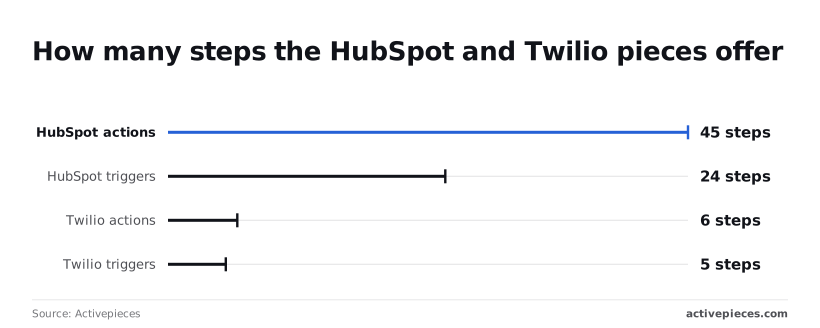
Read the catalogue before you plan, because it decides what's possible. HubSpot has 24 triggers and 45 actions and is the event source; Twilio has 5 triggers and 6 actions and is the message sender.
According to the integration catalogue, HubSpot's 24 triggers mean the CRM side is rarely your limit.
Twilio's 5 triggers and 6 actions, according to the same catalogue, are a small surface: plan around sending messages, not elaborate telephony logic.
What you need before you build
You need a HubSpot account with at least one contact you can edit, and a Twilio account with a number able to send texts.
Use your own phone number as the test contact, so you can see the message arrive.
- Pick the HubSpot trigger that matches your event, such as a new or updated contact.
- Add the Twilio send-message action as the next step.
- Map the contact's phone number into the recipient and write a short message body using the contact's first name.
- Trigger it with your own contact record and confirm the text lands on your phone.
Everything below works on Activepieces' free plan. Start without code or a credit card.
Five HubSpot and Twilio Workflows Worth Building
Five flows cover most of what this pairing does: a welcome text, a rep alert, inbound replies logged to the CRM, reminders, and an HTTP fallback for anything unlisted.
Each row is one trigger, one action and at most one filter.
| Trigger | Twilio action | Optional filter | Job done |
|---|---|---|---|
| "New Contact" | Send SMS | Phone number present | Welcome text |
| "New Form Submission" | Send SMS | Specific form only | Confirms the enquiry |
| "Updated Deal Stage" | Send SMS | Stage equals one value | Alerts the sales rep |
| "New Ticket" | Send SMS | Priority is high | Confirms the ticket and next contact time |
| Twilio's incoming-message trigger | HubSpot create or update step | Known sender only | Logs the reply on the record |
Prices and plan limits checked against activepieces.com and activepieces.com on November 18, 2026.
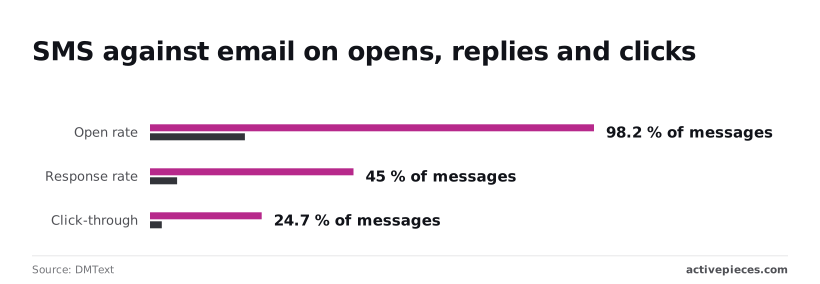
SMS is worth the effort: DMText's benchmarks put SMS opens at 98.2% against 21% for email, so the welcome text is almost certain to be read. Filter out empty phone numbers first, or the Twilio step fails.

HubSpot deal stage SMS alerts for reps
Within a week reps mute the number, because "Updated Deal Stage" fires on every move and each drag on the board sends a text. Filter to one stage. Map the rep's mobile number from the deal owner, not a hardcoded value.
Logging Twilio SMS replies and reminders in HubSpot
45% response rate for SMS against 6% for email: that, from the same benchmarks, is why replies matter, so the gap makes SMS essential for engagement-driven outcomes. That reply needs a home on the contact record.
Match on phone number, and skip unknown senders rather than creating junk contacts.
For reminders, the action is the same Send SMS on a different event.
Click-through is 24.7% for SMS against 2.6% for email, so a link to reschedule inside the text is used, not ignored. These are vendor benchmarks, so treat them as direction, not a promise.
Gaps in the Twilio catalogue
In the step catalogue, HubSpot has 45 actions and 24 triggers, while Twilio has 6 actions and 5 triggers.
Where nothing fits, such as a delivery-status callback, call Twilio's API with an HTTP request step, or point a Twilio webhook at a catch-style trigger.
Building the Welcome SMS Workflow Step by Step
You get from two empty connections to a published welcome text in four stages, and none of them needs more than one trigger and one send action.
Stage 1: connect both accounts
Create the HubSpot connection first, authorising it against the account that owns the contacts you want to message. Then add Twilio using your Account SID and Auth Token from the Twilio console.
Check that the Twilio number you plan to send from can send SMS on that account. A number that can't is the most common reason a flow delivers nothing.
Stage 2: set the HubSpot trigger and load sample data
Pick the HubSpot trigger that fires when a contact is created, and select your HubSpot connection.
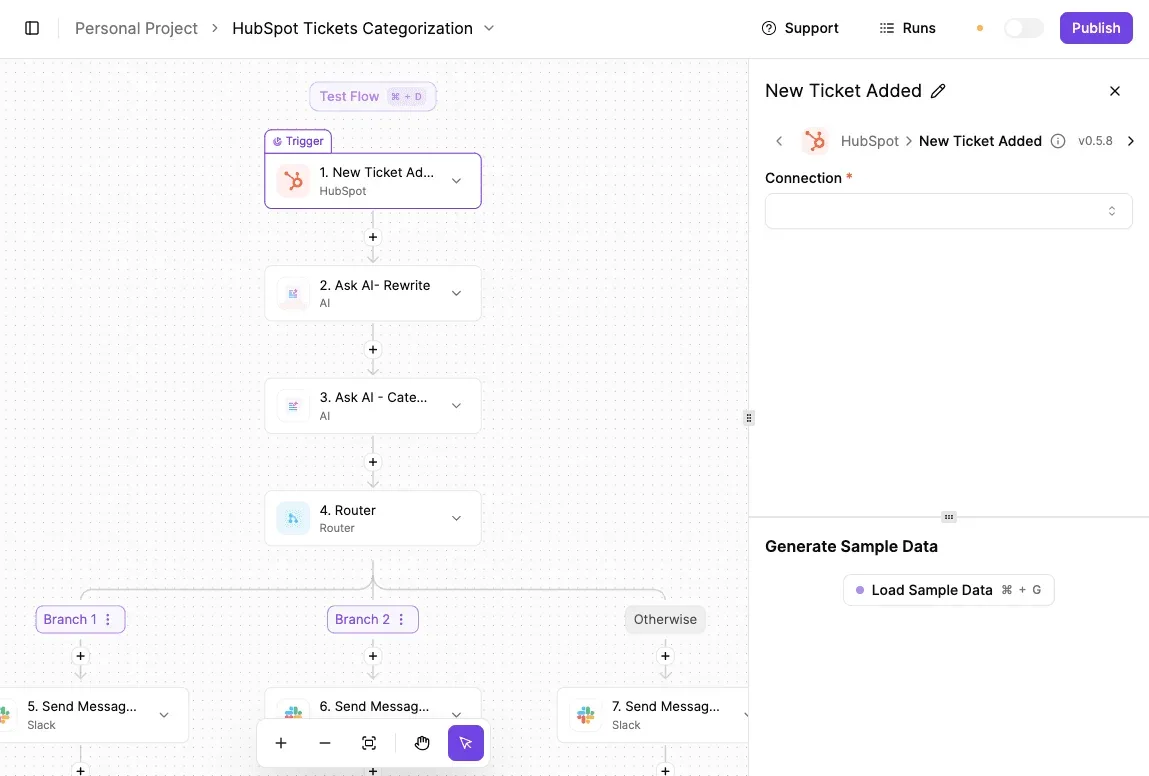
Look at the ticket-categorizing flow below for the layout you'll work in: a HubSpot trigger as step one, later steps stacked beneath it, and a configuration panel on the right with a Load Sample Data button.
You can also skip the panel entirely. Some builders have a built-in chat where you describe the job, a new HubSpot contact followed by a Twilio welcome text, and it builds and publishes the same flow you would have assembled by hand.
Because it's an ordinary flow, it carries the same access controls, audit logs and run traces as one built in the editor, so each send leaves a trace anyone on the team can read, with no certification needed to follow it.
You don't hire for this, you describe it, then open the published flow in your account and compare its run trace with what your test contact received. MoneyGram, Moneypenny, Alan and FundingSocieties run a platform like this in production.
Load sample data before you add anything else. It pulls a real contact record, which shows you exactly which property names the later steps can reference.
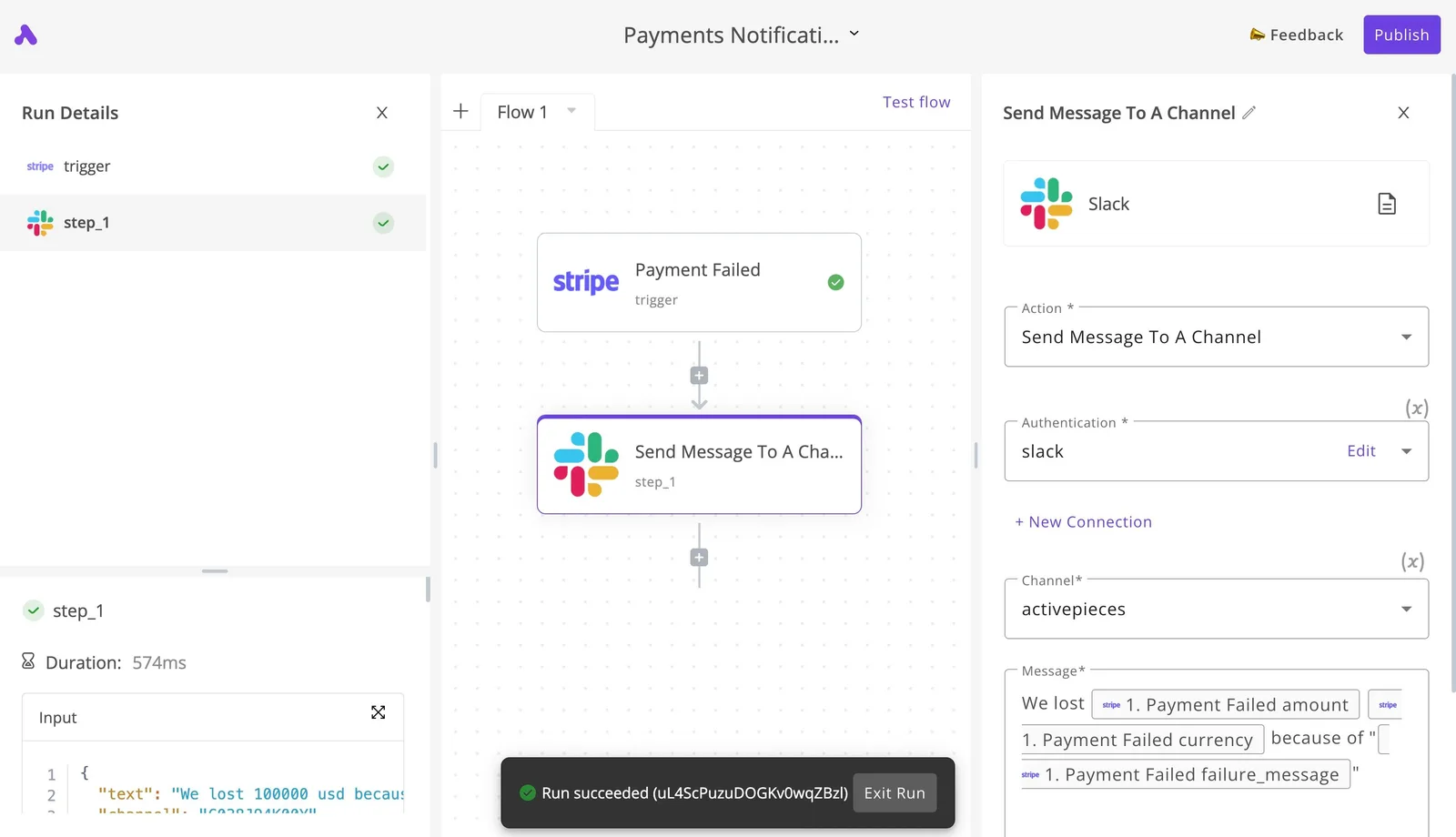
Add the Twilio Send SMS action beneath the trigger. Three mappings decide whether it works:
- Set the recipient to the contact's phone property from the trigger output. Twilio expects international format, so a number stored without a country code will fail.
- Set the sender to the Twilio number you checked in Stage 1.
- Write your welcome text as the message body, with the contact's first name inserted from the trigger data.
Before the send step, add a condition that continues only when the phone property exists. Without it, every contact created without a number produces a failed run, and those failures bury the real ones.
Stage 4: test with a real number, then publish
Create a test contact in HubSpot using your own mobile number, then run the flow against it.
Check three things: the text arrives, the name in the body is filled in, and the sender is the number you chose. Then create a second contact with no phone number and confirm the filter stops the run before the send.
Publish only after both tests behave.
Easier to see it running than to read about it: set it up free, no card.
Limits, costs and errors in HubSpot Twilio connections
When a HubSpot-to-Twilio workflow fails, the cause is usually on a short list: permissions, number format, sender status, rate ceilings, and consent. Figures below were checked on 2026-11-18.
If HubSpot returns a 401 or 403, the connection was almost always authorised without the scope the trigger or action needs.
Reading contacts and writing back a property are separate scopes, so a workflow that fires but can't log the send is missing the write one. Reconnect with the scope added; don't widen to every scope.
Phone number format and Twilio trial limits
Type a phone number as "(555) 010-0199" and the first send fails. Twilio expects E.164, a plus sign, country code, then digits with no spaces, while HubSpot phone fields hold whatever a person typed.

Normalise in the workflow before the message step.
A Twilio trial account also sends only to verified numbers, so a contact you never verified will fail while your own phone works.
Rate limits, retries and duplicate messages
On Free and Starter, a bulk enrolment hits the ceiling after a few dozen contacts: Scopious Digital lists 100 requests per 10 seconds, meaning bulk operations must be serialized or limited to small batches.
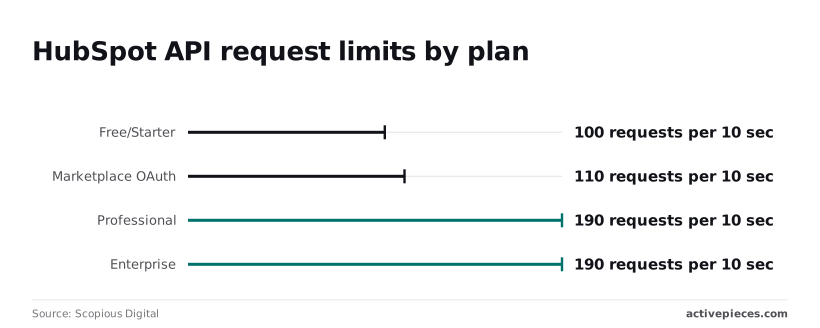
It gives 110 for marketplace OAuth apps, and 190 for both Professional and Enterprise, which roughly doubles throughput but doesn't remove the need to pace.
Before sizing a launch, confirm against HubSpot's API usage documentation, because the Scopious figures are a third-party summary, not HubSpot's own page.
The duplicate-send risk follows: if a retry replays a step whose first attempt actually succeeded, the contact gets two texts. Make the retry check for a logged send first.
Take the current rate for your destination country from Twilio's pricing page, and remember that carrier surcharges are billed on top of the base rate, so a budget built from the headline price alone will run low.

Compliance and opt-in rules for texting
Text a contact who never opted in and you have a legal problem, not a technical one. Sending from an unregistered sender also gets messages filtered or blocked by carriers. Gate the message action on a consent property in HubSpot.
Text a contact who never opted in and you have a legal problem, not a technical one.
| Symptom | Cause | Fix | Source doc |
|---|---|---|---|
| 429 responses from HubSpot | Rate limit exceeded | Pace or batch requests | HubSpot API usage guidelines |
| 403 on read or write | Missing scope | Reconnect with the needed scope | HubSpot OAuth scopes docs |
| Send fails to unverified number | Trial restriction | Verify the number or upgrade | Twilio trial account docs |
| Invalid "To" number | Non-E.164 format | Normalise before sending | Twilio phone number format docs |
| Delivered by Twilio, blocked by carrier | Unregistered sender | Complete sender registration | Twilio messaging registration docs |
| Message sent to opted-out contact | No consent check | Gate on a consent property | Twilio messaging policy |
| Contact receives two texts | Duplicate retry | Check for logged send first | Twilio messaging API docs |
Choosing Activepieces or Another Tool, Then Starting Monday
When to use another tool or self-host
If your team already runs HubSpot and Twilio through another tool, that is fine; Activepieces fits when you want to own the workflow, host it yourself from an MIT-licensed core, or stop counting steps, since a run costs 1 credit however many steps it has and every plan, including free, allows unlimited flows.
Other automation platforms, such as Zapier, Make and n8n, also connect these two apps, so the pairing isn't the deciding factor.
Open the HubSpot trigger and the Twilio action you need and check that each one exists as a named step, with the fields you plan to map. If it does, the tool works for this job.
Activepieces, MIT-licensed at the core, fits for these reasons:
- It's open source, so you can read how an integration behaves instead of guessing from a description.
- It's self-hostable, so contact data and message logic can stay on infrastructure you control, which matters if your compliance team asks where phone numbers are processed.
- It places no limit on the number of steps in a flow, according to its knowledge docs, so adding a filter, a delay or a second check doesn't force a plan change.
Another tool fits better when your team has no one to run a server and no appetite for one, or when a non-technical colleague already maintains flows elsewhere.
I would also stay put if the flow you need depends on a step Activepieces doesn't offer; its 750 integrations are counted from the open source monorepo, so you can check the HubSpot and Twilio ones before committing.
Keep the first week narrow. One trigger, one message, one contact you control.
- Create the flow in Activepieces and pick the HubSpot event that matches the moment you want to react to. Use only a trigger the HubSpot integration lists.
- Add the Twilio message action and map the recipient number and message body from the trigger's fields. Check that the phone field you map is the one actually populated on your test contact.
- Create or edit a HubSpot contact you own, with your own phone number, so the trigger fires for real.
- Run the real-contact test against every row of your checklist from the previous section. Fix what fails before touching anything else.
- Leave it running on that one contact through the week and read the run history each day.
- Only then widen it: more contacts, then a second trigger, one change at a time.
Frequently asked questions
Does HubSpot have a native Twilio integration?
Treat it as something you build, not something you switch on. The reliable pattern is a HubSpot event, such as a new contact or a form submission, wired to a Twilio send-message action.
Check HubSpot's marketplace for a Twilio listing on your plan, but a listing's existence tells you nothing about which triggers it covers. Read what it fires on before you rely on it.
Can I send WhatsApp messages from HubSpot through Twilio?
Yes, through Twilio's messaging API, but it needs more setup than SMS. WhatsApp sending requires a WhatsApp-enabled sender registered with Twilio, and business-initiated messages generally have to use pre-approved templates.
Look at whether the Twilio action in your builder accepts a WhatsApp-formatted sender and recipient. If it only handles plain SMS, a generic HTTP request step calling Twilio's Messages endpoint can do the job. Prove the plain SMS flow first, then change the channel.
Can I log incoming Twilio texts in HubSpot without code?
Usually, yes, as long as your builder has the right integrations. You need an incoming-message trigger on the Twilio side, a lookup that matches the sender's phone number to a HubSpot contact, and an action that writes a note or activity onto that record.
Where it breaks is the match. If your contacts store phone numbers in inconsistent formats, the lookup will miss them, so normalize the number before searching. Confirm the HubSpot side actually exposes a note-creating action before you promise the team this feature.
Can I self-host the workflow so contact data stays on my servers?
You can self-host the automation layer, provided the tool you build in is open source and has a self-hosted edition. That keeps the workflow runner and its run logs on your own infrastructure. It doesn't pull the data out of HubSpot or Twilio, though.
Contact records still live in HubSpot, and message content still passes through Twilio. Self-hosting narrows where the workflow's copies of that data sit. It doesn't make the whole path private.
Do you need a paid Twilio account to test the workflow? No. A Twilio trial account is enough for a first test, with restrictions: it can only message numbers you have verified, and trial messages carry a notice in the text.
Since the test is "send a text to my own phone," those limits cost you nothing. Upgrade when you want to message real contacts who haven't been verified.