
Jamf Pricing: Plans and Costs Per Device (2026)

Nov 24, 202615 min read
Jamf is Apple device management software, and its pricing is per device, split across plans by platform and company size, which makes it easy to budget for IT teams, including those who already tie device onboarding into broader Activepieces workflows.
Jamf pricing is the per-device fee organizations pay to manage Apple devices with Jamf, set by the plan chosen, the number of devices counted, and any add-ons included on top of the base rate.
The plan you pick sets the rate, but the device count and add-ons set the invoice. The table reflects Jamf's own pages as of 24 November 2026.
Jamf pricing in 2026, plan by plan
Every current plan in one table
Read the billing-unit and limits columns first: they decide whether a plan is cheap for your fleet or only cheap on the page. The table below lines up each plan by what you pay for, what the unit is, and what the plan covers.
| Plan | Price | Billing unit | Inclusions | Usage limits and minimums |
|---|---|---|---|---|
| Jamf Now | Published on Jamf's pricing page | Per managed device | Basic Apple device management aimed at small teams | Sized for small fleets; confirm the device cap before you commit |
| Jamf for Mac | Published on Jamf's pricing page | Per managed Mac | Management of Mac computers | Confirm the minimum device count on the plan page |
| Jamf for Mobile | Published on Jamf's pricing page | Per managed iPhone or iPad | Management of iPhone and iPad | Confirm the minimum device count on the plan page |
| Larger or custom deployments | Contact sales | Set in the quote | Scope agreed with Jamf's sales team | Set in the quote |
Because each platform is its own line, a mixed fleet pays on two lines, and anyone budgeting from a single headline rate will undercount.
You can build a first estimate without talking to anyone, because the three named plans show a price publicly. Anything beyond them is quote-only, and the quote is where add-ons and minimums get written in.
Treat the published rate as the floor of your estimate, and ask for the quote in writing so you can compare it with other tools on the same device count.
The next section covers how that count gets decided.
If you are running this arithmetic for your own team, see what the same workload costs on Activepieces.
Jamf plan costs at realistic fleet sizes
Once the count is settled, Jamf's list cost calculation includes:
- Annual list cost is $150 per Mac per year or $69 per mobile device per year
- The same fleet size can differ by more than double depending on what you enrol
- Jamf's chart shows annual list cost for 25, 100 and 500 devices on each line
- Device mix moves the invoice as much as headcount does
Anything you layer on comes on top of these totals, because the chart prices only those two lines. Jamf hasn't published a figure I can use for add-ons, so none appears here.
At 25 devices, Macs come to $3,750 a year and iPhones or iPads to $1,725. That's small enough to absorb as overhead, so the risk isn't the total but treating it as a floor.
Any add-on priced per device or as a flat fee is a larger share of the bill at this size.
100 devices
Put 100 Macs at $15,000 a year next to 100 mobile devices at $6,900 and the gap is $8,100, so the first question for a client is how many of their devices are Macs.

If you're billing clients back, an all-Mac fleet and an all-iPad fleet shouldn't share one flat rate, or the iPad client quietly subsidizes the Mac client.
500 devices and mixed fleets
Scale up to 500 and Macs run $75,000 a year while mobile devices run $34,500, so your total fleet costs $109,500 annually.
If the fleet is mixed, you simply add the two lines. For example, 50 Macs and 50 mobile devices come to $7,500 plus $3,450, or $10,950, which means the costs scale linearly with fleet size.
Price each device class on its own line and check that the quote does the same. A single blended per-device rate hides which devices are driving the cost, and at this size a few Macs counted as mobile devices would be a visible error.
Hidden costs and limits beyond headline pricing
On a 100-Mac fleet, five cost items outside the headline rate more than double the licence line, which is why the per-device rate alone misprices the contract:
- A 25-device minimum
- Separately priced security add-ons
- Onboarding and support tiers
- Admin time of 6-15 hours a week on manual tasks
- True-up when device count changes
To see how far those items push the total from the licence line, look at the first-year bill below.
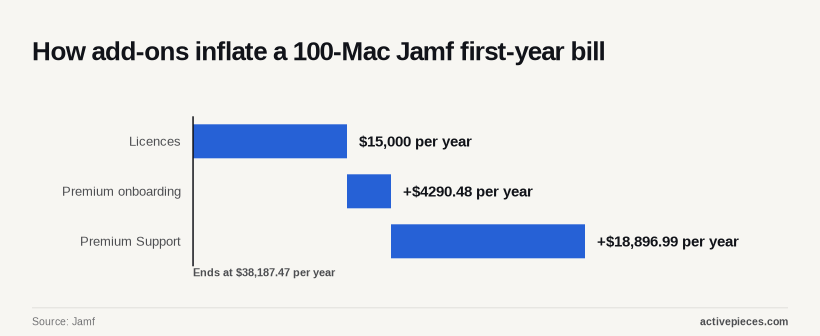
Because of the 25-device minimum, a very small fleet pays for seats it doesn't use. At 100 Macs the Jamf pricing page rate works out to $15,000 a year in licences, so that's the base the rest is added to.
If a client needs security add-ons, the base rate doesn't cover them, since they are quoted on top of the licence. Price them as a line item, not a footnote.
On the HSSL reseller listing:
- macOS premium onboarding costs $4,290.48
- iOS onboarding costs $2,145.24, half as much
- Support Enterprise costs $60,524, and the tier you pick can outweigh the software
- Adding licences, onboarding and Support Plus gives a first-year total of $38,187.47 according to figures from Howard Computers
- Year two drops the onboarding fee but keeps the support charge


Jamf admin time costs and renewal true-ups
At 6-15 hours a week, manual tasks cost 312-780 hours a year of someone's time. If an agency bills that time to nobody, the shared account is quietly subsidizing the client.
True-up works the same way: Jamf bills a device count that grows mid-term at renewal, so budget for the count you expect to have, not the one you have today.
Jamf compared with the closest alternatives on price
Per device, Jamf usually costs more than Mosyle, and more than Intune when Intune is already bundled into your Microsoft licence. The extra spend only pays off if you need its Apple depth.
Of these tools, only Intune is cross-platform, and the Apple-only tools differ mainly in how they package price; the table below is a snapshot as of November 2026. Confirm current rates on each vendor's page before they go on a client invoice.
| Tool | Published per-device price | Free tier or trial | Minimums | Platforms | Bundled or extra |
|---|---|---|---|---|---|
| Jamf | Listed per device, varies by plan | Trial offered | Varies by plan | Apple only | Add-ons extra |
| Kandji (now Iru) | Quote-based | Demo or trial | Set in quote | Apple only | Modules priced in quote |
| Mosyle | Listed per device, tiered | Trial offered | Varies by plan | Apple only | Tiers include more features |
| Addigy | Listed per device | Trial offered | Varies by plan | Apple only | Priced per device |
| Intune | $8 per user per month standalone | Trial offered | None for standalone | Cross-platform | Included in Microsoft 365 E3, E5 and Business Premium |
You pay Jamf for depth: Apple-specific workflows, and add-ons layered on the base plan. Every add-on is a line the client sees, so quote the bundle, not the base rate.
When Intune or cheaper Jamf alternatives are enough
Only 13% of enterprise endpoints are Apple hardware, according to MacStadium. That means most fleets are mixed, and an Apple-only tool is a second console beside whatever already manages the Windows machines.

If a client already pays for Microsoft 365 E3, Intune costs them nothing extra, and a handful of Macs rarely justifies a separate Jamf contract. Mosyle is the sensible step up when Macs outnumber everything else but the workflows are simple.
Otherwise, a Jamf line on a shared account is quietly subsidized by clients who only needed basic enrollment.
Worth checking against a plan that does not meter every step: one credit covers a whole run on Activepieces.
Choosing a Jamf plan without overbuying
Buy the plan your team can actually operate, not the one your device count suggests, because every tier above that is cost someone on a shared account ends up carrying.
Fleet size is a rough proxy. What decides the tier is who administers it and what an auditor will ask for.
Buy the plan your team can actually operate, not the one your device count suggests, because every tier above that is cost someone on a shared account ends up carrying.
Read the last column as a ceiling, not a target. The table maps each fleet band to the compliance load it usually carries, whether someone owns Apple administration full time, and the purchase that fits.
| Fleet size | Compliance needs | Dedicated Apple admin | Plan or add-on to buy |
|---|---|---|---|
| Under 25 | None or light | No | Entry plan; no add-ons |
| 25-100 | Light, such as encryption and passcode rules | No | Entry or mid plan; one add-on only if a client contract names it |
| 100-500 | Mixed, some audited | Often yes | Mid plan; add compliance or security tooling only for audited clients |
| 500+ | Regulated or contractual | Yes | Higher plan, with each add-on tied to a written requirement |
Without a dedicated admin, advanced features go unused, so you pay for capability nobody switches on.
Ask which features sit in the plan and which are separate line items, because that boundary moves the bill more than the headline rate.
Ask how devices are counted, including whether retired or unassigned hardware stays on the tally. Ask what happens to price if you add a client mid-term, and get every answer in the quote itself.
Negotiating term and device count
Start from the invoice you can defend to each client, then work backward. Commit to the device count you can currently bill for, not the one you hope to reach, and ask for a clear way to adjust it at renewal.
A longer term is worth trading only for something written down: a price hold on add-ons, or a right to drop one you never deployed.
Automating Jamf admin work with Activepieces
Count Activepieces as an offset to labor, not a discount on licenses: it won't lower your Jamf bill, it only trims the staff time spent around the subscription.
That distinction matters when you price the bundle, because a tool that saves an hour of ticket handling is a different line item from a price hold on an add-on, and it shouldn't be used to justify a bigger plan.
As a workflow automation tool, Activepieces sits between the systems where requests start and the Jamf API where devices get assigned or retired.
Its published pricing page lists 1 credit per flow run, any number of steps, so a ten-step onboarding flow costs what a two-step shortcut does; Zapier's pricing page bills per task and Make's pricing page per module, so the same ten steps add up to more on those meters.
What to take from it is that the people asking never touch Jamf, and the flow does the repeatable part.
(diagram)
Once the flow is in place, the work that used to be someone's afternoon becomes a trigger, which is why the two cases below are the ones worth checking first.
Automating Jamf device onboarding and offboarding
When a new-hire record lands in the HR system, it can open a ticket and post to a chat channel, and the flow can then assign a device in Jamf. An exit record can do the reverse and mark the device for retirement.
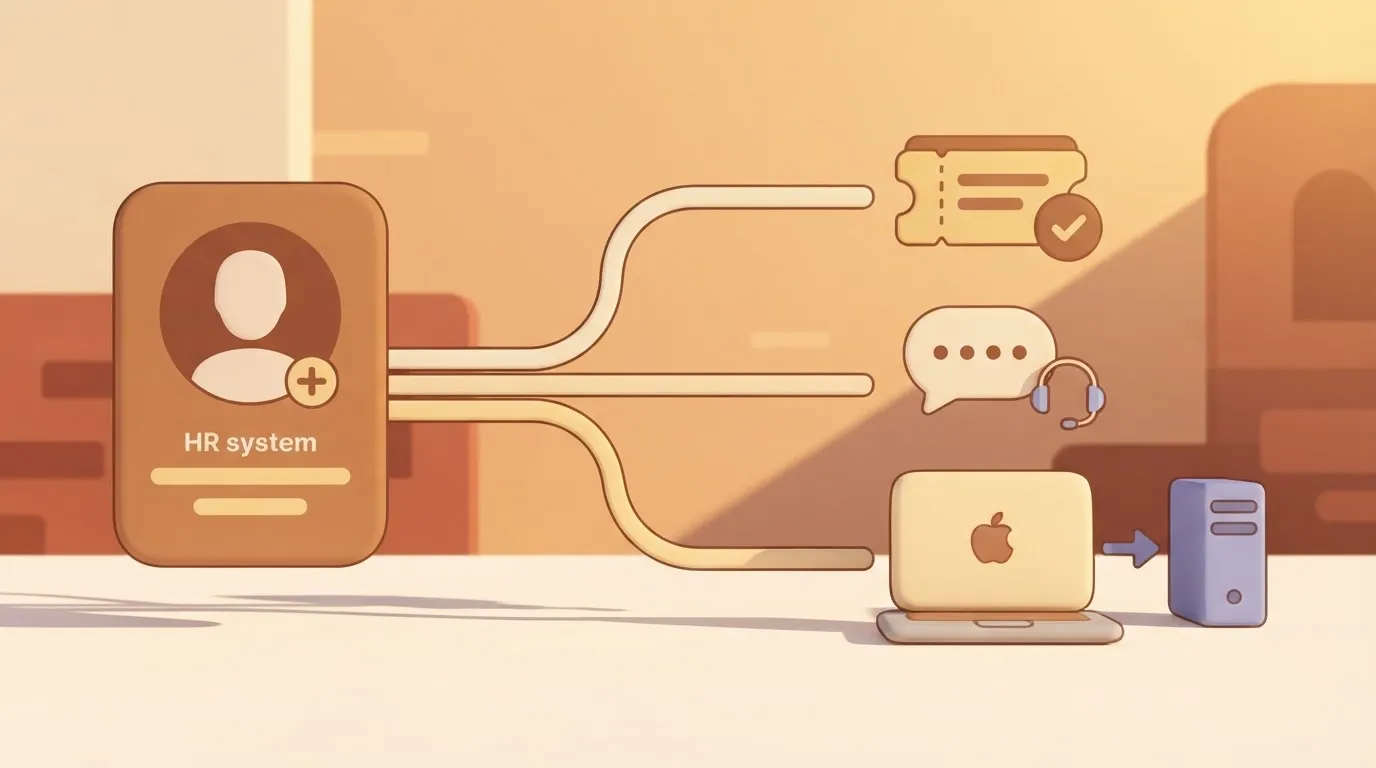
When retirement waits on someone remembering, devices stay counted after they've left, and you keep paying for them. That cost consequence is quieter than the labor one. Automated offboarding keeps your device count honest, which is the number the whole quote rests on.
You may not need any of this on a small fleet. If you handle a handful of changes a month, a manual step costs less than building and maintaining a flow, and someone has to own that flow.
What it needs from Jamf's API
Before you build anything, check Jamf's API documentation for the authentication method and the permissions each call requires, because the flow can only do what its Jamf credentials allow.
Give the flow its own API account scoped to assigning and retiring devices, not a shared admin login. A shared login hides who changed what, and it lets one team's automation run with another team's access.
Confirm too that API access is included in your plan rather than assuming it, since that's exactly the kind of thing the price comparison should surface.
A Monday-morning checklist for pricing Jamf
Run the API check as part of five steps, in this order, and you reach the Jamf call holding a bundle price rather than a headline rate. The list below is the whole job, and each step feeds the next:
- Count devices by type: Macs, iPhones, iPads and Apple TVs separately, because a single blended total hides which category is driving the invoice.
- Recheck Jamf's pricing page for changes since 24 November 2026, so you quote against today's published terms and not a screenshot someone saved.
- List the add-ons you need, including API access, security and any extra management features, so nothing surfaces as a surprise line later.
- Request two or three competitor quotes using the same device counts and add-on list, or the comparison tells you nothing.
- Book the Jamf sales call last, with your counts, your add-ons and the competitor quotes in hand.
Booking last matters because the call is where you have the most leverage, and you only have it once you can show an equivalent bundle priced elsewhere.
Build one yourself rather than trusting any single page. Put each plan Jamf lists on its own row, then use columns for what the plan includes, which of your add-ons it covers, and how it counts devices.
Do the same for each competitor. Any add-on you must buy separately becomes a visible cost on that row, not something a cheaper-looking plan quietly pushes onto you.
Treat any plan with a visible rate as a starting point, and any plan marked "contact sales" as an unknown to be priced in step four.
Where a number isn't published, ask for it in writing, itemized by plan and add-on. A single bundled figure is how one client's extras end up subsidized by everyone else's.
Frequently asked questions
Does Jamf offer a free trial?
Terms change, so confirm the current offer with a sales rep before you plan around it; Jamf has offered trials for its main products.
Treat the trial as a way to test your own enrollment workflow, not as a price signal. A trial tenant rarely includes the add-ons you'll end up paying for, so it understates the bundle.
Is there a minimum number of devices to buy Jamf?
Minimums can apply, and they vary by plan and by how the quote is built. Ask for the minimum in writing.
If your fleet sits near it, you may pay for devices you don't have, and that cost belongs in your per-device comparison against other tools.
Is Jamf Now still available?
Jamf Now is the entry-level product for small fleets, starting at $4 per device per month.
Check the current catalog directly rather than relying on older pricing pages. If the small-business option has moved, the plan you land on may cost more per device than the headline rate you saw.
Can I pay for Jamf monthly instead of annually?
Annual contracts are the norm for managed-device software, and monthly billing, where offered, usually costs more per device.
Ask for both quotes side by side. If you're billing a client for management, the annual commitment is yours to carry, so price in the risk of a client leaving mid-term.
Does Jamf charge for devices I have retired?
Billing generally follows the devices counted in your account, so a retired device that is still enrolled can keep costing you.
Remove devices from management when they leave the fleet, and ask how and when the count is reconciled. Otherwise, one client's stale records quietly raise the bill everyone else shares.
Related reading
References
Running the numbers
See what the same workload costs here.
Free forever plan, and every paid plan self-hosts at no extra cost.
See pricing Talk to sales