
Klaviyo API: Keys, Rate Limits and Error Codes (2026)

Nov 22, 202614 min read
Klaviyo's API is a REST API that speaks JSON:API, authenticated with a private API key, which makes it easy to call from scripts or from automation tools like Activepieces, and covers:
- profiles
- events
- lists
- campaigns
- flows
- catalogs
Every request must also name a revision in a header, so a call that works today stays on a dated contract rather than whatever the server ships next. Docs: developers.klaviyo.com, last checked 2026-11-22.
Klaviyo API basics and access
What the API lets you do
- Profiles: create, update and look up the people you market to
- Events: record what a profile did, such as a purchase or a page view
- Lists: add and remove profiles from static groups
- Campaigns: build and send one-off messages
- Flows: read and manage automated sequences triggered by events
- Catalogs: sync products so messages can reference them
Private keys, public keys and OAuth apps
Give a private key only the objects the job needs. It lives on your server and carries scopes you choose when you create it. A public key (the short site ID) identifies your account for client-side tracking and can't read your data.

If you're building something other Klaviyo accounts install, you need an OAuth app. If the integration is only yours, a private key is the simpler fit. A leaked private key is a credential leak, so keep it out of front-end code.
I haven't confirmed a plan-by-plan breakdown, so I'm not going to list one. The practical test is in your account: if you can create a private key under your account's API key settings, you have access.
Everything below works on Activepieces' free plan. Start without code or a credit card.
Klaviyo API authentication in four steps
Create a scoped private key, send it with the revision header, keep the public company ID out of server calls, and switch to OAuth once you serve other people's accounts. The developer docs cover each step.
Create a scoped private key
Generate the key in your Klaviyo account settings and grant it only the scopes the job needs. A key that reads profiles and writes events can't delete lists, so a leaked key or a buggy loop has a limited blast radius.
When a call returns a permissions error, check the key's scopes first.
Send the Authorization and revision headers
Send two headers on every request: Authorization: Klaviyo-API-Key your-private-key and a revision header that pins the API version by date.
Leave the revision off and Klaviyo rejects the request, which is the usual first failure in hand-written clients.
Put the public company ID, sometimes called the site ID, in a server-side call and you get nowhere. It identifies your account for browser and mobile tracking. It's not a secret and it's not authentication.
Klaviyo API OAuth for multi-account apps
If your app connects to many customers' Klaviyo accounts, don't collect their private keys. Register an OAuth app and let each customer grant access through the consent flow.
Each customer can revoke access, and you hold tokens that expire rather than keys that never do.
A minimal working Klaviyo API request
Read profiles with curl
To read profiles, a GET to the profiles endpoint needs four things:
- the URL
- an
Authorizationheader - a
revisionheader - an
Acceptheader
With a private key, the authorization value is Klaviyo-API-Key plus your key. With OAuth, it's Bearer plus the access token. Mixing the two prefixes is a common way to get a 401 on a key that's perfectly valid.
The response is JSON:API shaped: a data array, each item carrying a type, an id and an attributes object. If data is empty, the call worked and the account has no profiles that match.
Create an event with a JSON body
Once you POST, the request needs a body, and that body must follow JSON:API: a top-level data object, a type naming the resource, and an attributes object holding the payload.
Add a Content-Type header matching the Accept value. Without it, the server may reject a body that is otherwise correct.
For an event, attributes carries the metric, the profile it belongs to and the event properties. Nest each in its own object rather than flat.
Flattening them is the usual mistake and it returns a 400 naming the missing field. Read the error's source pointer, because it tells you which path in the body to fix.
Don't read a blank response here as a dropped write. A successful create returns an empty-bodied acknowledgement rather than the object you sent.
Pinning and upgrading the Klaviyo API revision
Pin the revision header explicitly in every request, and keep it in one place in your code or config.
Don't treat a pinned date as permanent, because Klaviyo retires old revisions after a deprecation window. Check the changelog before you move, change the date in a test environment first, and compare the responses to your parsing code.
Klaviyo API pricing and rate limits by tier
Does the Klaviyo API charge per call?
If a retry loop runs away, it costs you quota headroom, not money. Klaviyo doesn't bill per API call; your plan is priced by active profiles and sends.
If a retry loop runs away, it costs you quota headroom, not money.
Per Succession Media, the monthly price by profile count is:
| Profiles | Price per month |
|---|---|
| 500 | $20 |
| 1,000 | $30 |
| 5,000 | $100 |
| 10,000 | $150 |
| 25,000 | $400 |
| 50,000 | $720 |
If you sync contacts into Klaviyo from another system, your bill rises through profile count, never through request volume.
Klaviyo API rate limit tiers XS to XL
Stay under the burst and you can still fail on the steady window: every endpoint sits in one tier, and the tier sets both a burst limit per second and a steady limit per minute. Klaviyo's rate-limit docs list them:
| Tier | Burst per second | Steady per minute |
|---|---|---|
| XS | 1 | 15 |
| S | 3 | 60 |
| M | 10 | 150 |
| L | 75 | 700 |
| XL | 350 | 3,500 |
To find which tier an endpoint belongs to, read its reference page. An XS endpoint allows 15 calls a minute, so a loop over 1,000 records on it needs over an hour, and anything that ignores that gets 429s.

Responses carry rate-limit headers showing your limit, what remains in the window, and when it resets. A 429 comes with a Retry-After value.
A fixed sleep that suits an M endpoint wastes minutes on an XL one, and is too short for XS. Back off by the server's number, then retry.
Easier to see it running than to read about it: set it up free, no card.
Common Klaviyo API errors and fixes
Retry only when the server is at fault; every other error repeats identically until you change the request.
| Status | Likely cause | Documented fix | Docs |
|---|---|---|---|
| 400 | Malformed JSON or invalid field values | Validate the body against the endpoint's schema | Errors |
| 401 | Missing, malformed or revoked key | Send a valid key in the Authorization header | Authentication |
| 403 | Key lacks the scope the endpoint needs | Create a key with the required scope | Authentication |
| 404 | Wrong ID or path | Check the resource ID and endpoint path | Errors |
| 409 | Conflict with an existing resource | Look up the existing record and update it | Errors |
| 415 | Wrong content type | Send the JSON:API content type the docs specify | Errors |
| 429 | Burst or steady limit exceeded | Wait as the response says, then retry | Rate limits |
| 5xx | Server-side failure | Retry with backoff | Errors |
Check the revision header first, because a missing one usually surfaces as a 400. The versioning policy explains why.
When you see a 401, Klaviyo doesn't accept the credential at all. A 403 means it accepts the key but the key may not touch that endpoint. Rotating the key won't fix a 403; widen its scope, or use a narrower endpoint.

On a 400 or 415, check three things in order:
- The revision header is present.
- The content type matches what the docs specify.
- The body matches the schema for that revision.
On a 5xx, retry with backoff, and only where a repeat can't create a duplicate. A 409 on the retry can mean the first attempt actually succeeded.
Production limits Klaviyo API users hit at scale
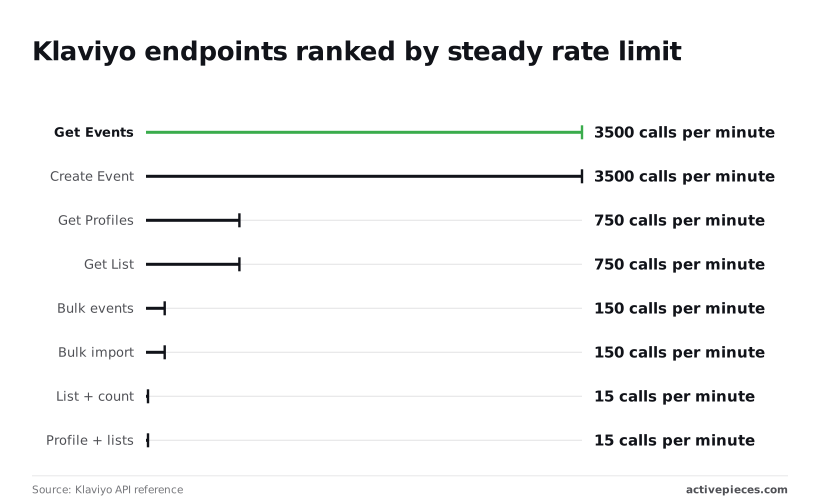
Pass every test against one endpoint and the job can still stall on the next one it touches, because Klaviyo limits each endpoint separately. The endpoint ranking chart shows the spread, and the figures below are from the Klaviyo API reference.
At 3,500 calls per minute each, Get Events and Create Event are plenty for a webhook handler writing one event at a time.
Get Profiles and Get List allow 750, so a sync that reads both on every run uses its budget about four and a half times faster.
Bulk events and bulk import allow only 150 calls per minute, so each call has to carry a full batch.
| Approach | Throughput | Complexity | Behavior on failure |
|---|---|---|---|
| Single calls | One record per call, capped by the per-endpoint rate | Low | A 429 hits one record; retry is simple |
| Bulk jobs | Up to 10,000 profiles per import, 1,000 events per request | Medium | A whole batch can be rejected or partly applied |
| Queued worker | Bulk batches paced to the limit | High | Failed batches retry without losing the rest of the queue |
Pick the row whose failure mode you can actually debug at 2am.
Send 50,000 events one per call at 3,500 per minute and it takes about 15 minutes, so your batch job cannot complete faster than this duration. In 1,000-event batches it's 50 calls, far under the 150-per-minute bulk ceiling.
Bulk imports run asynchronously, so poll the job status rather than assuming success.
When a 429 arrives, wait for the Retry-After value, then add random jitter. Without jitter, parallel workers wake together and trip the limit again.
For pagination, follow the next link in each response instead of computing page numbers. At 750 calls per minute for Get Profiles, a restarted offset scan wastes budget on pages you already read.
Call Klaviyo endpoints without code in Activepieces
For low-volume, event-driven tasks such as adding a profile to a list when a form is submitted, Activepieces fits: a run costs 1 credit however many steps it has, so the free plan's 1,000 credits a month covers 1,000 form submissions.
Anything that needs bulk jobs or tight control over rate limits stays in code.
When a no-code workflow is enough
When a hand-written call sends the wrong revision header or has no plan for a 429, that is the failure this article keeps returning to. In a workflow builder you describe the process, and the platform owns those mechanics instead of your script.

Activepieces has an MIT-licensed core and 750 integrations, each usable as a step in a flow or as a tool for an AI agent, so you pick a step and fill in fields rather than assembling headers yourself.
Check the catalogue for the app you need. If it isn't there, you can generate an integration with AI and add it privately to your own instance, with no vendor release to wait for.
What a typical workflow looks like
Look at the screenshot below for the shape of a typical flow. It's an "Invoice Collection System" with five steps, starting from a Google Sheets "New or Updated Row" trigger and ending in a Router, meaning data undergoes multiple processing stages before routing.

The first step is open, and its panel carries a note that Google can delay the trigger by a few minutes.
Take from it that each step declares its inputs and its own caveats, so a Klaviyo step in the same position would be just as inspectable.
Debugging Klaviyo API workflows and volume limits
When something breaks, you open Runs and read the trace step by step instead of grepping logs. That helps you find the failing step quickly, but it doesn't make a failing call succeed.
The limit is volume. A flow that fires once per form submission is a good fit.
A nightly sync of a whole customer table is not: you can't tune per-endpoint pacing the way code can, so a large burst of runs can still hit Klaviyo's limits, and you'd be debugging that through a builder.
Unsupported Klaviyo API endpoints via HTTP step
When the Klaviyo integration lacks an action you need, the HTTP step lets you call any Klaviyo endpoint directly.
But you're back to hand-building the request, so you must set the revision header yourself and keep it current. A retired revision will fail the same way it does in code, and the trace will show you the error but not the cause.
Use this step sparingly, for a single endpoint, and pin the revision in one place.
Frequently asked questions
Once the revision is pinned, most of what people ask next is settled, and each short answer below was checked against Klaviyo's developer docs on 2026-11-22.
Cost and plan access
Is the Klaviyo API free to use? Klaviyo doesn't bill per API call; the API comes with your account, and your plan is priced on the account itself.
Rate limits still apply, so a bulk job fails on throttling, not on a bill. Checked 2026-11-22.
Can I use the Klaviyo API on a free plan? Yes, a free account can create a private API key and call the API.
Limits tied to the plan still apply, so confirm in your account that the data you need is available before you build on it. Checked 2026-11-22.
Revisions and testing
What happens when a revision is deprecated? A revision is supported for a fixed window, then retired, and calls that still send a retired revision header stop working.
A pinned integration that nobody revisits breaks on a date you could have read in advance. Put the revision in one config value and review it on a schedule. Checked 2026-11-22.
Does Klaviyo have a sandbox or test account? Treat a separate Klaviyo account as your test environment, and don't point test scripts at production lists.
A script with a wrong filter then can't email real subscribers. Verify in the docs whether a dedicated sandbox exists before relying on one. Checked 2026-11-22.
REST or SDK
Should I use the REST API or an official SDK? Use an official SDK if your language has one, because it sends the revision header for you and removes one way to misconfigure calls.
Use plain REST for one-off calls or an unsupported language, and set the header yourself. Checked 2026-11-22.