
LiteLLM Self Hosted: Setup, Costs and Risks (2026)

Oct 28, 202614 min read
Self-hosting LiteLLM means you run its proxy server on your own machine, and you, not a vendor, own its uptime, its database and its keys. The software costs nothing to license.
Everything around it is your job, from the Postgres instance behind it to the Activepieces flows or other automations that may call it.
A self-hosted LiteLLM deployment is the practice of running LiteLLM's open-source proxy, which gives applications one OpenAI-compatible endpoint for many model providers, on infrastructure you control, with your own Postgres database storing virtual keys, spend and settings.
These facts were checked on 28 October 2026 against LiteLLM's documentation, its GitHub repository and its pricing page.
Change the model name and code written against one provider's API can call another. That is what LiteLLM gives you: an open-source project in two parts, a Python SDK and a proxy server, both offering one OpenAI-format interface to many model providers.
LiteLLM self hosted means running the proxy yourself
The proxy adds the keys, budgets and logs that a team needs once more than one person is calling models.
What the proxy does that the SDK alone does not
It holds no state and knows nothing about who is calling. That is the SDK: a library inside your own application that translates calls.
Between your applications and the providers sits the proxy, a separate service, and that's where the extra work happens.
- One OpenAI-format endpoint that every client calls, whatever provider sits behind it.
- Virtual keys, which you issue to people or services in place of the real provider keys.
- Per-key budgets, which cap what each virtual key can spend.
- Spend logs, which record which key used which model and what it cost.
Virtual keys, budgets and logs are stored in a database, which is why a proxy's a service and not a script.
Common use cases for a self-hosted LiteLLM gateway
When provider keys start spreading, teams reach for it. To stop one runaway loop draining a shared account, a platform group gives each product team a virtual key with a budget.
A small team uses a single endpoint so it can swap Claude Sonnet 5.5 for a cheaper model without touching application code.
An internal tool builder wiring up automations in Activepieces, which offers 746 integrations to build flows from, can run the model they chose or bring their own provider key, with credentials held centrally, which means when a provider's credentials change, rotating one connection updates every flow that uses it.
LiteLLM open source versus enterprise tier features
Open source and free to run: that covers the core proxy, including the endpoint, virtual keys, budgets and spend logs. LiteLLM also sells an enterprise tier, and its pricing page lists the features that sit behind it.
If your needs stop at the four additions above, the open-source proxy covers them, and your real spend's the server and the time you give it.
Everything below works on Activepieces' free plan. Start without code or a credit card.
What a self-hosted LiteLLM costs and requires
You pay in a database, a cache and the hours you spend keeping both patched, and a few features sit behind an enterprise licence. The licence itself costs nothing for the open-source proxy.
LiteLLM licence terms and enterprise-tier limits
Run the open-source proxy and LiteLLM charges no per-request fee. The Docs say single sign-on's free for up to 5 users, so a small team can log in properly from day one, but a sixth user means you need the enterprise licence.
viz type=stackrank title="Where a small AWS LiteLLM stack's monthly bill goes" unit="$ per month" source="LiteLLM AWS ECS architecture doc (sofatutor) - https://sofatutor.github.io/llm-proxy/deployment/aws-ecs-cdk.html"8 and Redis cache at The 24/7 support SLA's enterprise-only, so on the free tier an outage at 2 a.m. is yours alone to diagnose.
Docker, Postgres and Redis requirements for LiteLLM
Before it goes into production, the proxy wants Docker, Postgres for keys and spend, and Redis for shared rate-limit state.
The sofatutor AWS ECS architecture doc breaks down a small stack: Aurora Postgres at $43 a month, Fargate compute at $18 and ElastiCache Redis at $12.
That's $73 a month before a single token is billed, and the database's more than half of it, so it's the line to right-size first.
As traffic climbs, Redis sizing follows. The LiteLLM Redis sizing guidance asks for 2 vCPUs up to 1K requests per second, 4 vCPUs from 1K to 5K, and 8 vCPUs beyond 5K.

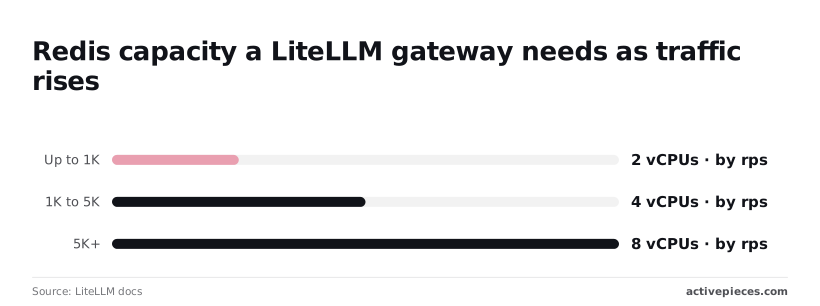
Most small teams sit in the first band, so the $12 node isn't something you'll outgrow soon.
Self-hosted OSS, enterprise licence and hosted compared
Cells marked "unverified" are ones I couldn't confirm from a source I can cite, so check them before you budget.
| Licence cost | Who runs upgrades | SSO (free to 5 users) | Support (24/7 SLA enterprise only) | |
|---|---|---|---|---|
| OSS self-hosted | Free | You | Free up to 5 users | Community only |
| Enterprise self-hosted | Price on request (unverified) | You | Included (unverified beyond 5 users) | 24/7 SLA |
| Hosted | Unverified | Vendor (unverified) | Unverified | Unverified |
If you buy enterprise self-hosted, the upgrade burden stays with you, so a licence buys features and an SLA, not relief from patching.
Only hosted moves that work off your team, and the unverified cells there are why you should ask for its terms in writing before comparing it with the $73 baseline.
If you buy enterprise self-hosted, the upgrade burden stays with you, so a licence buys features and an SLA, not relief from patching.
Stage-by-stage setup of a working LiteLLM proxy
You can build a working proxy in four stages, and each one leaves something you can test, so don't start the next until the current one answers a request.
Stage 1: Run the proxy and get one response
Write a config.yaml with a single entry under model_list. Give it a model_name your clients will use, and under litellm_params set model: anthropic/claude-sonnet-5-5 and api_key: os.environ/ANTHROPIC_API_KEY.
docker run -v $(pwd)/config.yaml:/app/config.yaml \
 -e ANTHROPIC_API_KEY=$ANTHROPIC_API_KEY \
 -p 4000:4000 \
 ghcr.io/berriai/litellm:main-stable \
 --config /app/config.yaml
Send a chat completion to /chat/completions on that port with curl. A reply means routing works. Nothing is persisted yet, so this proves only the plumbing.
Stage 2: Add Postgres and lock the master key
Without a database there are no virtual keys, no spend tracking and no Admin UI, so this stage is where the proxy becomes a service.
Start a Postgres container with its own volume, then pass DATABASE_URL to the proxy. Add LITELLM_MASTER_KEY as well, with a value beginning sk-.
Treat the master key as an administrator credential. Use it to create other keys and sign in to the UI, and never hand it to an application.
Restart and confirm the proxy applies its schema on first boot. Back up that volume now, because every key you issue later lives in it.
Stage 3: Issue a virtual key with a budget
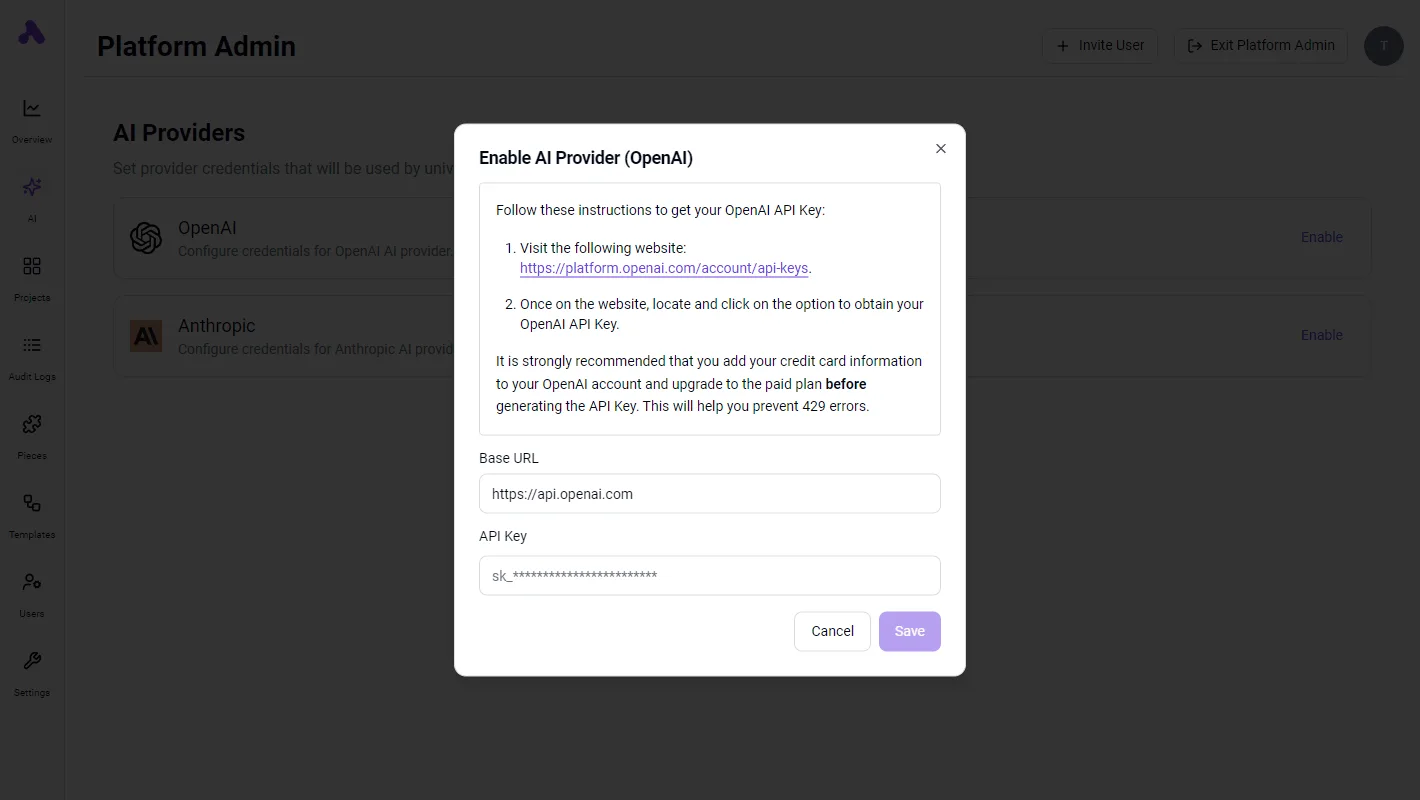
Open the Admin UI at /ui and sign in with the master key. Create a key, attach it to the model name from stage one, and set a maximum budget. You can also call /key/generate with max_budget in the request body.
Test the cap by using the key from a throwaway script. Once the budget is spent, the proxy should reject requests rather than let the provider bill continue. That behaviour's what you're paying operational effort to get, so check it rather than assume it.
Last comes the fallback model. Add a second model_list entry that points at a different vendor, for example gemini/gemini-2.5-flash. Then declare the pairing under router_settings:
router_settings:
 fallbacks: [{"primary-name": ["backup-name"]}]
Restart, then break the primary on purpose by supplying a bad provider key. The request should come back from the backup. Until you've seen that failover happen, you've configured a fallback but not verified one.
Easier to see it running than to read about it: set it up free, no card.
Mistakes that break self-hosted LiteLLM deployments
Before you go live, check your config against six setup mistakes, each cheap to avoid on day one, unlike a failover you only discover is misconfigured during an outage. The list below shows what each one costs:
- Running with no database, so every virtual key vanishes on restart.
- Changing the salt key after launch, so stored provider credentials can no longer be decrypted.
- Sharing the master key, so one leaked copy gives full admin access.
- Exposing the proxy publicly without TLS, so keys cross the network in plain text.
- Leaving the image tag unpinned, so a routine pull can ship breaking changes or skip a security fix.
- Ignoring spend-log growth, so the database slowly fills and queries slow down.
Fix the first two with a Postgres database and a salt key set once and backed up. The last three need more explanation.
Hand the master key to a teammate or an app, and you can't revoke that one holder without rotating it for everyone. It's the root credential, so use it only to create scoped virtual keys.

Issue one virtual key per person or service, with its own budget, and a leak costs you one key rather than the proxy.
The same question applies to every tool that ends up holding those virtual keys.
Activepieces, whose core is MIT-licensed, can send connection credentials to your own secret manager instead of its database when you self-host, so the keys sit in the vault and not in a table.
Enterprise cloud supports the same routing, and secret managers are listed in the enterprise governance feature set beside SCIM, custom RBAC, SSO/SAML and audit logs. A flow's virtual key can then live in a vault you run rather than in a vendor's database.
Not pinning LiteLLM versions or reading release notes
Pin an explicit version tag, never latest, and read the release notes before each upgrade. Patching matters here because the proxy sits in front of every provider key you own.
According to cvebase, there are 23 high-severity CVEs, 13 medium, 7 critical and just 1 low.
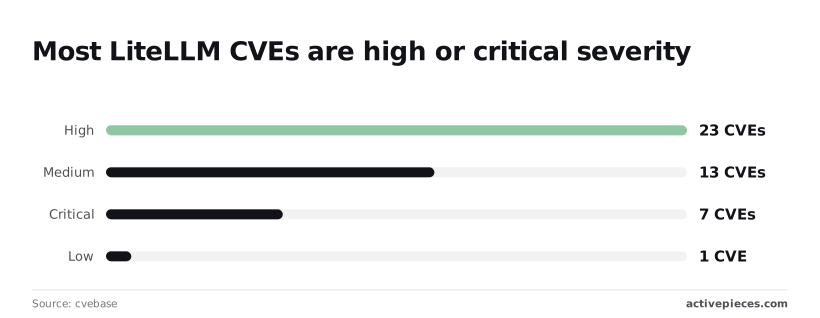
That's 30 of 44 rated high or critical, so most issues you could miss by never upgrading are serious ones.
On a busy proxy the database grows without any warning, because every request writes a row to the spend-log table.
Set a retention window for old logs and watch database size alongside CPU and memory.
Connecting workflow tools such as Activepieces to the gateway
Any OpenAI-compatible tool can use the proxy
If a tool can call an OpenAI-compatible endpoint, it can use your proxy. Give it the proxy's base URL and a virtual key, and it behaves as if LiteLLM were the provider.

That's the whole integration, and it's why this step is optional but worth doing once the upkeep above is in place.
Building workflows with triggers and steps
For an example, take Activepieces, which you can self-host too: its core is MIT-licensed, and MoneyGram, Moneypenny, Alan and FundingSocieties run it.
It's an automation tool where you build flows out of triggers and steps, such as "when a form arrives, summarise it, then post the result to a chat channel."
Its HTTP step sends an arbitrary request, so it needs no dedicated LiteLLM connector.
You point the step at your proxy's chat completions path, put the virtual key in the Authorization header as a bearer token, and send the usual JSON body with a model name and messages.
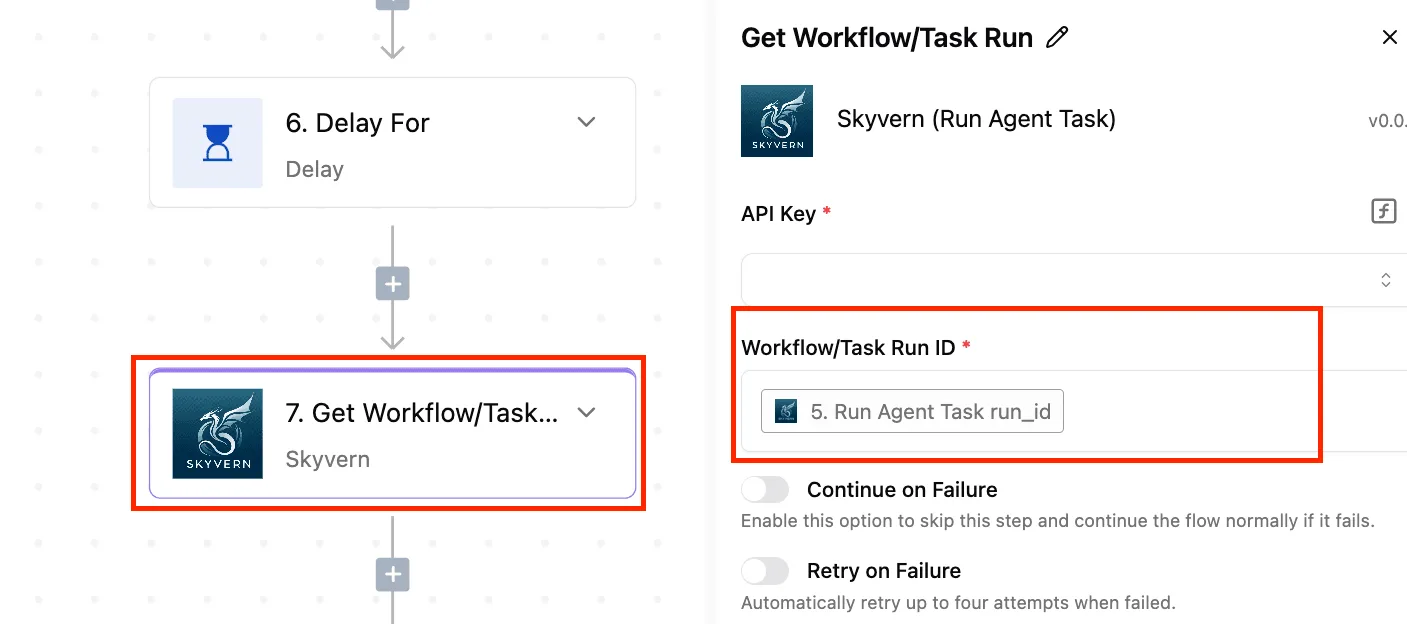
The model name is whatever alias you defined in the proxy config, not the provider's own identifier.
Keeping provider keys out of workflows with LiteLLM
The flow's HTTP step sends the base URL and virtual key to the proxy, and the proxy fans out to separate provider accounts.
Take from it that the flow never holds a provider key. Your provider credentials stay in one place, and the flow holds only a key you can revoke.
That has a practical consequence. Give each flow its own virtual key with its own budget, so a runaway loop in one automation hits its spending cap instead of draining the account every other flow shares.
If you swap a provider or change which model an alias points to, the flows keep working untouched, because they only ever knew the alias.
Once flows are in the loop, the proxy matters more to keep healthy, since an outage now stops automations, not just a test script. That's the argument for treating the setup as a service, and it leads to a short checklist for Monday morning:
- Pin the LiteLLM image to a specific version so an upgrade's a decision, not a surprise.
- Back up Postgres, and test one restore, since the keys and spend records live there.
- Rotate the master key and any virtual keys that have been pasted into flows or shared.
- Set a budget on every virtual key, starting with the ones used by automations.
- Put TLS in front of the proxy so keys don't cross the network in plain text.
Frequently asked questions
Is LiteLLM free to self host?
Yes, the licence costs nothing, and the proxy adds no fee on the tokens you send through it, so you pay your model providers directly at their own rates.
What you do pay for is the server, the database, backups, monitoring and the hours spent on upgrades and key management.
On a small server budget those running costs are the real price, so plan them before you point production traffic at the proxy.
Does LiteLLM self hosted need a database?
For a bare proxy that forwards requests with a single config file, no. For anything a team would call a service, yes.
Virtual keys, per-team budgets, spend tracking and the admin UI all store their state in a database, and PostgreSQL's the one the project documents.
If you skip the database, you lose the ability to issue and revoke keys per person or per project, and you'll want that the first time a key leaks.
Treat the database as part of the deployment from day one, with backups, rather than something you bolt on later.
Can LiteLLM self hosted run local models such as Ollama?
Yes. LiteLLM treats a local Ollama server as another provider: you add it to the model list with its address, and clients keep calling the same OpenAI-style endpoint they use for hosted models.
It trips up on networking. If the proxy runs in a container, localhost points at the container, not the machine running Ollama, so use the host's address or put both on the same network.
Test latency on the slowest connection your users will have before you route real work to local models, because they run only as fast as your hardware allows.
To upgrade a self-hosted LiteLLM proxy safely, pin the image to a specific version instead of a floating tag, and upgrade on purpose rather than on a restart. Then follow this order:
- Back up the database.
- Read the release notes for changes to config or database schema.
- Deploy the new version to a staging copy with a copy of your config.
- Send test requests through each model route and check that your keys and budgets still work.
- Promote to production, keeping the previous image tag so you can roll back.
If you do only one step properly, make it the backup, because a schema migration may not reverse cleanly. With it, a bad upgrade's an inconvenience. Without it, it can cost you every key you've issued.