
Manus MCP: What It Is and How It Works (2026 Guide)

Nov 17, 202613 min read
Manus MCP is Manus's support for the Model Context Protocol, an open standard that, much like the one Activepieces also speaks, lets its autonomous agent call external apps and read outside data during a task.
It's a connection layer, not a new capability: the agent can only reach what you connect, with the access you grant.
Connect tools to agents using Manus MCP
What MCP is in one paragraph
The Model Context Protocol is an open standard for how an AI agent talks to an outside tool. A tool publishes a list of things it can do, such as "read this calendar" or "create this record."
The agent discovers that list, picks an action, and sends a request.
Without a shared protocol, every pairing of agent and app needs its own custom integration. With one, any compliant app can be offered to any compliant agent, and the permissions travel with the connection.
What Manus adds on top of it
Give Manus MCP connections and its steps can touch your real systems instead of only its own sandbox. Manus is an agent that plans and acts on its own across many steps.
Read it as a reminder that the scope belongs to each connection. A broad grant on one app's a decision you make per app, not once for the agent.
As of 17 November 2026, everything here has been checked. Product facts about Manus link to Manus's own pages, so you can compare any claim against its maker. If a Manus page's changed since that date, trust the page over this article.
This takes minutes, not a project: automate it in Activepieces free.
How Manus MCP connections work
You get from opening the connectors settings to watching the agent make its first tool call in six steps, and that is all a Manus MCP connection takes.
- Open the connectors settings in Manus.
- Choose either a built-in connector or the option to add a custom MCP server.
- For a custom server, enter its server URL.
- Supply the authentication the server asks for.
- Authorise the connection.
- Run a task that should trigger a tool call, and confirm in the task that the tool was actually used.
Only step six counts as a real test. A connector that shows as connected has proved that a handshake happened, not that the agent can do anything useful with it.
Built-in connectors versus custom MCP servers
For a well-known app, built-in's the lower-effort path. Pick from a list and skip the URL entirely: that is a built-in connector, one Manus already ships.
A custom MCP server is one you point Manus at yourself, which means you own its address, its uptime and what it exposes.
If the tool isn't one Manus lists, custom is the route, and it puts the burden of checking the server on you.
Manus MCP authentication and shared permissions
Of all the steps, authentication's the one that decides what the agent can reach. Whatever account or token you authorise is the ceiling on what Manus can do through that connection.

So use a credential with the narrowest permissions the task needs, never your own admin login.
What happens when a task calls a tool
When you give Manus a task, the agent reads the tools the connection exposes, decides whether one fits, and calls it with arguments it writes itself. The result comes back into the task as input for its next step.
Because the agent chooses the call, not you, the same prompt can produce different arguments on different runs.
Where teams use Manus MCP in practice
When the agent only reads, Manus MCP gives teams their most dependable value, and trouble grows with every write and every extra app it touches. That's also where the line between agent and fixed workflow falls.
Because the agent chooses the call, not you, the same prompt can produce different arguments on different runs.
Sorted by what can go wrong and what it costs to set up, the three common uses fall into the table below.
| Use | Example documented connector | Risk | Setup effort | Reliability |
|---|---|---|---|---|
| Read-only research | Notion, as a workspace the agent searches | Low: a bad answer wastes time but changes nothing | Light: one connection, read access | Good, and a wrong summary is easy to spot |
| Writing into business apps | Slack, as a channel the agent posts to | Medium to high: a wrong write's visible to others | Moderate: write scopes, test targets | Uneven: the same prompt can produce different output |
| Multi-step cross-app tasks | Notion plus Slack in one run | Highest: one early error carries into every later step | Heavy: several scopes to audit | Weakest: failures compound across steps |
Start with read-only research and reporting. Pointing the agent at a workspace of notes and asking for a briefing exposes little, because read access can't alter anything.
Once the agent writes, "it worked in the demo" stops counting. A post to a team channel goes out under your account and can't be quietly retracted.
Give write access to one test destination first, scope it to that destination only, and rerun the same request several times. If the output varies in ways you wouldn't accept in production, the task belongs in a fixed workflow.
Across several apps, multi-step tasks multiply the failure points. If the agent misreads a record in step one, steps two and three act on the error with full confidence.
Use this only for work that's rare, varied and reviewed by a person before anything is sent. Repeatable chains are the case the next section handles with fixed workflows.
What Manus MCP costs and requires
On every run, a connected chain through Manus costs credits, and the paid tiers start at $20 a month, so users choosing a paid plan must budget at least $20 monthly.
The Manus help page lists prices and credits, but not which plan unlocks custom MCP.
viz type=dumbbell title="What annual billing saves on Manus Pro plans" unit="$ per month" source="Manus Help Center - https://help.manus.im/en/articles/11711111" before="Monthly billing" after="Annual billing"67 a month." Pro entry: 20 -> 17 Pro mid: 40 -> 34 Pro high: 200 -> 167
Manus's help center lists three Pro tiers:
- Billed monthly they cost $20; billed annually they drop to $17 a month, a saving of $36 a year
- Billed monthly they cost $40; billed annually they drop to $34 a month, a saving of $72 a year
- Billed monthly they cost $200; billed annually they drop to $167 a month, a saving of $396 a year
Check the connector settings in your own account before you pay, because the page gives no per-plan MCP eligibility I can quote.
Credits used by tool-heavy tasks
On the Free tier you get 300 refresh credits a day. Pro at $20 gets 4,000, Pro at $40 gets 8,000 and Pro at $200 gets 40,000, so there's no efficiency gain from choosing a higher-priced tier.

Credits meter AI usage, and a workflow vendor's live pricing page is where its current rates are published.
According to EasyClaw, a web lookup costs 10-20 credits, a research report 200-500 and an 8-slide deck 555. One deck uses more than a full day of free credits.
On the $20 Pro plan that includes 4,000 credits a month, a run is 1 credit however many steps it has, AI steps cost more by model tier, and with your own AI keys every AI step is 1 credit, so your spending is driven by AI usage, not by workflow complexity.

I couldn't find a published credit cost per MCP tool call, so measure your own chain's burn before you commit to a tier.
What you host and maintain for Manus MCP
You run a remote MCP server. Manus connects to it, but you keep it online, patch it and rotate its credentials. If it goes down mid-task, the agent stalls and the credits already spent are gone.

You can follow the rest of this with the builder open. Start free, no card.
Risks of connecting apps to agents
Say the agent causes damage you can't predict and bills you for it. That is the strongest objection. The agent chooses its own steps, with write access to your apps through servers you haven't vetted. Every connection you keep is another place it can act.
Four risks of Manus MCP connections
Four problems stack. The first is write access: an agent that can edit a customer record can overwrite one, and it picks the moment.
Second comes the server itself, because an MCP server is code someone else wrote.
Don't average them, because the sets differ. Read together, they say a randomly chosen server is more likely flawed than sound, so vetting each one isn't optional.
Prompt injection and cost risks with Manus MCP
Third comes prompt injection. Any text the agent reads, such as an email or a support ticket, can carry instructions, so read access to untrusted content becomes a route to write actions.
Fourth is cost. According to EasyClaw, a web lookup costs 20 credits, a website build 360 and an 8-slide deck 555.

One retried deck therefore burns about 28 lookups' worth of credits per attempt, and a failing loop repeats that.
How to reduce Manus MCP risks
Shrink what the agent can do rather than avoiding it. Four controls cover most of the exposure:
- Issue scoped credentials, so a leaked token reaches one folder or one board rather than the whole account.
- Start read-only, and grant write access only after the agent has handled real inputs correctly.
- Require approval before any action that sends, deletes or spends.
- Keep repeatable jobs out of the agent entirely.
Of the four, the last control decides the argument. Variable tasks, where the steps differ each time, justify an agent's cost and risk.
Fixed tasks, where the steps never change, belong in a deterministic workflow, which has no judgment to mislead and no retries to bill.
Some risk remains: injection can't be fully filtered, and a vetted server can still change after you approve it.
Fix repeatable jobs with Activepieces behind Manus MCP
Activepieces, whose core is MIT-licensed and whose open source repo holds 750 integrations, can expose its workflows and integrations as an MCP server, so Manus calls a fixed, logged workflow instead of improvising each run.
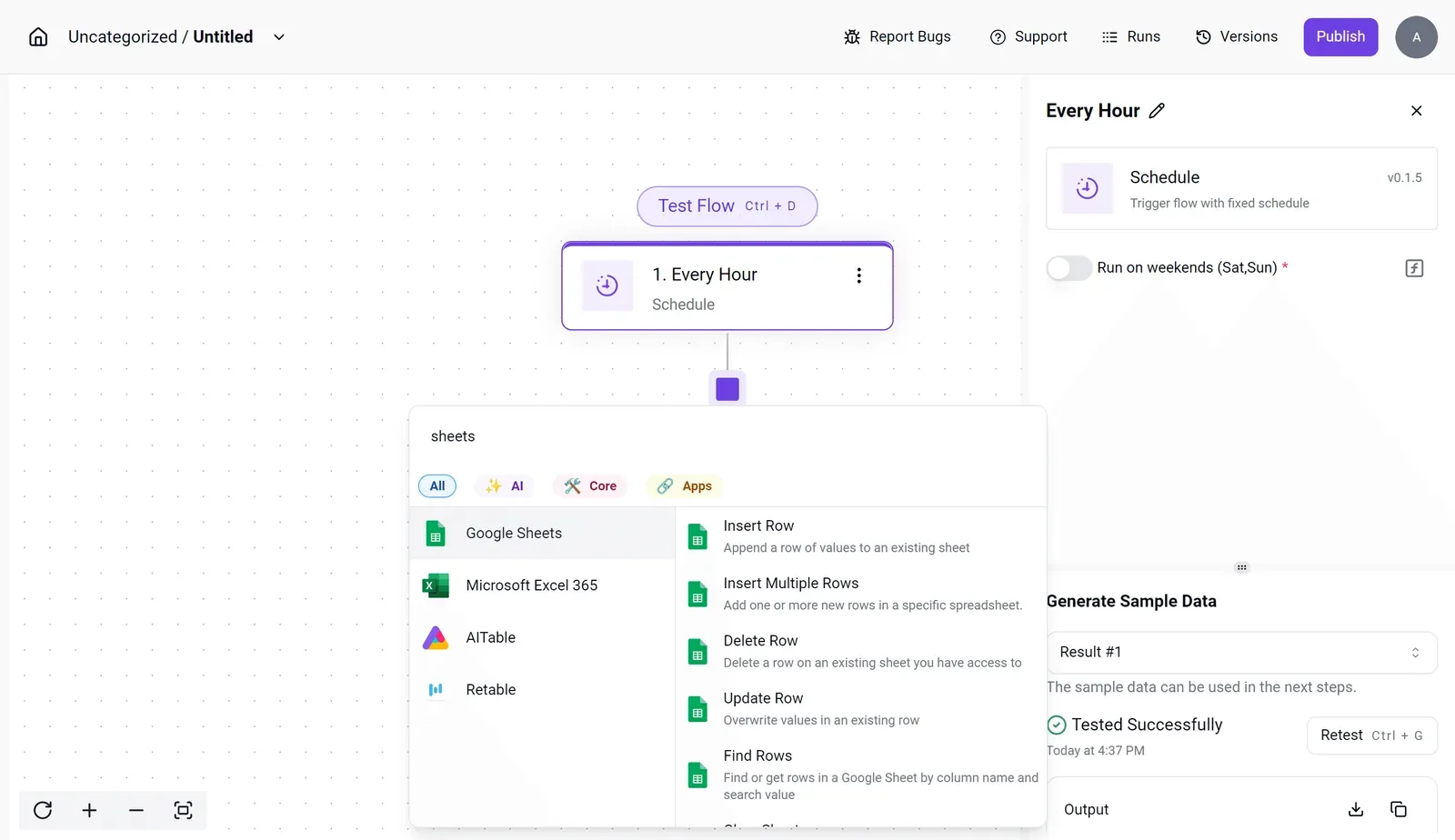
That narrows what a drifting server or an injected instruction can reach.
When a workflow beats an agent
Take a daily pipeline-monitoring report: same sources, same steps, same output every morning. Run as a deterministic workflow, it cost $0.01 per run, making frequent workflow execution economically feasible.
Run as an agent loop, it cost $1.50 per run, with 33 tool calls and 300K tokens, so agent operations incur substantial per-execution costs.
Set the cost aside and a bigger problem remains. Each of those 33 calls was a decision the agent made fresh, so any one could go differently tomorrow.
A workflow has a fixed path, and every run leaves a log you can read when the numbers look wrong.
When runs repeat and the sequence is known, a workflow is the right tool, and in Activepieces a run costs 1 credit however many steps it has, on a free plan that allows unlimited flows.
A one-off exploratory task is the opposite: you don't yet know the steps, so there's nothing to fix in place. Leave those to Manus and skip Activepieces.
Prove the workflow works first
Because you want the workflow proven before the agent can touch it, the order matters:
- Build the workflow in Activepieces and run it by hand until the output is right.
- Expose only that workflow through Activepieces' MCP server, following its docs. Leave unrelated flows unexposed.
- Add the server to Manus as a custom MCP connection.
- Trigger it from Manus with one known input and compare the result against your manual run.
- Open the run log in Activepieces and confirm the call appears there.
Step 5 is the check that matters. If Manus reports success but no run's logged, the agent did the work itself and bypassed the workflow, which defeats the point.
Re-check what it exposes whenever you edit the workflow, because the remaining risk from the previous section still applies to this server.
Frequently asked questions
Is Manus MCP free to use?
It depends on two bills that are separate: your Manus plan and the app on the other end. I can't give you a single price for "MCP" because I haven't found one published as its own line item.
Check Manus's pricing page for what your plan includes.
Then check the connected app's terms, because many apps charge for API access or limit it to higher tiers. A connection that works in a trial can still hit a paywall on the other side.
Can Manus connect to any MCP server?
No. It can use a server only if it can reach it and authenticate to it in a way Manus supports. A server on a private network, or one with an unusual login flow, may simply not connect.
Being able to reach a server isn't trust. A server you don't control can define tools that do things you didn't expect, so leave unknown servers unconnected.
Is it safe to give Manus access to my work apps?
Only as safe as the narrowest permission you grant. Connect the fewest apps the job needs, use a dedicated account where the app allows it, and grant read-only access unless the task has to write.
Then test the boundary: ask the agent to do something you didn't authorize and confirm it fails. If it succeeds, the scope is wrong. "It behaved in my first run" tells you nothing about the second.
On the difference between a Manus connector and an MCP server: a connector's the entry on the Manus side: the saved link, the login, the permissions. An MCP server's the program on the other side that exposes tools through the Model Context Protocol.
One's how Manus holds the connection. The other's what the connection reaches. When something breaks, this tells you where to look first.
If your Manus MCP connection fails to authenticate, work through the usual causes in this order:
- The token has expired or been revoked, so reauthorize and retry.
- The account you signed in with lacks permission on the app's side.
- The granted scopes are narrower than the tool needs, and the failure surfaces as an auth error.
- The server expects a different login method than the one you configured.
Change one thing per attempt. If you change two, you won't know which one fixed it.
Related reading
References
Build it
Set this up in minutes.
No code required. Connect your accounts, and Activepieces runs it from there.
Start free Talk to sales