
Microsoft Entra ID MCP: How to Secure MCP Servers

Nov 16, 202615 min read
The over-permissioned Entra MCP query
What Entra ID MCP is
Microsoft Entra ID MCP is Microsoft's MCP server that lets an AI assistant read your Entra identity data through Microsoft Graph, much as teams using Activepieces connect assistants to other systems they already run. It gives the assistant a live, permissioned path into your tenant.
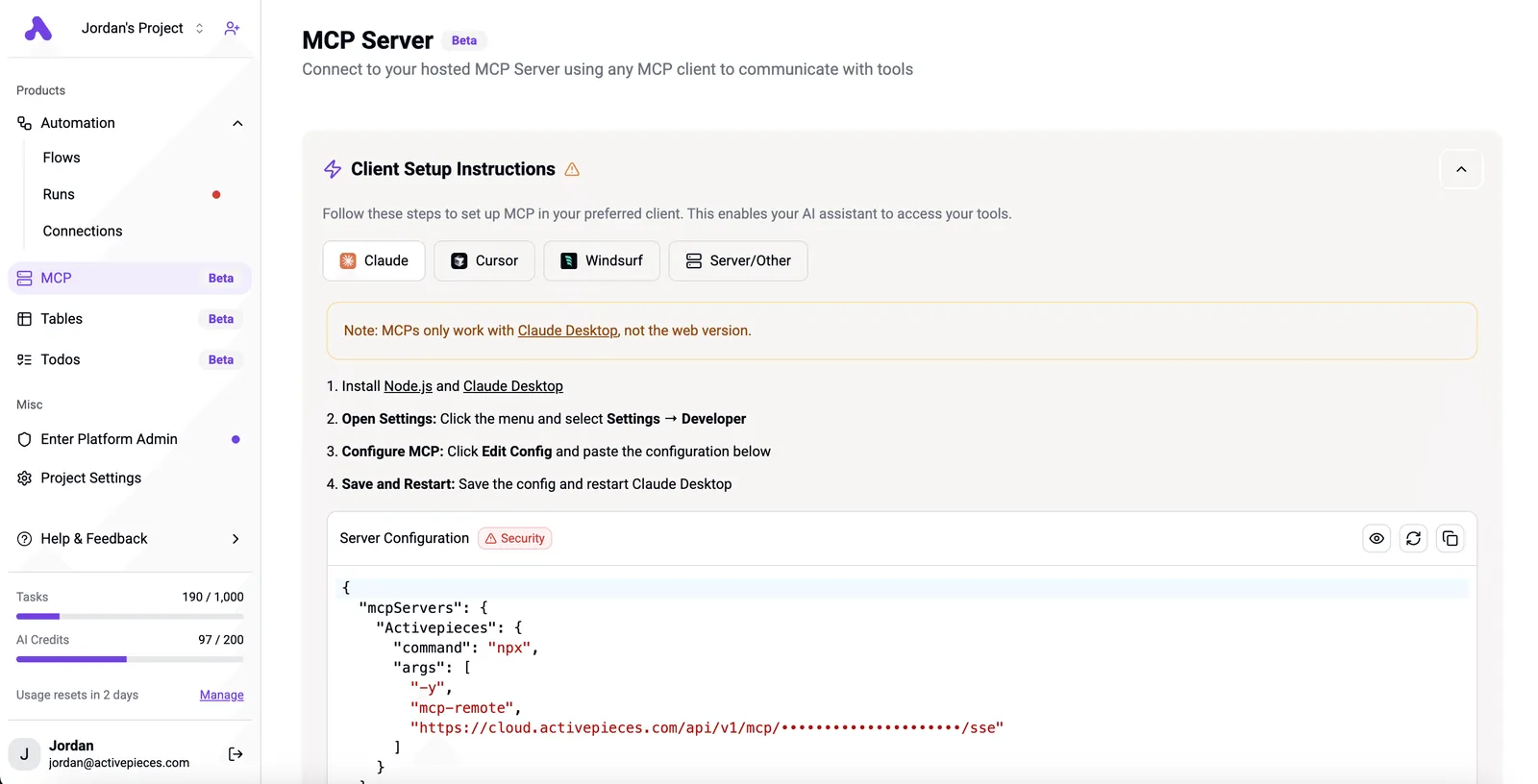
What goes wrong is rarely the protocol. Someone gave that path more reach than anyone chose, and too little logging to see it. The facts here come from Microsoft's own pages, checked 16 November 2026.
What an MCP server is
An MCP server's a small program that lets an AI assistant call another system's functions, using only the permissions you hand it. Think of a hotel key card. The card doesn't decide which rooms it opens. Whoever programmed it did.

Two terms need pinning down. Entra's Microsoft's identity service, the record of who your people are and what they may touch.
Microsoft Graph's Microsoft's single interface for reading that record and the rest of its cloud. Connect the two through MCP and the assistant can ask your directory questions in plain English.
If the permissions are too wide, the assistant can read too much, and nobody notices until the answer turns up somewhere it shouldn't.
Activepieces hands an assistant its 750 integrations as tools, so the same question of how much reach it gets applies well beyond Microsoft.
An example Entra MCP privileged roles query
Here's an illustrative case, not a reported incident. At 09:12 an admin asks their assistant, "Who holds privileged roles?"
The assistant has broad directory read access, so it answers in full. Because the admin is working in a shared team chat, the full answer lands there.
Left to right, the path below runs like this. The admin's assistant sends a request through the MCP server to the directory, and the reply, a list of every privileged-role user, arrives in a chat with colleagues' avatars beside it.
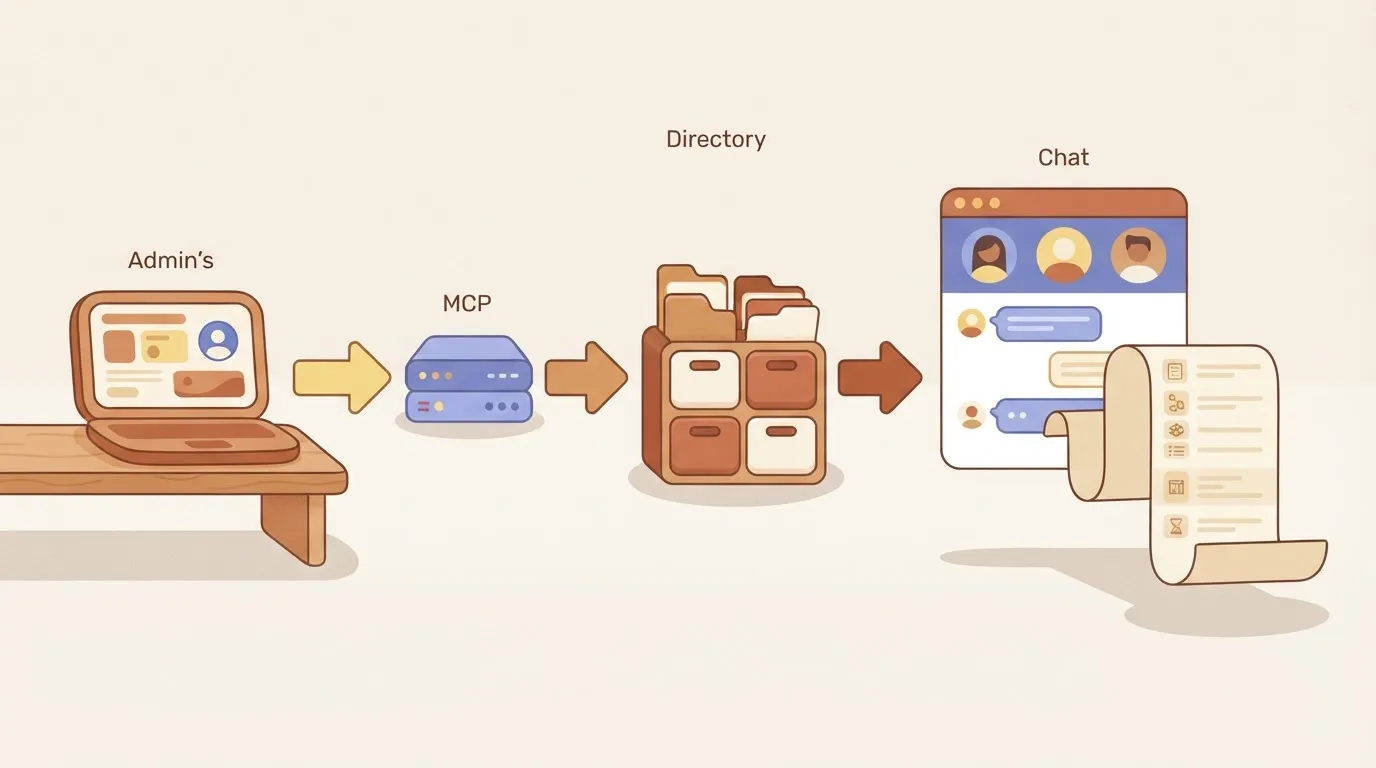
Take away that the directory did nothing wrong. It answered a permitted question, and the leak happened where the answer landed.
Once it lands in that chat, the list is a map of the accounts an attacker would most like to impersonate. It sits in a place with a much wider audience than the admin ever intended.
Unless you switched logging on, nobody can say who asked or what came back.
This takes minutes, not a project: automate it in Activepieces free.
The Entra MCP connection process
At each of the six steps of the connection, someone either limited what the assistant could reach or let it through, which is why the log question from the last section matters.
Client, server and Graph in call order
Read the order below as the order of the first call, and as a chain: a loose link anywhere widens everything after it.
- The AI client connects to the MCP server.
- The user signs in to Entra.
- The user approves the consent prompt.
- Microsoft Graph, the interface that reads the directory, grants the permissions.
- Delegated or application access applies.
- The first Graph call runs.
Watch step 5. Delegated access acts as the signed-in person and can do only what that person can. Application access acts as the app itself, with no person behind it, so it keeps working whoever is at the keyboard.

Consent and delegated permissions
Only once does a human see what they're handing over, and that's at consent. A delegated grant carries only the user's own rights, so an ordinary employee's session returns little. An admin's session returns a lot.
Approve broad consent once, and every later call inherits it silently.
Size matters too. A new tenant holds 600 directory objects, according to Microsoft Learn, so a test there shows you almost nothing about a real directory.
Go up a tier and the numbers jump: the same source puts a free tenant at 50,000 objects and a tenant with a verified domain at 300,000.

At the top figure, an assistant asked to "list everyone" can pull back hundreds of thousands of records, and your sandbox results will have hidden that, so you won't discover the scaling problems until they affect production.
I couldn't confirm preview or general-availability status, read-versus-write reach, licence tiers, required admin roles or price for this section. Check the current Microsoft Learn page and the Microsoft pricing page before you commit. Assume a gap there costs more than the check does.
Entra MCP breach costs and exposure
Whatever the permissions allow ends up as a dollar figure, and that figure barely depends on how the attacker got in.
Compliance Standards' summary of IBM's 2025 Cost of a Data Breach puts stolen credentials at $4.67 million per breach, phishing at $4.8 million, supply chain at $4.91 million and a malicious insider at $4.92 million.
Even a borrowed login costs nearly as much as any other way in, so an assistant holding a valid token deserves the same budgeting as an attacker would get.
Spend the first two and a half hours on three tallies: privileged accounts the assistant could reach, people who saw the chat, and sessions to revoke.
Each privileged account on the list's an account someone must review by hand, so the first list sets the size of everything after it. Count them before you do anything else.
What the audit logs did and did not show
Sign-in and audit logs last 7 days on Free and 30 on P1 and P2, while risky sign-ins last 7, 30 and 90, which means you can investigate risky sign-ins far further back into the past.
If you notice the incident on day eight of a Free tenant, you have nothing to read, and even a P2 tenant loses its sign-in history after a month.
What the assistant showed is not in the logs, only what was done. A read of user data may leave a trace, but the chat transcript itself sits outside Entra, so you must keep it separately.
What follows is the practical consequence: decide your retention before the incident, because after it the answer is whatever survived.
Most of the invoice here's people's time. Reviewing the account list, reading logs, revoking sessions, interviewing everyone who saw the chat and rewriting permissions all come out of the same pool of staff.
decide your retention before the incident, because after it the answer is whatever survived.
Keep your own count of those hours as you go. A tally kept during the work will be right, and one rebuilt afterwards will not.
Four Mistakes Behind the Entra MCP Exposure
How the four Entra MCP mistakes unfolded
In this order, four decisions produced the exposure, and each one made the tally you would need afterwards harder to rebuild.
Had anyone followed Microsoft's published least-privilege guidance, which says to grant only the access a task needs, every one of them would have been prevented. The sequence below shows the four in the order they happened, with the remedy beside each.
Small as each mistake was when it was made, each one also removed a check that would have caught the next.
Permissions granted too widely
When the assistant keeps hitting "access denied" during setup, someone approves wide directory permissions so it stops. Left that way, the agent can read, and possibly change, far more than any single question requires.

Start with read-only scopes, add write access one task at a time, and put a human approval step in front of any change.
Using an admin identity for Entra MCP
It's quick to point the agent at an existing administrator's sign-in. It also means the agent holds everything that person holds, and its actions look like theirs.
Give the agent its own identity, with its own narrow permissions, so you can trace anything it does to it and switch it off without locking out a person.
No policies or logs for the agent
Without rules written for the agent, it inherits whatever your general policies happen to allow. Without its own log trail, you can't say what it asked for or what came back.
Apply access policies that name the agent's identity, and turn on sign-in and audit logs filtered to that identity before it touches production.
Sending Entra MCP output to shared channels
Because that's where people already look, answers get posted to a team chat or a shared channel. Once a user list or a role assignment lands there, everyone in the channel has it, and you can't pull it back.
Send results to the person who asked, strip out what the question didn't need, and keep sensitive output out of shared spaces.
Fixing them in the order they were made is the sensible way to unwind them, because the scopes and the identity decide how much damage the last two can do.
You can follow the rest of this with the builder open. Start free, no card.
Where Activepieces Fits After an Entra MCP Incident
Once you've fixed the scopes and the identity, Activepieces earns a place in one job only: sending a privileged-query request to a named approver and recording what they decided. It's a separate workflow automation tool with an MIT-licensed core, not an Entra MCP server.

The approval step the company added
Left alone, the assistant's access to sensitive identity queries rests on nobody asking and nobody writing anything down. When something goes wrong, you reconstruct it from memory. That's the expensive way to find out.
When a request comes in, say a query touching privileged roles, a workflow tool holds it until a named person approves or refuses. That fixes the human part.
The 09:12 assistant came with code that could call the directory and nothing around it: no role of its own, no sign-in policy, no log of what it did.
Those come from a platform, and in Activepieces agents get least privilege of their own, and custom RBAC plus control over which apps a team may connect limit what an agent can reach. SSO and SCIM govern your staff's access.
Its run detail view lists every tool call as its own entry with input and output, beside the approver's decision, which is the record the 09:12 request never left, so each decision in the flow is traceable.

Whether Activepieces has a ready-made integration for MCP or for Microsoft services is something you can settle before you plan around it: its community integrations folder on GitHub holds the 750 integrations, so look for the integration by name.
Build the flow on what is listed there, not on what a sales page implies.
What stays in Entra
Nothing in the approval flow grants or limits anything. Permissions, and the Conditional Access rules that decide when and from where someone may sign in, stay in Entra.
If the workflow tool goes down or you misconfigure it, Entra should still refuse what it was set to refuse.
Below, the table shows who owns each job. Take from it that the workflow tool covers two rows and Entra covers the rest, meaning neither system alone shows the complete picture. The right-hand column marks what to check before you rely on it.
| Job | Activepieces or Entra | Claims to verify in docs |
|---|---|---|
| Approval routing | Activepieces | How approvers are notified and how a refusal is handled |
| Decision logging | Activepieces | Run detail lists which tool an agent called; audit logs and event streaming are an Ultimate-plan feature. Check where records are stored and how long they are kept |
| MCP server | Entra | Which tools and scopes the server exposes |
| Permissions | Entra | Exact scopes granted to the assistant's identity |
| Conditional Access | Entra | Whether the assistant's sign-in is covered by your policies |
It costs an afternoon to read everything in that right-hand column. Skipping it costs you an incident report.
Rules for Entra MCP use
Now the agent runs under six rules. They're read-only scopes, its own non-admin identity, a Conditional Access policy on that identity, weekly log review, no directory output in shared channels, and a quarterly consent review with a named owner. Each has a check.
Permissions and identity
Before the rules, the vocabulary: a scope's a permission the agent is granted, and read-only means it can look but not change anything. Give it its own account instead of borrowing a person's, and keep that account out of every admin role.
If the agent is ever tricked or misconfigured, the damage stops at what that account can see.
To decide when an account may sign in, Entra uses Conditional Access, its rule engine. Put a policy on the agent's account so it works only from the places and conditions you expect.
The check for all three rules is the same: ask the agent to change a user, and confirm it's refused.
Entra MCP audit logging and review
Who did what, to which resource, and when: that's what the audit log answers. A usable one looks like the page below: each row names the resource, the person who acted, the action taken, and the time.
Here a flow is created, a connection is updated, and the same connection is deleted. Read in order, those three rows tell you what happened without asking anyone, so by the time anyone notices, you've already found the cause.
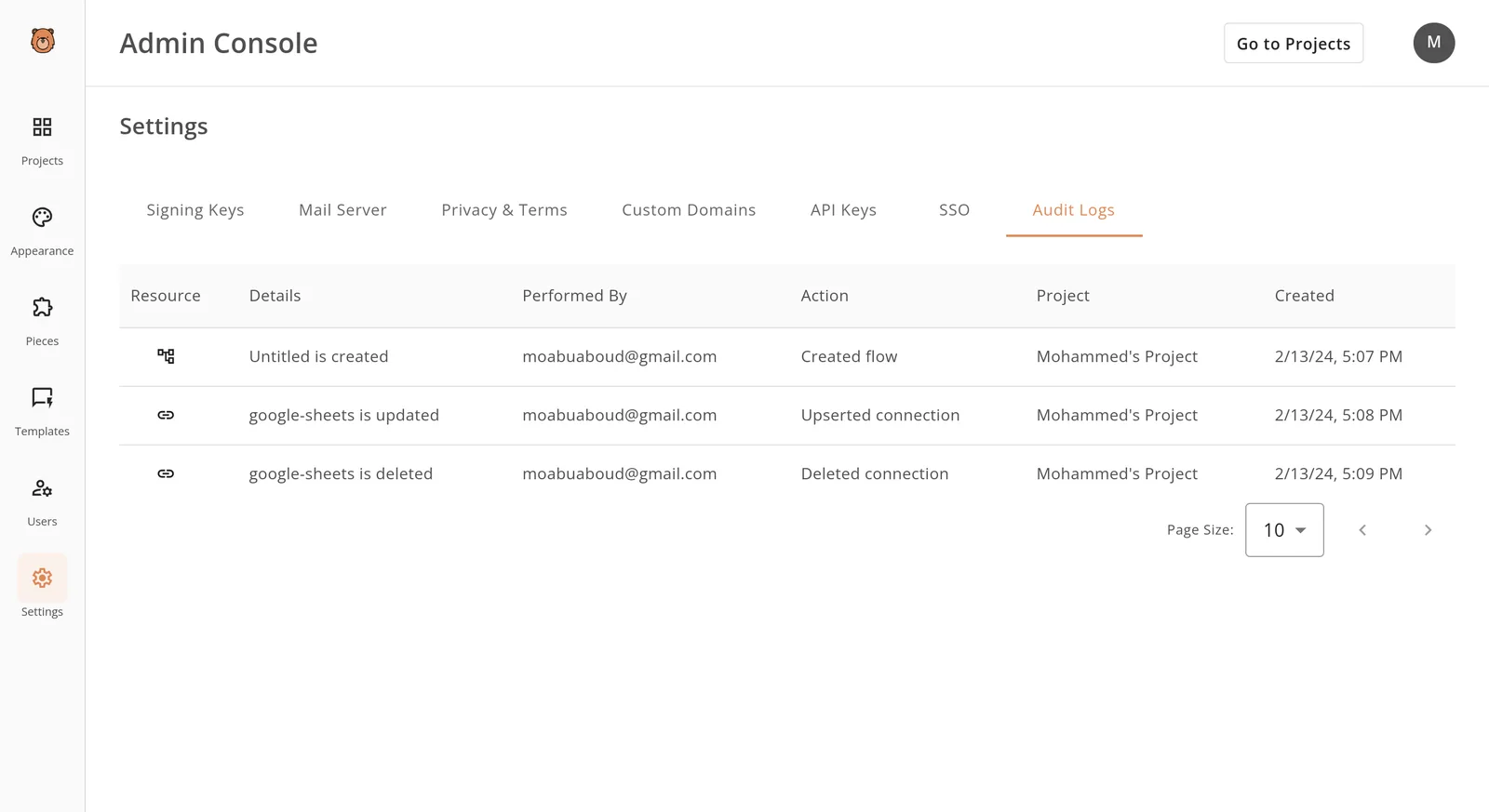
Your Entra logs need the same readability for the agent's account. Without it, a bad week's something you reconstruct from memory.
Review the sign-in log and the audit log weekly, and keep directory output, such as names and group lists, out of shared channels where anyone can copy it.
- Confirm the agent's scopes are read-only. Check: a write request fails.
- Confirm the agent signs in as its own non-admin account. Check: the account holds no admin role.
- Confirm Conditional Access applies to that account. Check: a sign-in outside the policy's blocked.
- Put the weekly log review on a calendar. Check: someone's name's on it.
- Tell the team where directory output may not be posted. Check: search the shared channels for it.
- Name the owner of the quarterly consent review. Check: the date's booked.
Frequently asked questions
Cost and write access
Is Microsoft Entra ID MCP free to use? Assume it's not, until your own tenant says otherwise.
As of 16 November 2026, the server rides on your existing Entra licence and your assistant's plan, and some directory features need a higher licence tier. Check the licence page for each feature you plan to call before you promise anyone a budget of zero.
Can the Entra MCP server change users or only read them? It can change whatever the permissions you grant allow, so the answer's yours to set.
Grant read-only access and it reads; grant write access and it can edit accounts and groups. As of 16 November 2026, the safe starting point's read-only, widened one permission at a time with a named owner.
Assistants and logs
Does Microsoft Entra ID MCP work with ChatGPT or Claude? It works with any assistant that can act as an MCP client, and your tenant administrator still has to approve the connection.
MCP's an open protocol, so the brand matters less than whether your assistant's current version supports it. Confirm that on the vendor's page before you build a plan around it.
Where do I see what the MCP server did in my tenant? In the Entra admin centre, in the sign-in log and the audit log.
Sign-ins show who connected and when, and audit entries show what was changed. As of 16 November 2026, check that both logs are retained long enough for your weekly review, because a log that expires early can't answer a question later.
Is the Microsoft Entra MCP server still in preview?
Treat it as preview until Microsoft's own documentation page drops that label. Preview features can change behaviour, limits and support terms with little notice, so don't put one on a process your business can't pause. Re-read the status line each time you renew access.
These're the points we couldn't settle, and each should be rechecked before you rely on it:
- Whether the server's preview label has been removed (checked 16 Nov 2026)
- Which licence tier each directory feature needs (checked 16 Nov 2026)
- How many records a single Graph request returns for users and sign-in logs (checked 16 Nov 2026)
- Which assistants Microsoft lists as supported clients (checked 16 Nov 2026)
- How long your tenant keeps sign-in and audit history (checked 16 Nov 2026)
Related reading
Build it
Set this up in minutes.
No code required. Connect your accounts, and Activepieces runs it from there.
Start free Talk to sales