
Runbook Automation Tools: 6 Compared (2026 Guide)

Nov 24, 202616 min read
A runbook is a documented procedure, such as restarting a stuck service, rotating a credential or paging the right owner, turned into steps a machine can run, whether through a script or a workflow tool like Activepieces.
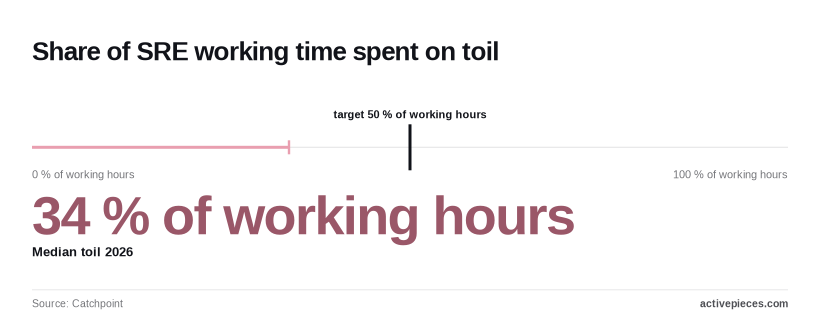
Catchpoint's 2026 SRE report puts median toil at 34% of working hours. On a 40-hour week that's about 13.6 hours per engineer, so a ten-person team spends roughly 136 hours weekly on repetitive work a runbook could absorb.
Each tool below is judged on how much of that it can remove. PagerDuty Runbook Automation is covered under Rundeck, which is why there are six entries, not seven.
Do not trust feature counts, because execution target decides the shortlist.
A step that runs a command on a host needs an agent or SSH reach, a step that updates an incident needs that tool's API, and a step that touches a ticket or spreadsheet needs app connectors.
Ranking Criteria: Where Runbook Steps Execute
A tool strong in one target is clumsy in the others.
Ask who can run a step, who approved it, and whether the log survives an audit. Self-service matters too: if only the author can launch a runbook, the toil has just moved to that person.
Runbook tool pricing and self-hosting options
I favor tiers I can price without a sales call, because cost per run is their only way to see where the math breaks at volume. Self-hosting decides where credentials and logs live, and lock-in follows from how portable your runbooks are.
| Tool | Execution target | Self-hosting | Pricing |
|---|---|---|---|
| Rundeck | Servers | Yes | Free open-source edition; commercial tiers quoted |
| Ansible | Servers | Yes | Free open-source core; commercial platform by subscription |
| Azure Automation | Servers, Azure-centric | No; hybrid workers run on your hosts | Published, metered by job runtime |
| ServiceNow | Business apps, ticketing | No | Quote-based |
| incident.io | Incident tooling | No | Published per-seat plans |
| Activepieces | Business apps | Yes | Free MIT-licensed self-hosted core; cloud free at $0, paid plans from $20 a month |
Only three entries can run on your own infrastructure, and only one lists a metered price. That is what the table shows.
The fastest way to settle a shortlist is to try one. Activepieces is free to try, no credit card.
Rundeck runbook automation for servers
When your runbook steps run on servers, Rundeck is the strongest pick. That covers a mix of on-prem hosts, VMs and cloud instances, and the tool was built to run commands on machines and control who may do so.

Once a runbook becomes a job, it gets a handful of controls that matter once more than one person depends on it:
- Node targeting, so one job runs against a chosen set of hosts instead of a hand-typed list
- Access control lists that say who can run, edit or view each job
- An audit trail of who ran what, where and when
- Self-service, so a support engineer can start a vetted restart without holding the SSH keys
- Scheduling and chaining, so routine maintenance doesn't depend on someone remembering
You can't see the cost of an unreviewed shell session until something breaks, and a job with a log lets you count it. That is why the audit and access controls are the real saving.
You can't see the cost of an unreviewed shell session until something breaks, and a job with a log lets you count it.
There are two editions. Rundeck Community is the open-source version you host yourself. Its licence costs nothing, but the hours of whoever installs, patches and backs it up are a cost, and they belong in the budget.
On the commercial side sits PagerDuty Runbook Automation, which adds vendor support and ties runbooks to PagerDuty's incident response, so a job can be launched from the alert that calls for it.
I can't confirm a published price here. Ask for the price in writing before you plan around it, since a tier you can only price on a sales call is one you can't model per run.
Before the first job is useful, setup, node inventory and access rules take real effort. That weight is its limit, and it is overbuilt for a team with a few scripts.
It also fits poorly when steps live in SaaS apps, such as updating a CRM record or posting an approval to a chat tool. You can script those through API calls, but you'd be fighting the tool's grain.
Ansible Automation Platform
When your steps land on servers, network gear and cloud resources, Ansible Automation Platform runs with that grain. Red Hat's playbooks describe the state a machine should end up in, and the platform executes them. The following are all native work:
- Restarting a service
- Patching a fleet
- Rotating a certificate
- Pushing a switch configuration
If a runbook is mostly those steps, it belongs here.
Once those playbooks exist, the platform wraps them in controls an operations team will want. Role-based access control decides who may run which job against which inventory.
Job history records who launched what and what it changed, which gives you an audit trail for remediation done at 3 a.m.
I won't quote a price I can't verify, and Red Hat sells this as a subscription. Get the cost-per-run arithmetic from your own quote, and be wary of any tier you can't read without a sales call.
If the subscription is priced on what you manage, the cost per run falls as your automation volume rises, but only if the same fleet keeps being managed.
It suits teams that have already standardised on Ansible. Their playbooks, inventories and habits carry over, so the platform adds scheduling, access control and logging to work they already do. The limits to weigh:
- Playbook skills are required, because every step is written in YAML, so someone on the team must maintain it, and a non-coder will struggle.
- Subscription cost is a fixed commitment, which is hard to justify if only a handful of runbooks need it.
- Incident-tool steps fit poorly, since paging, acknowledging and annotating incidents are API calls rather than state changes.
- Business-app steps fit poorly, since approvals, record updates and form handoffs are not what playbooks model.
Run steps on Azure resources
If your steps run on Azure resources and hybrid Windows servers, Azure Automation is Microsoft's runbook service for them, with runbooks written as PowerShell, Python or graphical. It's the direct answer if your steps mostly touch servers rather than tickets or business apps.
Azure Automation job-minute billing costs
Start with the arithmetic. According to Kelverion, job runtime is billed at $0.002 per minute after 500 free minutes a month, so a ten-minute runbook costs two cents per run once the free allowance is gone.

Because cost grows in a straight line with runtime, the bill is easy to forecast. The thing to watch is a runbook that hangs or polls, because you pay for every minute it sits there.
Hybrid workers and lock-in
Beyond Azure, what makes the service useful is Hybrid Runbook Worker. It lets a runbook execute on a machine you control, on-premises or in another cloud, so the script runs where the server is instead of reaching in from outside.
That matters when the target sits behind a firewall you won't open.
You pay in lock-in. Runbooks are scripts that lean on Azure identities, modules and the Azure portal, so moving them to another platform means rewriting the plumbing around them.
If your estate is mostly Azure, that's a fair trade. If Azure is one of several clouds, price the migration before you commit.
Before you build on any component, read the current notices in Microsoft's documentation, which also carry warnings about features being changed or retired.
{{chart}}
Reading a table only gets you so far. Build the same workflow in Activepieces and compare it yourself.
Runbook automation in ServiceNow
Because ServiceNow is an IT service management platform, its runbook automation sits inside that ticketing system rather than beside it. For a company already running it, that's the appeal: the steps aren't a separate script library but part of the record of what happened.
One incident ticket sits at left, and three boxes follow in sequence: a change request, a CMDB configuration item (the database entry for the server or service affected), and a runbook step.
Each box sends an arrow back to the ticket labelled "result written to record." Take from it that the ticket becomes the audit trail without anyone copying results by hand.
After the diagram, the cost question. ServiceNow sells by quote, so there's no public price list, and I treat that as a cost in itself, because you can't budget before you talk to sales.
One third-party estimate from DevTechnoSys puts IT operations management (ITOM, the module family that covers this work) entry prices by deployment scope at:
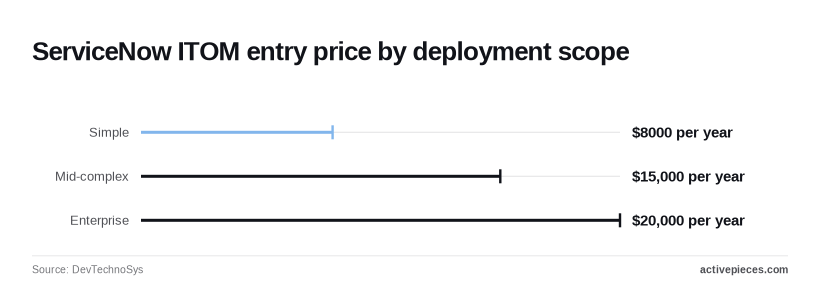
- $8,000 per year for a simple deployment
- $15,000 per year for a mid-complex one
- $20,000 per year for an enterprise one
Treat even the low figure as a floor, not a run rate. At $8,000 a year, a team running 50 runbook executions a month pays roughly $13 each, and that's before licensing add-ons and the admin time to keep it running.
The enterprise figure of $20,000 is only 2.5 times the simple one, so scope grows your bill more slowly than it grows your configuration work.
If your CMDB is inaccurate, the runbooks here are worth little, and you need ServiceNow administrators to maintain it. That dependence on the host platform is the limit.
If you don't already run ServiceNow, that overhead outweighs the benefit. If you do, it's the closest match for steps that must be recorded against tickets.
Incident response coordination in Slack
What incident.io handles
When your runbook steps are about coordinating people during an incident rather than touching machines, incident.io fits. It runs the response process from Slack or Teams, next to on-call schedules and status pages.
According to its documentation, the tool automates the process around an incident. That means opening a channel, paging the right responder, assigning roles, prompting for updates, and keeping a status page current, all without leaving chat.
The runbook here is the checklist a human follows, and the tool makes sure each item is raised, owned and recorded. For a team that already lives in Slack or Teams, that removes the manual overhead that makes incident response slow.
I count it in the vendor's favor that the plan pricing is published, since a tool I can't price without a sales call is a tool I can't budget.
Read the tiers against your own responder headcount and the features you need, such as on-call and status pages, before assuming the entry plan covers them.
incident.io limits for server remediation
The limit is where the steps execute. incident.io orchestrates the incident. It isn't built to run deep remediation on your servers, such as restarting services, rotating credentials or draining nodes.
Those steps still need an execution layer that can reach your infrastructure, and incident.io will coordinate around it rather than replace it.
Here is the chat-side work in miniature. A payment-failed event from a billing system triggers a single message into a Slack channel, and the run reports success. Nothing in that flow touches a server.
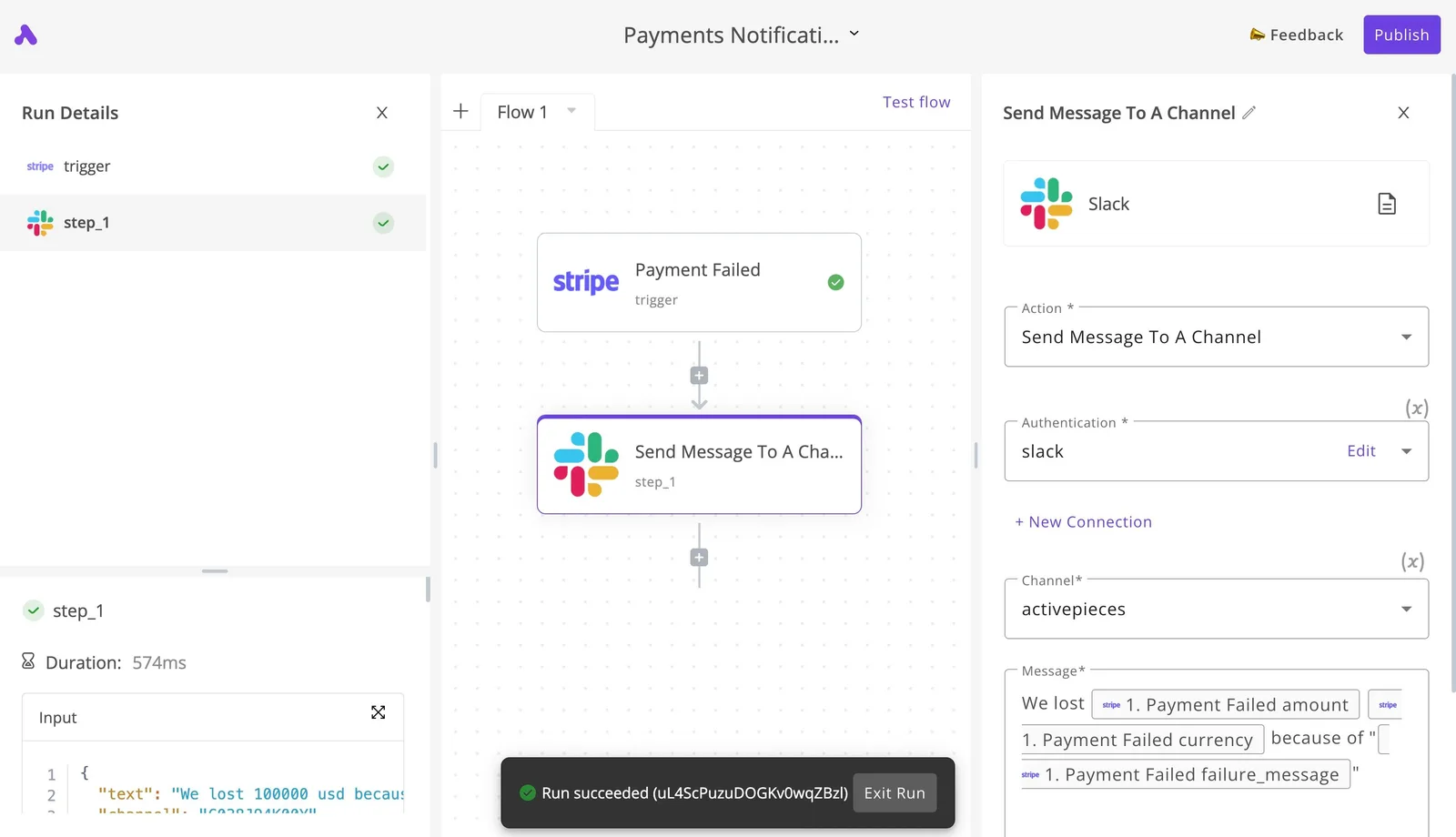
It tells people something happened, which is the kind of step incident.io wraps in roles, timelines and follow-ups. If a notification like this is most of what your runbook does, you're shopping in the right category.
If your runbooks end in commands against hosts, treat incident.io as the layer that runs the response and pair it with a tool that executes on the servers.
Activepieces
Activepieces fits the runbooks that incident.io and a server tool leave over. These are the ones whose steps are app actions, like posting a notification, opening a ticket, updating a record, or calling an API. It doesn't run commands on hosts.
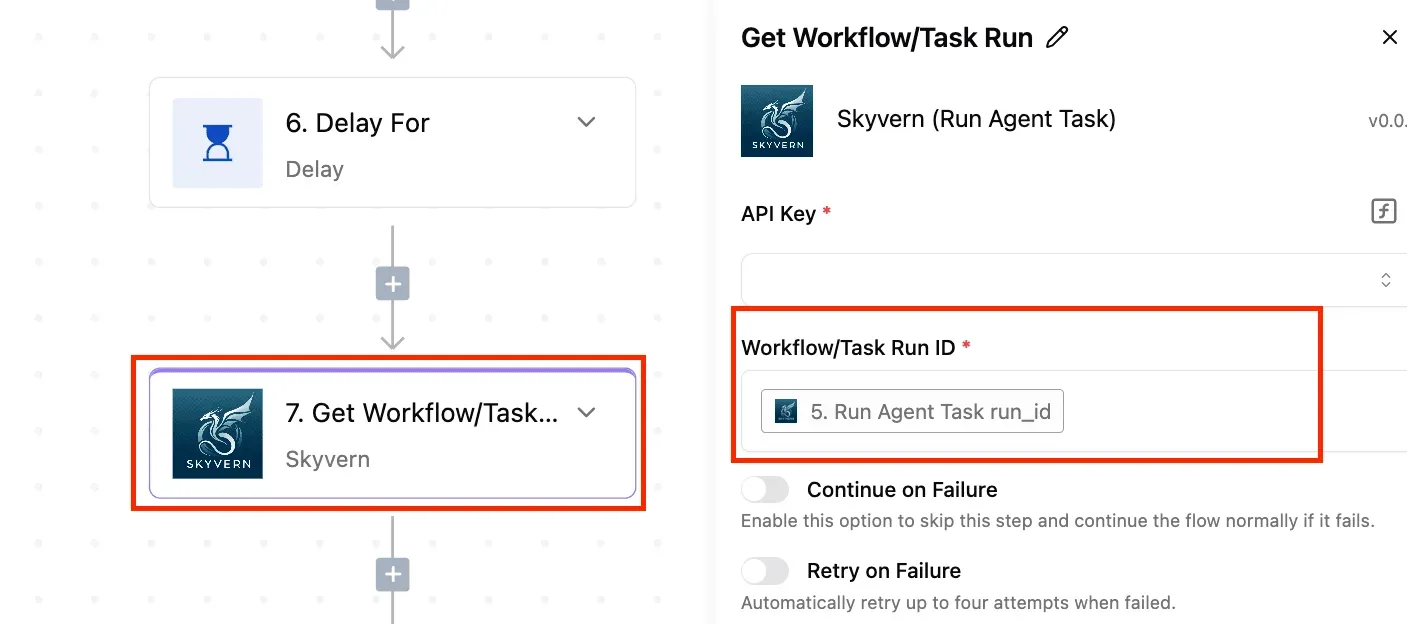
MoneyGram, Moneypenny, Alan and FundingSocieties run it in production.
Where it fits
For this kind of runbook, the cost math is simple. A step that sends a message or updates a ticket is cheap to run, and the expense comes from how many of those steps you chain and how often they fire.
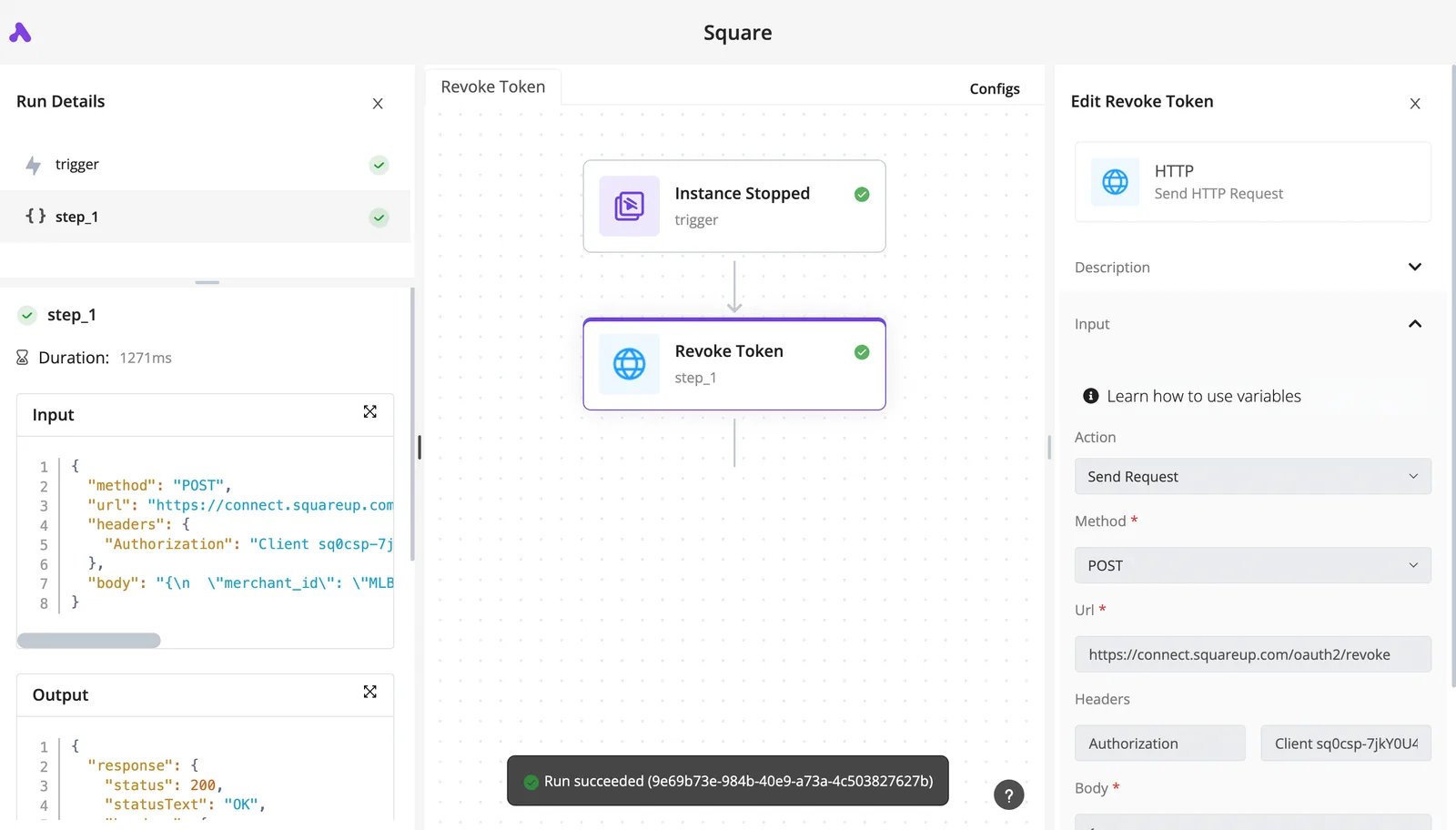
That shape is what Activepieces is built for: a no-code builder where each step is a connector or an HTTP request, and a trigger starts the flow.
The connector list is a directory you can count: packages/pieces/community in the open-source monorepo holds 750 integrations, roughly 60% of them community-contributed, so a ticketing or chat tool your runbook needs is likely already there.
If it isn't, AI can generate the missing connector, and you can keep it as a private piece on your own instance rather than waiting on a vendor release.
Its self-hosted core is MIT-licensed, so if you run it on your own infrastructure the per-run charge falls away and you pay for the machine and whoever patches it.
Confirm the current tiers on its pricing page before you budget. Hosted plans are listed there, but I didn't re-check them for this integration.
Anything that hides the number behind a sales call isn't worth modeling, and that's a fair test to apply to every tool here.
A cleanup example
Take cleanup after an incident. In the workflow shown below, an "Instance Stopped" trigger flows into a "Revoke Token" step, an HTTP request that POSTs to Square's OAuth revoke endpoint with an Authorization header and a body.
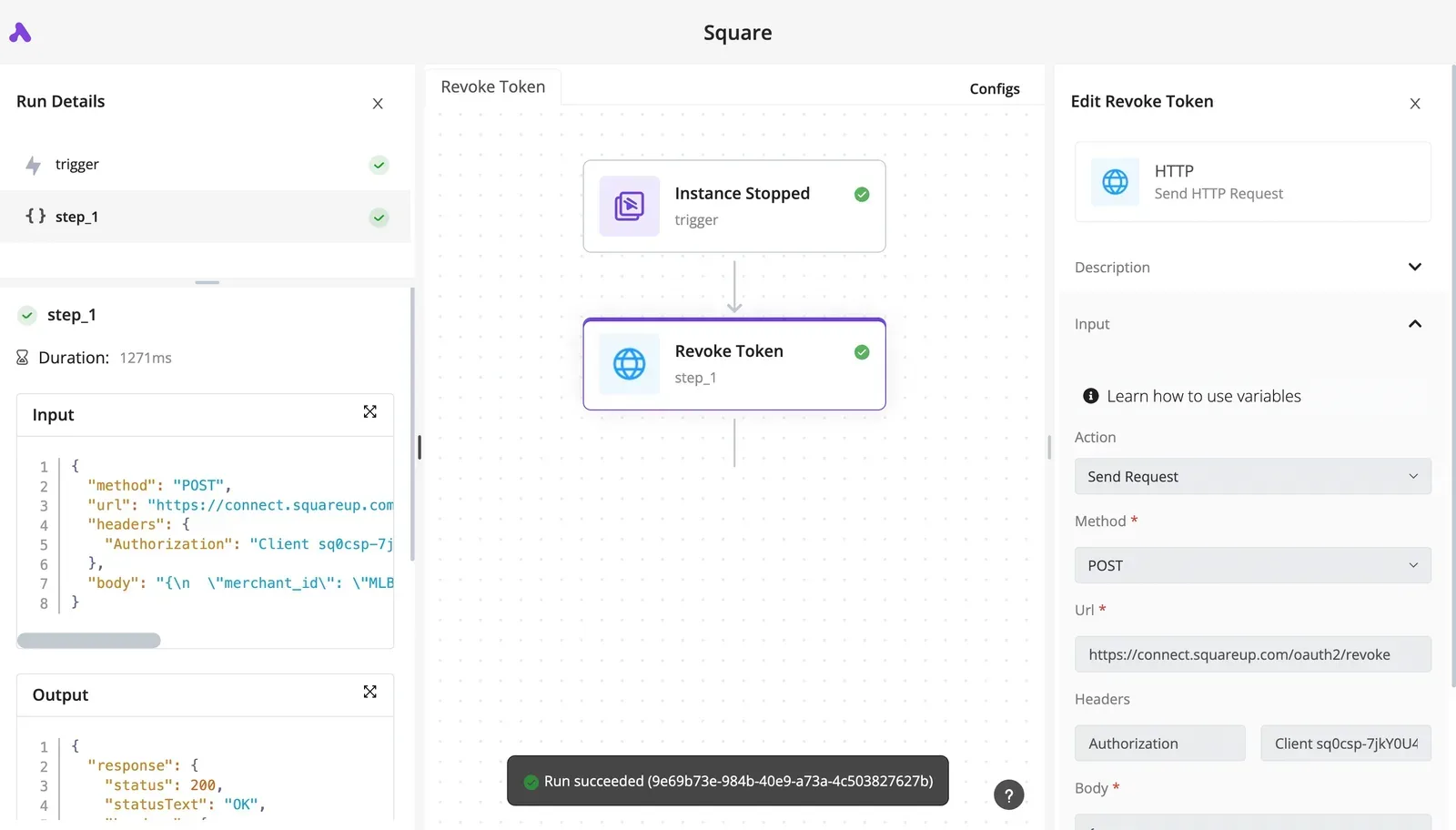
Look at the run details: both steps show green checkmarks and a "Run succeeded" message.
That tells you two things: the flow executed end to end, and the input and output of each step are inspectable, so someone who didn't build it can see what was sent and what came back.
What it lacks
Don't expect native server orchestration. Its 750 integrations are connectors to apps and APIs, so Activepieces won't run a script on a fleet of hosts, manage inventory, or handle privilege and rollback the way a server-side tool does.
It also lacks on-call features: no schedules, escalation policies, or paging logic of the kind incident tooling provides.
So it ranks behind the dedicated tools for both jobs. Use it as glue beside them, where an incident or a server event needs to reach a ticket, a chat channel, or a business system without anyone writing a custom integration.
Choosing and trialling a runbook automation tool
Write down every step of one runbook, tag each with where it executes, and pick one tool per tag; you don't need one tool that covers all three. That sequence keeps you from paying for breadth you will never use.
Map your runbook steps to execution targets
Pick a runbook you actually run, such as a failed-deploy rollback or a disk-full alert. Then work through it in order:
- List each step in the order a human performs it, including the boring ones like "post in the channel" and "update the ticket."
- Tag each step by where it executes: on a server (restart a service, clear a volume), in incident tooling (page someone, open an incident, change its status), or in a business app (update a ticket, notify a customer, log a record).
- Count the tags. If nearly every step sits on one target, that target picks your tool. If the steps split, expect to choose one tool for each target and connect them.
- Pick one tool per target. Resist adding a second tool for the same target; that's how maintenance cost doubles while capability barely moves.
- Trial the shortlist on that one runbook, as described below.
- Confirm pricing and self-hosting with each vendor before you commit.
Here is why the tags matter: they predict the bill. A tool priced per task or per run looks cheap on a runbook that fires rarely and gets expensive on one that fires on every alert.
Work out your cost per run from the vendor's published list price, then multiply by how often the trigger fires on a bad week, not an average one.
If a vendor will only explain pricing on a sales call, treat that as a cost in itself.
Run one real runbook as a trial
Use a real runbook, not a demo. Build it end to end, trigger it from a genuine test event, and have someone who didn't build it read the result and fix a deliberately broken step.
If they can't, the tool fails your maintenance test regardless of its feature list. Record how many runs the trial consumed so your cost-per-run figure rests on observation rather than the pricing page.
Quick answers: free options and self-hosting
Is there a free option? Several tools offer a free tier or a free self-hosted edition, but limits and terms change. Check the vendor's current pricing page and read what the free tier caps, since runs and steps are usually the cap.
Is runbook automation the same as workflow automation? Not quite. Runbook automation acts on systems during operations work, while workflow automation moves data between business apps. Some tools do both passably; most do one well.
Can I self-host? Only some can, and editions differ. If your data must stay inside your network, confirm self-hosting, and which features it includes, directly with the vendor before the trial begins.
Related reading
References
Still comparing
The fastest way to settle it is to build something.
Open source under MIT, so you can self-host the same thing later.
Start free Talk to sales