
School Administration Workflow Automation: 2026 Guide

Nov 24, 202616 min read
If your school is already on Microsoft 365, Power Automate suits it. Zapier or Make suit offices with no IT person, and n8n or Activepieces suit schools with a technical admin or student data that must stay on their own servers.
Pick by who will maintain the flow and where records must live, not by who lists the most apps. Prices and limits in this article come from vendor pages checked on 24 November 2026.
Workflow automation tools for school administration needs
**Pick by who will maintain the flow and where records must live, not by who lists the most apps.
The short answer in one line per tool
It sets the picks against school type.
(The chart sits here.)
After the chart, the rest of this article tests each pick against the jobs a school office runs first.
The jobs a school office automates first
Start where it hurts: most schools begin in the same three places, and each one hurts when it's done by hand.
When a parent submits an enquiry or enrolment form, someone retypes it into the student information system, then emails the family. Every retyped field is a chance for a wrong date of birth or a missing medical note.

When a parent reports an absence, a teacher or head of year needs to approve it, and the attendance record has to change. If this lives in an inbox, approvals stall and the register disagrees with what really happened.
Then there are notifications:
- Letters home
- Reminders about missing consent forms
- Alerts to staff
All follow the same pattern: something changes, and the right people need to hear about it. This is where a tool earns its place fastest, because the fix is small and the saving is felt the same week.
What a school tool must survive
When an office changes hands, a flow that only one person understands becomes a risk the day they leave. A school tool has to outlast the person who built it. If your office has no developer, choose something a non-coder can open, read and repair.

It also has to respect where student data lives. Enrolment forms and absence records carry names, addresses and health details, so ask where each tool stores and processes them before you build anything.
Some schools can accept a hosted service; others need records kept on their own servers or inside their Microsoft tenant.
Last, it has to fit the apps you already run. A long connector list matters less than whether your student information system and your email are on it.
Check those two first, and the rest of the choice follows from who maintains it and where the data sits.
This takes minutes, not a project: automate it in Activepieces free.
Comparison table of five school workflow tools
Judge all five tools on the same six points in the table below. The strength column rarely decides a school's choice, while the upkeep and self-hosting columns usually do.
| Tool | List price at 24 Nov 2026 | Strength | Limit | Best-for school | Non-coder upkeep | Self-hosting |
|---|---|---|---|---|---|---|
| Zapier | not confirmed | Widest app coverage, quick first build | Costs climb with busy flows | No-IT office | Easy | not confirmed |
| Make | not confirmed | Visual branching for multi-step flows | Harder to read once scenarios grow | Office with one patient tinkerer | Moderate | not confirmed |
| Power Automate | not confirmed | Native fit with Microsoft 365 | Awkward outside the Microsoft stack | Microsoft school | Moderate | not confirmed |
| n8n | not confirmed | Fine control over data and logic | Expects someone technical | School with a technical admin | Hard | Yes |
| Activepieces | not confirmed | not confirmed | not confirmed | not confirmed | not confirmed | not confirmed |
Read the last two columns first. A tool that nobody on staff can fix is a tool that breaks quietly during enrolment week.
School workflow tool pricing not confirmed
List prices were meant to come from each vendor's own pricing page. Some could not be confirmed on 24 November 2026 to a standard worth printing, so the price column says "not confirmed" where that applies.
That means you shouldn't budget from this table. Open each pricing page on the day you decide, and ask the vendor in writing what a school or nonprofit rate would be.
Usage-based versus per-user pricing for school tools
You will meet one of two charging styles. Zapier and Make meter by how much work your automations do, while Power Automate has generally leaned on licensing per person or per flow.
For a school this matters because your volume is lumpy. A flow that handles admissions forms might sit idle for months, then fire thousands of times in a week.
Under usage pricing, that spike lands on your invoice. Under per-user pricing, the cost follows headcount, so a small office with heavy automation pays less than a large staff with light use.
Model your busiest week, not your average one, and the right pricing style usually becomes obvious. Then match that choice to your maintainer and your data location.
Zapier and Make for school offices without IT
If nobody in your office writes code, Zapier is the safer pick. Make is the cheaper one if someone is willing to learn a visual canvas. Both run only in the vendor's cloud, so student data passes through their servers either way.
Expect plain first jobs: a family submits a form, the office gets a message, a row lands in a spreadsheet. The tool has to survive the person who built it leaving in June.
Zapier for office teams
At $19.99 a month on annual billing for 750 tasks, Zapier's entry paid plan, Professional, is where The text came through as only "most offices begin." It has no competitor, numbers, product names or superlatives to work with, so it looks truncated.

Could you paste the full sentence? A task is one completed action, so a form that triggers a spreadsheet row and an email uses two.
At that rate, 750 tasks covers roughly 375 such submissions a month, enough for a quiet office but thin during enrollment season.
Step up to Team and it lists at $69 a month for 2,000 tasks, so anyone needing more than 2,000 monthly automations must upgrade. That's more than three times the price for under three times the volume, and the plan is built for shared access.
Pay for it only if several staff need to edit the same workflows, so nothing depends on one person's login.
When a Zap breaks, an office manager can read it as a short list of steps and fix it without help. That is Zapier's strength: maintenance.
Make for visual builders
For $12 a month, Make's Core plan lists 10,000 credits. Make counts credits, not tasks, so the numbers aren't a like-for-like swap.
Still, the gap in entry price and included volume is large. A school that expects heavy bursts, such as attendance alerts or mass notices, will hit Zapier's ceiling long before Make's.
There is a catch, and it is the learning curve. Make shows each workflow as a map of connected modules, which handles branching well but takes longer for a non-technical person to read cold.
Make is Cheapest per unit of volume, while Zapier costs more.
What follows is the data question: cloud-only hosting rules out both tools for any record that must stay on your own servers.
Power Automate for schools on Microsoft 365
If your school already runs Microsoft 365, Power Automate is the right pick, because the connectors you'll use first come with the licence. Most US districts aren't in that position.
Keep in mind that it's a cloud service too, so the same rule about records that must stay on your own servers applies.
If a flow sticks to standard connectors for Teams, SharePoint, Forms and Outlook, the Microsoft 365 education licence covers it, so a form-to-approval-to-email flow costs nothing beyond what you already pay.
Premium connectors, such as those for database and third-party business systems, need a separate Power Automate plan. The table shows where the line sits, so check any connector you plan to depend on against the "extra" rows before you build around it.
| Item | In M365 education licence or extra | Price | Date checked |
|---|---|---|---|
| Standard connectors (Teams, SharePoint, Forms, Outlook) | Included | No added cost | 24 Nov 2026 |
| Premium connectors | Extra | Needs a premium plan | 24 Nov 2026 |
| Premium plan | Extra | Charged per user or per flow, set by Microsoft | 24 Nov 2026 |
Add one premium connector and the whole flow, and everyone who runs it, lands on a paid plan. Price that before you promise a front office a "free" automation.
Power Automate limits for non-Microsoft school stacks
Stack matters more than features. According to The Uptime Report, Google Workspace runs email in 76% of US school districts, Microsoft 365 in 15%, and other platforms in the remaining 9%.
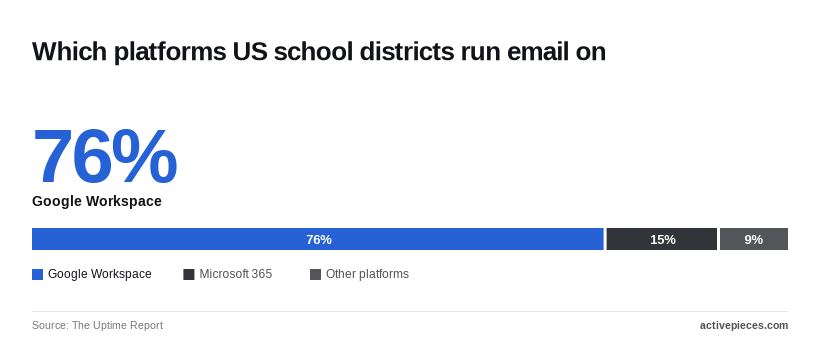
That means most districts would pay for a Microsoft stack they don't use just to get Power Automate's free connectors.
If your staff live in Gmail, Google Sheets and Google Forms, the included Microsoft connectors are the wrong ones. You'd be wiring a tool built around Teams and SharePoint to systems it treats as second-class.
The 15% of districts on Microsoft get a real advantage, so the other districts are without it. The other 85% should weigh the tools that follow on who maintains them and where data lives, not on this licence.
You can follow the rest of this with the builder open. Start free, no card.
n8n for schools with a technical administrator
Only when a named person can run it does n8n suit a school, because its strengths in data residency and complex logic come with a server someone has to look after.
After the licence question, the real test is who maintains it and where student data sits.
n8n cloud plans versus self-hosting for schools
You can buy n8n as a hosted cloud plan or run it yourself. The cloud plans get you started fast, but your workflow data, including any student records passing through, lives on n8n's infrastructure.
Self-hosting on your own server or container host keeps that data where your policies say it must stay, and that's the main reason a technical school picks n8n. The price is that updates, backups and uptime become your job.
It also handles branching logic, loops and custom code better than the simpler tools in this comparison. If your attendance-to-guardian-alert flow has six exceptions, n8n can express them.
n8n uses a source-available licence, not a standard open-source one, so read its terms for your use before you build anything on it.
Who maintains self-hosted n8n in a school
It breaks on people. Only about one in three districts has a full-time security employee, so in roughly two of three nobody's job is keeping a server patched.
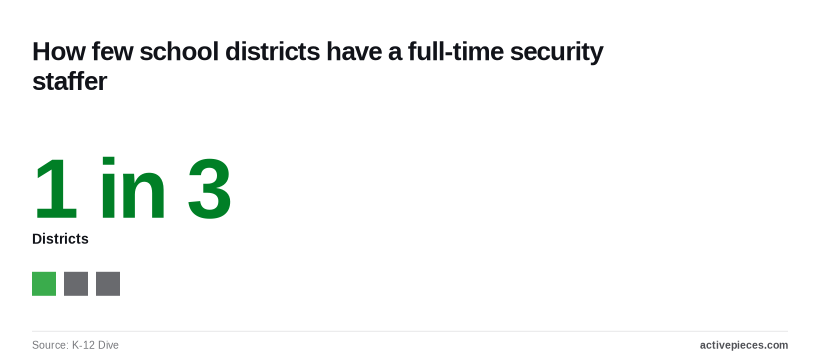
A self-hosted n8n instance holding student data then has no natural owner, and it's the one that quietly falls behind on updates.
Non-coders also hit a ceiling. Building a flow is visual, but fixing one means reading expressions, the small snippets that reshape data between steps. A teacher or office manager won't want to debug those at 7 a.m. before a term starts.
Before choosing n8n, a school needs:
- a named IT lead who owns it
- a server or container host
- a backup and update routine
- someone who can read expressions
- n8n's licence terms checked against your use
If you can't tick all five, the next sections cover tools that put less on your shoulders.
Activepieces for schools that must keep student data in-house
If your school has no developer but still needs enquiry and student records to stay on a server you control, Activepieces lets you run its MIT-licensed core on that server, with 750+ integrations available in the builder.
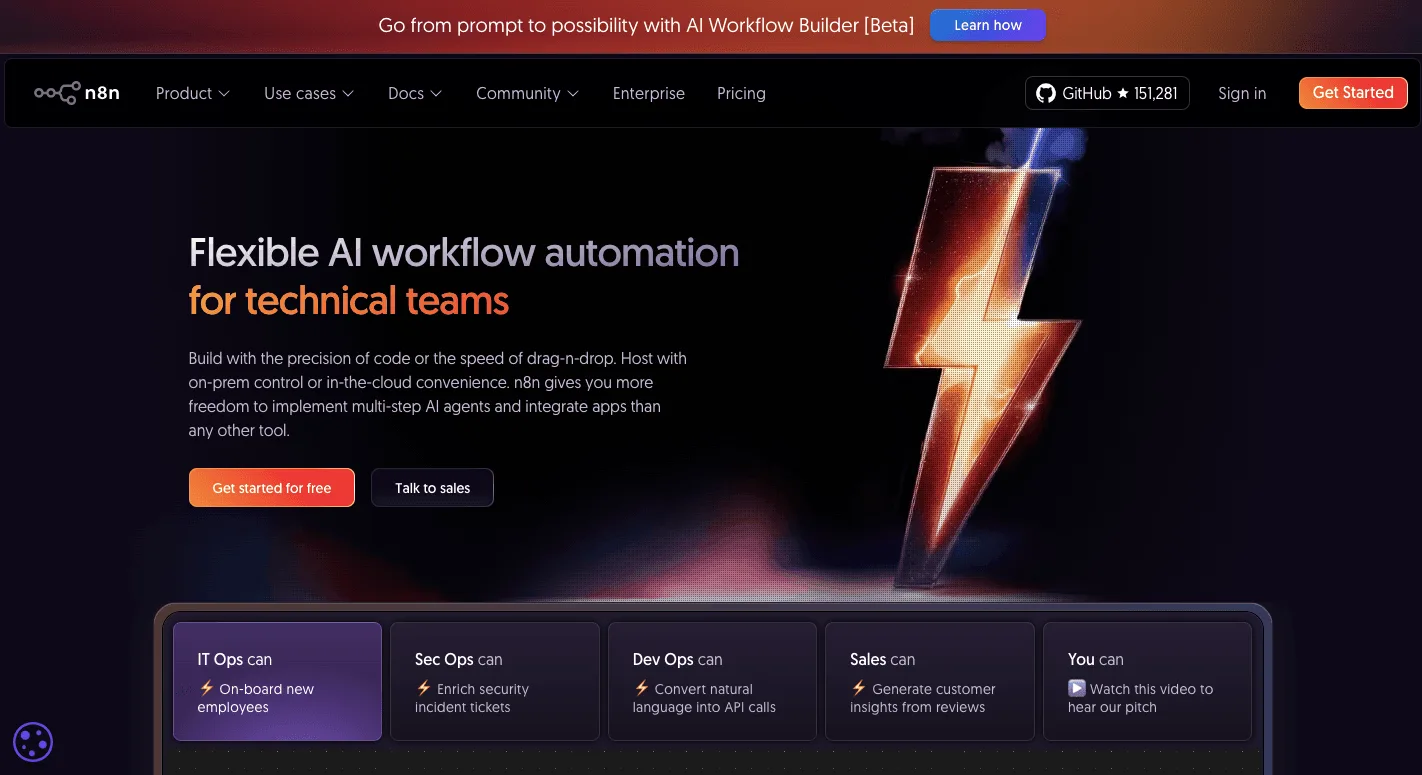
It's open source and can be self-hosted, with a visual builder a non-coder can edit.
That's the gap the five-point check left open: someone still has to run it, but the day-to-day changes don't need code.
Where it fits
When an admissions inbox depends on one person remembering to forward parent enquiries, Activepieces covers it without a quota worry, because every plan, including free, allows unlimited flows, so the enquiry flow and the absence flow never compete for a allowance.
You build flows in a browser by chaining a trigger and steps, so the office manager who knows the admissions process can change a wording or a recipient without raising a ticket.
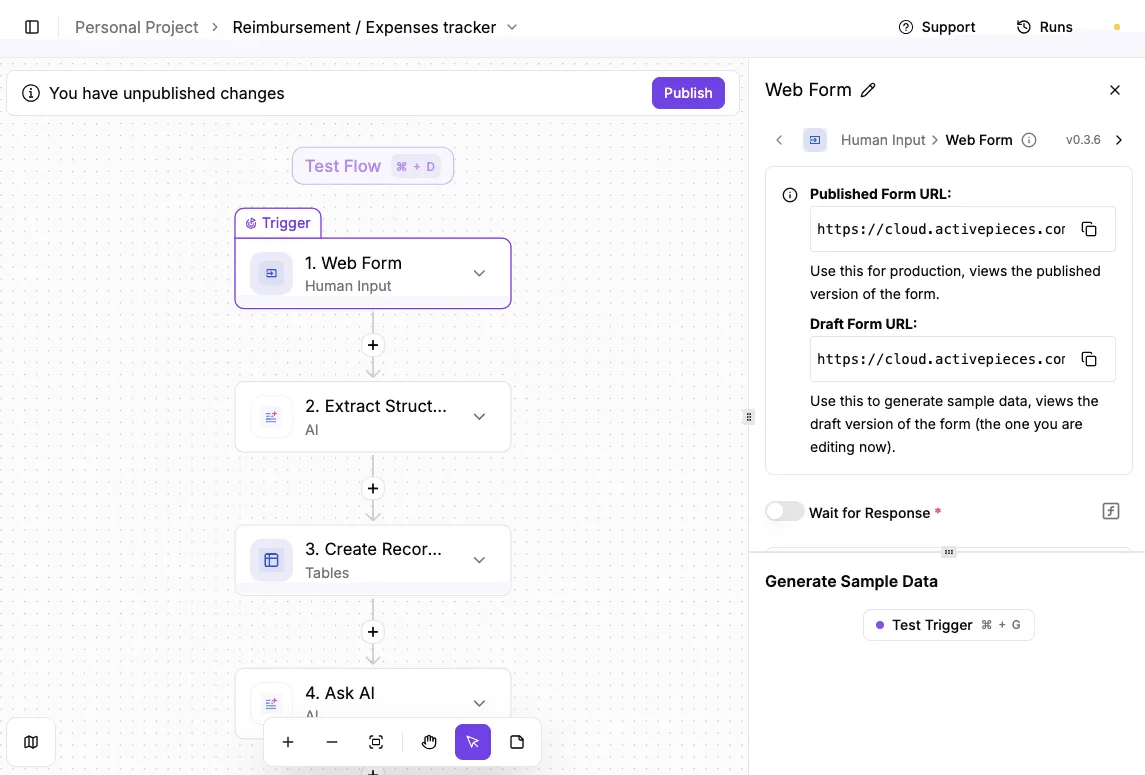
Most vendors treat self-hosting as the cut-down tier, which leaves a school that keeps records in-house without the very controls it wanted.
Activepieces doesn't split it that way: the air-gapped enterprise build on your own server has the same SSO, SCIM, custom RBAC, audit logs, release management and secret manager support as the managed cloud, and the docs list them side by side.
MoneyGram, Moneypenny, Alan and FundingSocieties run Activepieces in production, and student records and flow data stay on your own server, which is the question a governor or data protection lead will ask first.

The consequence is that you take on updates, backups and uptime, so someone in the school or its IT supplier must own that.
If nobody can own a server, it also offers hosted cloud plans. Those suit a school that wants the builder but whose data rules allow a vendor-hosted tool.
Check the current plan details on its pricing page before committing, because I won't quote what I can't point at.
Where it does not fit or is not confirmed
I couldn't confirm ready-made connectors for school information systems, the databases that hold timetables, attendance and pupil records. Assume you'll reach those through generic web requests or an export, which takes more setup than a one-click connector.
If your first job is syncing attendance, a Microsoft school will likely be better served by Power Automate.
I also have no confirmed security certifications to cite for either edition. Ask the vendor for them in writing if your procurement process requires them. For self-hosting, certifications matter less than your own server's controls, but that responsibility is yours.
Worked example: enquiry form to admissions inbox
This is the first job most schools automate. Read the sequence below as the whole flow, in order, with one trigger and four actions:
- A parent submits the enquiry form on the school website.
- The record is saved to your self-hosted database.
- The admissions inbox is emailed.
- A task is assigned to the named admissions person.
- An automatic reply goes to the parent.
If an email step fails, the enquiry still exists in your database and nothing is lost, because the record is saved before anyone is notified. Build and test that flow with a dummy enquiry first.
Frequently asked questions
Is there a free workflow automation tool for a school?
Yes: most of the major tools offer a free or trial plan, and a self-hosted option exists for schools that can run it.
Free plans are built for testing, so expect caps on runs or steps, which means you can prove one workflow but shouldn't plan the whole office around it. Check each vendor's pricing page for current limits before you build.
Can a school automate admin work without a developer?
Yes, for simple flows like a form that triggers an email or a spreadsheet row. A no-IT office can maintain these in the hosted, visual tools if one named person owns them.
The trouble starts when a flow needs custom code or a self-hosted server, because then every fix waits on someone technical. So pick for who will fix it at 8am on a Monday, not for who built it.
Is it safe to send student data through a cloud automation tool?
It depends on where the data lands and what your obligations are. Every step in a cloud tool passes records through the vendor's servers, and often stores them in run logs.
With a cloud tool, your data-protection duties (FERPA in the US, GDPR in the UK and EU) therefore extend to that vendor, so you need a data processing agreement and a known data location.
If you can't get both, keep names and grades out of the flow and pass only a reference number.
Should a school self-host its automation tool?
Only if someone technical will own it. Self-hosting keeps student data on infrastructure you control, which is the strongest answer to a privacy question.
It also makes your school responsible for updates, backups and uptime, so an unmaintained server becomes its own risk. A school with a technical admin can justify it; a school without one usually shouldn't.
Of the tools compared here, n8n can be self-hosted, and so can Activepieces, whose MIT-licensed core runs on your own server with unlimited flows.
How should a school office pilot its first workflow?
Start with absence approval, one of the three first jobs described earlier: it's frequent, low-stakes and easy to check by eye, meaning you can test confidently and get immediate feedback. Follow these steps in order:
- Pick the absence-approval form and write down each step it takes today.
- Build it on one tool's free or trial plan, using test records rather than real student data.
- Run it for a term, with the paper or email route as a fallback.
- Record who maintained it and what broke.
That log shows what the tool costs in attention, which a connector count never will. It also tells you whether the school needs the Microsoft route, a simpler hosted tool or a self-hosted one.
Related reading
References
Build it
Set this up in minutes.
No code required. Connect your accounts, and Activepieces runs it from there.
Start free Talk to sales