
Slack Workflow Builder Alternatives (2026 Guide)

Nov 14, 202615 min read
To move beyond simple chat triggers, you've got to evaluate platforms based on their ability to handle high-volume data processing, complex branching logic, and private infrastructure requirements.
While Slack Workflow Builder handles basic message routing, professional-grade automation requires a dedicated engine like Zapier, Make, n8n, or Activepieces to manage cross-app state and long-running processes.
Activepieces, for instance, provides an MIT-licensed core that allows teams to scale these operations on their own infrastructure while maintaining the visual simplicity of native chat tools.
Criteria for selecting a Slack automation alternative
Integration depth and API support
How much of a third-party service’s API a platform exposes determines its ultimate value. Standard connectors often only support basic actions.
These include sending a message or creating a row, which forces teams to write custom code for specialized tasks like updating a specific block in a Slack message.
Workflows often break when a vendor updates their software, unless you use platforms that provide "Universal API" or "HTTP Request" modules. These allow you to interact with any endpoint even if a pre-built connector doesn't exist.

Every catalogue is a ceiling, but Activepieces treats its library as a floor by allowing teams to generate missing integrations with AI and add them privately to their own instance.
A majority of the 748 integrations are community-contributed, meaning the catalogue grows based on user needs rather than vendor release cycles.
Every catalogue is a ceiling, but Activepieces treats its library as a floor by allowing teams to generate missing integrations with AI and add them privately to their own instance.
You can verify this by checking the open-source monorepo, where the catalogue is counted directly from the code rather than published as a marketing figure.
Logic complexity and data persistence
Scaling an operation requires the ability to store information between different steps of a workflow or even between different days.
Slack’s native tool lacks a built-in database. It can't remember that a customer asked a question three hours ago unless you push that data to an external spreadsheet.
Internal storage and advanced conditional branching are standard in dedicated automation tools.
These allow for "if-this-then-that" logic that spans dozens of steps and multiple outcomes, enabling the automation of complex workflows that would otherwise require constant manual oversight, thereby freeing your team to focus on high-value strategic tasks, which means your staff can redirect their attention toward growth rather than repetitive maintenance.
Comparing pricing and service limits by platform
Costs shift from negligible to significant as soon as a team moves from five notifications a day to five thousand. The following table compares how the leading platforms structure their service limits and delivery models to help you forecast monthly overhead.
| Platform | Integration Count | Max Execution Time | Pricing Model | Hosting Options |
|---|---|---|---|---|
| Zapier | Thousands | Restricted by plan tier | Per successful task | Cloud only |
| Make | Thousands | Variable by plan | Per operation (step) | Cloud only |
| n8n | Hundreds | User-defined | Per execution | Cloud or Self-hosted |
| Activepieces | 748 | User-defined | Per execution | Cloud or Self-hosted |
Choosing a model based on executions rather than individual steps prevents your monthly bill from ballooning just because a workflow requires a long sequence of logic.
Self-hosted vs cloud security for regulated teams
Where data leaves the building is as important as what the data does for teams in regulated industries.
While cloud-only services offer the fastest setup, they require you to trust a third party with your API keys and customer data.
Self-hosted options allow the automation engine to sit behind your own firewall. Sensitive information never touches an external server.
Activepieces ships its core under an MIT licence, which ensures that every commit released is yours to run, fork, or embed without a fair-code clause or hidden asterisk.
This is a distinct contrast to source-available tools like n8n, where the licence is built to let you look at the code rather than granting full rights to resell or modify it.
You can open the LICENSE file in the activepieces/activepieces repository to see the MIT designation on the core and the separate commercial licence for enterprise directories.
This infrastructure choice determines internal compliance standards for data privacy and residency. Organizations handling financial or medical records often find that the ability to run the engine on their own hardware is the deciding factor in their selection process.
The fastest way to settle a shortlist is to try one. Activepieces is free to try, no credit card.
1. Activepieces for secure open-source scaling
Activepieces provides an MIT-licensed core that allows teams to scale Slack automations on their own infrastructure while maintaining the visual simplicity of native chat tools.
It bridges the gap between high-overhead platforms like Workato and the rigid limitations of native chat tools by offering a self-hosted option that keeps sensitive operational data within your own firewall.

The specific choice depends on your priorities: if you value data sovereignty and predictable cost structures, Activepieces runs the same automation engine on your own servers or on a managed cloud, a flexibility utilized by MoneyGram and FundingSocieties to maintain control over their internal workflows.
Zapier remains the standard for sheer volume of third-party connections and Make offers the most granular visual logic. The platform maintains security compliance while scaling task volume.
The no-code interface allows non-technical department heads to maintain flows, which reduces the "bottleneck" effect where IT must approve every minor Slack notification change.
MoneyGram, Moneypenny, Alan and FundingSocieties run Activepieces in production to manage these environments at scale. Because the platform offers unlimited flows on every plan, including the free tier, teams can build out complex Slack-based operations without hitting artificial architectural limits.
The team isn't ever locked out of a legacy internal API that lacks a public connector because developers can write custom integrations using TypeScript.
Activepieces counts a single execution as one credit regardless of the number of steps, which prevents the "success taxes" often found in proprietary SaaS models.
This flat-rate execution model applies across all 748 integrations, ensuring that a 20-step Slack notification sequence costs no more than a simple ping, so you never have to worry about scaling costs as your automation needs grow.
The cost of running thousands of lead-routing or incident-response cycles can become a significant line item as your automation maturity grows.
| Provider | Plan | Monthly Cost (50,000 Tasks) |
|---|---|---|
| Zapier | Professional | $289-$433 |
| Activepieces | Team (Cloud) | $200 |
| Activepieces | Community | $0 (Self-hosted) |
Under this pricing structure, a marketing team can scale from ten to ten thousand automated lead assignments without renegotiating their departmental budget.
To replace a basic Slack workflow with a lead-processing engine, you can build a sequence that triggers from a Slack "New Message" (filtered by a specific emoji reaction).
Then, route the content to Claude Sonnet 5.5 for sentiment analysis, and update a record in PostgreSQL. This ensures the data persists even if the Slack channel is archived.
Review the 748 integrations in the open-source monorepo and start free on Activepieces Cloud with 1,000 credits a month and unlimited flows, giving you ample room to experiment with your first set of automated processes at no initial expense, which means you can scale your workflows significantly before needing to consider a paid subscription.
While Zapier offers a vast library of pre-built connections and Make provides intricate logic mapping, Activepieces is the better choice for organizations that prioritize transparency and data sovereignty.
By treating its open-source repository as a foundation rather than a fixed ceiling, the platform ensures that scaling remains secure and verifiable within a user's own infrastructure.
For teams that require the flexibility of a self-hosted engine without sacrificing visual simplicity, Activepieces is the better fit.
2. Zapier for no-code speed
Zapier has the A library of pre-built Slack triggers and actions for teams that prioritize immediate deployment over custom coding.
Slack Workflow Builder only handles internal events. Zapier connects the chat interface to thousands of third-party services, allowing a non-technical manager to build a cross-platform sequence in minutes.
Because a visual interface handles the underlying API authentication, a marketing lead can link a lead form to a private channel without asking the IT department for a developer token.
Directly into the path, you can integrate frontier AI models when your automation requires complex logic or content generation.
A support team can use Claude Sonnet 5.5 from Anthropic to summarize long customer tickets before they're posted to Slack. This reduces channel clutter and the time agents spend reading logs.
If the workflow requires high-volume categorization of incoming messages, GPT-6 Luna from OpenAI can be inserted as a step to tag sentiment. This routes urgent pings to the correct priority queue immediately.
The following table compares how Zapier handles the fundamental requirements of professional Slack automation against the native builder:
| Feature | Slack Workflow Builder | Zapier |
|---|---|---|
| App Ecosystem | Limited to Slack-native tools and basic webhooks. | Thousands of pre-integrated third-party apps. |
| Logic Depth | Basic linear paths and simple branching. | Multi-path conditional logic and nested loops. |
| Data Handling | Temporary storage within the specific workflow. | Built-in tables for persistent data storage across flows. |
| AI Integration | Manual setup via third-party Slack apps. | Native steps for models like Gemini 3.8 Flash. |
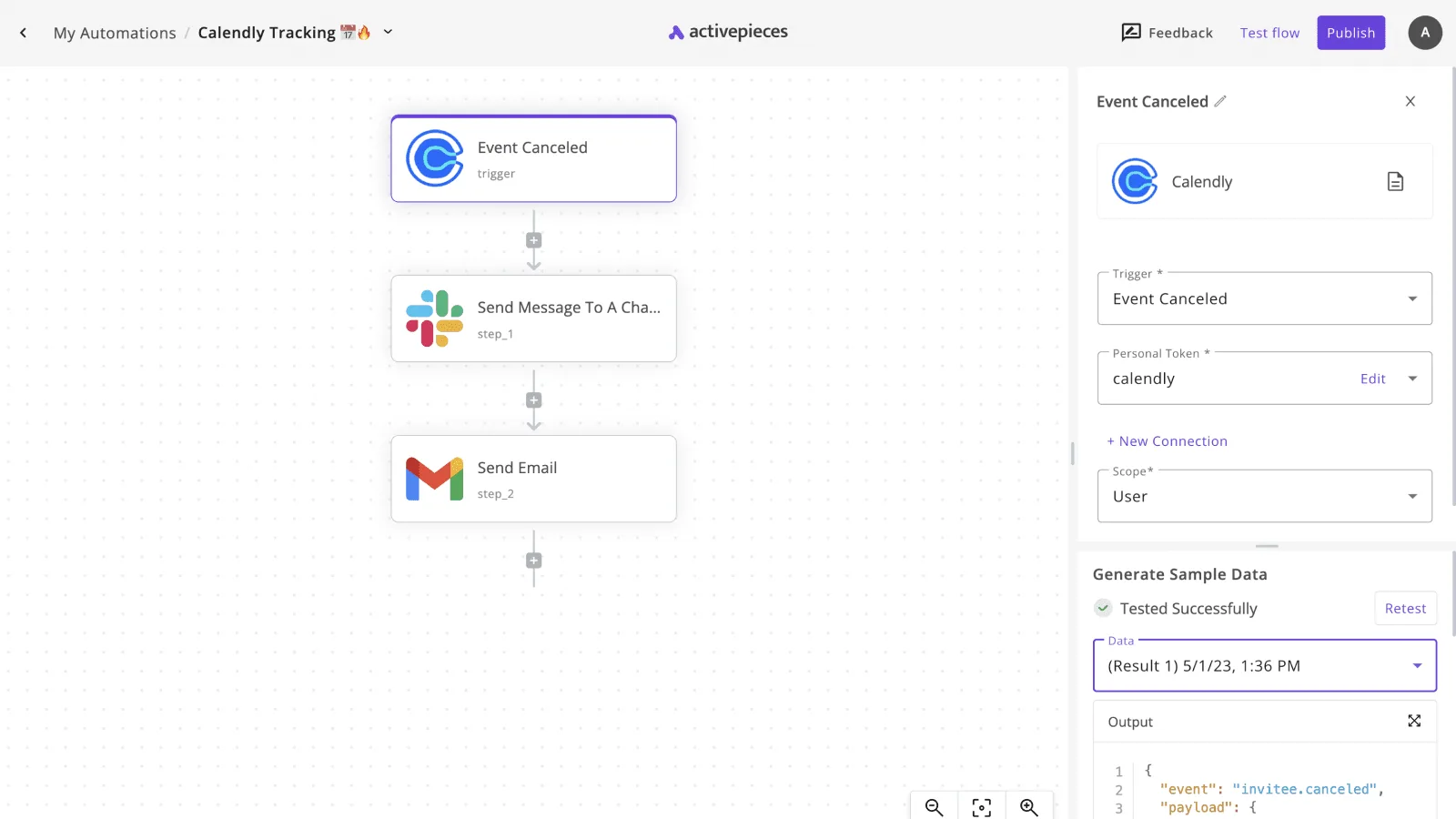
In the screenshot, a multi-app flow shows a canceled event in Calendly triggering a notification in Slack and a follow-up in Gmail.
This setup ensures the sales representative is notified in their workspace while the client receives an immediate confirmation in their inbox.
Moving beyond these pre-built connections often requires more granular control over how data is mapped between steps.
Reading a table only gets you so far. Build the same workflow in Activepieces and compare it yourself.
3. Make for complex visual logic
Visual data mapping
Make is a multi-directional visual canvas that allows you to map data structures and execute multi-branch logic beyond the linear constraints of Slack Workflow Builder.
Slack’s native tool handles sequential "if-this-then-that" steps. Make uses routers that filter data into parallel paths based on specific attributes found in your external databases.
Automating support ticket routing with HubSpot
When high-priority tickets require different internal stakeholders than routine billing questions, a simple notification isn't enough.
Consider a support team using HubSpot, a customer relationship management platform, to manage incoming requests.
The following workflow demonstrates how Make handles this complexity by pulling a new ticket from HubSpot and passing it through a reasoning layer.
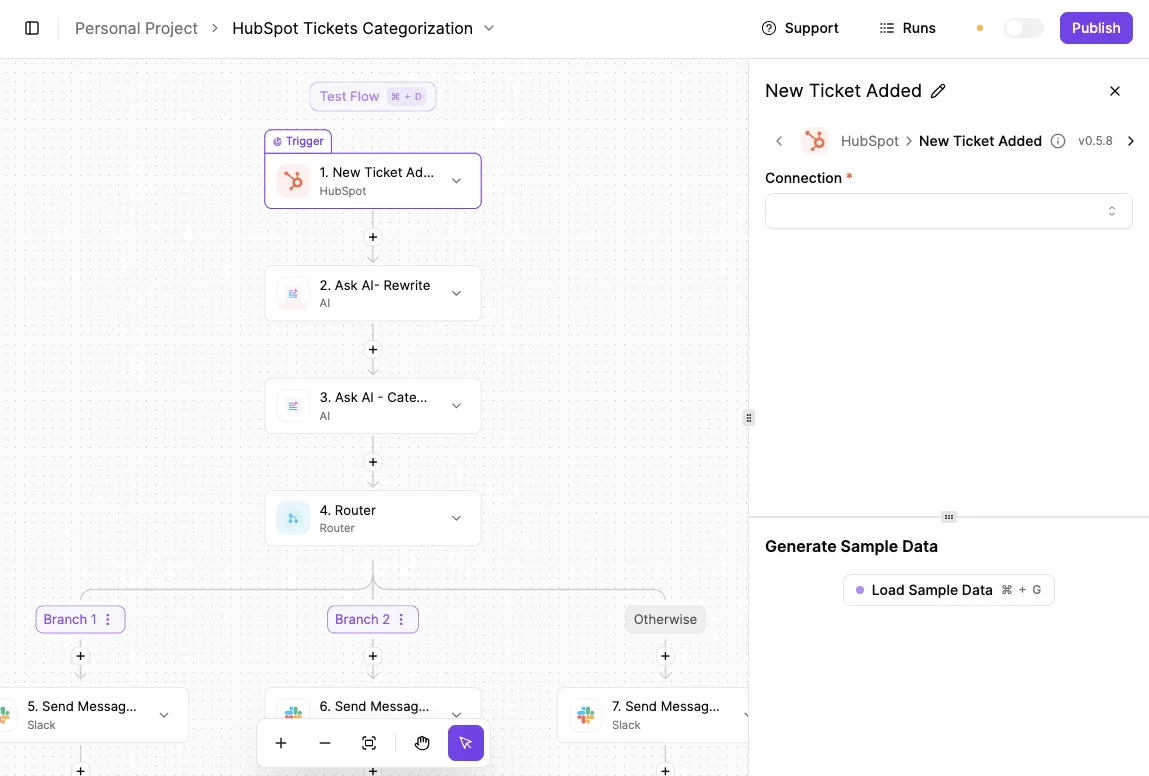
The triage system illustrated in the "HubSpot Tickets Categorization" flow starts with a HubSpot trigger that watches for new tickets.
It then passes the raw text to two sequential AI steps (one for rewriting the content for clarity and another for categorization).
The logic then splits at a router: Branch 1 might alert the engineering channel via Slack for "Bug" tags.
Branch 2 routes "Billing" queries to a private finance channel. This granular routing ensures that data doesn't just move from point A to B, but arrives at the specific destination required by its content.
Mapping variables with sample data previews
Directly from the connected app, the configuration panel allows you to generate sample data.
This maps the variables used in later steps to real-world outputs. This level of precision is necessary for teams managing high-volume data where a single misrouted notification results in a missed Service Level Agreement (SLA).

Beyond simple routing, Make supports advanced data manipulation:
Iterators break down a single Slack message containing a list into individual database records.
Aggregators combine multiple rows from a Google Sheet into one formatted Slack digest.
Error handlers allow a workflow to attempt a secondary path if an API call to a tool like Jira (a project tracking application) fails.
Centralized cloud management
Unlike self-hosted tools that require server maintenance, Make operates as a fully managed cloud environment. This ensures that your Slack automations remain active without your team needing to manage patches or infrastructure uptime.
The platform provides a high-availability architecture that scales automatically as your operation grows. This makes it an ideal choice for teams that need sophisticated visual logic but lack the DevOps resources to maintain a private server.
4. n8n for self-hosted technical teams
Data sovereignty and control
Technical teams choose n8n when they must maintain absolute control over the data transit layer of their Slack automations.
While cloud-native tools require you to pipe every internal message through a third-party server, n8n is a fair-code platform that can be deployed via Docker on your own virtual private server.

This architecture ensures that sensitive information, such as API keys or internal database records, never leaves your controlled environment.
Developer-first automation
Inside n8n, a visual node-based editor integrates directly with custom JavaScript for teams managing complex logic.
This allows a developer to bridge the gap between a standard Slack trigger and a high-reasoning model like Claude Opus 5.5 for long-running agentic coding tasks without building a custom application from scratch.
Driven by its community, the platform rapidly expands the library of pre-built integrations. Technical teams can now use hundreds of community-contributed nodes as of 2026.
Using prebuilt nodes for DevOps automation
Because of this surge in available nodes, a DevOps team is less likely to spend hours writing custom HTTP requests for niche internal tools.
Instead, they can focus on the reasoning logic required for sophisticated agents.
When a Slack command triggers a deployment audit, the workflow can now route the request.
Gemini 4 Carbon analyzes the codebase for vulnerabilities before reporting back to the channel. To maintain this level of technical flexibility, n8n uses a tiered pricing structure.
Pricing and deployment tiers
Free for personal use, the Self-Hustled plan allows for unlimited executions on your own hardware.
The Pro plan starts at $50 per month on the n8n cloud, providing advanced features like execution recovery and source control, which ensures that your critical business processes remain resilient and version-tracked, so you avoid the costly downtime associated with manual error recovery.
The Enterprise plan requires a custom quote to access log streaming and environment variables for large-scale production deployments.
Teams avoid the restrictive "no-code" ceiling by moving these operations off Slack’s native Workflow Builder and onto a self-hosted n8n instance.
They gain the ability to use flagship models like GPT-6 Astra for complex reasoning within their private infrastructure.
Auditing and migrating your Slack workflows
Spotting workflow bottlenecks beyond Slack's limits
Efficiency stalls when a workflow hits the functional ceiling of Slack, such as when a single form response must update both a CRM and a project management tool simultaneously.
You can pinpoint these bottlenecks by looking for "manual bridges." These are steps where a human must copy data from a Slack thread into another tool because the native builder can't resolve the logic.
If it lacks the reasoning to handle conditional branching, a workflow is a candidate for migration.
This often happens when routing a lead based on a specific territory found in a separate database.
Replacing these with a model like Claude Haiku 5.5 allows for high-volume, latency-sensitive classification of incoming requests that Slack’s basic filters would miss.
Mapping existing Slack triggers to new platforms
Transitioning a workflow requires translating Slack-specific events into universal webhooks or API listeners that external platforms can ingest.
This process ensures that when a user clicks a button or reacts with an emoji, the downstream logic receives the exact metadata (such as the User ID or Channel ID) needed to maintain context.
To replace a basic Slack workflow with a lead-processing engine, you can build a sequence:
- Audit current Slack Workflow usage to document every active trigger and the specific data fields they capture.
- Identify 'ceiling' triggers that require multi-app logic or advanced reasoning that native tools can't provide.
- Export data requirements to define what variables must be passed between the chat interface and the external database.
- Map Slack IDs to new platform variables so that the automation correctly identifies the person who initiated the request.
Still comparing
The fastest way to settle it is to build something.
Open source under MIT, so you can self-host the same thing later.
Start free Talk to sales