
Snowflake API for Developers: Which One to Use?

Nov 23, 202616 min read
There is no single Snowflake API. There are four: the SQL API, the Python API, the Python Connector and Cortex REST.
Snowflake API surfaces and what each one does
Each suits a different task, whether that is a script, a service or a workflow built in a tool like Activepieces, so choose by task before you touch authentication or limits.
Read the last column of the table first, because assuming the wrong sync behaviour is how a job reports success while the query is still running. The table shows the split.
| Surface | Best task | Language | Sync vs async |
|---|---|---|---|
| SQL API (REST) | Running statements from any HTTP client | Any | Can return a statement handle to poll |
| Python API | Creating and managing objects | Python | Calls return when the operation is accepted |
| Python Connector | Running queries inside Python code | Python | Synchronous by default, async optional |
| Cortex REST | Calling hosted models for inference | Any | Request/response, with streaming |
Don't count Snowpark as a fifth API: it's a Python framework for pushing dataframe code into Snowflake. Snowflake's own customer results put Snowpark users at 2% of customers, so most teams reading "Python" in the docs are meeting the connector or the Python API.
Use the SQL API when your caller is not Python, such as a webhook or a scheduler. A long statement hands back a handle instead of results, so you must poll it.
Use the Python API for databases, schemas, tables and tasks as objects. It manages the account; it's not the place to run your analytics queries.
Unless you ask for async, the connector blocks until the query finishes. Cortex REST is a different job: model calls, not queries.
Everything below works on Activepieces' free plan. Start without code or a credit card.
How to get access and credentials for Snowflake
Whichever surface you call, access starts with the same short list. A missing item shows up as a failed first request rather than a clear message. Here's what to have in hand before the first call:
- The account identifier for the account you are calling
- A user that can authenticate to that account
- A role granted privileges on the warehouse and the database
- A warehouse to run the work on
- Your edition, or the trial note as documented

Short as it is, each item on the list fails differently when it's wrong. Take them in the order a request meets them.
Find your Snowflake account identifier and base URL
If the identifier is wrong or half-copied, the host doesn't resolve, and that's really a typo when it looks like a network fault. The base URL is built from the identifier, so your request goes wherever it sends it.
Copy the identifier from your account's own settings rather than assembling it from memory.
Check whether your account uses an organization-and-account form or a locator with a region, since the two produce different hostnames. The SQL API and the Python connector both derive their endpoint from this value, so one mistake here breaks both.
Snowflake roles and privileges for API calls
Authenticating proves who you are; the role decides what you may do. A user can log in cleanly and still fail on the first statement because the active role has no usage on the warehouse or the database.
The error reads as a permissions problem, and it's one, but it's raised after login succeeds, which sends people to debug credentials that were never wrong.
Name the role explicitly in the request or session instead of relying on the user's default. Grant it only what the task needs: usage on the warehouse, usage on the database, and the object privileges for the work itself.
Snowflake API on trial versus paid accounts
If you are on a trial account, the identifier, user, role and warehouse steps above apply unchanged, because it's a real Snowflake account. What differs is the entitlement.
Which surfaces and features your edition includes is set by Snowflake's documentation for that edition. Read it for the specific surface you plan to call rather than assume a trial matches a paid account.
I'm not stating edition limits here beyond what the docs give you. Check the page for your edition before building on it.
Once these are in place, authentication is the next thing a request has to get through.
Authenticate to the Snowflake API with a token
Before any Snowflake API request goes through, it needs a token. Which kind you send depends on who is calling: a server uses a key-pair JWT, a user-facing app uses OAuth, and a script can use a programmatic access token.
The first mistake teams make is picking the token that was easiest to generate rather than the one that matches the caller.
Side by side, the three tokens look like this. The takeaway is that the token type also decides how often you have to renew it, so a choice made for convenience becomes a refresh job you own.
| Token | Lifetime | Header values | Best fit |
|---|---|---|---|
| Key-pair JWT | 59 minutes to 1 hour | Authorization: Bearer <token>, X-Snowflake-Authorization-Token-Type: KEYPAIR_JWT |
Server |
| OAuth | Set by the access token issued | Authorization: Bearer <token>, X-Snowflake-Authorization-Token-Type: OAUTH |
User app |
| Programmatic access token | Set when you create it | Authorization: Bearer <token>, X-Snowflake-Authorization-Token-Type: PROGRAMMATIC_ACCESS_TOKEN |
Script |
Read the header column before the lifetime column. A valid token sent with the wrong token-type header is rejected like a bad one, and the error doesn't tell you which part was wrong.
Snowflake API key-pair JWT and OAuth tokens
You sign the JWT yourself with a private key, and Snowflake checks it against the public key registered on the user. Because it lives for about an hour, a long-running server has to mint a new one on a schedule.
If it doesn't, the first symptom is a run of authentication failures roughly an hour after deploy.
When a person has to authorize your app without handing over a password, OAuth is the fit, which is why it suits anything user-facing. The access token it returns is what goes in the bearer header.
Plan for expiry here too: the app must handle a refused token by renewing it, not by showing the user an error.
Programmatic access tokens
Nothing signs or refreshes a programmatic access token. It's a long-lived credential you create ahead of time and paste into a script. That's its appeal and its risk: whoever holds the string holds the access. Store it as a secret, and set it to expire.
Once the token and its header are right, the next failures come from what the request asks Snowflake to do.
A minimal working Snowflake API request
One authenticated POST to /api/v2/statements is all you need, carrying a SQL string, a warehouse and a role. If the query outlives the call, you get a statement handle back and poll it. Nothing else is required.
SQL API request with curl
Name the warehouse and role in the body rather than relying on user defaults. A request that omits them can authenticate cleanly and then fail because no warehouse is in use, which looks like an auth bug and isn't one.
curl -X POST "https://<account_identifier>.snowflakecomputing.com/api/v2/statements" \
 -H "Authorization: Bearer $TOKEN" \
 -H "X-Snowflake-Authorization-Token-Type: KEYPAIR_JWT" \
 -H "Content-Type: application/json" \
 -H "Accept: application/json" \
 -d '{
 "statement": "SELECT CURRENT_TIMESTAMP()",
 "warehouse": "COMPUTE_WH",
 "role": "ANALYST"
 }'
If the query is fast, the result set comes back directly.
If it's slow, you get an in-progress response containing a statement handle, and that response is not a failure. Treat it as one and you will resubmit the statement and run it twice. Poll instead:
curl "https://<account_identifier>.snowflakecomputing.com/api/v2/statements/<statementHandle>" \
 -H "Authorization: Bearer $TOKEN" \
 -H "X-Snowflake-Authorization-Token-Type: KEYPAIR_JWT"
Keep polling until the response carries result data instead of a running status.
The polling loop is the part teams usually end up staffing.
In Activepieces you describe that job in the built-in chat, say a scheduled query whose rows land in a sheet, and the flow it publishes is a live one in your account, the same kind a person would have built step by step.
Every run of it sits under the same RBAC and audit logs as your other flows and leaves a trace anyone can read, so following it doesn't take Snowflake expertise. MoneyGram, Moneypenny, Alan and FundingSocieties run Activepieces in production.
Python API equivalent
Because the Python API manages objects rather than running SQL, the smallest useful call is listing databases. It builds on a session, which means the connection parameters carry the same account, user, role and warehouse you set above.
from snowflake.snowpark import Session
from snowflake.core import Root

session = Session.builder.configs(connection_params).create()
root = Root(session)

for db in root.databases.iterate():
 print(db.name)
Use this surface when the task is "what exists and how is it configured." Use the SQL API when the task is "run this statement and hand me rows."
Easier to see it running than to read about it: set it up free, no card.
Snowflake API pricing per unit and rate limits
Snowflake API cost per credit and token
You pay nothing extra for the API itself: the SQL API, Python API and Python Connector cost whatever warehouse credits the work consumes, and Cortex REST adds per-token rates.
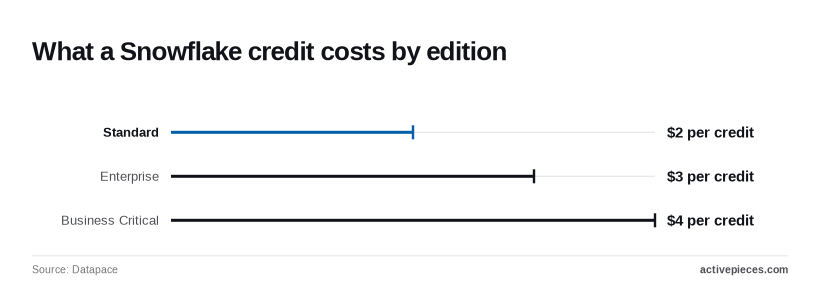
A credit costs $2 on Standard, $3 on Enterprise and $4 on Business Critical, per Datapace, so the same query costs twice as much on the top edition.
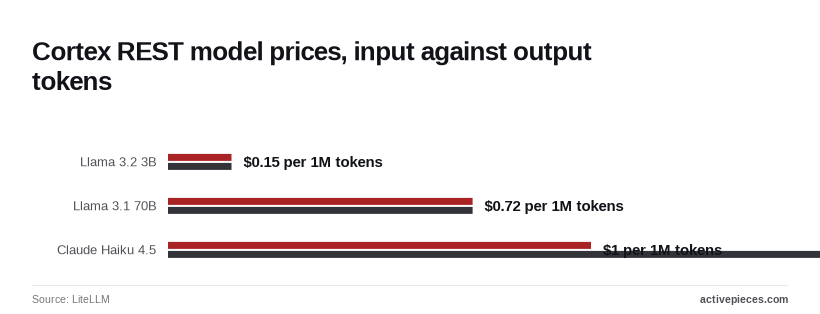
For Cortex REST, the rates come from LiteLLM, per 1M tokens:
| Model | Input | Output |
|---|---|---|
| Llama 3.2 3B | $0.15 | $0.15 |
| Mistral 7B | $0.15 | $0.20 |
| Llama 3.1 70B | $0.72 | $0.72 |
| Llama 3.1 405B | $1.20 | $1.20 |
| Claude Haiku 4.5 | $1 | $5 |
On Llama 3.2 3B and Llama 3.1 70B, reply length doesn't change the price, because input and output are charged the same. Mistral 7B charges slightly more for output, so longer generations become incrementally more expensive.
The 405B model costs eight times the 3B, and Claude Haiku 4.5 charged five times as much for output as for input in that listing, so a long generated answer cost five times what the prompt did.
Snowflake API documented limits by surface
Here is what each surface bills and where its published limits sit. Read the last column as a gap list: "Unpublished" means no figure was found, so you test it yourself.
| Surface | What is billed | Unit | Documented limits |
|---|---|---|---|
| SQL API | Warehouse compute | Credits per hour | 1 MB query text, 128 MB payload |
| Python API | Warehouse compute for any SQL it triggers | Credits per hour | Unpublished |
| Python Connector | Warehouse compute | Credits per hour | Unpublished |
| Cortex REST | Tokens processed | Per 1M tokens | Unpublished |
Of the four, only the SQL API has hard numbers here. A statement over 1 MB of text is rejected, so generated bulk INSERT statements are the usual casualty. Past 128 MB of payload, you need a different route for the data.
For the other three surfaces, no limit means no number to plan against. Load-test them before launch, and watch credit consumption rather than assuming a ceiling will stop a runaway job.
How to fix Snowflake API errors
When a SQL API call fails, it is usually one of six status codes, and each points to one of three fixes: renew credentials, correct the statement, or back off and retry.
The table below maps each code to its cause, its fix, and the page that documents it; treat the response body's message as the detail and the code as the category.
| Code | Cause | Fix | Docs |
|---|---|---|---|
| 401 | Expired or malformed token, or a key pair that does not match the user | Regenerate the token and check the key registered to the user | Authenticating |
| 403 | The role lacks privileges, or a network policy blocks the caller | Grant the privilege or allow the source address | Authenticating |
| 408 | The statement ran past its timeout | Right-size the warehouse or split the work | Submitting requests |
| 422 | The statement was accepted but failed to execute | Read the error message, fix the SQL, resubmit | Handling responses |
| 429 | Too many requests | Slow down and retry with backoff | SQL API overview |
| 503 | Service temporarily unavailable | Retry the same request with backoff | SQL API overview |
For authentication codes the fix is a credential change; for the rest it's a change in how you submit work.
Snowflake API error codes and fixes
A 401 means Snowflake doesn't recognise who you are; a 403 means it does, and the answer is no. Do not retry either. Fix the token, role, or network policy first, or you'll only generate more failed logins.
When a 422 comes back, it's your SQL failing, not the service. A 408 usually means the warehouse is too small for the query or the query does too much.
Resize the warehouse or break the work up, but watch credits while you do. For large results, fetch partition by partition rather than expecting one response.
Retry 429 and 503 responses with exponential backoff and a cap. Submit each statement with a request ID and resend the same ID on retry, so a repeated call doesn't run the statement twice. Log that ID; it's what support will ask for.

Call Snowflake without code using Activepieces
Without writing the HTTP calls, token handling or polling yourself, you can run Snowflake queries on a schedule, move the results into other tools and send alerts, all through Activepieces: an hourly schedule is about 720 runs a month, and since a run is 1 credit however many steps it has, that fits inside the free plan's 1,000 credits a month, so the automation itself never incurs charges.
That covers the routine jobs; it doesn't cover everything the raw surfaces can do.
Where a no-code workflow fits
Start with the trigger. The screenshot shows the builder with a Schedule trigger labeled "Every Hour" selected, a "Run on weekends" toggle in its settings panel, and a "Generate Sample Data" section reporting a successful test.
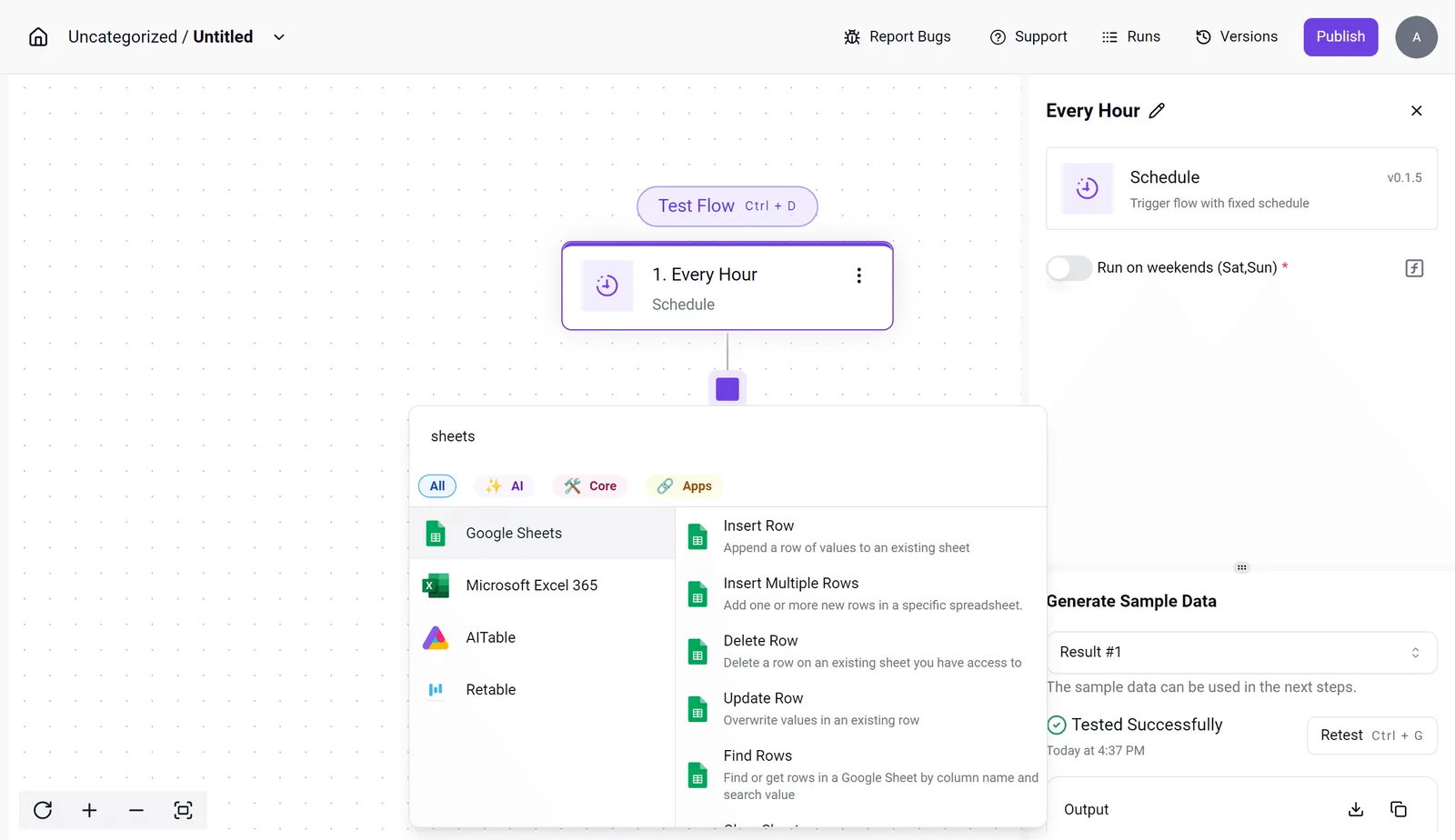
Run the trigger once and you see real output before anything downstream is built, which is the useful part of the sample-data test. A wrong schedule or an empty result then shows up in the editor, not in a Monday morning report.
Below the trigger, the integration selector modal is open on spreadsheet apps, with actions such as Insert Row and Find Rows.
That's the shape of the common Snowflake job: a scheduled query, then rows written to a sheet, or a message sent when a result crosses a line you chose.
Because the connector holds the credentials for you, the key-pair or token handling from the authentication section sits in one saved connection instead of in each script. Anyone who edits the flow reuses that connection, which means they inherit its role.
Scope that role to the tables the flow needs.
Next comes the limit of that convenience.
When to stay with the raw API
Stay with the SQL API or the Python API for the jobs a flow step can't express.
That means a statement that runs long enough that you need to control the async handling yourself, a case where you must keep the statement handle to log and give to support, or a result you need to page through in large partitions.
A flow step hides those details, which is helpful until a run fails and you want them.
Cortex REST is the same story. If the task is a model call with streaming and fine control over parameters, call it directly.
Use Activepieces for the scheduling, the hand-off and the alert, since the hand-off can reach any of its 750 integrations, letting you send results directly to your existing tools, and keep the heavy query logic where you can see every request.
Frequently asked questions
After the body, four questions stay open, and each one tends to turn up as a billing surprise or a rejected request.
Is the Snowflake API free to use?
You are not charged separately for calling the APIs, but what they trigger is billed. A SQL API request that runs a query uses warehouse compute and bills credits like any other query. Cortex REST calls are billed on the model usage they consume.
So the API is free to call, and the work behind it is not.
On a trial account you can call every surface, and your credits drain at the normal rate while you do. Check the trial's remaining balance before you leave a polling script running.
Can the SQL API run multiple statements in one request?
Yes, but only if you ask for it. Put the statements in one request separated by semicolons and set the parameter that declares how many statements you are sending.
Leave it unset and a multi-statement request is rejected, which looks like a syntax error when the cause is a missing parameter.
The response gives you a handle for the batch and for each statement, so you poll the handles for completion instead of assuming the batch finished.
Can I call the Snowflake REST API without a warehouse? For some operations, yes. Creating, listing and altering objects such as databases, schemas and tables is metadata work and needs no running warehouse.
Anything that scans table data needs one, and a SQL API request with no usable warehouse fails. Cortex inference over REST also doesn't run on your warehouse.
Snowflake Python API vs Python connector: which one? Pick by task. The Python API manages objects: you create, inspect and drop databases, tables and tasks as Python objects.
The connector executes SQL and fetches the rows. A pipeline that provisions objects and then queries them will usually use both, each for its own job.