
Workflow Automation 24/7 Support: A 2026 Guide

Nov 22, 202614 min read
Round-the-clock support is a plan or contract tier, not a platform feature, and on a self-hosted install it usually stops being the vendor's job. Ask which plan, which severity levels and which channel before you compare prices.
Here it means a named engineer reachable at any hour for a production outage. A help-centre article, a community forum or a chatbot available at night doesn't meet that. Neither does a status page.
Where a vendor's page didn't state a cell, the table says "not confirmed" rather than filling the gap from memory.
Read "not confirmed" as "get this in writing", not as "no". The table judges all six platforms on the same seven points.
Activepieces is held to the same standard: its Team plan at $200 a month lists email support, and its pricing page still states no hours, so a customer has no way to know when that support is actually available.
Workflow automation 24/7 support: short answer and comparison
| Platform | Hours | Plan | List price | Channel | Limit | Self-hosted | Best for |
|---|---|---|---|---|---|---|---|
| Workato | not confirmed | not confirmed | not confirmed | not confirmed | not confirmed | not confirmed | not confirmed |
| Power Automate | not confirmed | not confirmed | not confirmed | not confirmed | not confirmed | not confirmed | not confirmed |
| Zapier | not confirmed | not confirmed | not confirmed | not confirmed | not confirmed | not confirmed | not confirmed |
| Make | not confirmed | not confirmed | not confirmed | not confirmed | not confirmed | not confirmed | not confirmed |
| n8n | not confirmed | not confirmed | not confirmed | not confirmed | not confirmed | not confirmed | not confirmed |
| Activepieces | not confirmed | Team (email support); Ultimate (dedicated support) | Team $200 a month; Ultimate custom, via sales | Email on Team; not confirmed for Ultimate | Team: 50,000 credits a month, 25 users | Yes, MIT-licensed Community Edition; paid licence quoted by sales | not confirmed |
Since no platform here has its 24/7 terms confirmed from public pages, the contract is where the answer lives.
Request the support policy or SLA document and read the severity definitions. Ask whether the vendor guarantees a night-time response for the severity that matters to you.
Ask which channel the vendor staffs at that hour. Then ask what happens when the vendor's cloud is down, and for self-hosted installs, who answers when yours goes down.
This takes minutes, not a project: automate it in Activepieces free.
Workato support and pricing
What the vendor states about support hours
The platform itself doesn't carry it.
As of our check on 2026-11-22, the support documentation describes first-response targets that vary by severity, so the plan name alone doesn't tell you which severity gets an answer.
That's the audit point. A "24x7x365" label covers the hours of coverage, but a first-response target is a different thing from a resolution commitment.
Ask for the clause that defines each severity level, who decides which level a ticket gets, and which channel (portal, email or phone) the target applies to. If you file a ticket through a channel the contract doesn't name, the clock may not start.
A "24x7x365" label covers the hours of coverage, but a first-response target is a different thing from a resolution commitment.
Workato support pricing and contract terms
We found no public price card we could verify for this plan, so we state no price. Workato appears to quote pricing per contract, which means you negotiate the support tier and then hold it in writing, not switch it on from a settings page.

For a smaller team, the limit is access. If round-the-clock support sits only in the top contract tier, a team on a lower tier isn't covered at night or on weekends, however critical the workflow.
Ask the sales contact which tier your quote includes and have the severity table attached to the order form.
If you run business-critical integrations, can commit to an enterprise contract, and want the response targets in a signed document, Workato suits you. It suits small teams less, unless they can confirm in writing that their tier carries the coverage they need.
Microsoft Power Automate support and pricing
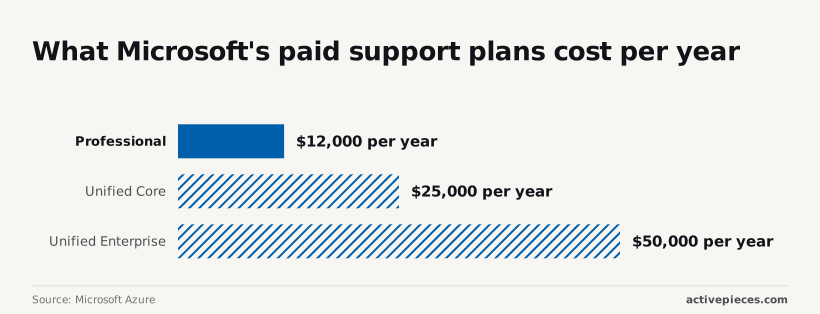
$12,000 per year is where Microsoft's round-the-clock help for Power Automate starts, sold as a separate support plan, so you cannot get 24/7 support without this cost.
Microsoft sells three paid plans: Professional Direct, Unified Core, Unified Enterprise. Which severity levels get 24/7 response under each isn't in the figures we hold, so you cannot compare plans based on support quality.
So ask for the severity definitions and the response-time table in writing.
Without them, "24/7" may cover only the most critical incidents, and a failed overnight approval flow would wait until morning.
Microsoft Azure lists Professional Direct at $1,000 per month, which is $12,000 per year.
A mid-size buyer moving up pays more than double, because the same page lists Unified Core from $25,000 per year. Unified Enterprise starts at a $50,000 minimum, and "minimum" means the invoice can only rise from there.
The table sets the three plans side by side.
| Plan | Price | Period | Coverage |
|---|---|---|---|
| Professional Direct | $1,000 | Per month ($12,000 per year) | Severity levels to be confirmed in the contract |
| Unified Core | From $25,000 | Per year | Severity levels to be confirmed in the contract |
| Unified Enterprise | $50,000 minimum | Per year | Severity levels to be confirmed in the contract |
Because the published price pages give a price, not a severity commitment, the coverage column is the same on every row. The contract has to supply that.
If you already run on Microsoft products and have a budget of at least $12,000 per year for support, you're the natural buyer. These are Microsoft's plans, so an outage in a non-Microsoft system your flow calls isn't obviously theirs to fix.
Zapier support and pricing
In what we confirmed on 22 November 2026, Zapier doesn't state a round-the-clock support commitment, so treat 24/7 as unstated and ask for it in writing.
Zapier is a hosted-only service, so the self-hosted question doesn't arise. Its support covers its own platform, not the third-party apps a Zap connects to, which is the same boundary as with Microsoft above.
Support by plan
Zapier ties support to the plan, and the higher tiers carry the faster or more direct channels. Which plans get live chat or priority handling isn't confirmed, so we name no tier here.
On lower tiers, expect support to stop at the help centre and ticket-style contact. If the Zap fails because an app you connect to is down, that's the app vendor's incident, not Zapier's. Before buying, ask Zapier three things in writing:
- Which plan includes live chat or priority support?
- Which severity levels are covered, and with what response target?
- Does the contract state those targets, or only the marketing page?
Zapier support pricing and task limits
Cost rises with the number of steps your automations run, because Zapier prices by plan, with usage measured in tasks. We have no confirmed list prices or task allowances to quote, and we won't guess at them.
Read the current pricing page on the day you buy, and check whether the plan with the support you need is the plan whose task allowance you can afford.
If you want a managed service and will accept that support depth follows the plan you pay for, Zapier suits you. It's a poor fit for anyone who needs a documented round-the-clock response and can't get one in the contract.
You can follow the rest of this with the builder open. Start free, no card.
Make support and pricing
Make's own pricing page ties 24/7 support to Enterprise only, and every source below that tier disagrees with another. This reflects the check made on 2026-11-22.
Three claims about Make's support circulate, and they can't all be true:
- Make's pricing page lists 24/7 support on the Enterprise plan only.
- A community post puts typical response at 8 to 12 hours, so a failure overnight can sit unanswered until the next working day.
- One review site says Make offers phone support; another says it doesn't.

Only the first comes from the vendor, and it's the only one that describes a plan rather than an anecdote. The community figure is one user's experience, not a service level.
Don't assume a phone line on any tier, because the phone claim is unresolved. Ask for the severity definitions, the channel and the contractual response time in writing.
Make support pricing and operation limits
I didn't confirm a current list price or operation allowance for each Make plan in this check, so none is stated here. Make meters usage in operations, so a scenario that runs often can consume the allowance faster than the monthly price suggests.
Read the live pricing page for your expected volume, and confirm what happens at the limit: does it stop, or bill overage?
Make suits teams that can tolerate a business-hours or best-effort response and want a visual builder. It's a poor fit where an outage outside office hours has a cost, unless you contract for Enterprise and get the response times and channel named in the agreement.
n8n support and pricing
No n8n tier is confirmed here as carrying round-the-clock support. Where you run n8n decides who answers an outage: on Cloud the vendor runs the servers, and self-hosted it's you.
Cloud versus self-hosted support
On n8n Cloud the vendor operates the servers, so a platform outage is the vendor's to fix. Whether that fix is staffed overnight depends on the plan's written support terms, not on the product's reputation.
Ask for the severity table and the stated response hours, and treat anything said only in a sales call as unconfirmed.
Once you self-host, the question splits. The Community, Business and Enterprise editions run on your hardware, so the vendor doesn't own your uptime. A paid self-hosted licence may buy help with the software, but a crashed server or a full disk is still yours.

So a self-hosted buyer is also buying an on-call rota, and that cost belongs in the comparison before any licence fee.
I give no price here because I have no confirmed figure to quote. Read n8n's own pricing page on the day you buy, and check which tier names its support hours and severity levels.
If you want the vendor to carry the servers and will accept whatever support the chosen plan writes down, Cloud suits you. Self-hosting suits teams that already staff an on-call engineer and need data to stay in their own environment.
Activepieces takes the pressure off that choice by making it reversible.
Git Sync and Releases is a documented feature in the Activepieces docs, and the self-hosted edition deploys with Docker, Compose or Kubernetes while sharing its codebase with the managed cloud, so a flow built on one side can be promoted to the other.
A team can start on cloud, where the vendor carries the servers, and bring the flows onto its own infrastructure once it has the on-call rota to match.
MoneyGram, Moneypenny, Alan and FundingSocieties run it in production, and the core is MIT-licensed, with 750 integrations counted from the open source monorepo on GitHub.
Activepieces support and self-hosting
We have no Activepieces page that commits the company to round-the-clock support on Cloud, self-hosted or enterprise, so this article claims none.
What the pricing page does list is dedicated support on the Ultimate plan, which is quoted through sales, so a buyer who needs night cover has to get the hours written into that contract.

Nothing is confirmed on hours, channels or severity levels for each plan, nor on whether any free plan carries support. Treat every one as an open question until a contract line answers it.
n8n self-hosting support and on-call costs
If you self-host, the pager is likely yours. Cover then becomes a payroll line.
One on-call engineer costs $208,000 a year: $140,000 base salary, $49,000 benefits, $14,000 on-call allowance and $5,000 tooling and training. The allowance is small, so most of the cost is simply employing the person.


One person can't cover every night, so the totals climb. A dedicated DevOps engineer runs $225,000, and two senior SREs $435,000, so operations roles will consume at least $208,000 of your annual budget.
At four engineers in a rotation the cost is $832,000, and at eight engineers $1,664,000, which means your engineering budget scales directly with team size.
Set these beside a vendor support plan priced per month, and in-house cover only wins if you already employ those people.
The figures above show what in-house cover costs, and the three questions below show what a vendor's plan actually covers. Send them to each shortlisted vendor, in this order:

- Which plan includes 24/7 support, and is that plan available for self-hosted deployments?
- Which severity levels receive a response overnight and at weekends, and how does the contract define each level?
- Which channel answers out of hours, and what is the committed first-response time in writing?
Ask for the answers as contract wording, not sales replies. An answer that exists only in an email has no force when an outage happens.
Frequently asked questions
Is 24/7 support the same as a 24/7 uptime guarantee?
No. A support commitment says who answers you and how quickly. An uptime guarantee says how often the service itself should be running. A vendor can offer either without the other.
Ask for the uptime figure and its remedy in the service level agreement (SLA), separately from the support terms. The remedy, usually a service credit, is what you actually receive when the vendor's cloud is down.
Does self-hosting an automation platform include vendor support?
Usually not, and for n8n it isn't confirmed. If you run the software on your own servers, the outage is in your infrastructure, and the vendor can't see or restart it.
If you get any help, it's a separate commercial agreement, not a default. Ask whether the agreement covers the software only, or also your deployment, and which severity levels it names.
Until the vendor states this in writing, treat round-the-clock cover as your own team's responsibility.
Which plan you need for phone or live chat support isn't confirmed for Zapier, and it isn't confirmed that Make offers round-the-clock support below its Enterprise tier. Neither claim should be assumed from a pricing page that lists "priority support" without a channel.
Ask the vendor three things in writing:
- Which plan includes the channel you need: phone, live chat or email.
- Which severity levels receive a response outside business hours.
- What response time applies to each severity level.
What should a support clause in the contract say?
It should name the plan, the severity definitions, the hours of coverage per severity, the channel, and the response target. It should also state the remedy if the target is missed.
If the answer lives only in a sales email, you can't enforce it during an outage. A marketing page can change without notice, but a signed clause binds the vendor. Ask for the clause itself, not a summary of it.
Related reading
References
Build it
Set this up in minutes.
No code required. Connect your accounts, and Activepieces runs it from there.
Start free Talk to sales