
Zoho Mail API Setup with OAuth 2.0 in 2026

Oct 30, 202616 min read
When the Zoho Mail API fails, the cause is usually something set up once and never re-checked, like a token in a Activepieces flow or a script that nobody has opened since launch, not Zoho itself.
It's a REST API that sends, reads and manages mail in a Zoho account, authorised through OAuth 2.0 by a client you register in the Zoho API Console.
The Zoho Mail API and the 08:02 failure
What the Zoho Mail API is and what it can do
Programmatically, the Zoho Mail API is a set of HTTPS endpoints for working with mailboxes:
- sending messages
- listing and fetching mail
- handling folders and labels
- managing account details
To make any call you need an OAuth 2.0 access token, and that token comes from a client you create in the Zoho API Console. Each of those integrations is a separate place for an assumption to go stale:
- the client
- the token
- the region your account lives in
You will most likely meet it through an integration rather than raw calls. Activepieces, whose MIT-licensed core carries 746 integrations, can wrap it, but the wrapper inherits every one of these assumptions, so it hides the failure without removing it.
It started with this log line:
{"status":{"code":401},"data":{"errorCode":"INVALID_OAUTHTOKEN"}}Here are the facts of the case:
- The team is five people, so nobody owned the integration full time and nobody was watching it.
- The workflow sends an order confirmation to a customer after each purchase.
- The first failed send was at 08:02 on a Monday, which means the break had been waiting through a quiet weekend and surfaced the moment orders resumed.
- The Zoho documentation was last checked on 2026-10-30, the date every claim below is measured against.
Nothing was deployed that morning and Zoho had no incident. The workflow stopped because a credential assumption expired, and the retry logic dutifully repeated the same dead request. The rest of the article works backward from that, one assumption at a time.

Against Zoho's published documentation, on 2026-10-30, every claim here was checked: endpoints, token behaviour and limits.
If Zoho changes a behaviour after that date, the rule still holds but the detail may not, so confirm against the current docs before you hard-code anything. Where the documentation is silent, the article says so instead of guessing.
Everything below works on Activepieces' free plan. Start without code or a credit card.
Team access setup and mail sending
When the team followed Zoho's documented sequence in order, one step went subtly wrong: step 2, the data centre. They picked it once and never checked it against where the account actually lives.
- Register a client in the Zoho API Console.
- Pick the regional domain. This is the wrong step. They hardcoded the
.comendpoints, and the account sits in another data centre. - Request scopes, such as
ZohoMail.messages.CREATE. - Exchange the authorization code for tokens.
- Store the access and refresh tokens.
- Fetch the account ID.
- Send.
Register a Zoho API client and data centre
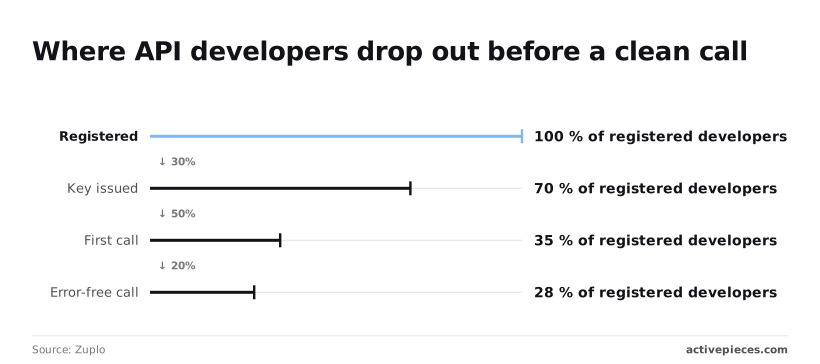
Before any Zoho behaviour matters, integrations die at setup. In Zuplo's funnel, 100% of developers register but only 70% get a key issued, so three in ten leave before they hold a credential.
Before any Zoho behaviour matters, integrations die at setup.
According to Zuplo, of the same registered group, 35% make a first call, so half of those who got a key never use it.
Only 28% make an error-free call per Zuplo, which means the first request often fails even for people who got that far. Wrong-domain mistakes land in that last gap.
Register in the wrong data centre and the failure looks like a bad token rather than a bad region. Each Zoho data centre has its own accounts and API domain, and a client registered in one won't authenticate against another's endpoints.
Scopes, grant code and the refresh token
Request only the scopes you need: ZohoMail.messages.CREATE for sending and ZohoMail.accounts.READ to look up the account ID.
Lose the refresh token and you repeat the consent step by hand.
The authorization-code grant returns a short-lived access token and a refresh token, so persist the refresh token. Treat the access token as disposable and refresh it on a schedule rather than waiting for a 401.
Minimal Zoho Mail API send request
Fetch the account ID once and store it beside the tokens. Then send a POST to /api/accounts/{accountId}/messages on your own data centre's mail domain, with the header Authorization: Zoho-oauthtoken <access_token>.
The body needs fromAddress, toAddress, subject and content. A 200 with a message ID is the only success signal worth trusting.
Everything above works on the first try only if step 2 was right.
Errors after the first failure
Start with 08:02, an expired access token: every error after it traced back to a setup assumption rather than a Zoho fault.
08:02 to 08:40: expired access tokens
At 08:02 the first call came back 401 with INVALID_OAUTHTOKEN. Access tokens are short-lived by design, so this is the expected end of a token's life.
It only became an incident because nothing refreshed it. The correct handling is one refresh, one retry, and a stop if that fails.
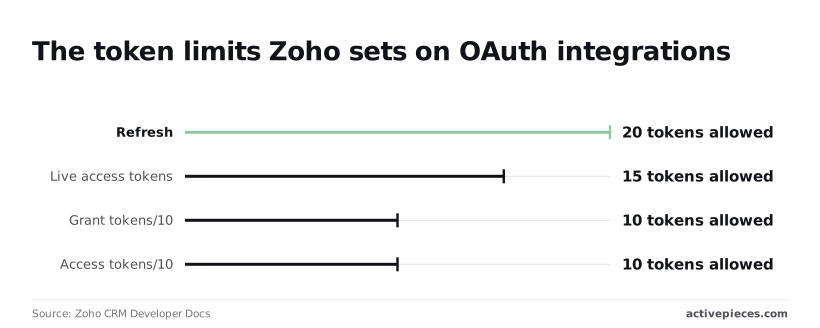
What the retry loop did instead was mint a new token on every failure. Zoho's token validity documentation sets caps on each kind of token, and each cap catches a different habit:

| Token | Cap | What hits the wall |
|---|---|---|
| Access token | 10 per 10 minutes | A loop that mints per failed call hits the wall on the eleventh attempt. |
| Live access tokens | 15 | Several workers minting independently drain the same pool. |
| Grant token | 10 per 10 minutes | Re-running the consent step as a "fix" is throttled too. |
| Refresh token | 20 per user | Every redeploy that re-authorises quietly spends one of a finite 20. |
Wrong data centre and missing scope
Around 08:15 someone replaced the token by hand and got a different failure. A token issued by the EU accounts server was sent to the US API host, and it was rejected with the same INVALID_OAUTHTOKEN message.

The token was fine and the host was wrong.
Because Zoho tokens are tied to the data centre that issued them, the accounts domain and the API domain must come from one config value.
Next came OAUTH_SCOPE_MISMATCH, meaning the new grant lacked a scope the old one had. No retry fixes that. It needs a new grant with the right scopes, so treat it as a stop condition.
Throttling once retries piled up
By 08:40 the backlog replayed at once and Zoho began throttling. Backing off with jitter helps here, but only if the loop distinguishes a rate limit from an auth failure. Retrying a 401 with more speed just burns the token caps above.
The alert that finally surfaced all of this should be small. The flow below posts a payment-failure event from a payments processor into a team chat channel, and its run finished in 574ms.
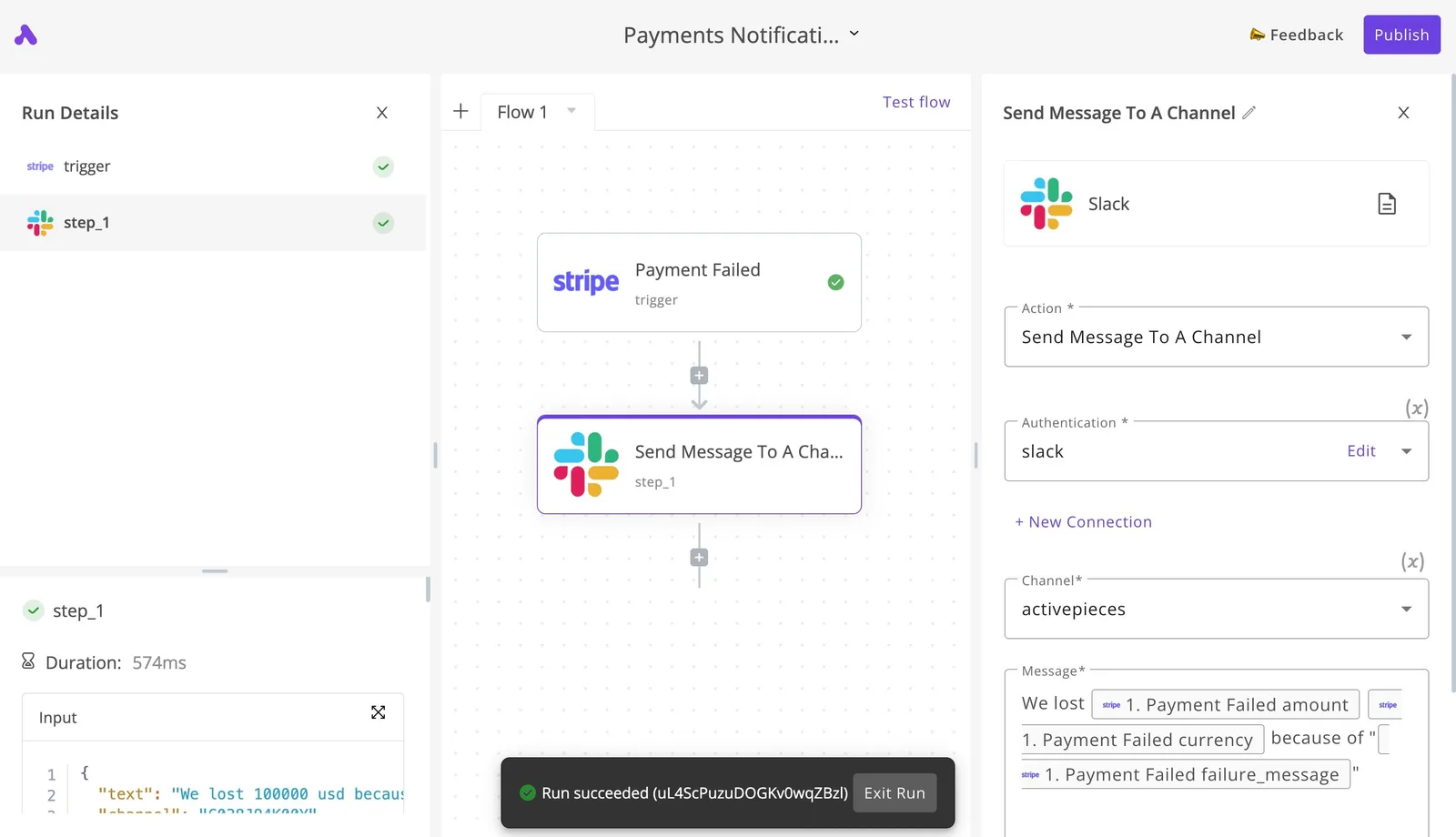
A Zoho auth failure deserves an alert that cheap, and it's the first thing to wire up before touching the retry code.
Easier to see it running than to read about it: set it up free, no card.
The failure's cost and causes
Between the first failed confirmation and the fix, an expired access token cost us hours, and nothing in that gap told us it was happening.
Hours lost and unsent emails from the failure
Below, a chart counts order-confirmation emails per hour from 08:00 until the fix, split into sent, failed and manually sent. It's annotated with the hours lost and the support tickets that came in.
Look at the failed bar: it never drops until a person intervenes, because a dead token fails every call the same way. Retrying harder only produces more failures.
Count the manually sent bar as the real cost. Every email in it was a person pasting an order confirmation by hand, and every ticket is a customer who wrote in before we noticed.
Rate and sending limits by plan tier
I'm not printing a table of limits here, because a figure copied into an article is stale the day Zoho edits its plan page. Request limits and daily outgoing recipient caps differ by Zoho Mail plan, and so does price.
Read the numbers for your own plan from Zoho's published limits and write the date you checked next to them in your runbook. A limit you've never looked up is the same kind of unchecked assumption that broke our token.
What the API costs per unit
I found no per-call fee for the Zoho Mail API. What you pay for is the plan, and the plan sets the ceilings.
So the price of hitting a limit is not a bill but a stalled queue, which is why the limit belongs in your monitoring.
Of the named API incidents in the database at incidents.fru.dev, config changes account for 98 and third-party faults for 96.

Those two causes are close to even, so a provider fault is about as likely as your own change, and you can't fix the provider's half.
Only 8 incidents come from certificate or TLS problems, so renewing certificates isn't where the risk sits. The larger share is settings someone changed and nobody re-verified, which is what the rules in this article are for.
Zoho Mail API rules to prevent repeat failures
Eight standing rules, each aimed at one assumption that went unchecked at setup, are enough to stop the repeat.
Zoho OAuth token, scope and region rules
Refresh the access token before it expires, not after the first 401. Waiting for the failure means one real request dies every cycle and your logs fill with errors that look like an outage.
Keep the refresh token in a secrets store, never in the repo or a .env someone pasted into chat. It's the one credential that can mint all the others, and rotating it shouldn't need a deploy.

Pin the data centre in config. Zoho runs separate regional accounts and API domains, and a token issued in one region won't authenticate against another.
If the host is derived implicitly, or copied from a tutorial, the first sign of a mismatch is an invalid_oauth_token that no amount of refreshing fixes. Write the region down once and fail loudly at startup if it disagrees with the token.
Request minimum scopes. A narrow scope means a leaked token can do less, and it means a scope error shows up as a clear refusal on one endpoint rather than a mystery later when you add a feature.
Zoho Mail API retry, queue and alert rules
Back off with a retry cap. Exponential delay with jitter is fine, but without a cap a throttled job keeps hammering the API and makes the throttling worse. After the last attempt, stop.
Put a queue in front of the daily limit. Count sends against the allowance and hold the overflow until the window resets, so you spend the limit deliberately instead of discovering it at the worst hour.
Alert on the first 401 or 429, not the fiftieth. Both are early signals of the exact assumptions above, an expired or wrong token and an exhausted quota, and they're cheap to catch while still rare.
Keep a dead-letter list for anything that exhausts its retries. A message that failed should be visible and replayable, not silently dropped.
Here is the Monday checklist:
- Confirm the refresh runs ahead of expiry and the refresh token lives only in the secrets store.
- Read the configured data centre and check it matches the account.
- List the granted scopes and remove any the code doesn't use.
- Verify the retry cap exists and the queue sits under the daily limit.
- Send a test
401and429to confirm the alerts fire. - Open the dead-letter list and replay or explain every entry.
Fix Zoho Mail sending with Activepieces
It doesn't change a single limit Zoho enforces on its side, but Activepieces does put the token, the retry and the alert in one workflow you can see, and with unlimited flows on every plan, including free, giving each Zoho send its own flow costs nothing extra.
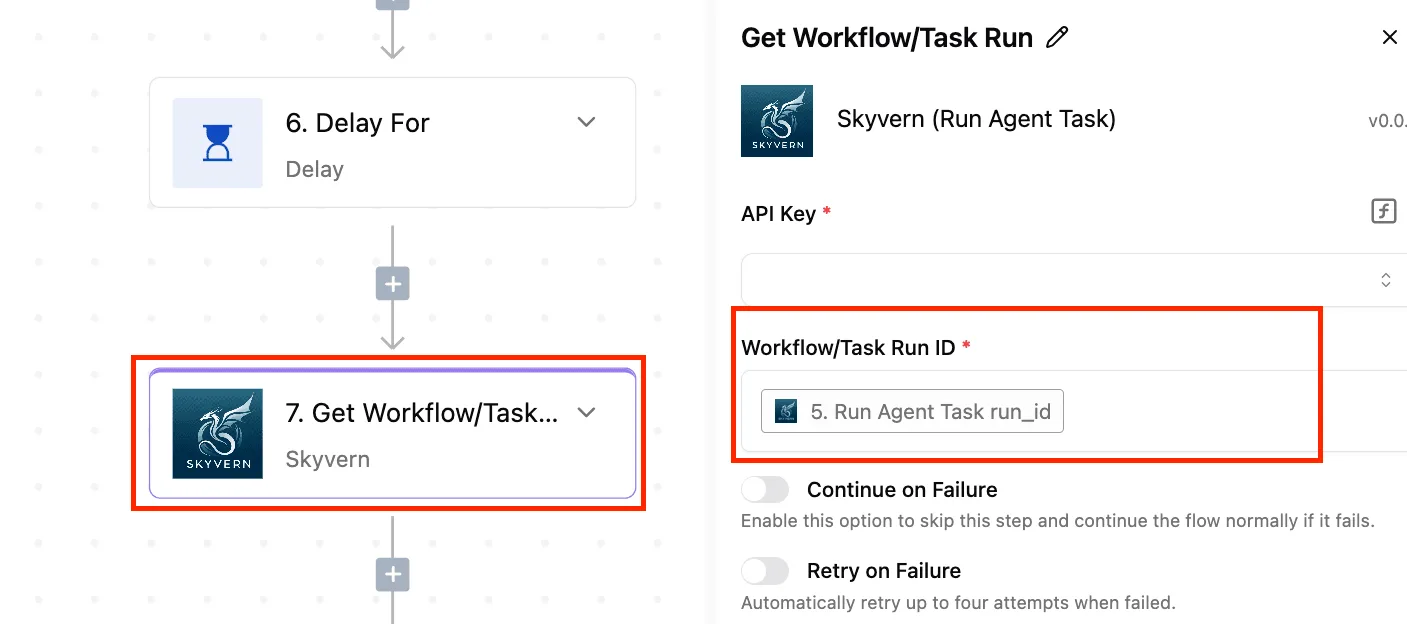
At 1am the failure usually looks like invalid_oauth_token or a bare 4xx on a send that worked yesterday. The cause is rarely the call itself.
It's a connection nobody owns, a data-centre assumption baked into a URL, or a burst of sends that hit a limit nobody wrote down.
For each of those, a workflow tool gives a place to live.
When a workflow tool is worth it
It's worth it when sends are triggered by events and more than one person depends on them. Think of a form submission, a new row or a deal changing stage.
In that case the Zoho client secret and refresh token sit in an Activepieces connection, and that connection can be routed to your own secret manager, in the self-hosted edition and the enterprise cloud tier alike, where secret managers sit in the same governance set as SCIM, custom RBAC, SSO/SAML and audit logs, instead of living in a script on someone's laptop.

Point a self-hosted instance at an external secret manager and the Activepieces database holds no Zoho credentials at all, so no vendor, including us, keeps the one token that can mint all the others. MoneyGram, Moneypenny, Alan and FundingSocieties run Activepieces in production.
It's not worth it for a single cron job that sends one report a day. A script with a clear error message does that fine.
Check what the current Zoho Mail connector actually has before you build on it. Open the integration in the editor and read its list of actions.
If the send you need is missing, or you need a field it doesn't expose, use an HTTP step against the Zoho Mail API with the same connection.
Then confirm the base URL matches your account's data centre, because the connector won't fix a wrong region for you.
Retries and failure alerts in a workflow
A failed send goes to a retry step, and anything still failing branches to an alert in your team channel.
At the far end sits the Zoho Mail API, and its limits stay outside the workflow, where you can observe them but not move them.
Take from it that retry and alert are separate decisions. Retry covers transient failures, like a timeout.
Alert covers everything a retry can't fix: an expired grant, a wrong region, a rate limit that is still biting after the pause. Retrying the second group only hides it, and a bigger loop makes the limit worse.
Make the alert carry the response body and the step name, not just "workflow failed". The next person reads that message first, and it should tell them which of the three assumptions broke.
Frequently asked questions
Treat each answer below as a prompt to re-check Zoho's current docs, because the failures this article describes come from answers that were true at setup and never rechecked.
Is the Zoho Mail API free to use?
I can't confirm a per-call fee, and I won't guess one. What you can rely on is that API access sits on top of a Zoho Mail plan, and limits and features depend on which plan the account is on.
If you're budgeting for volume, read the current pricing and API limits pages and date your note, because a plan assumption you made once is exactly the kind that rots.
Can I send mail with an API key instead of OAuth?
Not with the Zoho Mail REST API as I understand it. It authenticates with OAuth 2.0 access tokens, and the token needs a scope that covers sending.
If your call returns an invalid-scope or invalid-token error, the cause is usually a scope you didn't request when you authorised, not a bug on Zoho's side. Changing scopes means re-authorising, not just editing a config file.
How long does a Zoho access token last? Short enough that you should treat expiry as routine, not as an incident.
Don't hardcode a lifetime. Read the expiry value returned with each token response, refresh before it lapses, and keep the longer-lived refresh token somewhere safe.
A 401 that appears hours after a clean deploy is almost always a token that nobody refreshed.
Why does my request work in one region but not another?
Because Zoho runs separate data centres, each with its own accounts and API hosts. A token minted on one data centre isn't valid on another, and an account lives in exactly one.
If a request works for your test account and fails for a customer's, compare the data centre first. Use the API domain returned during authorisation instead of a hostname you copied from an example.
Can I use SMTP instead of the API? Yes, SMTP is a reasonable option if you only need to send.
It uses the SMTP host for the account's data centre, and accounts with two-factor authentication generally need an app-specific password.
You give up the API's mailbox operations, such as reading, folders and searching, so choose it only when sending is the whole job.