Arete 27B Workflow: Setup, Settings and Costs (2026)

Nov 18, 202615 min read
The fastest working Arete 27B workflow is one input, one call and one saved output, run with the vendor's documented settings before anything else is added. You earn every later step in this article by passing that baseline first.
Get Arete 27B's fastest one-call workflow
What Arete 27B is, per the vendor
For what Arete 27B is, this article treats one source as authoritative: the vendor's model page, checked on 2026-11-18, much as a workflow built in Activepieces would pull from a single system of record rather than reconcile several.
The name carries a size, 27B, and that's all the name itself tells you.
Architecture, context window, licence terms, rate limits and recommended sampling settings were not confirmed against the page for this draft, so none of them is asserted here. Treat each as not documented until you read it on the page yourself.
Read the model card behind the weights
The only concrete artefact this article points to is a set of GGUF files, which are quantized conversions of a model whose weights are published openly. That suggests Arete 27B is something you can run yourself rather than only call through a hosted API.
Whether a hosted API also exists is a question for the vendor page.
The authoritative facts live on the original model card on Hugging Face, which the GGUF repository links to near the top of its own card.
Read five things there and copy them into your notes: who published the model, which base model it was built from, the licence, the context length, and the recommended sampling settings.
They are not repeated here because they were not confirmed for this draft, and the licence in particular decides whether you may ship the result.
What you'll have working at the end
Below is the entire baseline. Each step produces something you can inspect, so a failure points at one step and not at a chain of them.
- One input: a single, fixed piece of text, saved in a file you can re-run unchanged. A fixed input means any difference in the output comes from the model or its settings, not from your data.
- One call to Arete 27B: a single request using only the settings the vendor documents, with no retries, loops or chaining. Where a setting isn't documented, leave it at the default and note that you did.
- One saved output: the full response written to disk exactly as returned, plus the settings you sent. If the call fails, save the error text too.
Add a step only after this passes. Passing means the same input produces a saved output you have read and can account for, and the settings in your request match the vendor page line for line.
You need the following:
- access to Arete 27B under your own account
- the credential the vendor requires
- the vendor page open beside your request so you can compare settings
- one input file
- a writable location for the output
Everything below works on Activepieces' free plan. Start without code or a credit card.
Stage 1: Get Arete 27B Responding
Get one reply by obtaining the weights or a hosted endpoint, copying the exact model name from the vendor page, and sending a single prompt. Which file or GPU you choose decides whether that first call works.
Get Arete 27B access or download GGUF weights
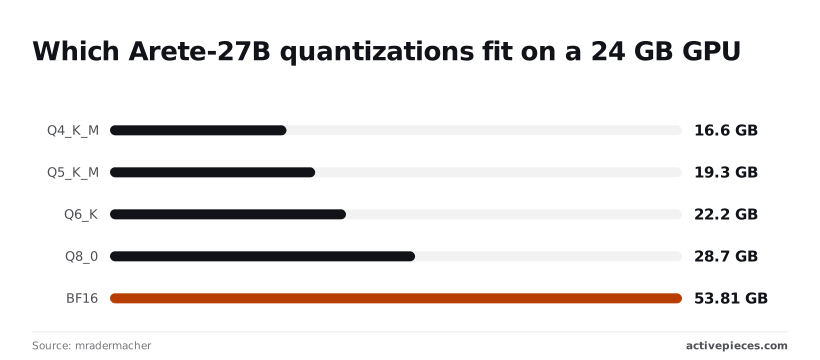
Before you download anything, know that the quantized files in mradermacher's Arete-27B-GGUF repository are third-party conversions, not vendor releases. Their sizes are real, but they cover weights only:
- Q4_K_M is 16.6 GB
- Q5_K_M is 19.3 GB
- Q6_K is 22.2 GB
- Q8_0 is 28.7 GB
- BF16 is 53.81 GB
So Q4_K_M, Q5_K_M and Q6_K load on a 24 GB card. Q6_K leaves under 2 GB for context, so long prompts may fail to load. Q8_0 and BF16 don't fit on 24 GB, so skip them for a first run.
Without a suitable GPU, rent one. RunPod's GPU list shows the L40S at $0.79 per hour, enough to hold Q8_0, so practitioners can run model inference without major capital expense. The A100 PCIe 80GB is $1.19 per hour, and the H100 PCIe is $1.99.
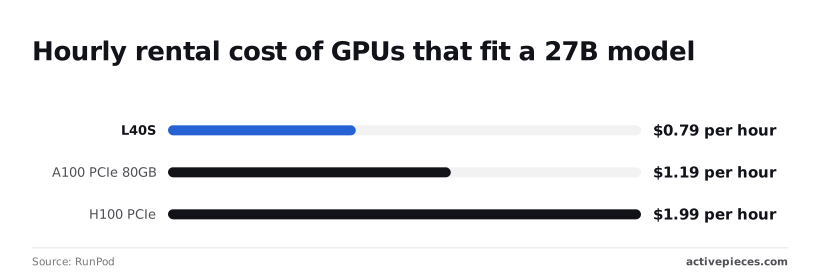
Only those 80 GB cards hold BF16, so pay the extra $0.40 or $1.20 per hour only if you need full precision. These prices are for GPUs that fit any 27B model, not Arete specifically.
Run Arete 27B locally with llama.cpp or Ollama
A GGUF file is served locally by llama.cpp or Ollama, and both expose an HTTP endpoint you can call like any hosted API.
With llama.cpp, start llama-server with the file path (or -hf mradermacher/Arete-27B-GGUF:Q4_K_M to pull it) and a context size no larger than the model card allows. It listens on port 8080 by default and answers OpenAI-style requests at /v1/chat/completions.
With Ollama, ollama run hf.co/mradermacher/Arete-27B-GGUF:Q4_K_M downloads and starts the model, and the server answers on port 11434. Its OpenAI-compatible route is /v1/chat/completions there too. Use the model name your runtime reports, and set the sampling values from the model card in the request body.
Your baseline script then posts to http://localhost:8080/v1/chat/completions or the Ollama equivalent, with one fixed prompt and the saved settings. The same URL and body go into the Activepieces HTTP step later.
A cloud-hosted Activepieces cannot reach localhost, so for a local model run Activepieces on the same network or expose the endpoint deliberately, with authentication.
Enter the exact model name and endpoint
Copy the model identifier and base URL from the vendor's page, or from the repository name if you run the GGUF locally. A name that's one character off usually produces a "model not found" error, which looks like an outage but is a typo.
If the page gives no endpoint, write "not documented" and use the one your runtime prints at startup.
Send a test prompt and confirm the reply
Send a short, fixed prompt such as "Reply with the single word: ready." Check three things: the call returned, the text isn't empty, and you can save it to a file. A fixed prompt gives you a baseline to compare against once you add steps.
502 integrations sit in the connector library of the no-code automation tool that later stages pass this call's output into, meaning data reaches most services in a typical business stack.
The plain HTTP integration in that library sends the same request you just made by hand.
Stage 2: Build the Workflow Around the Model
Because the library sends the same request you made by hand, the workflow is that request with three parts frozen: the input, the prompt template, and the settings. Then the output gets saved and the call gets run twice.
Fix the input and prompt template
Pick one input and keep it in a file, not in your clipboard. You can diff a file, but not a pasted block.
Write the prompt as a template with a single slot where the input goes, and keep every instruction outside that slot unchanged between runs.
If the instruction text drifts between runs, you can't tell whether a changed output came from the model or from you.
Set the documented parameters
Set every parameter in the request explicitly, even where you expect the default to match. A default you didn't write down is a default you can't audit when a result changes.
The table below lists the five settings that matter for a first call and what the vendor documents for each. Where a cell says "not documented", we have no vendor figure to give you, so don't assume one.
| Setting | Documented default | Documented limit |
|---|---|---|
| temperature | Not documented | Not documented |
| top_p | Not documented | Not documented |
| max output tokens | Not documented | Not documented |
| context length | Not documented | Not documented |
| stop sequences | Not documented | Not documented |
Do not infer anything in this table from another model's behavior. Read the model card for Arete 27B, copy its values into your request, and treat any setting it leaves out as one you pin yourself.
Save the output and run it twice
Write the full response to a file, with the request settings beside it. Save the raw response, not a cleaned-up copy, because the raw text is what you'll need when two runs disagree.
Then run the identical request a second time and save that output under a different name. Compare the two files. If they differ, you have learned something real about how much variation your pinned settings allow.

Add a second step only after two saved runs agree closely enough for your purpose.
Easier to see it running than to read about it: set it up free, no card.
Troubleshoot Arete 27B workflow errors and limits
When a one-call run fails, the cause traces to a documented limit or setting, so the two saved runs are where to check them. Compare each against the vendor's pages before changing the workflow.
Find Arete 27B documented limits and context window
Read three things on the vendor's model page: the context window, the rate limits for your account tier, and the maximum output length.
I am not quoting those figures here because they differ by tier and change, and a stale number in an article is worse than none.
Copy them into the notes beside your first saved run.
For local runs, speed sets your timeout. Wisely Chen's deployment guide charts a 27B model at 4-bit quantization:
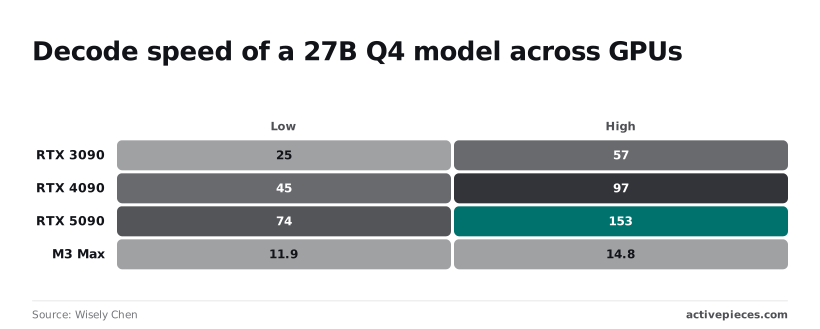
- RTX 3090: 25 to 57 tokens per second
- RTX 4090: 45 to 97 tokens per second
- RTX 5090: 74 to 153 tokens per second
- M3 Max: 11.9 to 14.8 tokens per second
At the M3 Max rate, a 1,000-token answer takes roughly 68 to 84 seconds, so a 60-second client timeout fails every long reply. The wide ranges mean you should time your own saved run and set the timeout above the slow end.
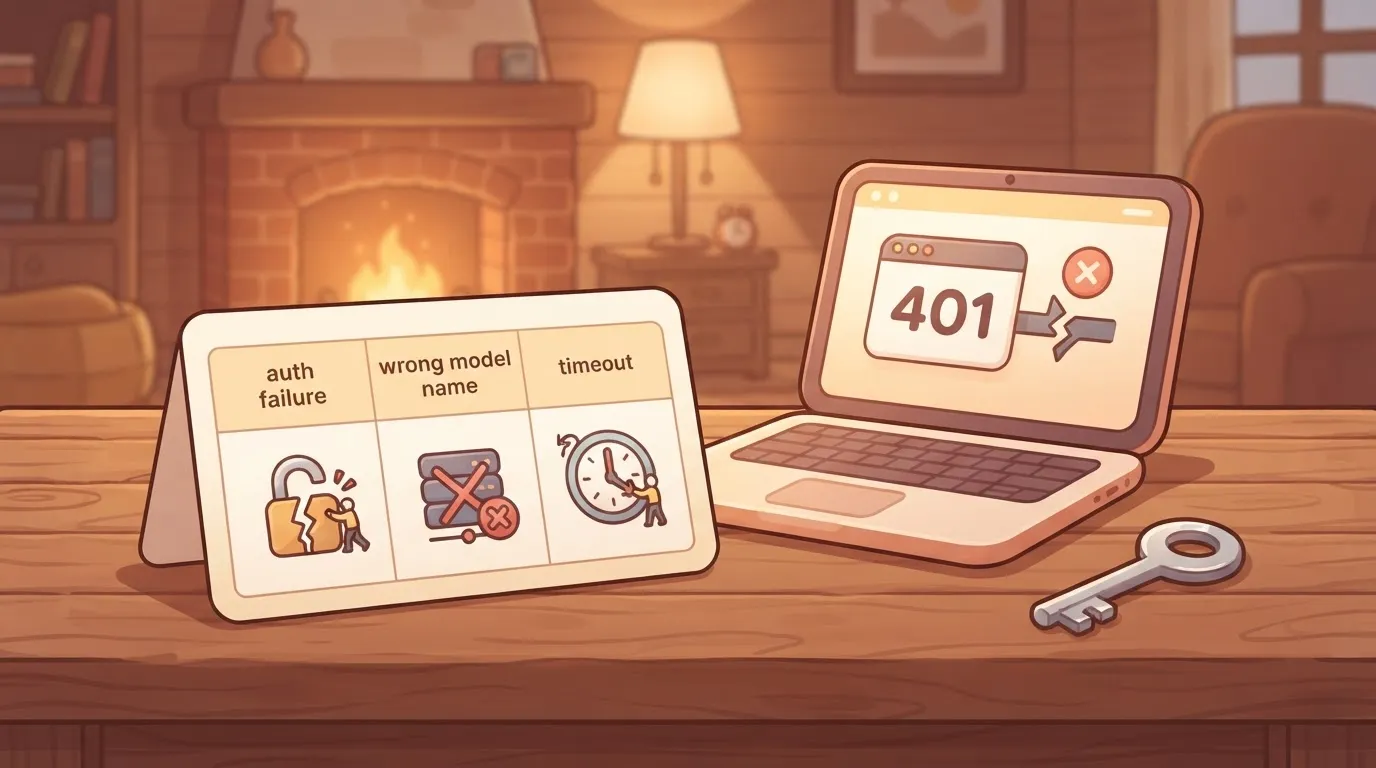
Match the symptom first, because several of these errors look alike.
| Error | Symptom | Cause | Fix |
|---|---|---|---|
| Auth failure | 401 or 403 response | Missing, expired or wrong-scope key | Regenerate the key and resend with the header the docs specify |
| Wrong model name | "Model not found" | Typo or retired identifier | Copy the name verbatim from the model page |
| Context overflow | Request rejected, or oldest text ignored | Input plus output exceeds the window | Shorten the input or split it |
| Rate limit | 429 response | Requests exceed your tier's quota | Wait, retry with backoff, or lower request frequency |
| Truncation | Answer stops mid-sentence | Output cap reached | Raise the output limit or ask for shorter output |
| Out-of-memory | Crash on load or first token | Weights plus context exceed GPU memory | Use a smaller quantization or shorter context |
| Bad structured output | Invalid JSON or missing fields | Format not constrained | Give an exact schema and example, then validate |
Fix one row at a time and rerun the same saved input, so you know which change worked.
Run Arete 27B on a Schedule With Activepieces
Once the single call reproduces, Activepieces can run it on a schedule: a timer, one HTTP request to the documented endpoint and one saved output.
A run is 1 credit however many steps it has, so the free plan's 1,000 credits a month covers 1,000 scheduled runs of this flow.
This only applies if the vendor documents an HTTP API. If Arete 27B is documented as local weights only, there's no endpoint to call, and you should skip this section.
When a separate automation tool is worth it
If you're the only person who reads the results, a cron entry on a machine you already run, calling a short script that makes the request and writes a file, is smaller than anything below. Stop there.
If someone who doesn't read shell scripts needs to see what ran and what came back, Activepieces earns its place.
You don't hire for this, you describe it: type the timer, the single HTTP request to the documented endpoint and the one saved output into the built-in chat, and it publishes a live flow in your account, the same artifact a builder would have assembled by hand.
That flow is an ordinary flow in your account, so each scheduled call leaves a run trace a teammate can read without knowing any shell. MoneyGram, Moneypenny, Alan and FundingSocieties run Activepieces.
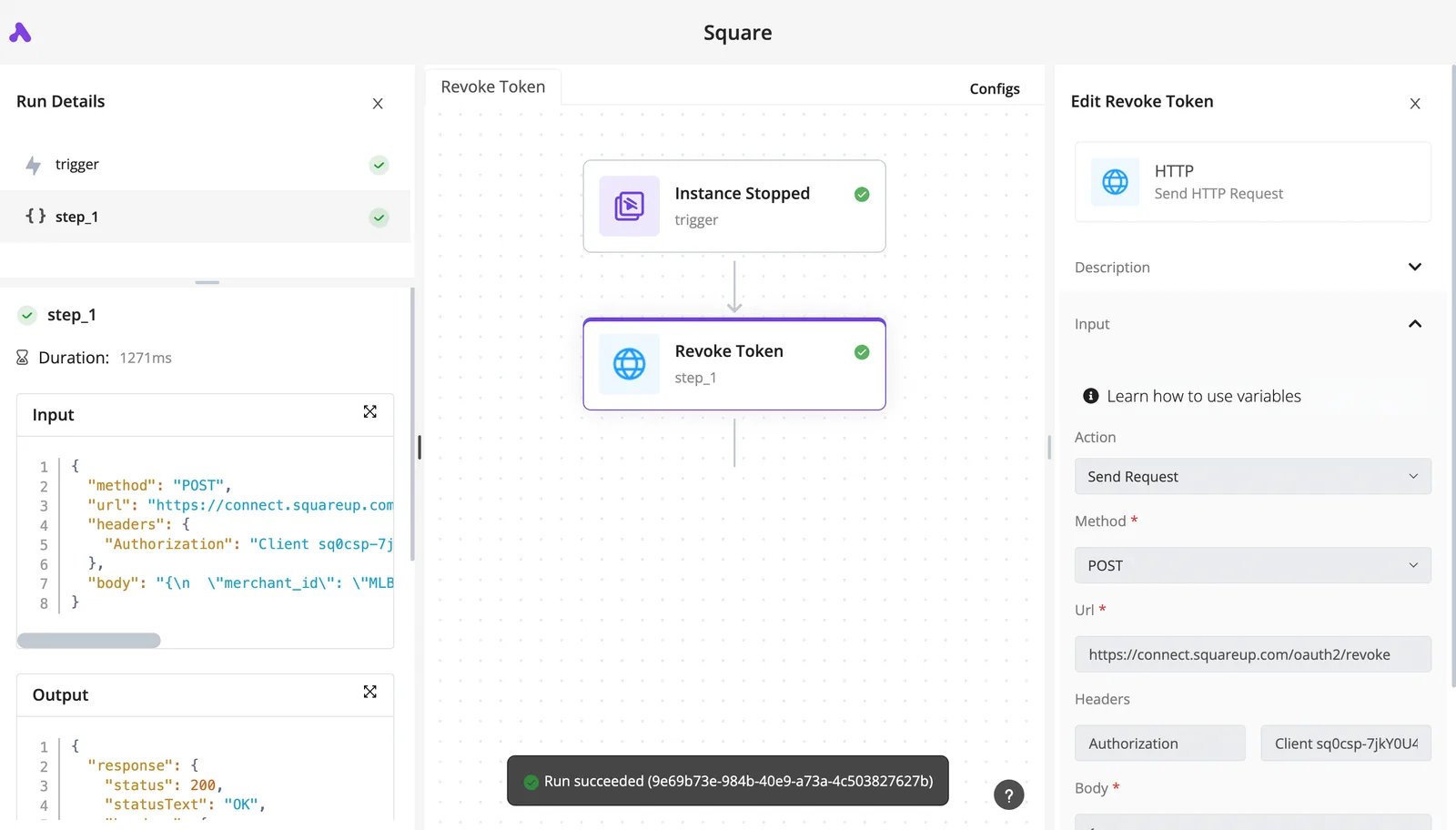
It also pays off when the saved output has to land in another app afterward.
Build exactly this and nothing more, because every extra step is a new place for the first failure to hide. The list below shows the flow in the order it executes.
Build exactly this and nothing more, because every extra step is a new place for the first failure to hide.
- Schedule trigger: pick the interval you'll actually check. A trigger firing more often than you review results only produces unread output.
- HTTP request: use the method, endpoint and headers exactly as the vendor documents them, including the authentication header. Send the same input you used in the baseline call, with the same documented settings, so a difference in output points at the schedule and not at the prompt.
- Write output: save the response body to one destination, such as a file or a single table row. Don't transform it yet. A transformed output can't be compared with your baseline.
- Retry settings: configure these on the HTTP step last, after a run has succeeded unattended once.
After a successful first scheduled run, you have two saved outputs to compare before touching anything else.
Handle Arete 27B workflow failures and retries
Turn on retry-on-failure for the HTTP request only, and read the vendor's documented limits first. Activepieces allows unlimited flows on every plan, including free, so you can keep the no-retry baseline as its own flow and test the retry version as a second one.

If the documentation names rate limits or error codes that mean "try later," retries fit those.
If a request fails because of a malformed body or a rejected key, retrying repeats the same rejection on every attempt, so fix the request instead.
Leave "continue on failure" off at first. With it off, a failed request stops the flow visibly, and a stopped flow is easier to diagnose than one that wrote an empty file and reported success.
Frequently asked questions
When a flow stops loudly, you are left with a question to look up, and these five are the ones the vendor's documentation answers.
Is Arete 27B free to use commercially? The licence attached to the weights decides, and the model card states it. Read it before the workflow touches a paying customer's data.
Can Arete 27B run on a single consumer GPU?
It depends on which precision of the weights you download. Full-precision weights need far more memory than compressed ones.
An out-of-memory error on load is a hardware limit rather than a bug in your flow. If it appears, try a smaller quantization or a shorter context before debugging anything else.
How large a document can Arete 27B read at once?
Treat the context window listed on the model card as the ceiling. Check whether the vendor counts the model's reply inside that window as well as your input.
If it does, a document that nearly fills the window leaves no room for the answer, and the saved file can look finished while ending mid-sentence. Test with your largest real input in the single call, not a sample.

Does Arete 27B support tool calling or JSON output? The model card and API reference say which of these are supported, and the hosted and local versions can differ.
If your flow needs structured output, make that the one thing the baseline proves. Otherwise the first sign of a missing feature is a parse failure at step three, far from its cause.
Where do I find the official Arete 27B changelog? Use the release notes linked from the vendor's own model page, not a third-party summary. Entries there are dated, so you can match a change in behaviour to a release.
Record the version you tested and the date you checked it.