
Automate Expensify Approvals with AI and Activepieces

Oct 2, 202612 min read
Automated expense approval with AI and Expensify
The shift from OCR to semantic policy enforcement
AI expense approval uses Large Language Models (LLMs) to interpret the intent behind a transaction rather than just extracting text from a receipt.
Traditional Optical Character Recognition (OCR) tools merely digitize data, whereas modern workflows, such as those built with Activepieces, leverage these advanced models to automate complex decision-making processes.
AI expense approval is the practice of using Large Language Models to validate transactions against corporate policy by interpreting the context and intent of spending data.
Models like Gemini 3.8 Flash can now evaluate a line item against a 50-page employee handbook to determine if a "client dinner" actually met the internal criteria for reimbursement.
When a manual workflow typically takes 14 to 28 days to finalize, it creates a significant cash flow lag for traveling employees, according to AutomationLabz.
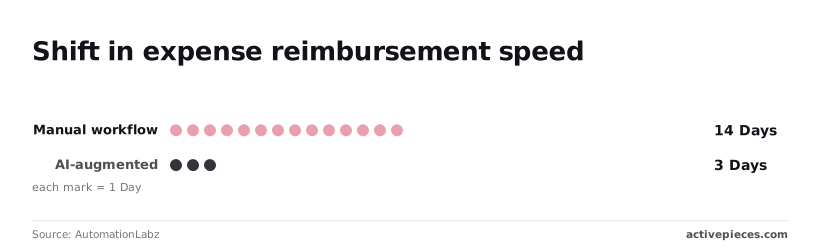
By moving to AI-augmented systems, companies reduce this window to between 3 and 7 days, which means financial reporting can be finalized significantly faster than before. This means staff receive reimbursements up to four times faster.
$38.72 is the average cost to process a single expense report for manual entry, based on Invio’s analysis. AI-automated processing costs under $0.50, so businesses can achieve near-instantaneous cost efficiency at scale.
This massive delta in unit cost transforms expense management from a specialized back-office burden into a background utility. Consequently, the bottleneck shifts from data entry to the reliability of the approval itself.
Why high-risk write actions require a governance layer
The moment an agent triggers a payment or updates a ledger, automating a "write" action introduces the risk of hallucinated approvals or API failures.
Expensify, the receipt management platform, enforces a strict rate limit of 10 requests per minute to manage this traffic, so developers must design their integrations to handle throttled responses.
10 requests per minute is significantly more restrictive than the 60 allowed by Xero, the accounting software, or the 100 permitted by Zoho Books, forcing developers to implement aggressive rate-limiting logic to avoid service interruptions.
An SDK provides an agent with code to execute, but it lacks the tenant, role, and audit log required for secure financial operations. Activepieces gives agents least privilege and centralizes credentials, ensuring the AI only reaches the Expensify accounts you authorize.
You can verify this by opening the run detail view for any step, where every tool call is logged with its own distinct input and output instead of being collapsed into one opaque result.
Expensify and AI approval pipeline overview
By following this guide, you will deploy a production-ready pipeline that connects your receipt inbox to your accounting software. The system follows three specific stages.
- A trigger monitors for new uploads in Expensify and fetches the raw receipt image.
- Claude Sonnet 5.5 analyzes the image against your specific policy document to flag non-compliant spend.
- Finally, a conditional branch either auto-approves low-value, compliant items or routes questionable expenses to a Slack channel for manual review.
This takes minutes, not a project: automate it in Activepieces free.
Step 1: Extracting and auditing receipt data with AI
Automating the extraction stage eliminates the manual entry tax that scales linearly with every new hire. In a traditional setup, processing a physical receipt costs $2.80 ReceiptsAI.

$15.16 per receipt is what high-touch manual audits climb to, creating a significant bottleneck that delays month-end closing, forcing finance teams to operate with outdated information, which means the company is consistently making decisions based on financial snapshots that no longer reflect current reality.
These audits occur where managers must verify line items against specific project codes.
Connecting your Expensify account to the workflow
The workflow begins by monitoring Expensify, a popular expense management platform, for the "New Expense" event.
You must provide a Partner User ID and Secret to link the account, which allows the builder to pull the raw image URL and metadata the moment an employee uploads a photo.
Prompting the LLM to spot policy violations
Once the system retrieves the image, we pass it to an LLM for structured analysis. The screenshot shows a logic flow where a loop processes individual items using the Ask AI step, here configured with Claude Fable 5.1 from Anthropic.
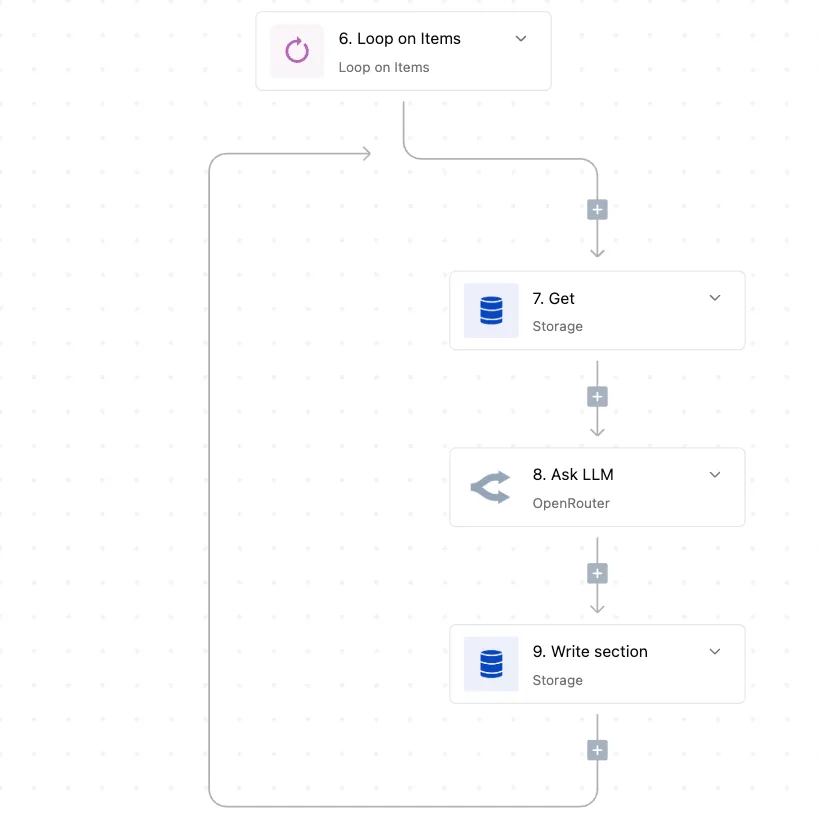
We use this specific model because it handles demanding reasoning and long-horizon agentic work. Subtle fraud like altered dates or non-compliant vendors is caught through this process.
The prompt should explicitly instruct the model to return a JSON object containing the total amount, tax, and a boolean "policy_violation" flag based on your company handbook.
Testing the extraction with a sample receipt image
Before turning the agent live, you must run a manual test using a high-resolution scan of a crumpled or faded receipt. The "Tested Successfully" status in the configuration panel confirms the model can parse distorted text, which is the primary failure point in production environments.

Step 2: Building the safety gate for automated approvals
Decision-making in automated finance requires a binary gate to prevent hallucinated approvals from reaching the general ledger.
While extraction models identify the merchant and amount, the safety gate evaluates these against corporate policy to determine if the agent can act alone or must defer to a human.
Decision-making in automated finance requires a binary gate to prevent hallucinated approvals from reaching the general ledger.
Defining the 'Pass' criteria for autonomous action
Reliable automation depends on a structured JSON output that separates raw data from policy compliance. When using Gemini 3.8 Flash for high-throughput processing, the model must return a numerical confidence score alongside specific boolean flags for policy breaches.
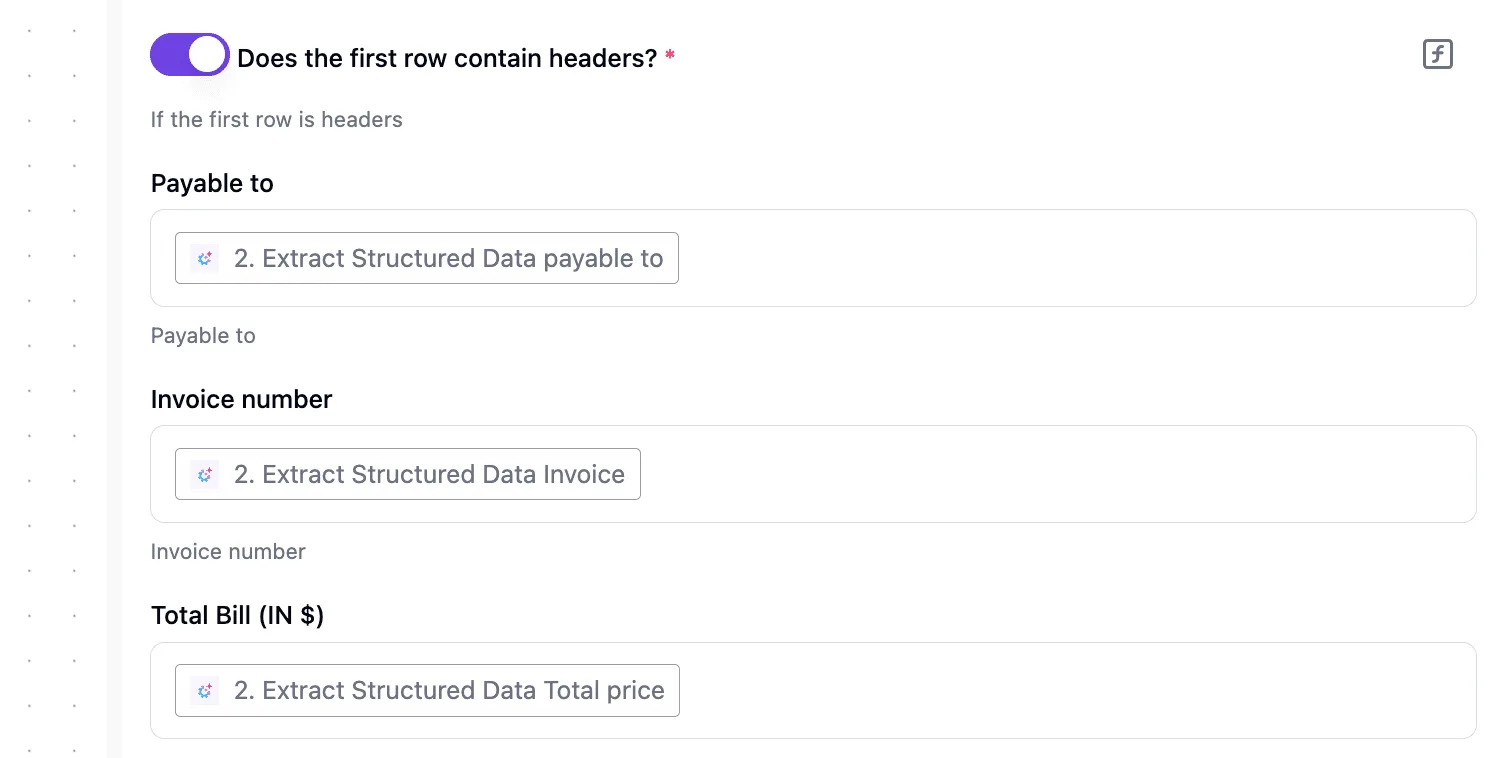
A confidence score reflects the model's certainty in its own extraction accuracy. Weekend travel restrictions or alcohol bans are flagged here to indicate whether the expense adheres to set limits.
Setting up the conditional filter in the workflow
The logic gate is a traffic controller, routing data based on the integrity of the AI’s reasoning. This step evaluates the incoming payload and only allows the workflow to proceed to the payment or reimbursement phase if all safety parameters are met.
Setting up human review for flagged expenses
Any expense that fails the automated gate moves to a manual review queue to maintain financial oversight without stalling the entire process.
This branch typically sends a notification to a communication tool like Slack or an issue tracker like Jira, providing the reviewer with the original receipt image and the specific reason for the flag.
You can follow the rest of this with the builder open. Start free, no card.
Step 3: Executing the Expensify approval action safely
Executing the final approval requires a precise handshake between the decision logic and the Expensify API to ensure the system releases no funds against the wrong report ID.
Mapping the Report ID to the Approve action
The system must pass the specific reportID captured during the initial trigger directly into the approval payload to prevent the agent from accidentally authorizing adjacent pending expenses.
Using the Expensify API, a RESTful interface for managing corporate spend, the workflow targets the updateReport method with a status change parameter.
Important: Ensure the
reportIDis mapped from the trigger output, not hardcoded, to maintain dynamic execution across different users.
Verifying the write-back in the Expensify dashboard
For the finance team, manual verification of the first several automated batches is the only way to confirm that the API status "200 OK" translates to the expected UI state.
An auditor should log into the Expensify dashboard (the centralized web portal for expense management) to confirm the report status has shifted from "Submitted" to "Approved."
Managing API rate limits for bulk approvals
High-volume organizations must implement a queuing strategy to prevent the automated agent from being throttled by the service provider during peak filing periods.
When dozens of employees submit reports simultaneously at the end of a quarter, a surge of concurrent requests can trigger a 429 "Too Many Requests" error, causing the automation to drop tasks.
To maintain reliability, the workflow should incorporate a delay function between consecutive API calls to space out traffic.
Governing AI financial workflows with Activepieces
Activepieces runs the AI you chose over the apps you already have, anchoring ephemeral reasoning into a verifiable business record with an MIT-licensed core.
Logging AI decisions for Expensify audit trails
A centralized logging system ensures every API call to the LLM and the subsequent response is captured outside the model’s volatile context window.
Every agent decision trace and the data it acted on is recorded step-by-step in the Run Details UI, sitting alongside the deterministic workflow steps.
Companies like MoneyGram and FundingSocieties run Activepieces in production because these traces can be exported as event streams into a SIEM, ensuring an audit log of what an agent decided is as accessible as a standard login log.
| Feature | Activepieces Governance | Custom Python/Node Scripts |
|---|---|---|
| Audit Logs | Visual execution history for every step | Fragmented logs across server files |
| Version Control | Published vs. Draft flows for safe testing | Manual Git commits required for every tweak |
| Error Handling | Automatic retries on 500 errors | Requires custom try/catch for every API |
Prices and plan limits checked against docs.claude.com and openai.com and gemini.google on October 1, 2026.
Version control for prompt and policy updates versioning
Separating the "Draft" and "Published" states of a workflow allows administrators to iterate on prompt engineering without disrupting the live production environment.
If the corporate policy changes to require two levels of approval for international flights, the new logic is built and tested in a sandbox first.
Role-based access to high-risk automation workflows
Granular permissions restrict the ability to edit "write" actions to a small group of verified engineers and controllers.
By locking down the workflow that connects the AI agent to the corporate bank account or ERP system, organizations prevent unauthorized users from lowering the threshold for automatic approvals.
The Monday morning rollout plan for AI approvals
Deploying an automated approval system begins with a silent observation phase where the AI evaluates real-world receipts without the authority to trigger payments.
Shadow-testing AI expense approvals with Claude
Shadow-testing involves running a high-reasoning model like Claude Fable 5.1 in parallel with your existing manual process. This allows you to compare AI decisions against human judgment without risking capital.
You can begin this testing at no cost using the Google free tier.
This provides $0 per month access to basic reasoning capabilities, ensuring you can validate your workflow logic before committing to a paid enterprise subscription, allowing for risk-free experimentation with the platform, so users can confirm the system's value without any upfront capital expenditure.
Phase 2: Defining the 'Auto-Approve' ceiling amount house rules
Transitioning to live automation requires a tiered risk strategy where the AI only finalizes low-stakes transactions that fit strict criteria.
You must define a specific monetary ceiling for "Auto-Approve" status, meaning any report above that limit is automatically routed to a human manager regardless of the AI’s confidence score.
Phase 3: Monthly audit of AI-approved reports
A recurring audit ensures the system has not developed "model drift." This is where the agent's interpretation of policy shifts as new types of expenses are introduced.
$4.99 per month is the cost of the Google AI Plus tier, meaning even small teams can afford to maintain a dedicated "Audit Agent." This agent runs a second, independent check against the primary approval agent to catch hallucinations.
Frequently asked questions about AI expense automation
How does AI handle non-English receipts?
Modern vision models process multilingual text by treating visual characters as tokens rather than relying on simple dictionary lookups.
Using Gemini 3.6 Flash for optical character recognition allows the system to extract merchant names and currency symbols from Japanese Kanji or Arabic script without requiring a translation step. This prevents the "hallucinated conversion" errors common in legacy software.
Is sending receipt data to an LLM compliant with GDPR?
Compliance depends entirely on the data processing agreement (DPA) held with the model provider to ensure personal data is not used for foundational training.
When deploying Claude Sonnet 5.5 through an enterprise-tier API, the vendor is contractually prohibited from retaining the image or text prompts for model improvement. This means your employee’s name and location remain within your private execution environment.
What happens if the Expensify API is temporarily down?
An automated approval workflow must include a persistent queue to prevent "lost" transactions during vendor outages.
By routing the final payload through a secondary database or a persistent message broker before hitting the Expensify expense management platform, the system can retry the write action once the service returns to health.

This ensures no valid employee reimbursement is dropped due to a 503 error.
Can the AI detect duplicate submissions across different users?
AI agents detect duplicates by comparing the semantic features of an image rather than just looking at the total dollar amount. The system generates a unique hash for every uploaded receipt image to catch exact file copies.

GPT-6 Astra analyzes the specific timestamp, merchant location, and line items to flag "near-duplicates," such as two employees submitting different photos of the same shared dinner bill.
Cross-referencing these features against the historical ledger identifies fraudulent double-dipping that traditional rule-based filters often miss.
Related reading
References
Build it
Set this up in minutes.
No code required. Connect your accounts, and Activepieces runs it from there.
Start free Talk to sales