
HubSpot BigCommerce Integration Setup Without Code

Nov 18, 202614 min read
You connect them with a trigger-and-action workflow, built in a no-code automation tool such as Activepieces: a BigCommerce event, such as a new order, fires, and a HubSpot action writes the result to a contact.

Nothing needs custom code, and both HubSpot and BigCommerce expose the APIs it relies on. Checked on 18 Nov 2026.
Connect HubSpot to BigCommerce without custom code
What people automate between the two apps
Most setups reduce to a handful of one-line jobs:
- A new BigCommerce order creates or updates the matching HubSpot contact.
- Order details such as items and totals land on that contact's record, so sales and support see purchase history.
- A new customer signup in the store becomes a HubSpot contact.
- An abandoned or cancelled order sets a property that a HubSpot list or email can key off.
HubSpot and BigCommerce integration prerequisites
Before you start, four things have to be in place, and a missing one usually shows up as an authorization error halfway through the build, not at the start:
- A HubSpot account whose credentials carry contact-write scope
- A BigCommerce store with API credentials
- An Activepieces account, cloud or self-hosted
- A test order to supply sample data

Skip the test order and you'll type field names by hand, because the HubSpot step has nothing to pick from.
- Create a flow in Activepieces and choose the BigCommerce trigger for new orders, then connect it with your store credentials.
- Run the trigger against your test order so the sample data loads and every order field becomes selectable.
- Add the HubSpot action that creates or updates a contact, connect your account, and map email, name and order fields from the sample data.
- Test the flow end to end, check the contact in HubSpot, then publish.
Everything below works on Activepieces' free plan. Start without code or a credit card.
Choose how store data reaches your CRM
Every integration of this kind answers one question: how does the CRM learn that something happened in the store? There are three answers, and the rest of the build follows from which one you pick.
Push is the webhook model. BigCommerce sends an HTTP message the moment an order is created, and the receiver acts on it. It is fast and cheap, but the receiver must be reachable and must tolerate retries.

Pull is polling. A scheduler asks the store's API every few minutes for orders newer than the last one it saw. It needs no public endpoint and survives downtime, at the cost of some delay and extra API calls against your rate limit.
File transfer is the oldest method: export orders as a CSV and import them into HubSpot. It suits one-off backfills and nothing live.
Who runs the push or pull varies. A marketplace app does it inside the platforms, an automation service such as Zapier or Make hosts it for you, and a small custom script or middleware gives full control at the price of maintenance.
Whatever the runner, the job is the same: match on email, write the fields, and cope with repeats.
Five HubSpot and BigCommerce workflows worth building
Build five: order to contact, abandoned cart to list, customer to company, order status to deal stage, and shipment to ticket. Three run on listed steps from a BigCommerce trigger, and two need a Custom API Call on the HubSpot side.
A dropped order sync costs more here than on WooCommerce or Shopify: BigCommerce orders average $137, against $122 on WooCommerce and $113.97 on Shopify, so every dropped order sync means a $137 transaction goes unrecorded.
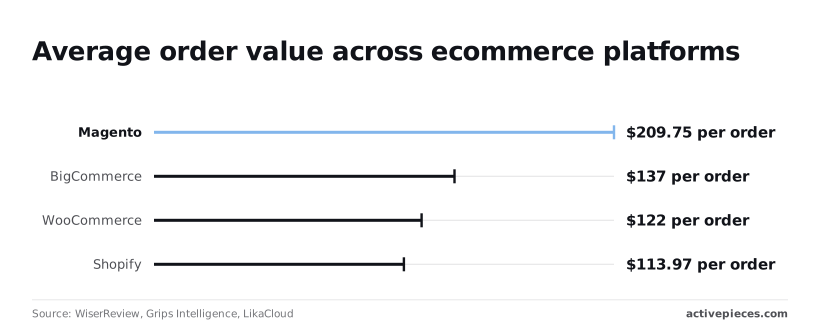
Magento sits higher at $209.75, which tells you the platform matters less than the catalog.
| Workflow | BigCommerce trigger | HubSpot action | Listed or Custom API Call |
|---|---|---|---|
| Order to contact | "Order Created" | Create or update contact | Listed |
| Abandoned cart to list | "Abandoned Cart" | Add contact to list | Listed |
| Customer to company | "Customer Created" | Create company, associate contact | Listed |
| Status to deal stage | "Order Status Updated" | Update deal stage | Listed |
| Shipment to ticket | "Shipment Created" | Create ticket | Listed |
Prices and plan limits checked against activepieces.com and activepieces.com on November 18, 2026.
Check the HubSpot action picker before you assume a row is listed; the BigCommerce triggers are confirmed on its trigger list.
Use "Order Created" from BigCommerce, then a HubSpot contact step keyed on email.
At signup, before any order, "Customer Created" fires. Pair it with "Customer Updated" so address and name edits flow through. Both triggers appear in the BigCommerce list.
Order changes reach the sales or support team
Branch on the new status, because "Order Status Updated" drives both the deal-stage and ticket rows: "shipped" opens a ticket and "refunded" moves a deal.
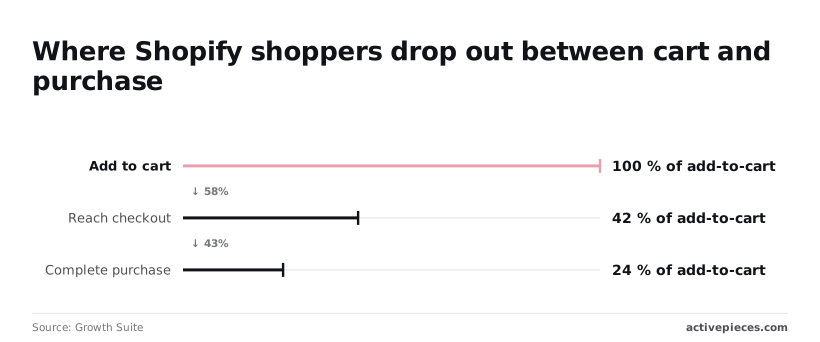
Only 42% of add-to-cart shoppers reach checkout and 24% buy, in Shopify data from Growth Suite, which is why "Abandoned Cart" matters. Roughly three in four carts are therefore candidates for a follow-up list, though that figure is for Shopify, not BigCommerce.
Where no listed HubSpot step exists, use Custom API Call against the HubSpot REST endpoint with your private app token. Where BigCommerce has no trigger, register a webhook in BigCommerce and point it at the flow's webhook URL.
Build the order-to-contact workflow in Activepieces step by step
Connect both accounts, load sample data from a BigCommerce trigger, map the order fields into a HubSpot contact action, then test, check HubSpot and publish.
Connect your HubSpot and BigCommerce accounts
Create the connections before you add any steps, so a failed authorization shows up on its own instead of inside a half-built flow.
Open Connections in Activepieces, add one for HubSpot and one for BigCommerce, and authorize each with the account that owns the data you want to move.
If you authorize HubSpot with a user who can't create contacts, the connection will save without complaint and the failure will only appear when the action runs.
Stage 2: add the trigger and load sample data
Add a trigger step, choose the BigCommerce integration, and pick the order event from its trigger list. If the event you need isn't in that list, use the webhook trigger instead and point a BigCommerce webhook at the URL Activepieces gives you.

The screenshot below uses a demo trigger from the Ice-cream integration, "new flavor created", rather than a BigCommerce one.
It's still the panel you'll work in: the trigger name, the connection with its Reconnect button, and a Generate Sample Data section with a Load data button.
Until you press Load data, nothing downstream has a real order to map against.
You can also skip the clicking: describe the job to the built-in chat in Activepieces, say a new BigCommerce order creating or updating a HubSpot contact by email, and it builds and publishes the flow you would otherwise have assembled by hand.
That flow sits under the same RBAC, audit logs and run traces as every hand-built one, so each run leaves a trace anyone on the team can read, with no certification needed to follow it. You don't hire for this, you describe it.
MoneyGram, Moneypenny, Alan and FundingSocieties run Activepieces in production.
Stage 3: map fields into HubSpot
Add the HubSpot step that creates or updates a contact. Click into each field and pick the matching value from the trigger's sample data: the customer email, first name and last name from the order.
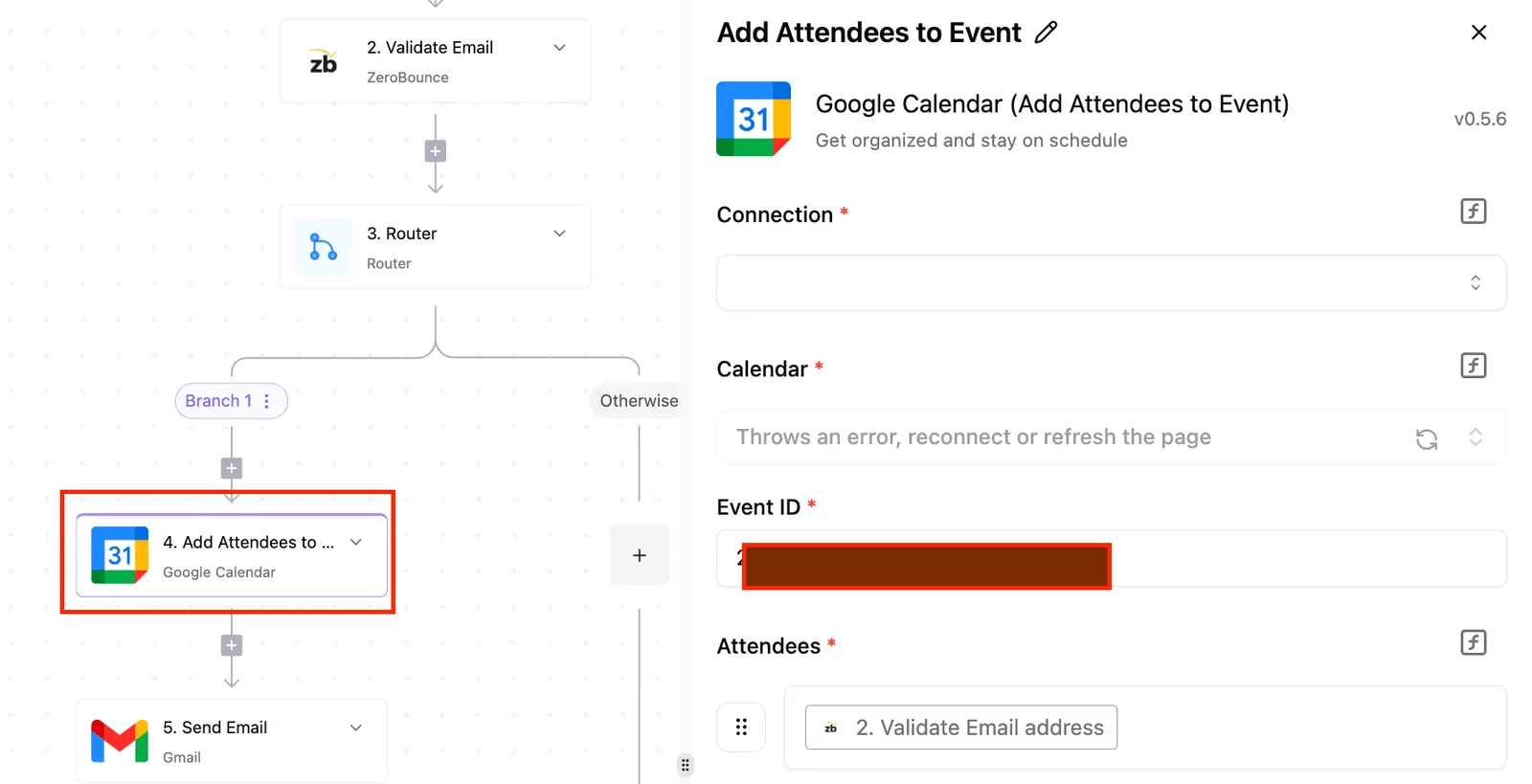
Map email first, because it's what HubSpot uses to tell contacts apart. If it's empty on some orders, you'll create duplicates or get failed runs.
- Run the test on the HubSpot step and read the output it returns, not just the green tick.
- Open HubSpot and find the contact by email. Confirm each mapped field landed in the property you intended.
- Fix any field that is blank or misplaced, and re-test.
- Publish only once a real contact has appeared correctly.
A passing test against sample data proves your mapping, not your live webhook, so place one real order afterward and confirm it arrives.
Easier to see it running than to read about it: set it up free, no card.
HubSpot and BigCommerce limits, errors and fixes
Once a real order has gone through, the failures that remain fall into five groups: auth and scope, rate limits, duplicate contacts, guest checkouts without an email, and webhook retries.
**A passing test against sample data proves your mapping, not your live webhook, so place one real order afterward and confirm it arrives.
Match an error in your run history to a row: the table gives the symptom you'll see, its usual cause and the fix, with each row pointing to the vendor's developer documentation.
| Symptom | Cause | Fix | Vendor docs |
|---|---|---|---|
| 401 or 403 on a step | Expired or wrong token, or an API account missing the scope for that resource | Reissue the credential and grant the scope for the object the step touches | BigCommerce, HubSpot |
| 429 Too Many Requests | Bursts of calls, such as a catalog or contact backfill, exceed the plan's allowance | Slow the run, add a delay or retry with backoff, and batch where the API allows | BigCommerce, HubSpot |
| Duplicate contacts | Create action used where an update was needed, or email casing differs | Search by email first, then create or update | HubSpot |
| Guest order creates no contact | Guest checkout left the email blank or the field mapped wrongly | Branch on empty email and skip or flag the record | BigCommerce |
| Same order processed twice | The sender retried because your endpoint answered slowly or with an error | Respond quickly, then dedupe on the order ID | BigCommerce |
When a step returns a 401, the credential was rejected; a 403 means it was accepted but lacks permission. Fix the two differently.
For a 401, replace the token. For a 403, open the API account or private app and add the missing scope, then rerun.
HubSpot and BigCommerce API rate limits and retries
Read the figure for your own plan in the vendor docs rather than borrowing one from a blog post, because limits differ by plan on both platforms.
A 429 is a request to wait, not a failure. Put a delay between loop iterations, retry with growing pauses, and run backfills off-hours.
If your receiving endpoint is slow or returns an error, BigCommerce will send the same event again, which is the other half of this. The workflow must tolerate repeats. Store the order ID on the first pass and exit early when you see it again.
Fix duplicate HubSpot contacts and missing fields
HubSpot treats email as the identity of a contact, so most duplicates come from creating without checking first. Search by email, then update if found.
When no email arrives on a guest checkout, there's nothing to match on. Add a condition that stops the run or routes the order to a review list, and never let the step create a contact with an empty identifier.
Other connectors for HubSpot and BigCommerce, and where Activepieces fits
If you need open source or self-hosting, Activepieces fits. Zapier, Make and the marketplace connectors from MakeWebBetter and Randem all link HubSpot and BigCommerce, but they differ on hosting, step limits and custom HTTP logic.
Native and third-party HubSpot BigCommerce connectors compared
Read the custom HTTP column first: it tells you whether a missing BigCommerce action is a dead end or a ten-minute workaround. The table shows where each option stops.
| Option | Hosting | Step limits | Custom HTTP logic | Starting monthly price |
|---|---|---|---|---|
| Activepieces | Cloud or self-hosted | Set by your plan on cloud; none imposed when self-hosted | HTTP step available | Free when self-hosted |
| Zapier | Cloud only | Capped by plan | Webhooks and request steps on paid plans | Free plan, then usage tiers |
| Make | Cloud only | Capped by plan operations | HTTP module available | Free plan, then usage tiers |
| Marketplace connectors (MakeWebBetter, Randem) | Run inside the apps you install | Fixed by what the connector ships | None; you get the listed syncs only | Set per listing |
Because cloud-only tools cap steps by plan, a workflow that loops over order line items can exhaust a quota faster than the order count suggests.
Marketplace connectors skip that problem, but they do only what the listing says.
When Activepieces is the better fit
Activepieces can be self-hosted on your own infrastructure, with an MIT-licensed core and 750 integrations counted straight from its open source monorepo, so when your order or customer data can't leave your servers, or a step is misbehaving, you can read its source.
Self-hosting moves the step-limit question from the vendor's plan to your own server capacity, and you carry the maintenance.
It also suits the pattern this article recommends: use a built-in step where one exists, and drop to an HTTP request or webhook where it doesn't. A tool that treats the HTTP step as a normal block, not an upsell, makes that fallback cheap.
If you already work in Zapier or Make and your volume is small, staying put is a reasonable call.
Begin with the BigCommerce trigger for a new order, since that's the event every later step depends on.
- Create a new flow and add the BigCommerce trigger.
- Place one real test order and confirm the trigger returns its payload.
- Add the HubSpot action that matches your goal, such as creating or updating a contact.
- Where no matching step exists, add an HTTP request and map the fields yourself.
- Run another real order end to end before turning the flow on.
Frequently asked questions
Do I need a developer to connect HubSpot and BigCommerce?
No, not for the steps that exist as ready-made triggers and actions, because you pick them and map fields in a visual editor.
You need one when a step is missing and you fall back to an HTTP request or webhook. That means reading API documentation, building a request body, and handling authentication yourself.
Can I sync orders that already exist in BigCommerce?
Not with the new-order trigger alone. It fires when an order is created after the workflow is switched on, so older orders never reach HubSpot.
To backfill, use an HTTP request step to pull past orders from the BigCommerce API, or export them and import them into HubSpot directly. Run the backfill once, and check that it doesn't duplicate contacts the live workflow has since created.
Can data flow from HubSpot back to BigCommerce?
Yes, as a second workflow rather than a reverse setting. Start from a HubSpot trigger, such as a contact property changing, and finish with a BigCommerce action.
Where the BigCommerce side has no matching action for the change you want, use an HTTP request to the BigCommerce API.
What happens if a step in the workflow fails?
At the failed step the run stops, and later steps don't execute. Earlier steps have already happened and aren't undone. A typical result is a HubSpot contact created for an order with no deal attached.
Open the run log, read the error the failing step returned, fix the cause, and rerun that execution.
Can I self-host the workflow engine?
That depends on the engine, not on HubSpot or BigCommerce. Some workflow tools publish their source and run on your own server, and others exist only as a hosted service.