Real Estate Brokerage Automation Software: 2026 Guide

Nov 24, 202614 min read
Without anyone re-keying data, brokerage automation software runs three separate jobs: lead follow-up, transaction paperwork and cross-app handoffs. The best pick is the specialist for whichever job costs you most.
No single product is the best at all three, so each pick below fits one job.
Real estate brokerage automation software: the short answer
- Lead follow-up: Follow Up Boss, a real estate CRM, for teams whose money leaks from slow replies to portal and web leads.
- Transaction compliance: SkySlope, a transaction management platform, for brokerages that must prove every file was reviewed.
- Cross-app handoffs: Zapier, or Activepieces (750 integrations, MIT-licensed core), for the gaps between those two tools, such as pushing a signed contract's details into accounting.
Pick the first row that matches your worst week, then add a connector only where the specialists stop talking to each other.
The three jobs a brokerage automates
Each job has its own measure of success:
- Lead follow-up is speed: who answers, and how fast.
- Compliance is proof: which documents exist, and who signed off.
- Handoffs are plumbing: moving a field from one app to the next.
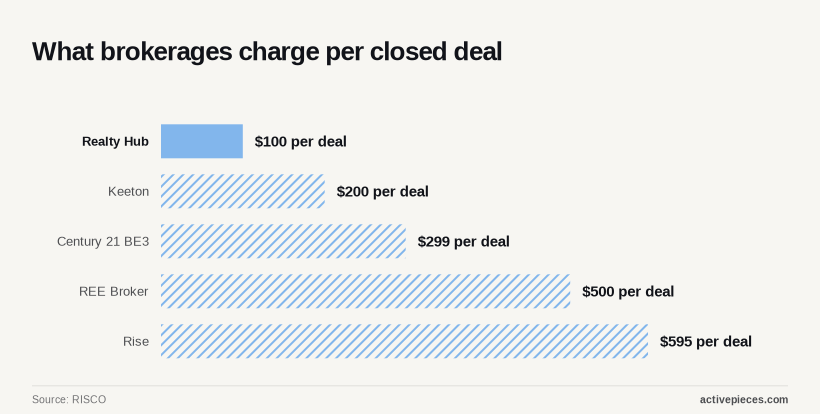
Look at compliance first if you want to see cost plainly. Per-deal fees in RISCO's 2026 flyer are:
- $100 at Realty Hub
- $200 at Keeton
- $299 at Century 21 BE3
- $500 at REE Broker
- $595 at Rise

That's a sixfold spread for handling the same file, so a brokerage closing hundreds of deals a year should price this job before any other.
On 24 November 2026 the vendor pages were checked. Ranking followed three tests:
- Does the tool do its job natively rather than through a workaround?
- Can an office administrator maintain it without a developer?
- Does its price rise with deals, seats or tasks?
This takes minutes, not a project: automate it in Activepieces free.
Brokerage automation tools compared side by side
Judged on the trigger you need rather than the app count, the four tools split by job. Follow Up Boss covers lead follow-up, SkySlope covers transaction compliance, and Zapier covers the glue between apps.
Top real estate automation software picks
Details were checked against vendor pages on 24 Nov 2026.
Some list prices read "not confirmed" because none was verified on that date, so get a quote from the vendor before budgeting around any of them.
| Tool | List price | Main strength | Main limit | Best for |
|---|---|---|---|---|
| Follow Up Boss | not confirmed | Lead capture and follow-up built for real estate teams | Not a compliance or document-review system | Teams whose costliest job is leads going cold |
| SkySlope | not confirmed | Transaction files, checklists and compliance review | Not a lead-nurture tool | Brokerages whose costliest job is audit-ready files |
| Zapier | Paid plans start at $19.99/month | Connects apps through triggers and actions | No real estate logic; you build every rule | Gaps between two specialist tools |
| Activepieces | not confirmed | General-purpose workflow builder with 750 integrations and an MIT-licensed core that can be self-hosted | No brokerage-specific compliance features out of the box | Teams that want custom flows and control over where they run |
When a new inquiry lands, it should get a reply, a task and a reminder without anyone remembering: that is lead follow-up, speed and persistence.
Transaction compliance is paperwork: required documents, signatures and checklists must be complete before a file closes. The third job is glue, such as passing a signed contract's status from the transaction system back to the CRM.
How brokerage automation tools were ranked
Rather than count apps, I ranked on the specific trigger or action each job needs. For each tool I asked whether it can start a flow from the event you care about and write the result to the field you use.
Where a page didn't state a price, the cell says "not confirmed" instead of a guess. Strengths and limits come from vendor pages and documentation.
Follow Up Boss
For lead follow-up, rank Follow Up Boss first, because it works on the stretch where most leads are lost: the time before anyone makes first contact.
834 cold leads sourced were tracked by D. Foster Consulting. Per D. Foster Consulting, only 138 became a connection, about one in six, so roughly 696 leads never produced a live conversation.
Just 17 ended in an appointment, about 2% of the original pool, so nearly all leads stalled before even scheduling.
What it automates
Getting a new lead to the right agent quickly, then keeping contact going, is the job. Lead routing assigns incoming leads by rules, so no lead sits in a shared inbox waiting for someone to claim it.
Action plans then schedule the follow-up tasks, calls and texts for each lead, so a missed day doesn't quietly end the sequence.
Because integrations bring leads in from the sources a brokerage already buys, the routing rules only help if your lead sources can feed it. Check that against your own source list before committing.

SkySlope pricing and limits
I didn't confirm a current list price for this write-up, so get a quote for your actual agent count before comparing it with general tools. Price per user matters here because a team that adds agents adds seats.
Measure it against the funnel figures: if the tool lifts connections even modestly from 138 of 834, the extra connections are what you're paying for.
It suits teams buying leads at volume, where the 696 unreached leads represent real spend.

Skip it if your costliest problem is transaction paperwork or moving data between apps, because follow-up is the job it's built for. A brokerage with few inbound leads will also see little return from routing rules.
SkySlope for transaction compliance automation
Where the costliest job sits in the file rather than the funnel, SkySlope fits, because it automates transaction compliance and does nothing for lead nurture.
After a deal is under contract, SkySlope's work begins: transaction checklists, document collection, and broker review of each file before it closes.
If your compliance risk is a missing disclosure or an unsigned addendum, that's the job it targets. It has no routing rules or drip sequences, so a brokerage with a leaky lead funnel won't fix it here.
At the top sits a brokerage-wide Suite, with cheaper agent-level tools beneath it. According to Deedspring, the Suite costs $340 a month. That's the figure to budget against if the broker wants checklists and review across every file.
Deedspring lists Forms at $15.99 a month, which is roughly one twenty-first of the Suite, so an agent who only needs forms isn't paying for broker oversight. DigiSign, the e-signature tool, is $6.25 a month (Deedspring).

Buying Forms and DigiSign together comes to $22.24, which leaves about $318 a month as the premium for the Suite.
That premium is the cost of the compliance layer, so it only pays off if someone at the brokerage actually reviews files. These are list prices from a third-party breakdown, not a quote, so confirm them against current terms before you commit.
Who SkySlope is best for
It suits a broker who owns file review and wants every transaction held to the same checklist. It also suits a small team of agents that only needs forms and signing at $22.24 a month combined.
Skip it if your pain is slow lead response, or if the real gap is moving data between your CRM, accounting and calendar. Those are different jobs, and SkySlope won't cover them.
You can follow the rest of this with the builder open. Start free, no card.
Zapier app automation
Where SkySlope leaves the handoffs between apps open, Zapier does that work. It connects apps you already run through triggers and actions, with no code, so a new row in one tool starts a step in another.
It earns a place in a brokerage only for those gaps between specialists.
Think of a Zap as one trigger followed by one or more actions. Typical brokerage uses are a form submission creating a contact in your CRM and a signed document posting a note to a team channel.
Check the trigger before you commit. A catalogue of thousands of apps says little; what matters is whether your CRM exposes the specific trigger you need, such as "new lead" or "stage changed", and the fields you need to map.
Look up your own CRM and transaction tools in Zapier's app directory first, because real estate coverage varies app by app.
If the trigger you need isn't in a closed directory, you wait on the vendor's roadmap rather than your own. Activepieces lets you generate the missing integration with AI and add it privately to your own instance, with no vendor release in the way.
Its 750 integrations are counted straight from the packages/pieces/community folder of the open-source monorepo on GitHub, roughly 60% of them contributed by the community, and the core carries the MIT licence in the repository's LICENSE file (the packages/ee/ directories sit under a separate commercial licence), so you're reliant on community maintenance for most of your integrations.
MoneyGram and Moneypenny run it in production.
Because Zapier bills by task, meaning each action step that runs, a five-step Zap uses several tasks per lead.
The table shows the three tiers and how quickly the allowance shrinks against real lead volume, by the time most teams are running real volume, they've already stepped up to a higher tier.
| Plan | Monthly price | Tasks |
|---|---|---|
| Free | $0 | 100 |
| Professional | $19.99 | 750 |
| Team | $103.50 | 2,000 |
To get shared use with 25 users, you need Team, turning collaboration into a premium-tier feature, which means smaller teams are locked out of this functionality.
The free plan suits a trial of one workflow, since a brokerage with steady inbound leads would exhaust 100 tasks quickly.
Because each added step multiplies usage, cost climbs with volume rather than with team size.
If your data must stay on your own servers, Zapier isn't an option, because it is a hosted service.
It suits a broker or office manager who needs a handful of connections between tools they already pay for, and who wants to maintain them without a developer.
Skip it as your main system for lead follow-up or transaction compliance, where a specialist covers the whole job. Skip it too if high volume with many steps per record would make task billing your largest line item.
Activepieces
For the third job, the glue between apps, Activepieces moves a record from one tool to the next across 750 integrations, and it's neither a brokerage CRM nor a compliance system.
It's a workflow builder that moves a record from one tool to the next, so you reach for it where your specialists stop talking to each other.
Where it fits a brokerage
Nobody sold you the handoff, and that's the typical gap: a web-form lead lands, and the CRM contact, the transaction file and the agent's alert all have to follow without someone retyping.
Activepieces handles that with a trigger, then actions, drawn from its 750 integrations, about 60% of them contributed by the community, meaning most integrations come from outside the company.
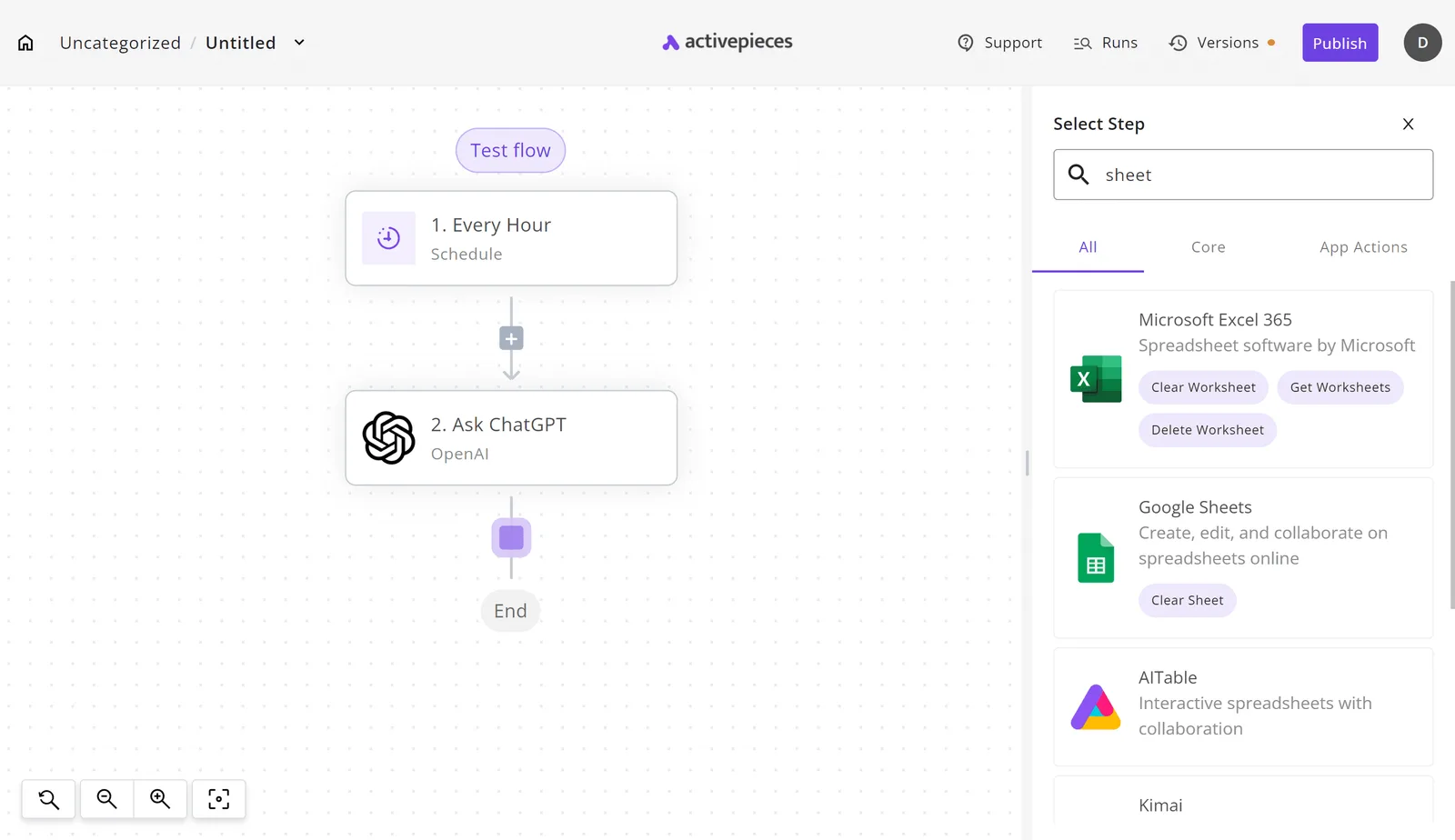
Below is the whole chain. What to take from it is that each step is one named action with one field mapping, so when it breaks you can see which step failed.
- Trigger: a new web-form submission arrives.
- Create or update the CRM contact, matching on email so a repeat inquiry updates the existing record instead of making a duplicate.
- Create the transaction file in your compliance or transaction tool, carrying over the contact's name and the property address.
- Notify the agent, by email or chat message, with a link to the new file.

Whether this works comes down to the matching rule in step 2 and the field mapping in step 3.
Check that your specific CRM and transaction tool each have a connector (called a piece) with the exact actions you need, such as update-contact or create-file.
A catalogue count tells you nothing about that, and I haven't confirmed that any particular real estate CRM has one.
I have no confirmed plan prices or task allowances to quote, so check the vendor's pricing page before budgeting.
Because its core is MIT-licensed, it can be self-hosted, which matters if client data must stay on your own servers. In exchange, someone on your side maintains the install and its updates.
When brokerage automation software doesn't fit
Don't make it the main system for lead follow-up or compliance. It has no built-in drip sequences, deadline tracking or audit trail of the kind a specialist provides, and you'd be rebuilding those from scratch.
If a brokerage app has no connector, you'll be working through a generic web request step, which needs someone comfortable reading API documentation.
Activepieces is the better fit for brokerages whose real gap is the handoff between tools they already own, judged on how far the integration catalogue can stretch to cover it.
It is not a CRM or a compliance system, and it doesn't pretend to be one.
Its 750 integrations are counted directly from an open-source monorepo you can check, so that figure is a floor rather than a ceiling, and a web-form lead can reach the CRM contact, the transaction file and the agent's alert without anyone retyping it.
Frequently asked questions
Do I need a real estate CRM before I add an automation tool?
Yes, because a general automation tool moves records between apps but doesn't store your contacts, and the web request step above can only fetch data that already lives somewhere. Without a CRM, lead stages end up in a spreadsheet nobody trusts.

Even with a CRM in place, you still need transaction software: the CRM holds the lead, while the transaction tool holds the checklist and the signed documents.
Brokerages that run both usually need a connector or a web request step between them, so that's where a general tool earns its place.
Can a brokerage automate commission calculations?
Partly. A general tool can do the arithmetic when split rules are fixed and the inputs sit in fields it can read, such as sale price, agent and split tier.
It gets harder with caps, team agreements or referral fees, because those rules often live in documents rather than fields.
Check first whether your transaction software already has a commission module, since rebuilding it in a workflow means you maintain the logic. Whatever you build, have a person approve the figure before money moves.
Is self-hosting worth it for a small brokerage?
Usually not, unless you have a firm requirement about where client data sits or someone on staff already runs servers. Self-hosting means you own updates, backups and uptime for a system that touches client records.
While Zapier and Make are sold as hosted services, n8n publishes a self-hosted edition, so the option exists but isn't universal. Read each vendor's own hosting page before assuming it applies to the plan you're pricing.
How often do these prices change?
Often enough that you should treat any list price here as a snapshot. Vendors revise plan names, usage limits and what counts as a billable task without much notice, and some transaction platforms don't publish a price at all, only a sales quote.
Before you commit, open the vendor's pricing page on the day you decide and check how usage is metered. The metering unit is what decides your bill as volume grows.
Related reading
References
Build it
Set this up in minutes.
No code required. Connect your accounts, and Activepieces runs it from there.
Start free Talk to sales