
Set Up a Workday Slack Integration Without Code

Nov 22, 202614 min read
A Workday Slack integration is a trigger-and-action workflow, which you can build in a automation tool like Activepieces or code yourself: when something happens in Workday, a message appears in a Slack channel without anyone copying it over by hand.
A no-code Workday Slack integration is a setup, built with a visual workflow or automation tool instead of custom programming, that watches for a defined Workday event, such as a approved time-off request or a new hire, and automatically posts a message about it to a chosen Slack channel or person.
Here's a composite scenario, not one named company. At 9:02 on a Monday, a recruiter finishes a hire in Workday. The record is correct and the start date is set.
But the IT lead, the team manager and the buddy who should greet the new person all live in Slack, and none of them has opened Workday today. The record exists and the channel stays silent.
At that moment, the illustration shows both sides:
- The finished record on one side
- The empty channel on the other
- The gap between them
Workday Slack Integration and the Miss at 9:02
Break it open and a Workday Slack integration has two parts:
- A trigger watches Workday for an event, such as a hire being created
- An action turns that event into a Slack message in a channel you chose
- Between them you can filter, so only the events someone cares about get through
Checked on 2026-11-22:
- Trigger on the Workday event you care about: describe it in a sentence to the built-in chat in Activepieces, such as "when a hire is created, post name, role and start date to the onboarding channel", and it builds and publishes a live flow in your account, the same one a builder would have wired by hand, with no one hired to do it. The flow sits under the same RBAC and audit logs as any other, and every run leaves a trace anyone can read.
- Post the fields people need (name, role, start date) to one Slack channel.
- Create a test event in a non-production setup and confirm the message lands before you switch it on.
You will probably automate these between the two:
- New hire announcements to the manager, IT and the onboarding buddy
- Time-off requests and approvals, sent to the approver or the team channel
- Job requisition status changes, so recruiters and hiring managers see them without logging in
- Terminations and role changes that trigger access reviews
Everything below works on Activepieces' free plan. Start without code or a credit card.
Missed message cost and workflow prevention
Each copy of the hire notice buys back days of an empty seat. An empty seat is priced per day: Stealth Agents puts an admin assistant at $308, an accountant at $544, a software developer at $843 and a chief executive at $1,550.

Let a developer's start notice sit for three days and it costs about $2,500 before anyone notices.
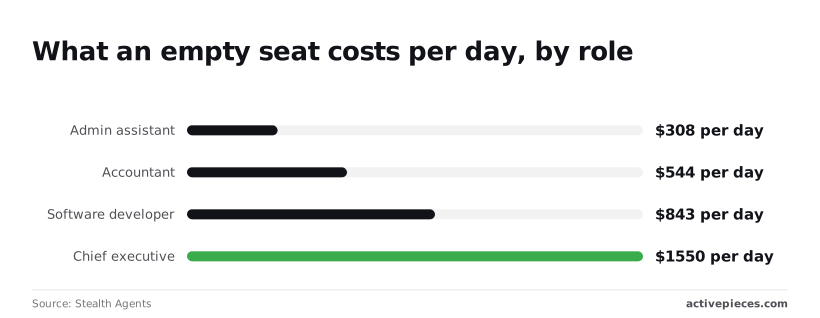
At the top, benefits widen the gap. According to Stealth Agents, the admin assistant range is $205 to $308 a day. The chief executive range is $1,037 to $1,550, so the same missed message costs roughly five times as much.
Look at approvals and the lag is the same.
T&E reimbursement, at 3 days for the 25th percentile against 7+ days for the 75th, means approval times range from under an hour to a week or more depending on request type and system, so employees cannot predict reliably when they'll receive their reimbursement.

Trigger on "New Hire Created" or "Employee Terminated", then post a message to the team's channel. Put the name, role and date in the text, so nobody has to open Workday to learn who is arriving or leaving.
To route an approval to the approver, use "Leave Request Submitted" or "Expense Report Submitted" as the trigger, and send the approver a Slack message with the requester and amount.
To message a person directly, use "New Inbox Task", which fires when something lands in someone's Workday inbox. Send that person a direct message, since a task buried in the inbox is exactly the one that sits for three days.

For a digest, "Run WQL Query" pulls a list on demand, such as open requests or pending invoices. Format the rows into one Slack post, so one message replaces a dozen individual pings.
If the step you want isn't listed, "Business Process Event Completed" covers events the named triggers don't, and "New Supplier" and "New Supplier Invoice" cover procurement.
If an action is still missing, a custom API call can fill the gap. That works only if you test it with real data first, because nothing will warn you when it breaks.
Rebuilding the Workflow Step by Step
Rebuild it in this order: connect both accounts, set the trigger and pull a real sample, map that sample into a Slack message, then test and publish. The sample comes before the message, so you never write against fields you invented.
Below, the canvas shows a ticket-routing flow built in this style.
A HubSpot trigger for new tickets feeds two AI steps and a router, which ends in three Slack Send Message steps, potentially creating multiple Slack alerts per new ticket, meaning the Slack alert volume exceeds new ticket volume.
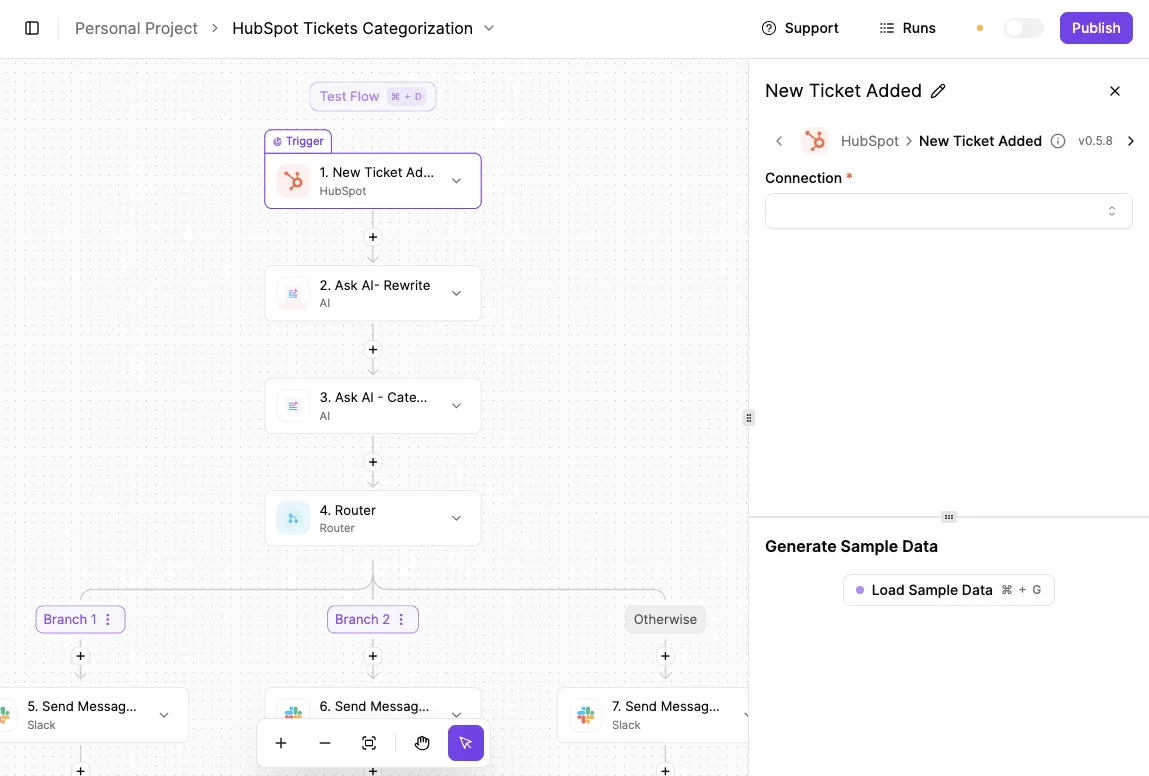
The trigger is selected, and its panel holds the Connection field and the Load Sample Data button.
Authorize Slack first, into the one channel the alert is for, and give Workday a dedicated integration account rather than your own login. Your own login breaks the day your password rotates or you change roles, and the flow fails without a sound.
Set the trigger and pull a sample
Pick the Workday event that matches the one you care about, such as a hire, a termination, or a job change. Then load a sample.
My first attempt at the Slack message used field names I guessed, and it posted a row of empty braces. The sample showed the real names.
If the connector has no trigger for your event, use the tool's webhook URL or a scheduled HTTP request to a Workday report exposed as a web service. Load the sample from that response.
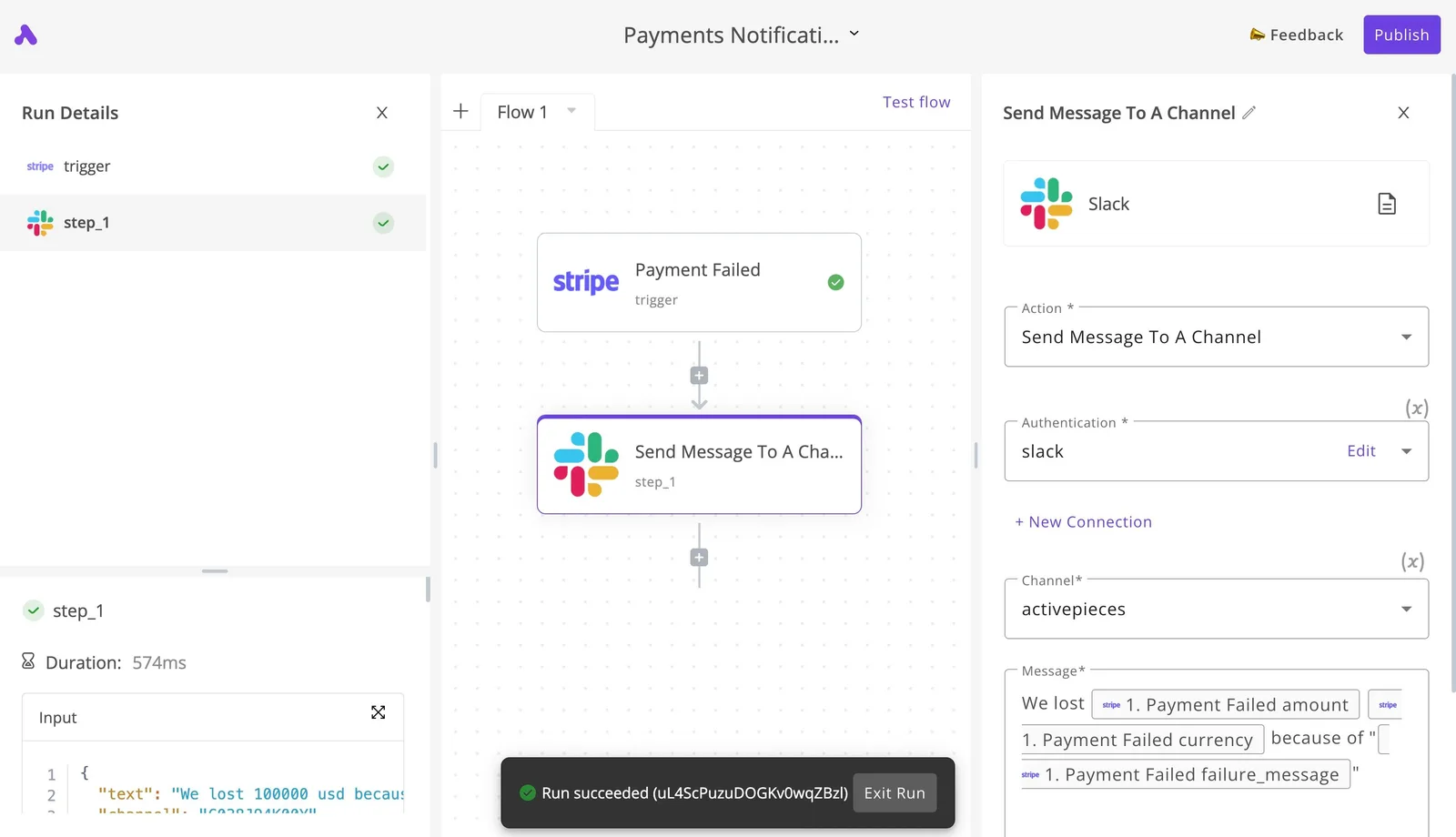
Choose Send Message, select the channel, and insert fields from the sample instead of typing them. Keep the text plain: who, what changed, effective date.
Add a filter before this step if only some events deserve a ping, such as one department or one worker type.
- Run the test with the loaded sample and confirm the message lands in the right channel.
- Trigger a real event in a non-production tenant, or a low-stakes real change, and check that it arrives with the right values.
- Publish only after both pass, then watch the first live runs.
Easier to see it running than to read about it: set it up free, no card.
Workflow failure causes and error fixes
Once the filter is in, a failed run almost always traces to one of seven causes. Check them in this order, permissions first and limits last, because that finds the cause fastest.
Anything marked "unconfirmed" in the table wasn't verified against vendor documentation on 2026-11-22, so test it yourself before relying on it.
| Cause | Symptom | Fix | Source |
|---|---|---|---|
| Auth and scopes | Slack returns invalid_auth or missing_scope |
Reinstall the Slack app with the posting scope and reconnect | Slack API error codes; scope name unconfirmed |
| Bot not in channel | not_in_channel or channel_not_found |
Invite the bot to the channel, or use a public channel | Slack API error codes |
| Workday access | Trigger never fires or returns nothing | Give the integration user access to the worker data the event needs | Unconfirmed |
| Empty fields | Message shows blanks or the step errors | Add a fallback value or skip the step when a field is empty | Unconfirmed |
| Formatting | Bold or links appear as raw symbols | Write the message in Slack's own markup, not standard Markdown | Slack formatting docs, unconfirmed here |
| Duplicate runs | Same event posts twice | Store the event ID and skip repeats | Unconfirmed |
| Rate limits | Slack rejects a burst of posts | Space out posts and retry after the wait Slack asks for | Slack API docs, unconfirmed here |
Prices and plan limits checked against activepieces.com and activepieces.com on November 22, 2026.
Workday Slack integration authentication and permission errors
If the first test post fails, read the error text before changing anything. A bad token and a missing scope look alike in the run log but need different fixes: one means reconnecting, the other means reinstalling the app so the new permission takes effect.
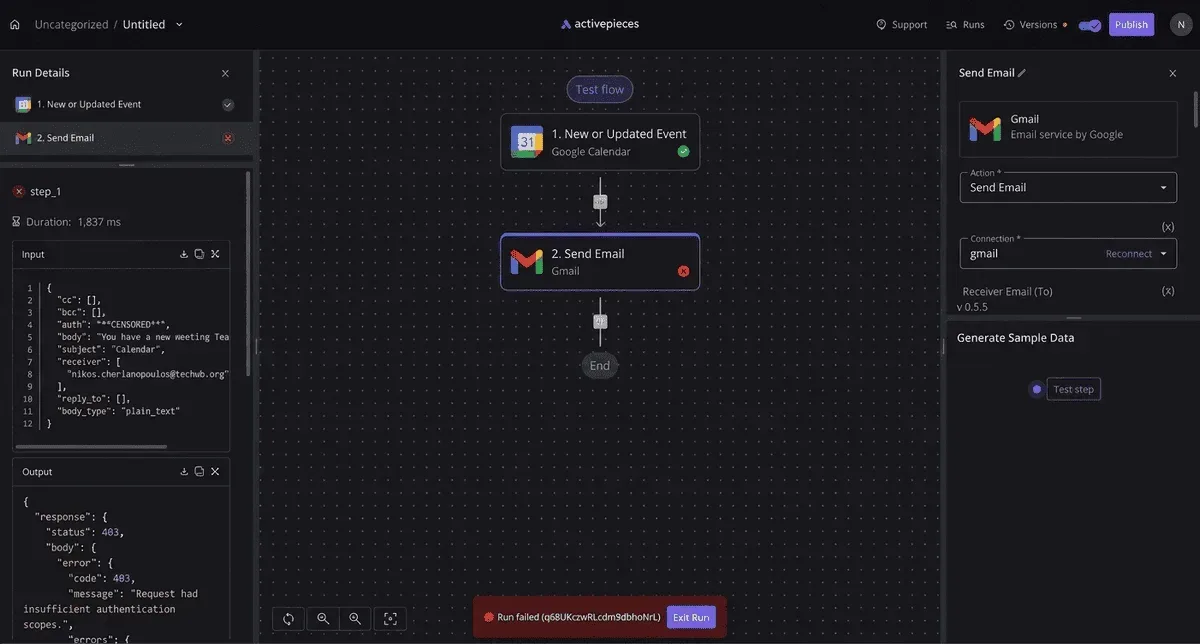
On the Workday side, failure is quieter, because an integration user without access simply sees no data.
Even with perfect authentication, a bot can still fail to post. It has to be a member of the channel, so a private channel needs an explicit invite. Test with the real channel, not a scratch one.
Run a test with a worker whose record is incomplete, such as no manager or no end date. An empty field either leaves a gap in the message or stops the run. Decide which you want before launch.
Post too fast and Slack pushes back, and the allowance differs by method and plan. Exact figures are unconfirmed here, so check Slack's current documentation.
A bulk event, such as a mass hire import, is the case that trips this, so test one before anyone depends on the workflow.
Fix the Missed-Message Gap with Activepieces
By turning a Workday event into a Slack post, Activepieces closes the gap. A bulk import is where it fails first, so four rules go in before anyone relies on it:
- A failure alert goes to a named person, not a shared channel.
- Every change is tested before it goes live.
- A filter lets only the right events post.
- One named owner is responsible for the workflow.
As the system behind the events grows, those rules matter more.
Workday reports that subscription revenue rose from $4.55bn in FY2022 to $5.57bn in FY2023, $6.6bn in FY2024, $7.718bn in FY2025 and $8.833bn in FY2026, with the company posting year-over-year increases across the entire period.
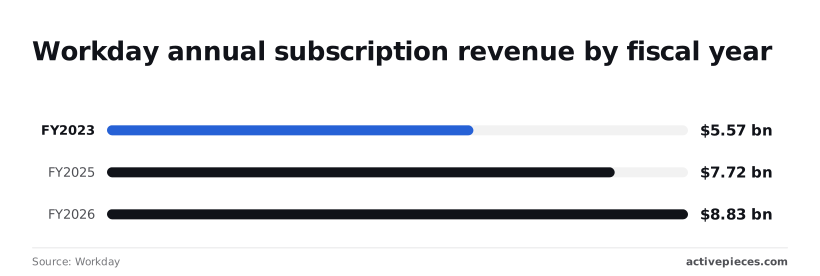
Revenue isn't event volume. A base that has nearly doubled in four years suggests more tenants and more HR events flowing through them, so an unfiltered, unowned alert gets noisier each year.
In Activepieces you get a trigger, an action and the steps between them. The trigger watches for the Workday event, a filter step drops what you don't want, and the action posts to a Slack channel.
A failed run is visible in the run history, which is what the failure alert hangs on.
Running workflows on your own infrastructure
Activepieces runs on your own infrastructure under an MIT-licensed core, and a run costs 1 credit however many steps it has.
That suits a team that wants the workflow inside its own infrastructure, or one that expects to add filter and routing steps without counting them.
Choose on hosting and step limits, not on whether the connection exists, because other automation tools also connect these two apps. If you can't host anything and need one simple post, a tool you already pay for may be quicker.
Build the smallest version first. Pick one Workday event, post it to one test channel, and name the owner in the flow's description.
Add the filter, then the failure alert, then run a bulk case against it. Only after that point the flow at the real channel.
Monday Checklist for a Working Workday Slack Workflow
On Monday, the job is one Workday event and one named Slack channel. The flow needs to have survived a real sample, have a failure alert, and have an owner before anyone relies on it.
- Pick one Workday event. Choose the one people currently learn about late, such as an approved time-off request or a completed hire. One event means one trigger to test, and when the message looks wrong you know where to look.
- Name the Slack channel. Create it or pick it, and make the name say what arrives there. A vague channel gets muted, and a muted channel is the same as no channel.
- Build it and test with a real sample. Use a record that already exists in Workday, not a made-up one, and send it to a private test channel first. Check the message the way a stranger would: the name, the date, and the link should all make sense with no context.
- Add a failure alert. Point it at a place a person will see, which isn't the channel the flow posts to. A flow that stops quietly looks exactly like a quiet week in Workday, so nobody notices until someone asks why they never heard.
- Name an owner. Write one person's name in the flow's description, not a team.
- Recheck vendor limits on the check date. Put a recurring reminder on the owner's calendar to reread the current limits and terms for Workday's integration access and Slack's posting.
A flow that stops quietly looks exactly like a quiet week in Workday, so nobody notices until someone asks why they never heard.
Frequently asked questions
Most have short answers, since every extension prompts the same few questions.
Five of them appear below as people type them, such as whether Workday needs code to post to Slack and how fast a trigger fires, each with a one-line answer.
Take from it whatever settles your doubt and skip the rest. The five that need more than a line follow.
Does Workday have a native Slack integration?
Not one that replaces this workflow. Workday has its own ways of surfacing notifications, but they don't give you a trigger of your choosing posting a message of your choosing into a Slack channel.
Check what your tenant exposes before you build, because that varies by configuration. If the native option covers your event, use it and skip the build.
Can I connect Workday and Slack for free?
Possibly on the Slack side, less likely on the Workday side. Slack lets workspaces add apps and incoming messages on its free plan, subject to its current limits.
Expect the costs elsewhere: the automation tool you run the workflow in, and whether your Workday agreement includes the integration access you need. Ask your Workday administrator before assuming it costs nothing.
Can the workflow send private direct messages? Yes, if the Slack app has permission to message individuals and you can match each Workday worker to a Slack user, usually by work email.
The matching's where it breaks. A mismatched or missing email means the message goes nowhere or to the wrong person, so test with a real record before anyone depends on it.
Is it safe to send HR data into Slack?
Only if you decide what leaves Workday. Slack messages are copied, searched and retained by workspace rules, so treat anything posted as readable by everyone in that channel.
Send the minimum, such as "a request needs your approval" with a link back to Workday, and keep pay, performance and personal details out of the message body. Use a private channel or a direct message when the audience is narrow.
Can I self-host the workflow? It depends on the tool running it. Some workflow tools can be installed on your own infrastructure and others are hosted only.
If you self-host, the machine must still reach your Workday tenant and Slack, and keeping the tool patched and its credentials protected becomes your job.