



The AI agent doesn't need its own stack. It needs a flow.
Activepieces
Jul 11, 20267 min read
The take

Most "build an AI agent" tutorials still start with a virtual environment, an API key you have to guard like a state secret, and forty minutes of scaffolding before anything runs. The native Agent step skips all of that. You drop it into a flow the same way you'd drop in an HTTP request or a filter, give it a goal and a set of tools, and watch it reason through a task in the same run timeline you already use to debug everything else. No framework import, no Python process to babysit.
I tested this the way I test any new automation primitive before I recommend it to a revenue team: build the thing that actually matters to a sales desk, not a toy example. So the proof here is a lead-qualifier agent, built inside a single flow, that reads an inbound lead, decides whether it's worth a rep's time, and either routes it or drops it, with every tool call it makes sitting right there in the run log for you to inspect afterward.
The briefs
1. The Agent step is a node, not a new stack. You add it to a flow the same way you add any other step. It sits between the trigger that hands it a lead and whatever step you chain after it to act on the output. There's no separate agent runtime to deploy, no orchestration layer to wire up. The flow is the orchestration layer.
2. You define the job in plain instructions, not a prompt-engineering exercise. The agent gets a goal ("qualify this inbound lead against our ICP and recommend a next action") and a defined set of tools it's allowed to call: a CRM lookup, an enrichment call, maybe a Slack notifier. What it doesn't get is a script telling it the order to call them in. That's the actual point of an agent step versus a rules-based flow: you're handing over the sequencing decision, not just the execution.
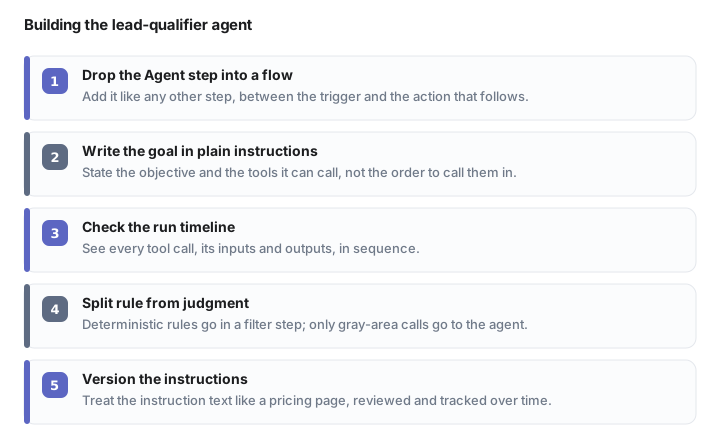
3. The tool calls show up in the run timeline, in order, with inputs and outputs. This is the detail that matters most for anyone who has to defend an automated decision to a VP later. When the lead-qualifier agent decided a lead was cold, I could open that run and see exactly which tool it called first (CRM lookup), what came back, and why it chose not to call the enrichment tool at all. That visibility is what turns "the AI decided" into "here's the reasoning chain, check it yourself."
4. Draw the line between rule and judgment before you build, not after. This is where most agent builds go sideways. If a decision has a clean deterministic rule ("company size below your ICP threshold, auto-disqualify"), that belongs in a filter step, not inside the agent's reasoning. Save the agent for the decisions that actually need judgment: is this job title a real buying signal, does this company's stated use case match what you sell, is the timing language in the inbound message worth escalating now versus nurturing. Rules handle the floor. The agent handles the gray area above it.
5. Run the arithmetic before you trust the agent with real pipeline. Say your team runs 200 inbound leads a week through a manual qualification process. If a rep spends roughly 8 minutes per lead deciding fit, that's about 1,600 minutes, close to 27 hours, of qualification work every week, done by people who should be closing deals instead. Even if the agent only handles a portion of that volume correctly, and you should assume it won't catch everything, that's still meaningful hours clawed back for a rep to spend on calls instead. Run this math with your own numbers before you believe anyone's case study, mine included.
The agent isn't replacing the judgment call. It's replacing the twenty minutes you spend making the same judgment call for the hundredth time.
6. It behaves differently across segments, and that's useful signal, not a bug. I ran the same lead-qualifier logic against enterprise-shaped leads and against small-business-shaped leads with the same instruction set. On enterprise leads, the agent leaned on the CRM lookup tool almost every time, chasing account history before it made a call. On small-business leads, with thinner CRM records, it defaulted more to the enrichment tool. Watching which tool it reaches for tells you where your instructions are underspecified for a given segment, before that gap costs you a real deal.
7. It fails loudly when the instructions are vague, which is the failure mode you want. Give the agent an ambiguous goal ("find good leads") and it either over-calls tools trying to compensate, or picks a plausible-sounding tool and stops. Both show up immediately in the timeline. Compare that to a bad rule buried in a filter step, which fails silently until someone audits the flow six weeks later. Vague instructions are still a build problem, but at least this one surfaces itself fast.

8. Version your instructions like you'd version anything else customer-facing. The instruction text is the actual product here. Change "qualify against ICP" to "qualify against ICP, weighting recent funding events higher," and you'll get different tool-call sequences and different outcomes on the exact same lead. Treat that instruction block with the same review discipline you'd give a pricing page, because functionally, it's making pricing-relevant decisions about who gets a rep's time.
Watching next
Next week I want to see whether chaining a second agent step, one that drafts the outreach after the first one qualifies, holds up on tone across segments without extra instruction tuning, or whether it needs a human editing pass every time. I'll also be watching how the tool-call logs hold up as an audit trail once a flow runs for real volume over real weeks, not just a handful of test leads.
Reply if you've built an agent step into a live revenue flow and hit a place where the reasoning surprised you, good or bad. That's the part of this I actually want to hear about.
Frequently asked questions
What is the native Agent step in an automation flow?
It's a node you drop directly into a flow, like an HTTP request or filter step, that reasons through a goal using a defined set of tools, with no separate agent runtime or framework to deploy.
How do you build an AI lead-qualifier agent without a separate stack?
You add an Agent step to a flow, give it a plain-language goal like qualifying a lead against your ICP, and hand it a defined toolset (CRM lookup, enrichment, Slack notifier) without scripting the call order.
When should you use a rule-based filter instead of an AI agent step?
Use a filter step for decisions with a clean deterministic rule, like disqualifying by company size threshold, and reserve the agent step for judgment calls like assessing buying signals or timing language.
How much time can an AI agent save on lead qualification?
For a team running 200 inbound leads a week at roughly 8 minutes of manual qualification each, that's about 1,600 minutes, or close to 27 hours, of rep time weekly that an agent step could partially claw back.
Can you audit what an AI agent did inside an automation flow?
Yes, every tool call the agent makes shows up in the run timeline in order, with inputs and outputs, so you can inspect exactly why it called a CRM lookup and skipped enrichment on any given run.
Automate your work without writing code
Create an Activepieces account in seconds.
Written by
Activepieces
