



What Tayo's WhatsApp leads taught us about agents versus chatbots
Activepieces
Jul 11, 20269 min read

Lagos, 9pm, and a small business owner named Tayo (call her that, she could be any of a dozen founders running lean teams across the city) is doing what she does most nights: scrolling through three different WhatsApp groups where leads land, then copying whatever looks promising into a Google Sheet that already has too many tabs. One tab is "New Leads," one is "Qualified," one is "Dead (maybe check later)." Nobody checks later. By the time a lead gets a reply, the excitement that brought them in has usually cooled.
This is not a technology problem in the way Silicon Valley tends to frame technology problems. Tayo doesn't need a CRM with forty modules she'll never open. She needs something that reads a message, decides if it's worth her time, and tells her which ones to call first, ideally before her data bundle runs out for the week.

That's the gap a native Agent step is built to close, and it's worth being precise about what that actually means, because "AI agent" has become one of those phrases that gets stretched over everything from a chatbot widget to a genuinely autonomous system that makes decisions and calls tools on its own.
The Difference Between a Chatbot and an Agent
A chatbot answers questions. An agent decides what to do next, and does it, without you writing the logic for every branch by hand.
The distinction matters inside a flow builder like Activepieces, because up until recently, "AI in your automation" mostly meant a single step that took a prompt and returned text. You'd get a summary, a classification, a translated sentence, and then the rest of the flow still had to be written by you, branch by branch, if-this-then-that, the same way automations have worked for a decade.
A native Agent step flips that. Instead of one prompt and one output, you give the agent a goal and a toolbox: maybe a piece that reads a spreadsheet row, another that sends a WhatsApp message, another that updates a CRM field. The agent decides, at runtime, which tools to call, in what order, and when it's done. You're not writing the branching logic. You're describing the job and handing over the tools to do it.
That's the "no framework, no Python" part of this. You are not standing up LangChain, wiring a vector store, and writing a Python orchestration loop just to get a lead-qualifying bot running. You're dropping a step into a flow you already understand, giving it a prompt and a set of pieces, and watching it work.
What the Agent Step Actually Runs
Say you're building a lead qualifier for a small events business, the kind that gets inquiries through a website form, a WhatsApp Business number, and the occasional Instagram DM forwarded by a cousin. This is a hypothetical build, not a real company's numbers, but it's the shape of the problem most small teams actually have.
The flow starts the way most flows start: a trigger. A new row appears in a lead sheet, or a form submission comes in. Then, instead of a chain of filter steps and branches, you drop in a single Agent step.
Inside that step, you write a goal in plain language, something like: "Read the lead's message and any details provided. Decide if this is a qualified lead based on budget signals, event date, and guest count. If qualified, add them to the priority sheet and send a WhatsApp confirmation. If not qualified, log the reason and leave them in the general pool."
Then you attach tools. Maybe that's a "read spreadsheet row" piece, a "send WhatsApp message" piece, and an "update spreadsheet" piece. You're not coding the sequence. You're handing the agent a toolbox and a job description, the way you'd brief a new hire rather than write them a script.
What happens next is the part worth watching closely, because it's also the part that builds trust in a system you didn't write line by line:
An agent that hides its reasoning is a liability. An agent whose every tool call shows up in a timeline, in order, with the inputs and outputs visible, is something you can actually debug at midnight when a lead doesn't get a reply.
When the agent runs, the timeline in Activepieces shows each decision as it happens: it read the row, it reasoned about the budget line, it decided the lead qualified, it called the WhatsApp piece, it called the update-sheet piece, done. You can click into any of those calls and see exactly what was sent and what came back. That visibility is the whole difference between "trust the black box" and "watch the work happen."
Building the Qualifier, Piece by Piece
The actual build is smaller than it sounds, which is the point. You don't need a data scientist, a Python environment, or a weekend of YouTube tutorials to get the first version running.
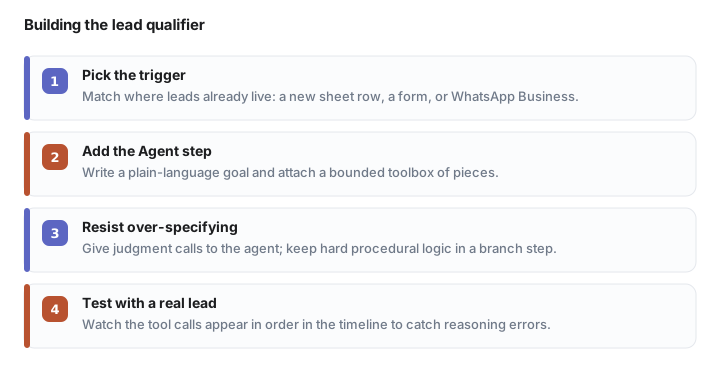
Start with the trigger. If your leads live in a Google Sheet because that's what someone set up two years ago and nobody's had time to migrate it, use the "new row" trigger. If they land in WhatsApp Business, use that. The trigger doesn't need to be elegant. It needs to match where your leads actually already are, which for most small teams in Lagos, Nairobi, or Accra is going to be a spreadsheet, a form, or a chat app, not a dedicated CRM.
Next, the Agent step itself. This is where you write the goal and pick the tools, and it's worth resisting the urge to over-specify. An agent works best with a clear objective and a bounded set of tools, not a paragraph of edge cases. If you find yourself writing "and if X then check Y unless Z," you're writing procedural logic again, and you might be better served by a traditional branch step. The agent step earns its keep on judgment calls: is this lead serious, is this message worth a human reply, does this inquiry match what we actually sell.
Then you test it, and this is where the timeline view stops being a nice-to-have and becomes the actual debugging tool. Run the flow with a real lead example (or a made-up one that mimics your real inquiries), and watch the agent's tool calls appear in order. If it calls the wrong piece, or skips the WhatsApp confirmation, you'll see exactly where the reasoning went sideways, and you can adjust the prompt rather than rewriting a chain of conditionals.
This is, in miniature, the case for building agents inside a flow tool rather than a framework: the failure modes are visible in the same interface you built the thing in. You don't need a separate observability stack to know why your agent did what it did.
Building for Bad Connections
None of this matters if the tool assumes a desktop, a stable connection, and unlimited data, which is a fair assumption in a lot of the material written about AI agents and a bad one for a huge share of small businesses running their operations from a phone on a data plan that gets more expensive toward the end of the month.
A flow-based agent step has one real advantage here that's easy to undersell: it runs server-side. The agent's reasoning, the tool calls, the back-and-forth between the model and the pieces, none of that happens on Tayo's phone. Her phone just needs enough signal to see the trigger fire and the result land, usually a WhatsApp message or a notification, not a live session with a chatbot that needs to stay connected while it "thinks."
That's a meaningfully different data cost than a chat-based AI tool that expects you to sit in a conversation window, typing back and forth, burning through a session on 3G. An agent step that runs once, does its tool calls, and delivers a result is closer in shape to the automations small teams already trust, the "form fills, message sends" kind, just with a layer of judgment added on top.

It's also worth testing deliberately, not assuming. Build the flow, then try triggering it from a phone on a weak connection, the kind where a page takes a few seconds too long to load. If the trigger fires and the agent completes its run even when your own view of the dashboard is lagging, that's the sign the architecture is doing what it should: the thinking happens elsewhere, and your connection only needs to carry the trigger and the result.
The Sheet You Finally Retire
The version of this that actually works for a business like Tayo's isn't a dashboard with charts nobody looks at. It's the lead sheet, still open, still familiar, except now a row appears already marked qualified or not, already followed up on WhatsApp, with the reasoning sitting in a timeline she can check if something looks off.
She still owns the sheet. She just isn't the one reading every message anymore, deciding at 9pm which lead is worth a reply before the excitement wears off. The agent read it at 9:01, and by 9:02, the message was already sent.
Frequently asked questions
What is the difference between an AI chatbot and an AI agent?
A chatbot answers questions when prompted; an agent decides what to do next and takes action on its own, calling tools like sending a message or updating a spreadsheet without you writing the branching logic by hand.
How do I build a lead qualifier without coding or using Python frameworks like LangChain?
In Activepieces, you drop a native Agent step into a flow, give it a plain-language goal and a toolbox of pieces (read spreadsheet, send WhatsApp, update CRM), and it decides at runtime which tools to call and in what order, no vector store or orchestration code required.
Does an AI agent work on a slow or unstable internet connection?
Yes, because the agent's reasoning and tool calls run server-side, not on the user's device; a phone only needs enough signal to see the trigger fire and the result land, unlike a chat-based tool that needs a live session to stay connected.
Can I see why an AI agent made a specific decision?
Yes, a well-built agent step shows every tool call in a timeline, in order, with the inputs and outputs visible, so you can debug a decision after the fact instead of trusting a black box.
What tools does an Agent step need to qualify WhatsApp leads?
A minimal build needs a trigger (new spreadsheet row, form submission, or WhatsApp Business message), an Agent step with a plain-language goal, and a small toolbox: read spreadsheet row, send WhatsApp message, update spreadsheet.
Automate your work without writing code
Create an Activepieces account in seconds.
Written by
Activepieces
