
Workflow Templates: Free Options Compared (2026 Guide)

Oct 15, 202616 min read
1. Zapier: best for the largest ready-made library
What it's and best for
If you want a working automation in minutes rather than a build, start with Zapier: it has the biggest catalog of ready-made workflow templates of the platforms covered here, even compared with open-source options like Activepieces.

A free workflow template is a prebuilt automation, offered by a platform's library at no cost, that you can copy, edit at every step, and run at your own task volume without being pushed onto a paid plan.
Its templates are prebuilt trigger-and-action chains you copy into your own account. They fit non-technical teams, one-off automations, and anyone who needs a connector for an obscure app.
Pricing and free plan, checked 15 October 2026
Each action a workflow performs in a month counts as a task, and that is how Zapier bills. The free plan caps monthly tasks and limits how much you can build, and the paid tiers raise that cap as you climb.

I'm not quoting dollar figures here because I couldn't confirm them against zapier.com/pricing on the day of checking, and the page changes.
Do the arithmetic yourself instead: count the action steps in your template, multiply by your monthly lead volume, and compare the result to each tier's task allowance.
A flow that looks free at ten leads can land in a paid tier at a few hundred, because every extra step multiplies the count.
Example template: form lead to CRM and Slack
Trigger: a new response arrives in Google Forms. Two actions follow: create or update a contact record in HubSpot from the form fields, then post a message with the lead's name, email and source to a sales channel in Slack.

Because each lead runs two action steps, each one consumes two tasks as Zapier counts them. Adding a lookup or a formatting step raises that count for every lead.
Start this flow free in Activepieces.
Zapier strengths for free workflow templates
Because the catalog is so large, a template probably exists for your pair of apps, and the editor is easy enough that a non-developer can adapt it. The library is the draw. Documentation and community examples are plentiful, so troubleshooting rarely means starting from nothing.
Zapier limits on free workflow templates
As volume grows, a template that seems free in testing costs more, because every action step is metered, and the free plan's cap and feature restrictions can stop a workflow you depend on. The task meter is the limit.
Templates also run only on Zapier's hosted platform. You can't move them to infrastructure you control, so the platform's pricing governs your cost per run for as long as you use them.
The fastest way to settle a shortlist is to try one. Activepieces is free to try, no credit card.
2. Make: best for visual, multi-branch scenario templates
Check one number before you copy anything: Make bills by operations rather than by finished runs, and a template with many branches costs more every time it fires.
On a canvas, you connect modules with lines and split the path with routers; that is how you build a scenario in Make, a hosted automation platform.
Its templates are prebuilt scenarios you open and edit module by module. They suit people who want to see the whole flow at once, especially flows that split into several paths depending on the data.
You can start on Make's free plan, and paid tiers raise the operation allowance. Every module that executes in a run counts as an operation.
A template with a router and several modules therefore uses more of your allowance per run than a two-step flow, which makes the free plan run out sooner.
Read the allowance and the minimum scheduling interval on make.com/pricing, then multiply the modules in your template by your expected runs.
Example template: email attachment to Drive and Sheet
Start with a Gmail module watching for new emails with attachments. An iterator splits each email into its individual files. A Google Drive module uploads each file to a chosen folder.

A Google Sheets module then adds a row with the sender, subject, file name and Drive link.
Because the iterator runs the later modules once per attachment, an email with several files uses several times the operations of one with a single file.
When you debug a run that took the wrong path, the canvas makes branching legible, and mapping data between modules is visual. You can edit every module in a template.
You can't self-host Make, so the pricing model sets your cost per run. Operation-based billing also punishes loops and routers, the very features its templates showcase.
3. Activepieces: best for free, editable, self-hostable templates
After that complaint, Activepieces fits, because you can run its templates on your own server, where loops and routers cost whatever your hardware costs, not a metered operation each.
Operation-based billing also punishes loops and routers, the very features its templates showcase.
For small teams and developers who want to edit every step of a template and choose where it runs, Activepieces lets you open, change and self-host every flow across its 740 integrations, with unlimited flows on every plan, including free, so you may need custom integrations.
The core is MIT-licensed, while some enterprise features sit under a separate commercial licence.
There's a free cloud tier, and you can self-host the community edition at no licence cost. I'm not quoting the cloud limits here. Read them on the pricing page against your own monthly run count before you commit, because that's where any per-run math breaks.
Template: form response to Sheets and Slack
The trigger is a new Google Forms response. Every step stays editable. It receives the response through Google Forms, appends a row to a spreadsheet in Google Sheets, then posts a summary to a channel in Slack, the team chat tool.
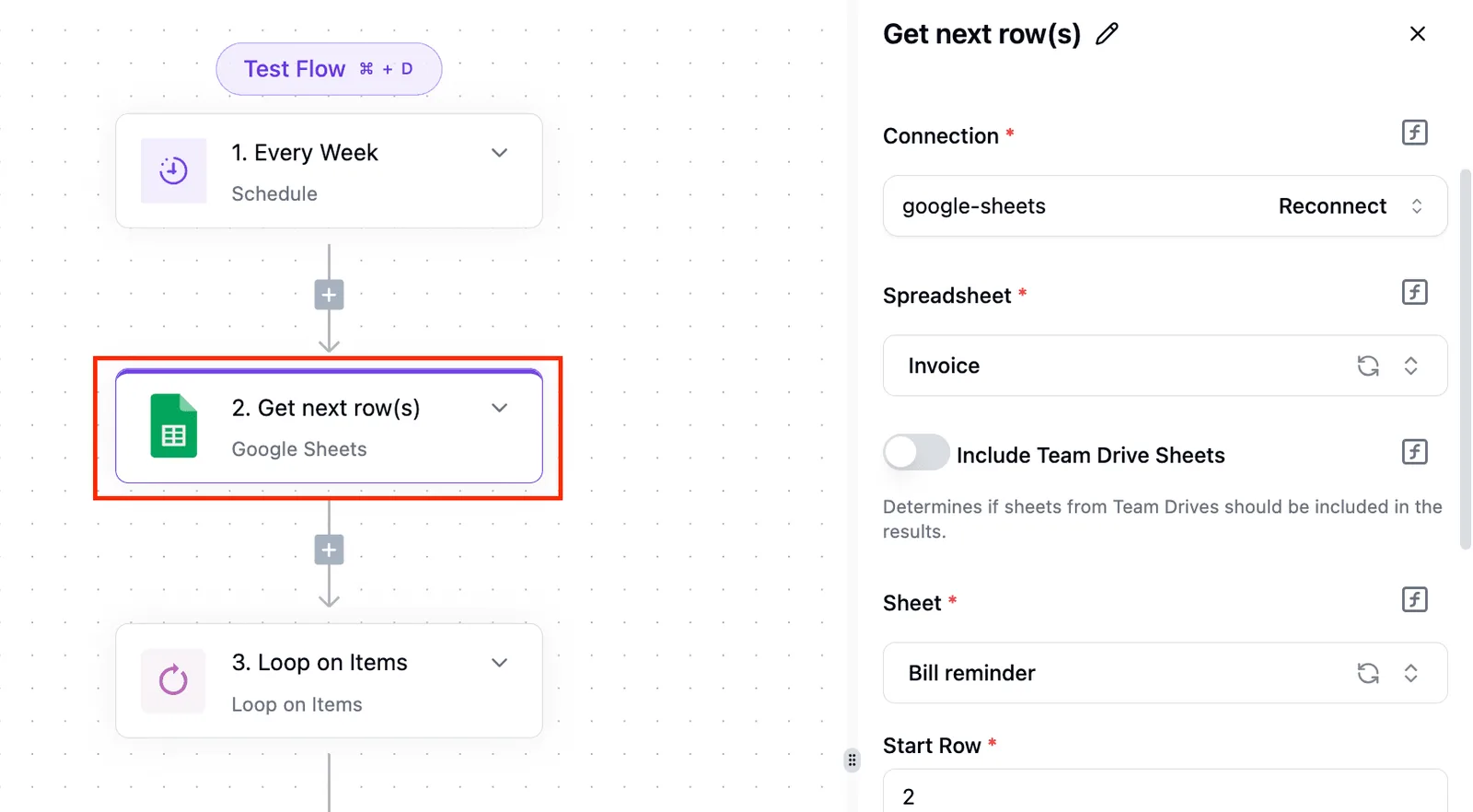
Start this flow free in Activepieces: https://cloud.activepieces.com/sign-up
Template: Stripe payment to invoice and bookkeeping
When a payment succeeds in Stripe, the payment processor, the flow creates an invoice record in QuickBooks, the accounting package, and logs the sale in Google Sheets. Add a branch for failed payments, and you're paying for a router only on a metered platform.
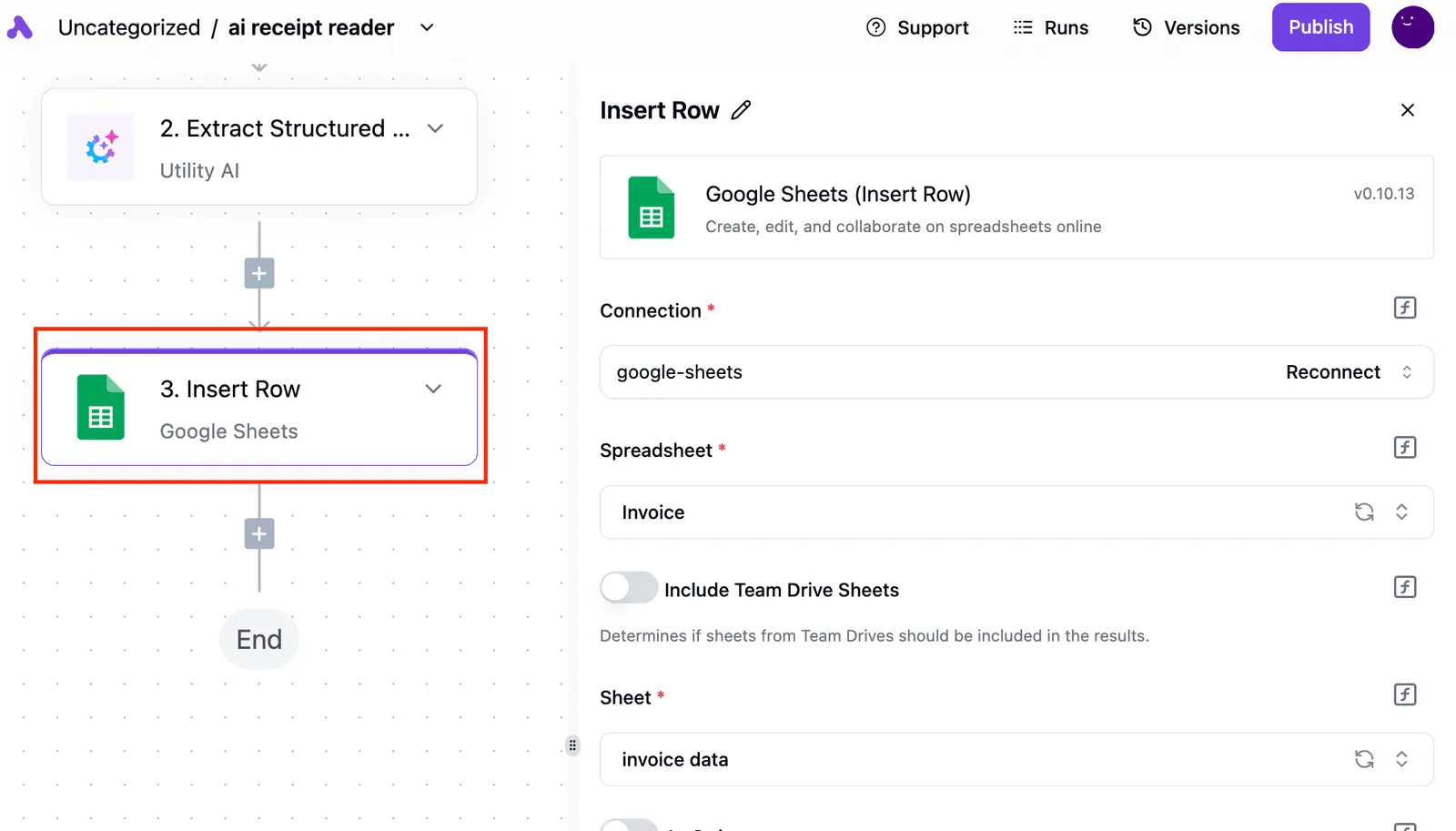
You can edit every step, inspect the code behind each integration (all 740 sit in the open source monorepo on GitHub, roughly 60% of them community-contributed), and move the same flow between cloud and your own server, so you're not waiting on the vendor's roadmap to connect tools you need.
Nobody has to take a sales call to learn what self-hosting costs.
Most vendors strip the self-hosted build to sell control separately, so the question is whether moving a template onto your own server costs you the governance features.
It doesn't: the air-gapped build carries the same single sign-on, user provisioning, custom roles, audit trail, release management and secrets-manager support as the managed cloud, which can be pinned to an EU or US region and holds SOC 2 Type II.
MoneyGram, Moneypenny, Alan and FundingSocieties run Activepieces in production.
Once you self-host, uptime, upgrades and backups are yours. Its app catalogue is smaller than Zapier's or Make's, so check that your apps exist first.
If you need the widest catalogue, pick Zapier. If you want heavy visual data handling, Make. If you want maximum code-level control, n8n.
Reading a table only gets you so far. Build the same workflow in Activepieces and compare it yourself.
4. n8n: best for technical teams wanting code-level control
If you will treat a template as a starting point for real engineering, n8n suits you. Every node is editable, and a code node sits wherever the template stops being enough.
If you want to write JavaScript inside a flow, call any HTTP endpoint, and version the result like software, n8n fits.
It is a workflow automation tool with a public library of community-built templates you import onto your own canvas. It suits developers and technical operators.
Pricing, licence and self-hosting, checked 15 October 2026
It is not an OSI open-source licence: the code ships under n8n's fair-code Sustainable Use License. You can self-host for internal business use at no licence cost, but you can't resell it as a hosted service.
So the real cost is a server and someone to patch it. The paid cloud plans meter by workflow executions, so run the arithmetic on your monthly volume before you commit. Confirm current plan limits on the pricing page, because they change.
Example template: scheduled digest with AI summary
This flow replaces a daily skim of industry news.
- A schedule trigger fires each morning.
- An RSS node reads the feeds you chose.
- A filter drops items you've already seen.
- An AI node summarizes what remains into a few lines per item.
- A Slack node, which posts to your team chat, sends the digest to one channel.
Each step is editable, so you can swap the summarizing model or add a code node to rank items first.
You get code nodes, self-hosting, and a canvas that exposes every step. Nothing in a template is locked.
Self-hosting makes you the operator:
- Updates, backups, and uptime are yours
- The licence restricts commercial resale, so check it if you build a product on top
- Non-developers may find the canvas steeper than simpler tools
5. Microsoft Power Automate: best for Microsoft 365 organisations
If your organisation already lives in Microsoft 365, Power Automate, Microsoft's flow builder, suits you, because most templates run on connectors you already license. Its templates are prebuilt flows with a trigger and actions you can open and edit step by step.
If you tie SharePoint (Microsoft's document and list store), Outlook and Teams together, you get the most from it. The canvas rewards that familiarity.
Pricing and licensing, checked 15 October 2026
While a flow stays on standard connectors, the cost per run is nothing extra, because Microsoft 365 includes them. The maths changes when a flow crosses into premium territory. These are the triggers, per Microsoft's own pricing and documentation:
- Premium connectors, such as those for third-party databases and many non-Microsoft business systems
- Unattended desktop flows, which run robotic process automation (RPA) with no one signed in
- Process mining, which analyses how your processes actually run
- A per-user plan, with a higher-priced tier once RPA is added
Audit each template's connectors before you roll it out, not after: one premium connector in a template can move every person who runs it onto a paid licence.
Example template: SharePoint item to Teams approval
This flow sends a new list item to an approver in chat and records the answer:
- Trigger: a new item is created in a SharePoint list.
- Start an approval and assign it to a named approver.
- Post the request to the approver in Teams.
- Wait for the response.
- Write the outcome back to the SharePoint item.
It uses standard connectors, so it should cost nothing beyond your existing licence.
Setup is short because identity, permissions and storage are already in place. Every step in a template is editable.
Across many users, the true cost is hard to predict because of premium triggers. Outside Microsoft's ecosystem, you'll meet that licence boundary quickly.
6. IFTTT: best for simple personal and small-device applets
If all you need is one trigger and one action, IFTTT suits you, and it avoids the licence boundary above because it ties consumer apps and smart devices together without a vendor suite behind it.
When something happens in one service, IFTTT does one thing in another; that single rule is an applet.
The hosted service suits individuals wiring up phones, smart-home gear and social accounts, and small teams who want a notification or a logged row without building anything.
Though the free plan is a real entry point, it caps how many applets you can run. Your cost per run is zero only until the cap and then becomes the price of the next tier.
The table shows how the three plans differ in kind, so you need to choose based on what you're actually trying to do, not just how much you can spend.
Exact applet counts and prices sit on ifttt.com/plans, and I'd read them there rather than trust a secondhand number.
| Plan | Number of applets | Multi-step support | Query and delay features | Price per month |
|---|---|---|---|---|
| Free | Small fixed cap | Single action only | Not included | Free |
| Pro | Higher cap | Multiple actions | Included | Paid |
| Pro+ | Highest cap | Multiple actions | Included | Paid, above Pro |
If your flow needs a second action or a wait, you're paying for the tier, so price that before you build.
Example applet: saved item to a spreadsheet row
Save an article in a read-later app, and that is the trigger. The action appends a row to a Google Sheets spreadsheet with the title and link. It's one rule with no branching, and it runs on the free plan.
Within minutes you can be set up, the device and consumer-app coverage is wide, and nothing needs hosting.
Expect shallow logic: filtering, looping and error handling are thin or locked behind paid tiers. When a flow needs several dependent steps, or your run count keeps pushing you up the plans, move to a multi-step tool.
How to choose a workflow template library
Choose by where the template will run and what each task costs at your volume, not by how many templates the library lists. Past a few dependent steps, that choice decides whether "free" holds.
Match the template to where it will run
31 hours a week for accountants, 25 for marketers and 20 for IT professionals: that is what Zapier's survey reports.
Savings that large mean high run counts, so a per-task meter becomes your real bill. The table maps five situations to a pick and the cost check to run first.
| Situation | Best pick | Why | Cost check to run first |
|---|---|---|---|
| Non-technical small team | Hosted visual builder | No servers, editable steps | Tasks per run times runs per month |
| Microsoft 365 shop | Power Automate, Microsoft's tool inside 365 | Native access to Outlook, Teams, SharePoint | Which connectors need a premium licence |
| Developers self-hosting | Open-source engine on your own server | You edit every step and own the data | Licence terms for commercial use |
| High task volume | Self-hosted, or a flat-priced plan | Cost stops rising with each run | Price at ten times today's volume |
| Personal use | Free tier of a hosted builder | Setup takes minutes | The monthly task cap |
Find your row, then price that pick against your own task count before copying anything.
Mistakes that break copied templates
- Running a template unchanged, so it fits someone else's fields and data.
- Ignoring that platforms count every step as a task, so a six-step flow burns six.
- Skipping error handling, so one failed step stops the flow without telling anyone.
- Testing on live data, so a faulty draft emails real customers.
How to start using free workflow templates
- List your three most repeated tasks and count their steps.
- Multiply steps by monthly runs to get your task count.
- Match your situation to a row above and price that platform at that count.
- Copy one template, edit every step, and add a failure alert.
- Run it on test records before connecting live ones.
FAQ on free workflow templates
Though copying a template costs nothing, running it is where the platform's pricing starts to matter, and the answers below follow from that split.
What's a workflow template?
A workflow template is a saved automation: one trigger, such as a new form submission, followed by a fixed chain of steps that move data between apps.
Copying it into your account gives you a working draft of that chain. You still connect your own logins and test it before it does anything useful.
Are workflow templates really free?
The template is free, but the runs may not be. Most hosted platforms give free plans a monthly cap on tasks, meaning each executed step or each completed run, depending on how that vendor counts.
A ten-step template can burn through a cap many times faster than a two-step one.
Before you copy anything, find how the platform counts a task, multiply by your expected runs, and compare the result to the free limit.
If the pricing page won't state the unit of billing without a sales call, treat the template as a trial, not a free tool.
Can I customize a template after copying it?
Usually yes, but check which steps you can actually change. On an open platform you can swap apps, reorder steps, add branches, and edit the code or filters inside any step.
Some libraries lock certain steps or reserve branching and custom code for paid tiers, and that turns a free template into a demo. Open the copy and look for a step you can't edit before you build your process around it.
Do templates work on self-hosted installs?
Often they do, but only if the template's apps and step types exist in your install. A self-hosted copy has no task cap from a vendor, so your cost becomes servers and maintenance.
Templates that depend on a hosted-only connector or a paid-tier feature will import with gaps you have to fill by hand.
Related reading
References
Still comparing
The fastest way to settle it is to build something.
Open source under MIT, so you can self-host the same thing later.
Start free Talk to sales