
AI Workflow Automation Examples: 11 Ideas You Can Try Today
Explore 11 AI workflow automation examples and learn how you can implement them with Activepieces to improve your day-to-day workflow.

Apr 7, 202616 min read
You’re probably here because your day feels a bit repetitive. Same tasks, same steps, over and over.
Even during more productive days, it doesn’t always feel like you’re making progress. That’s usually a sign your workflow should be handling more of the work for you.
AI workflow automation can help with that, and it’s a lot simpler than it sounds. You don’t need complex tools or technical skills to start.
In this guide, you’ll learn AI workflow automation examples you can use right away.
TL;DR
These are the 11 AI workflow automation examples you can build easily with Activepieces:
- AI blog content generation and publishing workflow
- Social media content creation and scheduling workflow
- SEO keyword research and content brief automation
- AI lead qualification and scoring workflow
- Automated personalized sales outreach workflow
- AI ticket classification and routing workflow
- Automated customer response workflow
- Invoice processing and data extraction workflow
- Automated reporting and insights workflow
- Employee onboarding workflow
- Resume screening and candidate shortlisting workflow
Everything below works on Activepieces' free plan. Start without code or a credit card.
How AI Workflow Automation Can Help
Once you see how work slows down with manual steps, it becomes easier to understand why teams switch to artificial intelligence (AI). These are the key benefits you get when you start automating processes:
- You can see big productivity gains because you stop doing repetitive tasks and focus on work that needs judgment.
- Systems run nonstop, so these tools keep your business operations running day and night.
- AI reduces human error by applying the same logic consistently and maintaining accurate records.
- Companies get the best operational efficiency when systems run automatically.
- AI uses live data to help you with better decision-making before problems grow.
- Work moves faster when workflows remove manual coordination between tools and teams.
- AI-driven automation handles routine tasks that usually slow down progress.
- Workflows enable employees to address everyday needs without waiting for approvals.
11 AI Workflow Automation Examples You Can Implement Today
Now that you know how AI can improve your workflows, let’s look at AI automation examples you can build:
Marketing Workflow Automation Examples
Marketing work often repeats the same steps, so it helps your marketing teams turn an idea into a whole month of posts.
1. AI Blog Content Generation and Publishing Workflow
Content starts with research, structure, and planning, which is why writing tasks involve multiple steps that usually take hours.
A typical workflow begins when you add a topic to a sheet or task board.
An AI agent scans search results, pulls competitor gaps, and builds an outline based on what ranks. That outline feeds into a writing step where you use generative AI to write long articles from just a title, then refine tone and structure in a second pass.
After that, another step generates visuals based on the topic, while a review stage sends the draft to your editor. Once approved, the system pushes the article to your content management system (CMS) and creates extra assets like emails and social posts.
It further manages complex workflows that need research and SEO at the same time. You just need one AI workflow automation tool to connect your apps and keep each step moving.
2. Social Media Content Creation and Scheduling Workflow
A single blog post can turn into short videos, carousel posts, and text updates.
The workflow gets your latest content, then splits it into formats for each platform. One version becomes a LinkedIn post, another turns into a TikTok script, and another becomes a short caption.
From there, you can easily run multiple campaigns on TikTok and LinkedIn.
It can also write follow-up messages for comments or replies, so engagement doesn’t stop after posting. It tracks reactions using sentiment analysis to see if people like your comments, then adjusts future posts based on what performs better.
Having everything in an automation platform saves a lot of time, since you don’t switch between tools or repeat the same steps.
3. SEO Keyword Research and Content Brief Automation
Keyword research used to mean opening multiple tabs, copying data, and sorting everything manually.
With AI automation, you start with a main topic, and the system pulls related keywords from multiple data sources at once. It groups similar terms, checks search intent, and reviews top results to understand what content works.
Afterward, it builds a structured brief with headings, suggested sections, and notes on how to rank. It even selects critical information like headers for your writers, so they don’t guess what to include.
At the same time, the workflow sends all the keyword data into your Google Workspace sheets, which keeps everything organized for your team. That gives you competitive intelligence on other brands.
Sales Workflow Automation Examples
Sales teams deal with constant input, so AI-driven automation helps them move faster.
4. AI Lead Qualification and Scoring Workflow
Leads enter your system from forms, ads, or referrals, but not all of them warrant the same level of attention.
As a lead enters your customer relationship management (CRM) system, machine learning algorithms find out which leads want to buy by analyzing behavior, company data, and past results. The system assigns a score based on those signals, then decides what happens next.
High scores go directly to the relevant team members to close the deal. Medium scores enter a follow-up sequence, and low scores move into long-term nurture.
All of this runs with no manual intervention, which means your team doesn’t spend time filtering data. It stops your sales team from wasting time on routine tasks that don’t lead to revenue, too.
5. Automated Personalized Sales Outreach Workflow
Outreach works better when messages feel personal.
Automated personalized sales outreach often uses AI assistants as researchers who can read a profile, collect recent activity, and gather details that make each message relevant. Information then feeds into an AI model that writes a short message based on your tone and offer.
Because of natural language processing (NLP), your emails sound as if a human wrote them. After that, you review the message quickly and approve it before sending.
When it gets approved, the system sends emails and follow-ups automatically, so you can send custom emails with minimal manual effort.
Customer Support Workflow Automation Examples
You can resolve customer issues much faster with AI tools and workflows.
6. AI Ticket Classification and Routing Workflow
Every support request enters your system and needs to reach the right person fast. Rather than having someone read each message, every new email is routed to the appropriate workflow in a split second based on the customer’s needs.
The system reads the message, understands intent, and checks urgency. It looks at tone, topic, and past interactions, then routes the ticket to the right person or system.
There is no need for manual coordination to see who is working, since the system already tracks workload and assigns tasks automatically.
After routing occurs, the system keeps the ticket status the same in all your internal systems. In turn, you cut down the lengthy list of tasks for your IT teams because they no longer manage routing rules or fix mismatched records.
7. Automated Customer Response Workflow
Some requests don’t need a person at all. Simple questions, such as password resets or order status checks, can be handled immediately.
In this workflow, AI agents can solve common problems before a person sees them. The system reads the message, checks account details, and performs the action when it is safe to do so.
Compared to older setups, these bots think for themselves instead of just following predefined rules. As it can adjust based on context and past data, it makes it much more flexible than traditional automation tools.
Customers get answers quickly, and they don’t wait for constant human input. When a request becomes more complex, the system passes it to a human with complete context already prepared.
Operations Workflow Automation Examples
AI makes your quiet business processes run much smoother.
8. Invoice Processing and Data Extraction Workflow
Invoices arrive in different formats, which makes manual review slow and error-prone. An invoice-processing workflow can read each document and extract the relevant data.
To read text and understand where values belong, the system uses robotic process automation (RPA). Even when layouts change, it can identify totals, vendor names, and line items.
Old setups rely on manual processes that use paper or basic scanning, which slows everything down. AI replaces those steps and connects with accounting tools directly. It can even talk to your old legacy systems, so you don’t need to rebuild your setup.
For verified data, the system posts it automatically and removes the delay of manual handoffs between different desks.
9. Automated Reporting and Insights Workflow
Reports typically take hours to build, especially when data comes from many tools.
Using an AI workflow, you can collect data, compare it with past results, and highlight changes. Additionally, it uses machine learning to tell you why your numbers changed instead of just showing raw data.
With advanced automation, your reports are done before you wake up, which means you always start with fresh insights. You can say goodbye to time-consuming tasks like making sheets by hand, since everything updates automatically.
Human Resources Workflow Automation Examples
HR teams handle people, documents, and approvals, so automation reduces delays.
10. Employee Onboarding Workflow
New hires need access, documents, and training from day one.
Employee onboarding workflow runs as soon as a hire is confirmed. All the basic onboarding tasks, like signing papers, happen on their own, so HR doesn’t track documents. The system also handles administrative tasks such as creating a new email account and setting up tool access.
Each role follows a different path, so you can change the automation settings to fit your office style and policies. That way, onboarding stays consistent.
11. Resume Screening and Candidate Shortlisting Workflow
Hiring teams often spend hours reading resumes that don’t match the role. AI reduces that time by filtering candidates before review.
The system starts by automating repetitive tasks, including sorting applications and checking requirements. It can do the manual tasks of checking for job skills, experience, and role fit.
You can also train AI models to find the exact person your team needs by learning from past hires and outcomes. Once scoring finishes, top candidates move forward automatically, which speeds up the hiring process.
Easier to see it running than to read about it: set it up free, no card.
How to Create AI-Powered Automation Workflows With Activepieces

At this point, you’ve seen what these workflows can do. Now, you need to implement AI flows.
Activepieces is an open-source automation platform that connects your apps, data, and AI in a single place. It currently offers 678+ prebuilt integrations called pieces, and you can also create your own using TypeScript if something is missing.
Besides that, you can:
Start With a Template
Getting started usually takes the most time. Activepieces provides templates for real-world use cases such as lead routing, onboarding, reporting, and content creation.
You pick a template, review the steps, and adjust inputs based on your setup. That first step gives you a working structure in minutes.
Blog Writing Using OpenAI Template

It uses Google Sheets for your list of ideas. Each new row triggers AI to create a title, write the article, publish it to WordPress, and notify your team.
After that, your team reviews and edits before making it public.
Step-by-step process:
- Sign up and access the workflow builder, where you will create your automation.
- Start a new flow and name it something like “AI Blog Writer” to keep things organized.
- Create a sheet with columns like idea and guidelines. Connect it so every new row starts the workflow.
- Set a prompt that generates a blog title using the idea from the sheet.
- Use the generated title and guidelines to create the whole article.
- Send the title and content directly to your site as a draft.
- Send an email with the post link so your team can review and edit.
- Run a test, then publish the flow so it works automatically.
- Insert ideas into the sheet and let the system create posts in the background.
SEO Site Audits Template
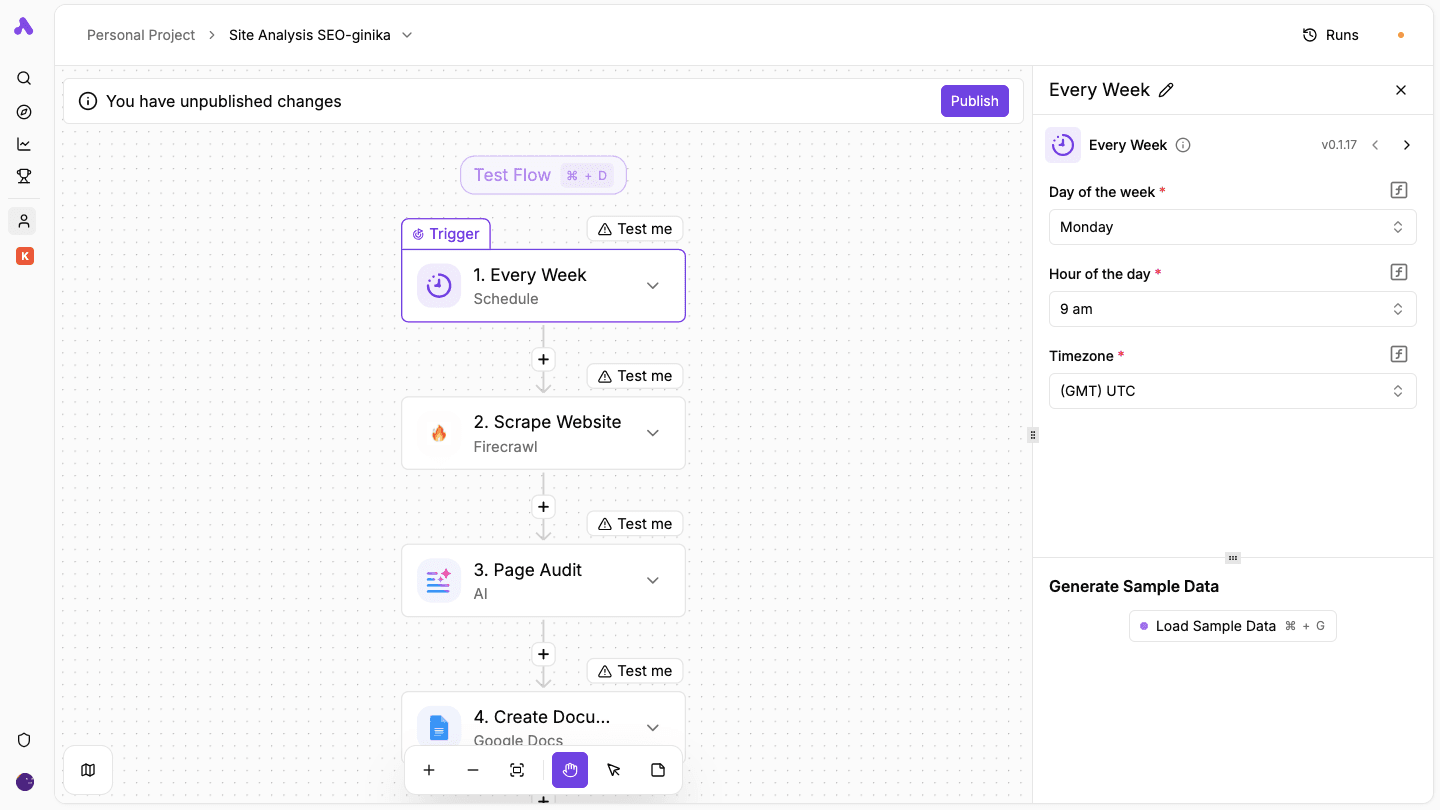
Checking your website every week sounds simple until it starts eating up hours. You open tools, copy data, review pages, and build reports again and again.
Once you set SEO Site Audits up, your site gets scanned, reviewed, and reported automatically. Each run follows the same steps, so you don’t miss issues or forget checks.
Step-by-step process:
- Sign in and open the builder where you’ll set up your audit flow.
- Start a new flow and name it something like SEO Audit System.
- Choose how often the audit should run, such as weekly or monthly.
- Connect your Firecrawl account using your API key, then enter the page URL you want to analyze.
- Select a full scan or set rules if you want specific data, like headings or meta tags.
- Write a prompt that checks for SEO issues like missing tags, weak structure, or gaps.
- Send the AI results into a document so you have a clean summary of the audit.
- Set up an email that includes the document link so your team can review it.
- Run a test, then publish the flow so it runs automatically on your schedule.
Check out the template here: SEO Site Audit
Inbound Lead Qualification Template
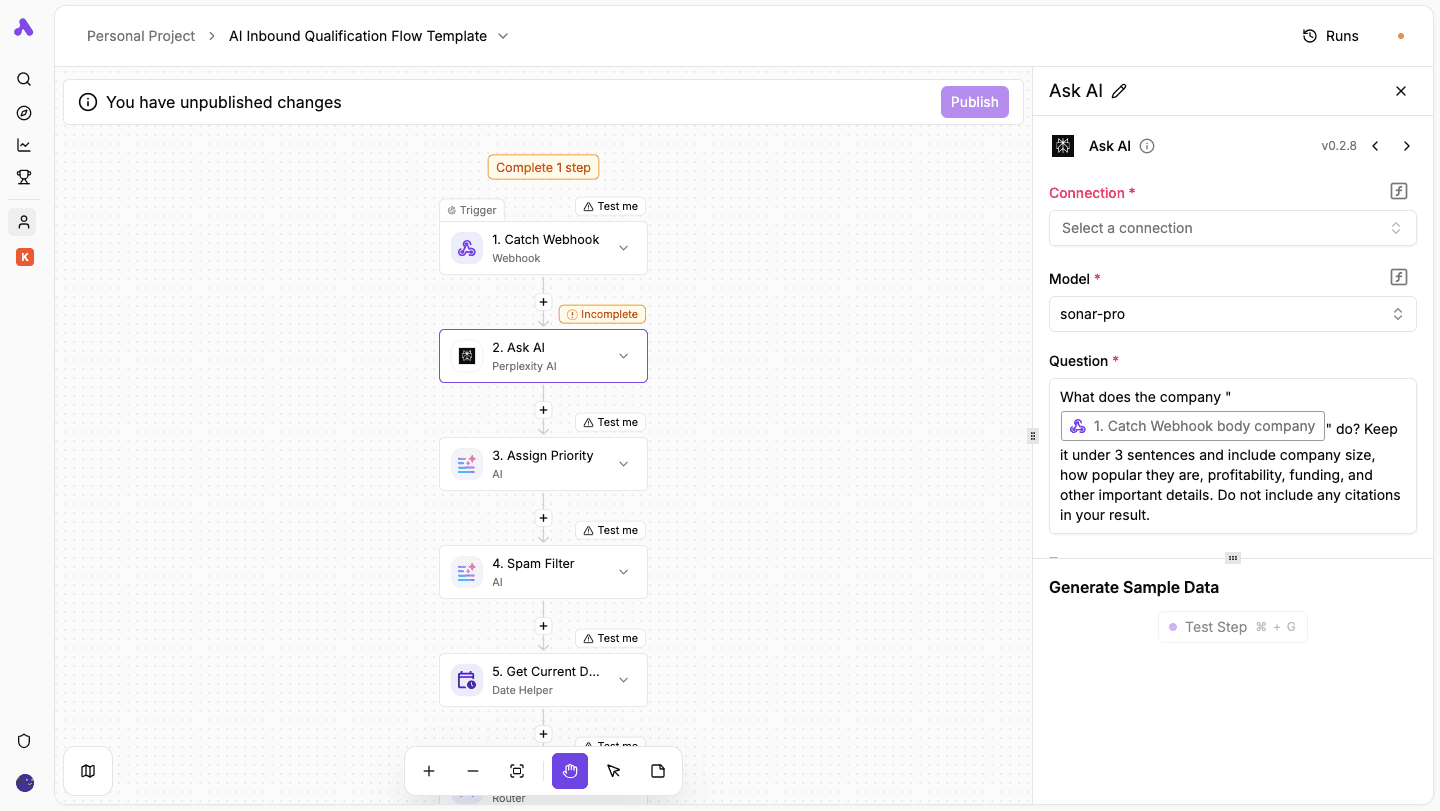
Inbound leads come in fast, but sorting them takes time. You read messages, check the company, decide if they’re worth replying to, then send a response and notify your team. Doing that for every lead slows everything down.
A workflow like this handles the full process for you. Once a form gets submitted, the system researches the company, scores the lead, filters spam, sends a reply, and alerts your team.
Step-by-step process:
- Set the trigger to Catch Webhook so your website form can send lead data directly into the workflow.
- Update your form to send name, email, company, and message to the webhook URL when someone submits it.
- Connect your Perplexity account and ask it to summarize what the company does based on the submitted name.
- Use an AI model to review the company details and message, then assign a priority like Low, Medium, High, or Hot.
- Check the message, email, and company data to decide if the lead looks real or not.
- Capture the current date and time so each lead gets logged with a clear record.
- When the lead is spam, send it to a separate log. If not, continue the workflow.
- Store spam entries in a sheet so you keep a record without cluttering your main list.
- Generate a quick one-line summary of the lead so your team can understand it fast.
- Create a short, friendly response based on the lead’s message and company details.
- Automatically send the generated email to the lead right after submission.
- Save all lead details, priority, and responses in your main sheet for tracking.
- Notify your team with lead details so they can act quickly on high-priority leads.
Check out the template here: AI Qualification Inbound Flow
Describe What You Want and Let AI Build It
Once you have a base, you explain what you want the workflow to do. Activepieces turns that into steps using built-in AI features.
You can say something like “Qualify leads and send high-quality ones to sales,” and the system builds the AI-powered workflows with the right logic. It connects actions, conditions, and outputs without requiring code.
Connect Your Existing Systems
Activepieces connects your existing systems, like CRMs, email platforms, support tools, and spreadsheets, through its pieces.
For example, a form submission can trigger a workflow that sends data to your CRM, checks lead quality, and alerts your team. You don’t move data manually or switch between tools, which reduces errors.
Bring Your Team in Without Extra Setup
Activepieces makes it easy to invite your team and get them started right away.
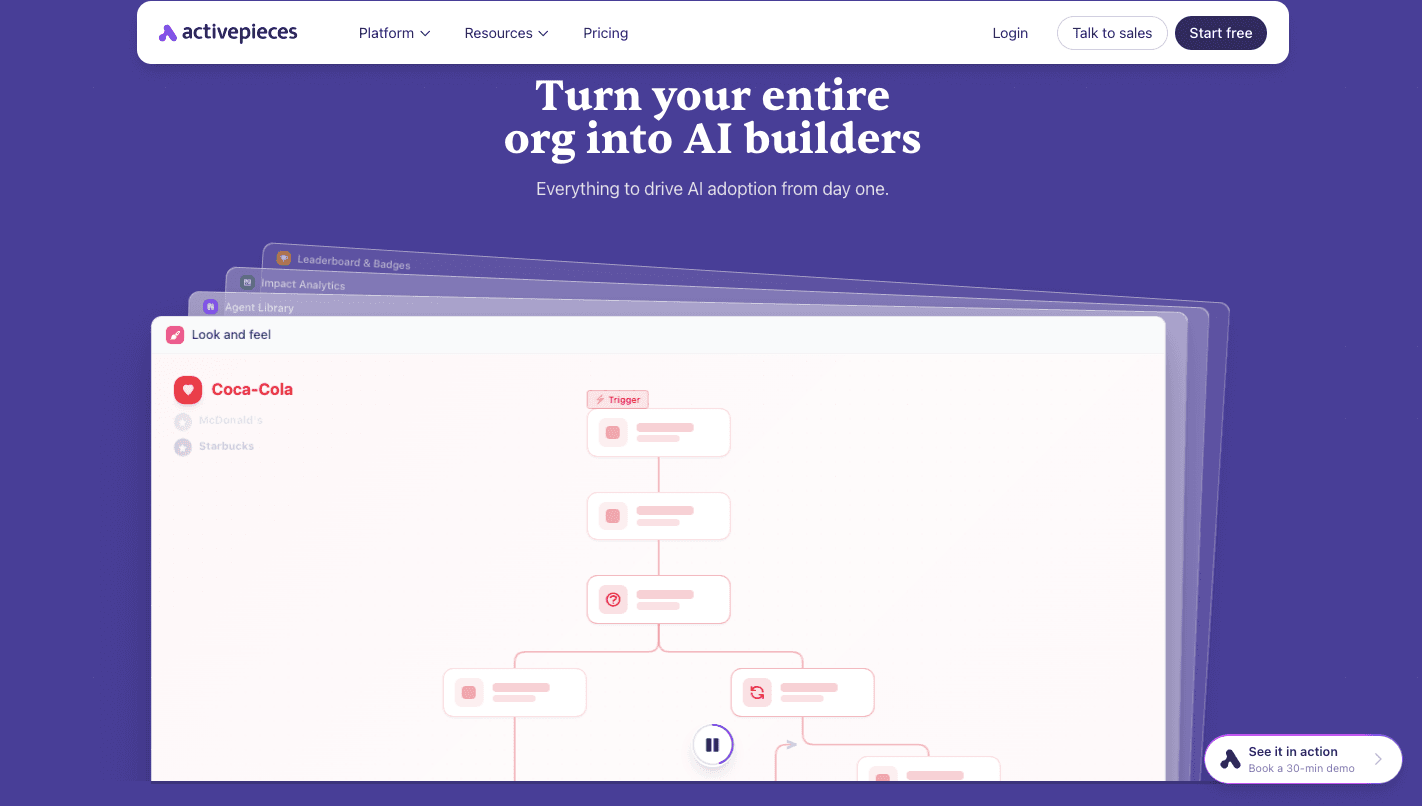
Each person gets their own workspace to test ideas, while shared spaces allow teams to collaborate. Leaderboards and badges highlight active users, so you can encourage more people to build workflows.
Choose How You Want to Deploy
Some teams want a managed setup, while others need full control over their data. Activepieces supports both options.
You can run it in the cloud with managed infrastructure and uptime guarantees, or host it yourself if you need stricter control.
Put AI Automation to Work With Activepieces
Examples help, but results only show once you start using them. Usually, implementing AI can feel complex, but Activepieces makes it easier.
You can begin by choosing a template that matches one of the workflows you saw earlier. Each template already includes the main steps, so you only need to adjust it to fit your process. Those practical examples turn into working systems in minutes.
Next, you describe what you want to automate. Activepieces builds the logic and connects your tools without manual setup. It can connect your apps and keep data moving, so your automated workflows run by themselves.
Once everything runs, those examples stop being ideas and start handling real work every day.
FAQs About AI Workflow Automation Examples
What is the best AI workflow tool?
Activepieces is one of the best options since it combines AI agents, 678+ integrations, and control in one platform.
How do AI workflows work?
They follow a trigger like a form or schedule, then use artificial intelligence technologies to process data, make decisions, and run actions such as sending emails or updating systems.
Can non-technical users build AI workflows?
Yes, most platforms use visual builders, like no-code automation platforms, so you connect steps and describe what you want.
What industries benefit from AI workflow automation?
Marketing, sales, customer support, finance, operations, and HR all benefit since they deal with repeat tasks and large amounts of data.