
How to Automate Manual Processes: Elevate Your Business
Learn how to automate manual processes with Activepieces and improve your workflows by eliminating time-consuming tasks from your to-do list.

Sep 25, 202513 min read
How to Automate Manual Processes: Elevate Your Business
Manual work eats up hours that could be better spent elsewhere. Many of these jobs are time-consuming and often push other tasks to the side.
Employees get stuck fixing mistakes or repeating actions that never move the business forward. To get past that cycle, you can follow specific steps that cut wasted effort and improve results.
Companies that implement automation save money and free their people to focus on meaningful work.
In this article, you’ll learn which manual processes can be automated and how digital workflow automation helps.
Skip task limits and test unlimited automations with Activepieces!
TL;DR
- To automate manual processes, use workflow automation tools to turn repetitive work into automated workflows.
- The most common types of manual processes that can be automated include data entry and reporting, customer support, HR, marketing, sales and CRM, finance and invoicing, and inventory management.
- Activepieces helps you automate these workflows fast with ready-to-use flows built for real business work.
This takes minutes, not a project: automate it in Activepieces free.
What Does It Mean to Automate Manual Processes?
Manual tasks take time that could be spent on real progress. You get stuck doing the same individual task over and over, often through manual methods like spreadsheets, emails, or paper forms. Those habits slow everyone down, create human errors, and waste significant time.
An automation process changes that pattern. Work that once depended on people copying data or manual coordination between departments shifts to automated processes that run independently.
For example, a modern enterprise resource planning (ERP) system can automate these existing processes so that information moves smoothly between finance, HR, and operations.
When you move from manual business processes to automated solutions, you cut repetitive tasks and optimize processes.
The Role of AI in Automating Manual Processes
Older automation worked well for predictable steps but broke down when something unexpected came up. Artificial intelligence (AI) removes that limitation by:
- Studying patterns
- Learning from new inputs
- Adjusting on its own
AI reads emails, invoices, or scanned forms without someone retyping the details. It can flag odd data, suggest corrections, and even make choices based on what it has learned from past outcomes.
Over weeks and months, the system becomes sharper and more reliable.
Why Activepieces Is the #1 Choice for Manual Process Automation

Activepieces is open-source workflow automation software that supports both developers and everyday business users. It offers a framework where technical teams can customize deeply while non-technical staff design flows without code.
Unlike many competitors that split “basic” and “enterprise” experiences, Activepieces keeps everything under one roof. The platform is community-driven, meaning new integrations and improvements come from both its team and the larger user base.
This approach keeps the library fresh and responsive to modern needs, particularly in AI and SaaS ecosystems.
For companies with strict data policies, the self-hosted edition offers maximum control without sacrificing access to the full catalog of pieces. For those who prefer cloud solutions, tiered pricing keeps costs predictable regardless of task volume.
Key Features
- Open-source framework - Built-in TypeScript gives developers the freedom to create, edit, and share pieces easily.
- No-code builder - Designed for quick flow creation, which allows non-technical users to launch intelligent automations with a short learning curve.
- AI-native design - Includes AI capabilities, agents, and AI Copilot support inside the builder.
- Community-driven growth - Over 60% of integrations are contributed by users, expanding the catalog faster than competitors.
- Human input interfaces - Built-in triggers such as chat and form inputs let you create flows that involve real-time feedback.
- Secure by design - Options for self-hosting ensure sensitive data never leaves a company’s environment.
- Enterprise-ready controls - Branding, approval flows, and advanced permissions allow large teams to work confidently.
Integrations
The platform currently has 628 pre-built connections, or pieces, and the list continues to expand through community input.
You can easily integrate systems, such as:
- OpenAI
- ElevenLabs
- Airtable
- Google Sheets
- Microsoft Excel 365
- Slack
- Stripe
- Discord
- Zoho Desk
- WooCommerce
- WordPress
- Zoho Invoice
- Microsoft Power BI
By combining open-source contributions with enterprise integrations, Activepieces stays relevant across industries.
Use Cases
Activepieces lets you automate straightforward tasks, including:
- HR teams can speed up HR processes like onboarding forms, approvals, and payroll updates.
- Sales departments handle lead routing, CRM updates, and timely follow-ups without manual intervention.
- Finance automates financial processes such as invoicing, expense tracking, and reconciliation.
- Customer support uses AI-powered flows to improve response time and overall customer satisfaction.
In each scenario, automation removes repetitive steps and gives staff space to focus on higher-value decision points.
Pricing
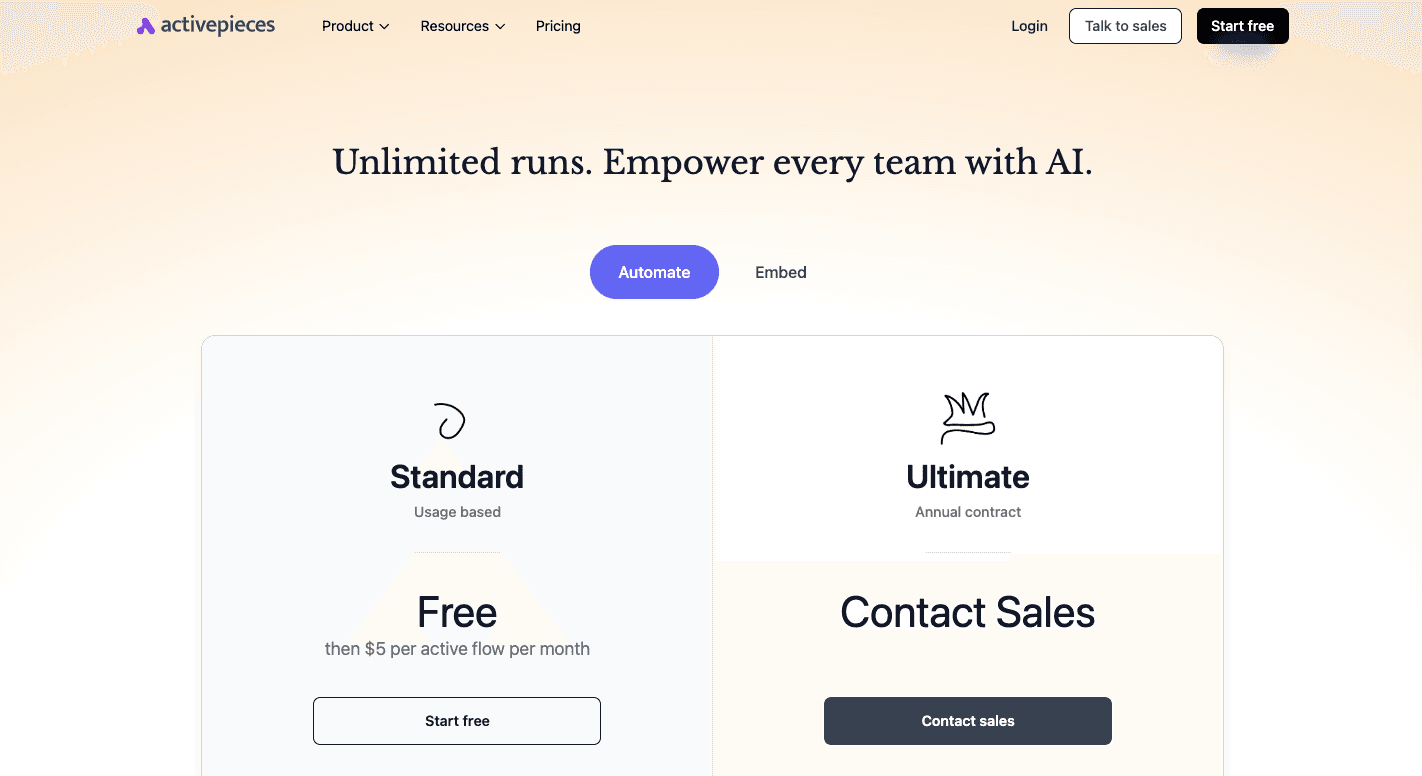
You want to know what you’ll pay, and you want that number to stay stable as your automation goals grow.
Activepieces gives you the Standard plan, which starts free, then costs $5 per active flow per month. Even with increased volume, you don’t suddenly hit surprise charges or hidden costs, so the true cost stays transparent.
Moving to the Ultimate plan, it includes things like RBAC, SSO, audit logs, management APIs, Git sync, private pieces, and enterprise deployment. Those security features are necessary once multiple stakeholders start building automations.
For SaaS teams who want to scale automation, Activepieces Embed starts at $30k per year.
There’s also a free open-source edition if you want full control through self-hosting.
Connect with our sales team and find the right plan for your business!
What Makes Manual Processes Automation Crucial in 2026
Relying on manual data entry and similar chores drains time and leaves room for mistakes. Work like that is error-prone, demands more labor hours than necessary, and keeps people stuck in tedious tasks.
Operating a company that way in 2026 puts you at a disadvantage. Many leaders now use workflow automation to boost efficiency, identify bottlenecks, unify disconnected tools, reduce labor costs, and give employees time for work that adds more value.
The pressure comes from two sides:
- Companies need to accommodate business growth without constantly adding new hires.
- Leaders are looking for cost savings by replacing slow steps with reliable automation tools.
When the routine work is automated, the same team gets through more projects, deadlines shorten, and the outcome is increased operational efficiency.
Besides that, process automation focuses on making such key benefits possible: data moves smoothly between departments, managers make quicker choices, and customers see consistent service.
Other potential benefits include faster delivery, higher accuracy, and simpler compliance. Companies that adopt these systems stay competitive while those tied to manual methods fall behind.
You can follow the rest of this with the builder open. Start free, no card.
Which Types of Manual Processes Can Be Automated?
Every company faces common tasks that eat up time and pull people away from bigger goals. Embracing automation turns those chores into smooth workflows and helps match each business need with the right system.
Data Entry and Reporting
Typing numbers into spreadsheets or copying them between tools eats up more hours than you realize. That kind of work also invites mistakes, which means someone later has to check and correct the results.
Automating data entry and reporting cuts out those gaps. Reports arrive faster, numbers stay consistent, and trends show up clearly.
Freeing people from this grind ends up allowing employees to stay focused on planning, analysis, or customer work instead of filling in cells. Leadership benefits too, since dashboards update in real time and provide the information needed for quick choices.
How Activepieces Automates It
With Activepieces, you can connect spreadsheets, CRMs, and communication apps without writing a single line of code. For example:
- Use the “Expense Tracker” flow to automatically log expenses into Google Sheets and generate structured data reports.
- Apply “Email Routing” so incoming emails that contain attachments are scanned, then the data is extracted and added directly into a report or database.
- Deploy “Sales Call Transcript Analyzer” to push call notes straight into your CRM, avoiding double entry and missed details.
Customer Support Workflows
Support requests don’t stop at five o’clock, and customers expect quick answers. Automation helps by sorting routine tickets for instant replies to common questions and routing complex cases to the right agent.
This balance creates stronger customer satisfaction and a smoother customer experience.
People get answers right away when the issue is simple, and staff are free to deal with urgent issues that need a human touch.
Over time, your team feels less pressure, the service feels more consistent, and the whole support function scales without hiring dozens of new people.
How Activepieces Automates It
Activepieces offers ready-to-use flows with reusable components that can route messages, trigger alerts, and push updates into support tools. For example:
- “Email Routing” flow can filter incoming support emails and send them to the right department automatically.
- “Automated Upselling” flow can follow up with customers after a ticket closes, offering upgrades or add-ons based on their request history.
HR Tasks
Human resources carries a load of routine duties:
- Tracking leave
- Managing benefits
- Handling payroll
- Screening applicants
Automation reduces the execution time of those chores. Core HR processes like scheduling or compliance updates run on their own, while staff have space to tackle long-term goals. You get better data for decision-making because the numbers are current and complete.
The shift also eases day-to-day operations, so you can keep up with demand without straining its limited resources. For workers, the change means faster responses and a smoother overall experience, from employee onboarding through to offboarding.
How Activepieces Automates It
Activepieces has flows designed for recruitment and employee management. For example, the “CV Screening and Scoring” flow automatically reviews resumes, scores candidates, and forwards the top profiles to HR.
Marketing Tasks
Without automation, your marketing team burns time repeating the same steps every week. Moving those jobs into systems changes the pace.
Emails go out on schedule, leads move through drip campaigns, and social updates post automatically. That frees the team to experiment with new messages and strategy. Performance data arrives quickly, so campaigns can be adjusted on the fly.
The end result is sharper outreach and better use of creative energy. By handling the repetitive side of the work, automation gives marketers the room to focus on the kind of ideas that win attention.
How Activepieces Automates It
Activepieces provides marketing-specific flows to reduce the manual load. For example:
- “Lead Nurturing” flow sends articles or videos automatically to warm prospects to keep them engaged.
- “Lead Appointment Qualification” flow sorts leads based on set criteria, and books calls when they’re ready.
- “Automatic Scraping of Company Information” flow collects data on prospects before outreach.
Contact sales and find the right plan for your business!
Inventory Management
Running stock with spreadsheets always ends the same way:
- Items go missing
- Orders get delayed
- Customer trust slips
With automated inventory management, every product scan updates the system instantly. A warehouse worker receives goods, scans them in, and the count adjusts across all locations in real time.
This prevents overselling online and alerts managers before shelves run empty.
Purchase orders can trigger automatically once stock falls below set levels, so buyers don’t have to watch spreadsheets daily. The system also helps spot slow movers, which lets managers cut storage costs on products that tie up capital.
For businesses that ship thousands of items, automation cuts days off fulfillment cycles and ensures customers get what they ordered without delay.
How Activepieces Automates It
While Activepieces doesn’t have a direct “inventory” flow, you can link e-commerce tools, order systems, and spreadsheets to manage stock. For example:
- Connect your ERP system with Google Sheets so inventory levels update instantly when an order is placed.
- Use triggers from Shopify or WooCommerce to send low-stock alerts to Slack or email.
- Automate purchase order creation by linking sales data with supplier records.
Sales and CRM Updates
Sales teams lose hours every week typing notes, updating contacts, and logging calls. A rep, for instance, who spends 15 minutes after every meeting entering details into the CRM. By the end of the week, that’s five hours gone.
Automating those updates removes the burden and lowers the risk of missing key information. Calls can be transcribed automatically, emails synced, and contacts updated without manual entry. That context flows into the pipeline, so you see real-time progress.
Forecasts then improve because the data is complete, not outdated. Automated lead routing also makes sure new prospects land with the right rep immediately. It even helps reps sell more and enhance the experience for every prospect.
How Activepieces Automates It
Activepieces makes CRM updates hands-free with flows like:
- “Sales Call Transcript Analyzer” that pulls meeting notes into the CRM automatically.
- “Lead Nurturing” flow that logs each touchpoint and makes sure prospects don’t go cold.
- “Email Routing” flow that pushes inquiries into CRM pipelines.
Finance and Invoicing
When you create invoices by hand, errors slip in, and payments get delayed. Automating financial processes keeps things moving.
For example, when a project closes, an invoice can be generated, sent, and tracked automatically. If a client misses the due date, a reminder goes out without anyone lifting a finger.
Automated reconciliation connects the bank feed directly to the ledger, flagging only exceptions for human review. The result is faster month-end close, cleaner records, and steadier cash flow.
How Activepieces Automates It
With Activepieces, financial tasks can run automatically between apps. For example:
- “Expense Tracker” flow captures expense details from emails or forms and records them in a finance sheet.
- “Email Routing” flow ensures that invoices sent via email are stored and tracked in one place.
Experience Next Level Automated Workflows With Activepieces

Some automated software only handles simple jobs but collapses when teams try to scale. Others bury users in technical setups that slow adoption.
Activepieces removes that tradeoff. Developers get full control with TypeScript. Then, your non-technical teams can build flows in minutes and map current workflows with the drag-and-drop builder.
It can further run in the cloud for ease or self-host for full data control. You even get “human-in-the-loop” for processes that require human judgment.
The ecosystem grows quickly because the community contributes most of the integrations. That makes it one of the largest open libraries, with new pieces added faster than closed competitors.
Native AI support means flows can use providers like OpenAI or Google Gemini without extra layers.
Enterprises gain security and branding options, while smaller teams benefit from quick setup. Activepieces makes automation scalable, practical, and ready for real business use.
Try Activepieces today and get access to hundreds of ready-to-use pieces!
FAQs About How to Automate Manual Processes
How to automate a manual task?
To automate a manual task, start with a process map, pick the exact steps you want to automate, then build and test the workflow before rolling it out.
What to consider when selecting an automation platform?
When selecting an automation platform, look at integration complexity, conditional logic, error handling, and whether it gives real-time visibility into every run.
What is automation in manual handling?
Automation in manual handling means replacing human-run steps with software, sometimes using robotic process automation (RPA) or business process management (BPM).
What are the four stages of process automation?
The four stages of process automation are: identify the work, design the flow, implement the automation strategy, and then optimize it over time.
What are the risks and pitfalls to avoid when automating processes?
Risks include system failures, weak governance, poor testing, and unclear ownership, so build a business case first and closely monitor early runs.
Build it
Set this up in minutes.
No code required. Connect your accounts, and Activepieces runs it from there.
Start free Talk to sales