
Enterprise AI Agents: 7 Best Platforms Compared for 2026

Jan 14, 202622 min read
When an organization must maintain absolute control over its automation logic and data residency, Activepieces runs the AI you chose, over the apps you already have, with agents and structured automations under maximum control of cost and governance.
Activepieces provides an MIT-licensed core and 735+ integrations, allowing teams to build on a transparent foundation that avoids the vendor lock-in of proprietary alternatives.
While big-tech ecosystems lock your workflows into their proprietary clouds, this open-source framework allows you to containerize your entire automation engine. It's a setup that keeps sensitive operational data behind your firewall.
1. Activepieces: best for open-source and self-hosted flexibility
Self-hosted deployment for total data sovereignty
The risk of third-party data leaks disappears when you deploy Activepieces within a private virtual cloud or an on-premise data center. This is because the execution environment is entirely under your IT team's jurisdiction.
In industries like healthcare or legal services, where a single leaked prompt could result in a compliance violation, this self-hosted model has a verifiable audit trail that public cloud providers can't replicate.
Architectural independence means you aren't forced to trust a vendor's privacy promise.
By decoupling the automation engine from the model provider, you can route tasks to a local instance of Mistral Large 3 for high-security reasoning while using Gemini 3.8 Flash via API for less sensitive, high-speed tasks.
Architectural independence means you aren't forced to trust a vendor's privacy promise.
Every connector in the library is an agent tool by design.
The moment an integration is connected in Activepieces, an agent can call it via the per-project MCP server, which exposes the same integration actions found in the packages/pieces directory of the open-source repo as tool schemas for Claude or ChatGPT.
There is no separate catalog to publish to or wire up twice, as the Integrations Framework ensures a single integration runs as both a flow step and an MCP tool.
You can instead rely on your own network security protocols.
Visual workflow builder with 100+ app connectors
Department heads can build complex agentic sequences without waiting for a developer to clear their backlog by using the platform's no-code interface.
It bridges the gap between legacy software and modern AI by providing pre-built integrations for common tools like Discord, Slack, and various CRM systems.
Logic becomes visible and editable by non-technical staff through a drag-and-drop Flow Builder canvas where users define triggers and actions. Developers can use the built-in TypeScript editor for Custom Code Integrations to write bespoke logic when a standard connector doesn't exist.
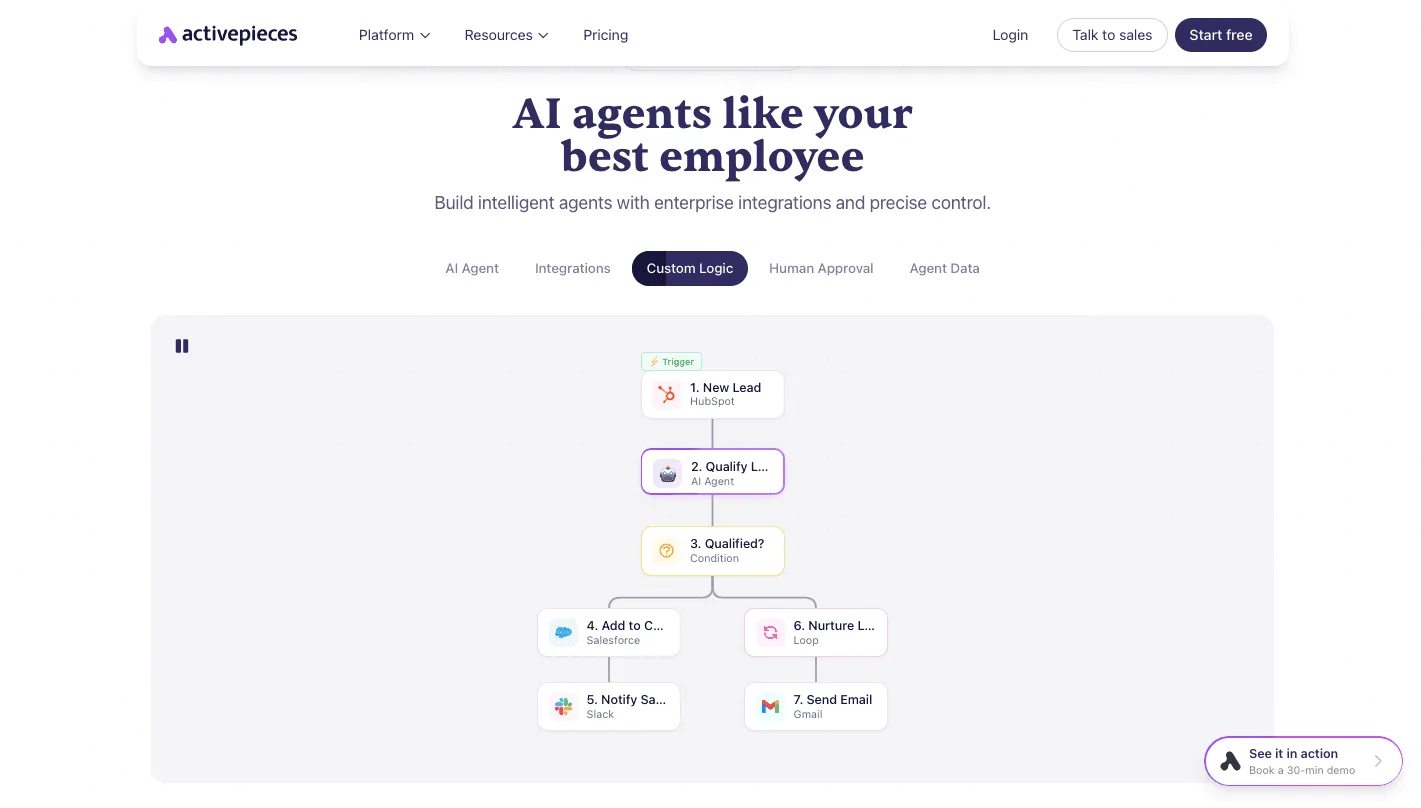
Unique business requirements are met as Activepieces ensures the platform scales. Long-Horizon Agents allow users to chain multiple AI steps together, such as using Claude Sonnet 5.5 to summarize a document before GPT-6 Luna formats it for a specific database entry.
Transparent pricing without per-seat licensing fees
Actual volume of work performed, rather than the number of employees with dashboard access, is how Activepieces scales.
The platform offers unlimited flows on every plan, including free, which prevents the common licensing bloat where companies pay for hundreds of idle seats just to give a marketing team occasional access to an automation tool, ensuring that businesses avoid unnecessary overhead costs for underutilized software.

The following table compares how this model sits against the rigid seat-based structures of the major enterprise players.
| Feature | Activepieces | Microsoft Copilot | Salesforce Agentforce |
|---|---|---|---|
| Deployment | Self-hosted or Cloud | Cloud-only | Cloud-only |
| Pricing model | Per-execution | Per-user, per-month | Per-user, per-month |
| Base cost | Usage-based | $30/user/mo | $5 to $550/user/mo |
Prices and plan limits checked against sanalabs.com and uipath.com and docs.claude.com and claude.com and openai.com and gemini.google on October 1, 2026.
Software spend aligns directly with the value generated by your autonomous workers under this shift toward execution-based billing. If an agent runs once a month, you pay for one execution, rather than maintaining a permanent monthly subscription for an underutilized seat.
By unifying the architecture of its 735+ integrations so that every connector functions natively as an agent tool, this platform bridges the gap between structured automation and autonomous reasoning.
Activepieces is the better fit for organizations that require a transparent, open-source foundation where the same piece actions used in standard flows are instantly accessible as MCP tools.
This architectural consistency ensures that teams can scale their AI capabilities without sacrificing the governance or data sovereignty provided by a self-hosted environment.
The fastest way to settle a shortlist is to try one. Activepieces is free to try, no credit card.
2. Sana: best for knowledge management and internal search
Sana functions as an autonomous librarian for the enterprise, indexing fragmented documentation to ensure employees spend less time hunting for information and more time applying it.
While tools like Activepieces provide an MIT-licensed core with 735+ integrations to automate multi-app workflows, Sana prioritizes the retrieval and synthesis of the institutional knowledge trapped within those applications.
AI-powered enterprise search and indexing
A unified searchable layer across every department’s distinct software stack is created by the platform's centralized indexing engine. This Knowledge Core is a single source of truth.
It connects to Slack for chat history, a Google Drive folder for documents, a Notion page for project wikis, and a Salesforce cloud for customer data to map the relationships between disparate files.
New hires can see not just a product spec, but the Slack discussion that led to its final revision by visualizing these connections. This deep indexing prevents the duplicate work cycle where teams recreate assets simply because they can't find the original versions.
Automated knowledge synthesis and workflows
Models like Claude Fable 5.1 allow the platform to perform tasks beyond simple retrieval. It reasons through long-horizon knowledge tasks, such as drafting onboarding paths or summarizing technical debt.
The Sana Learn module, an all-in-one learning platform, automates the creation of training content by pulling directly from verified internal documents.
Staff aren't ever trained on deprecated workflows because Sana ensures that educational materials update automatically when a process changes. Because the AI handles the initial drafting and structure, subject matter experts only need to perform a final review rather than building curriculum from scratch.
Sana sync with enterprise data sources
Manual file uploads are not required as Sana maintains persistent syncs with the primary environments where work actually happens.
The Sana pricing page lists a "Built to scale" tier priced per user monthly (plans start at 300 users), as well as a separate "Enterprise-Grade. Future-Ready." tier with custom pricing for organizations with complex compliance needs.
Answers surface in the user's current window because the agent embeds directly into the browser or existing chat tools. They don't have to break their focus to search a separate database. This integration transforms a static archive into an active participant in the daily workflow.
3. Microsoft Copilot Studio: best for Microsoft 365 ecosystems
For organizations that run their operations through Microsoft 365 and Azure, Microsoft Copilot Studio is the primary orchestration layer.
It allows teams to build agents that inherit the existing security, compliance, and identity configurations of their tenant. Consequently, an agent can't bypass the data access permissions already set for a specific user.
Low-code agent authoring for Teams and Web
Business analysts who understand the logic of a process but don't write code can build agents in Copilot Studio using a graphical interface.
The platform has a drag-and-drop canvas where users define topics, trigger phrases, and branching logic to handle specific employee or customer queries.
Visual logic and deployment
These agents are native to the ecosystem. They can be deployed to Microsoft Teams with a single click, removing the need for custom API middleware or separate authentication headers to identify the user.
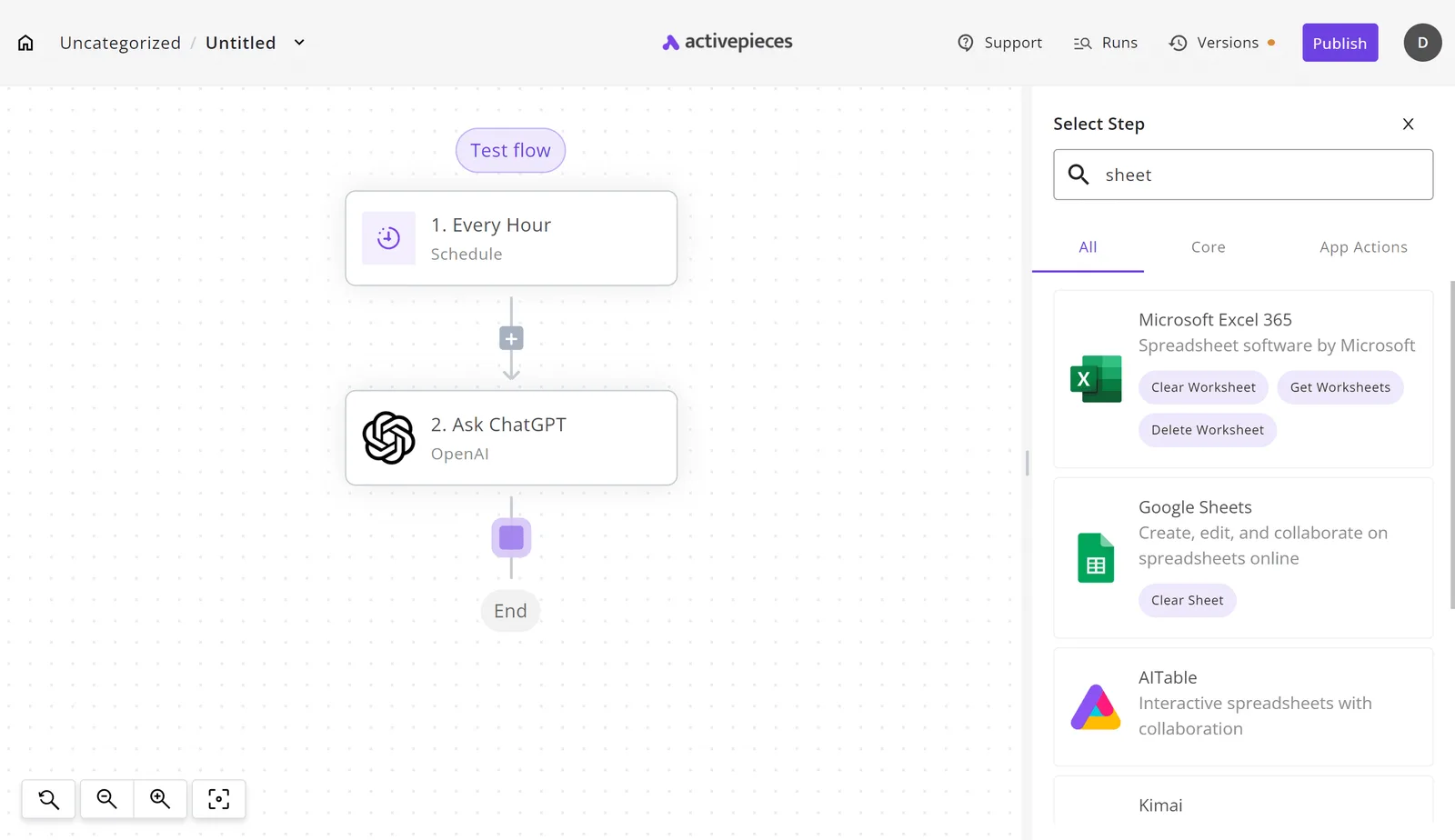
The following workflow illustrates how a failed payment trigger in one system can immediately prompt a specific notification action in another. This automation removes the need for manual monitoring to catch transaction errors.
Managers can review latency or failure points because cross-platform tasks, like moving data from a payment processor to a chat app, become visible, auditable logs.
This visibility ensures that when a process breaks, the admin sees the exact step that failed rather than just a silent error in a script.
Integration with Power Automate and Dataverse
Agents rely on their ability to act on data stored within Microsoft Dataverse, which is the centralized relational database for the Power Platform.
When an agent needs to perform an action, such as updating a lead status or checking inventory, it calls a Power Automate flow to bridge the gap between the conversation and the database. This connection allows the agent to:
- Query records from Dynamics 365 to provide personalized account summaries.
- Trigger multi-stage approval workflows that require a manager's digital signature.
- Write conversation transcripts directly into a centralized table for long-term sentiment analysis.
Copilot Studio support for Azure OpenAI models
Developers can connect to specific frontier models via Azure OpenAI Service, even though the default behavior utilizes the standard models provided through the Microsoft 365 license.
This setup allows for the use of Gemini 3.8 Flash for high-speed enterprise workflows or GPT-6 Astra for complex reasoning tasks within the same governed environment.
Prompts are not used to train public versions of models when they are routed through Azure. This maintains the privacy of internal company secrets.
Build custom agents with Google Vertex
Google Vertex AI Agent Builder is a managed environment for developers to construct autonomous agents using the Gemini model family and Google’s native search infrastructure.
By moving away from fixed per-seat licensing, organizations can scale their agentic workloads based on actual compute usage rather than headcounts.
Grounding agents in Google Search and private data
Accuracy depends on grounding agent responses in Google Search results and specific enterprise datasets, an architectural choice made by Vertex AI.
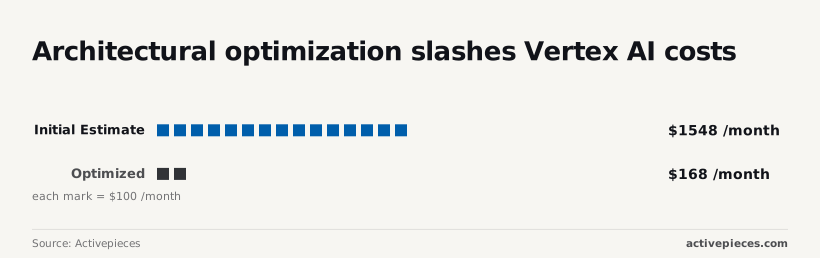
For example, an initial implementation might see a monthly cost of $1,548 [Activepieces], so budget planners can anticipate a predictable recurring expense for the platform. This represents the high overhead of unoptimized, frequent API calls to large models.
Efficiency must be prioritized by developers to avoid rapid budget depletion. By refining how the agent queries its data sources, an optimized architecture can drop that cost to $168 per month [Activepieces].
Efficiency must be prioritized by developers to avoid rapid budget depletion.
This 89% reduction means a team can deploy nearly ten times as many specialized agents for the same budget.
Basic tasks are accessible via a free plan at $0 per month with a Google Account [Google], meaning new users can explore the tool's core functionality without any upfront financial commitment.
Enterprise-scale grounding requires far more than the 15 GB of cloud storage included in Google's free plan [Google], since corporate knowledge bases typically demand the greater capacity available through paid tiers, which means organizations must scale their investment as their data requirements grow.
Businesses must budget for scalable subscription tiers to accommodate growing data requirements.
Vertex AI Extensions for external system actions
Agents perform actions in external systems, such as updating a CRM or querying an inventory database, through the use of Extensions. These extensions function as pre-built bridges to Google Workspace and third-party APIs.
Workflows execute without a developer writing custom middleware for every step. This capability is essential for long-horizon agentic work, where a model like Gemini 3.8 Flash must maintain state across multiple API calls to complete a complex procurement or scheduling task.
Gemini model options in Vertex AI
Developers select models based on the specific needs of the agent’s role rather than using a one-size-fits-all approach:
- Gemini 3.8 Flash: The flagship model for coding and enterprise workflows, balancing speed with the ability to handle complex logic.
- Gemini 3.1 Flash-Lite: A cost-efficient version designed for high-volume, low-latency tasks where budget is the primary constraint.
- Gemini 3.1 Pro: A high-reasoning model used for advanced coding and deep analytical tasks that require a larger context window.

Expensive reasoning resources are not consumed by simple data-entry agents because of this model variety.
Reading a table only gets you so far. Build the same workflow in Activepieces and compare it yourself.
4. Manage compliance with IBM watsonx Orchestrate
IBM watsonx Orchestrate provides a high-governance environment where pre-configured skills execute recurring business processes under strict regulatory oversight.
While general-purpose models focus on creative generation, this platform is built to restrict agent behavior to a defined catalog of enterprise actions. This restriction prevents automation from drifting into unauthorized territory.
IBM watsonx Orchestrate pre-built skills library
Agents interact directly with enterprise software without custom API middleware through a library of pre-packaged integrations. These skills act as guardrails, defining exactly what an agent can and can't do within a specific third-party application.
Specific workflows restrict agents in highly regulated sectors like HR. It might pull a candidate’s history without being granted broad administrative access to the entire database. The following capabilities define the system’s focus on operational utility:
- Read-only audit logs for all agent actions
- Pre-built HR skill sets for Workday
- SOC2 and HIPAA compliant data handling
- Human-in-the-loop
Risk of an autonomous worker attempting to execute a command that violates internal security policies is reduced by anchoring agents in these verified skills.
Natural language sequencing of complex tasks
Plain English descriptions of a desired outcome allow users to coordinate these skills, which the orchestrator then breaks down into a logical sequence of API calls.
Instead of a developer mapping out every logic branch in a flowchart, the platform uses its underlying model to determine which skill should be triggered next based on the user’s intent.
A sequence for a manager is automatically triggered by a request to "onboard the new designer."
This includes generating a contract, notifying IT to provision a laptop, and scheduling a background check. This abstraction layer allows non-technical staff to manage complex cross-platform workflows that would otherwise require dedicated engineering support.
Enterprise-grade governance and auditability
A forensic trail of which user initiated an action and which model executed it is provided by logging every interaction within the platform.
This level of transparency is a requirement for organizations subject to external audits, as it eliminates the black box problem often associated with autonomous agents.
Critical steps require a manual click from a verified employee before the agent can proceed because the platform supports human-in-the-loop triggers.
These steps include approving a payroll change or signing a legal document. This structure ensures that while the agent handles the repetitive data movement, the ultimate accountability for the business outcome remains with the human supervisor.
5. Salesforce Agentforce: best for CRM-driven customer interactions
Salesforce Agentforce shifts CRM automation from rigid, if-this-then-that workflows to autonomous agents that can navigate complex customer journeys without manual intervention.
By embedding these agents directly into the existing interface, teams can hand off repetitive inquiry resolution to a system that already has permissioned access to their customer records.
Autonomous reasoning via the Atlas Reasoning Engine
Specific intent of a customer’s message is evaluated by the Atlas Reasoning Engine to determine which business process to trigger. Unlike traditional chatbots that follow a static decision tree, this engine uses a proprietary loop to refine its plan before execution.
Irrelevant actions that would require human cleanup become less likely.
It connects directly to Apex, the Salesforce object-oriented programming language, allowing the agent to run existing custom code to update records or trigger external API calls.
This means an agent can autonomously handle a return request by checking the policy, verifying the shipping status, and generating a label, rather than just pointing the user to a FAQ page.
Deep integration with Salesforce Data Cloud
Salesforce Data Cloud provides a unified view of customer information across disparate systems like marketing, sales, and service for Agentforce.
Because the agents operate on this metadata layer, they can pull real-time signals, such as a customer’s recent website clicks or their lifetime value score, to personalize their responses.
Live data grounds the agent and ensures it isn't hallucinating based on general knowledge.
By using this grounding, the system limits the agent's output to the facts found within the company's own verified documents and records. This prevents the brand from providing incorrect or unauthorized information to a client.
Agentforce templates for service and sales roles
Pre-configured templates designed for common roles like the Service Agent or the Sales Development Representative reduce the technical barrier to entry.
These templates come with pre-defined actions (such as scheduling a meeting or looking up an order) so that a department lead can deploy a functional worker without writing new logic from scratch.
Tier 1 support cases are handled by the Service Agent through searching knowledge bases and updating case statuses.
The Sales Representative qualifies inbound leads by answering product questions and checking calendar availability. The Merchant Agent assists with e-commerce tasks like tracking shipments or providing personalized product recommendations.
Return on investment can be seen in a few months for an IT helpdesk using this template-led approach. a fully custom-coded customer service operation often requires over a year to reach the same level of complexity and financial benefit.
6. Automate legacy software with UiPath agents
UiPath AI Agents bridge the gap between generative reasoning and legacy software by using Robotic Process Automation (RPA) to click buttons and read screens where no API exists.
This infrastructure allows an agent to move beyond generating text and start interacting with the green-screen terminals or local desktop applications that still house critical enterprise data.
Combining LLMs with Robotic Process Automation
Static scripts turn into dynamic workflows as UiPath integrates large language models with its existing library of automation activities.
While a traditional robot follows a rigid path, these agents use models like GPT-6 Astra to interpret user intent and decide which specific sub-processes to trigger based on the context of a request.
Hard-coding every possible branch of a customer service interaction is no longer required of the developer. The agent can evaluate the incoming email and select the correct sequence of clicks to update a legacy mainframe.

Autopilot for cross-application task execution
Swivel-chair work, moving data between modern SaaS tools and local software, is handled by the Autopilot feature. Because it sits on top of the UiPath orchestrator, it can trigger multiple robots across different virtual machines to complete a single complex request.
The following table outlines how the platform segments these capabilities based on the scale of the operation and the level of AI access required.
| Plan | Target Use Case | Key Features |
|---|---|---|
| Community | Individual developers and small projects | Free forever, includes Studio/SDKs and Autopilot, Community Forum support. |
| Basic | Small teams needing dedicated execution | $25/mo, supports 5 users, attended automation focus. |
| Standard | Enterprise-wide autonomous workflows | Contact Sales, unlimited scale, full AI Agent and Autopilot access. |
Organizations that require centralized governance over a fleet of autonomous agents must choose the Standard tier. This structure ensures that as an agent learns to navigate new UI layouts, the updates are pushed across the entire digital workforce simultaneously.
UiPath document understanding AI models
Structured data is extracted from messy, non-digital sources like scanned invoices or handwritten forms using specialized models.
By combining Gemini 3.8 Flash for reasoning with their proprietary Document Understanding models, the agents can identify specific fields in a PDF and verify them against a database before proceeding.
Manual data entry time is reduced in departments like accounts payable, where the primary bottleneck is usually a lack of standardized digital inputs.
How to choose an enterprise AI agent platform
Selecting an enterprise AI agent platform requires aligning your technical debt and security mandates with the specific autonomy your workflows demand.
While the allure of a universal agent is strong, most organizations find that their choice is dictated by where their data lives and who is responsible for keeping it there.
Data residency and privacy considerations for AI agents
Whether you can use a public cloud orchestrator or must deploy within a private, air-gapped environment is determined by data residency requirements.
For organizations in highly regulated sectors, the primary constraint is the physical location of the inference servers and the logs generated during agent execution.
You'll need a platform that supports self-hosting or dedicated instances where you control the encryption keys if your compliance team mandates that no metadata leaves your virtual private cloud.
Regulated and public-sector organizations like MoneyGram and FundingSocieties run the air-gapped edition of Activepieces in production today to maintain this level of sovereignty.
The self-hosted build includes the same enterprise feature list (SSO, SCIM, custom RBAC, and secret manager integration) found in the SOC 2 Type II managed cloud, ensuring that air-gapped deployment does not result in a fragmented product.
UiPath offers an Automation Cloud for those prioritizing managed services, but their platform also allows for on-premises deployment to ensure that sensitive transaction data remains within the corporate firewall.
Risking a compliance breach the moment an agent processes a customer’s personally identifiable information is the result of choosing a platform that lacks these regional controls.
Evaluate your existing software ecosystem lock-in
Gravity of your current data silos should govern your choice of platform to avoid the high latency and cost of constant API egress.
If your entire sales and support operation is built on Salesforce, using their native Agentforce tools ensures that the agent has immediate, low-latency access to the underlying metadata without building custom connectors.
Microsoft’s Copilot Studio provides pre-built identity management that respects your existing user permissions if your developers live in GitHub and your documentation is in SharePoint.
Selecting a platform outside your primary ecosystem forces your team to rebuild authentication and authorization logic for every new agent, which increases the surface area for security vulnerabilities.
Determine the complexity of the required agent tasks
Lightweight automation tools or high-reasoning models capable of long-horizon planning are chosen based on the complexity of the task.
Simple data extraction or form-filling can be handled by efficient models like Gemini 3.1 Flash-Lite, which minimizes operational costs for high-volume, repetitive work.
You'll require a platform that supports frontier models like Claude Opus 5.5 or GPT-6 Astra if the agent must debug code or perform multi-step research across disparate databases.
Unnecessary compute spend results from using an overpowered model for basic tasks, while using a low-reasoning model for complex logic leads to hallucination loops where the agent fails to complete the workflow.
The following implementation roadmap outlines how to translate these platform choices into a functioning production environment.
- Audit manual workflows to identify high-volume bottlenecks.
- Select platform based on data residency and compliance needs.
- Build MVP with RAG grounding to ensure factual accuracy.
- Set up human-in-the-loop triggers for high-stakes decisions.
Frequently asked questions about enterprise AI agents
What is the difference between a chatbot and an AI agent?
Proactive workers capable of executing multi-step workflows without constant human intervention are AI agents, whereas chatbots function as reactive interfaces that respond to specific user prompts, a distinction that matters when picking the best AI agents in 2026.
A chatbot built on a model like GPT-6.1 Sol might answer a question about a missing invoice by summarizing a PDF.
Intelligence is used by an enterprise agent to log into the accounting software, verify the payment status, and email the vendor the transaction receipt.
This shift from conversation to execution means the agent requires permissions to act within your software stack rather than just permission to read your files.
Can enterprise AI agents run on-premises?
Open-weight models that don't require a persistent connection to a third-party cloud provider allow organizations to deploy agents on-premises.
Mistral Large 3 is a state-of-the-art open-weight model that allows a company to host the entire intelligence layer on their own hardware.
Sensitive operational logic never leaves the internal network. While proprietary models from vendors like OpenAI or Google require an API connection, hosting a model locally provides total control over the execution environment at the cost of managing the underlying GPU infrastructure.
How do enterprise AI agents handle data privacy?
Role-based access controls and strict data residency configurations prevent customer information from being used to train public models, allowing enterprise AI agents to protect data privacy.
When using a tool like Gemini 3.8 Flash for enterprise workflows, the platform separates your organizational data from the base model weights.
Proprietary trade secrets don't leak into the global intelligence pool because of this separation. Security teams typically enforce this by using private VPC endpoints, which ensure that the data traveling between your databases and the AI agent stays within a private encrypted tunnel.
What are the typical implementation timelines for agents?
Whether the organization uses a pre-built ecosystem or develops a custom solution from the ground up determines the timeline for deploying an agent.
Ecosystem-integrated agents that live inside platforms like Salesforce or Microsoft Dynamics can be configured in days because the data connections and user permissions are already mapped.
Months are often required for custom agents built to handle unique legacy software or complex reasoning tasks to move from a prototype to a production environment.
These tasks include those requiring the long-horizon capabilities of Claude Fable 5.1.
Hybrid deployments involve a pilot phase where the agent runs in an observation mode to log its planned actions before a human manager grants it the authority to execute those actions live.
Related reading
References
Still comparing
The fastest way to settle it is to build something.
Open source under MIT, so you can self-host the same thing later.
Start free Talk to sales