
CRM and Marketing Automation: A Beginner’s Guide
Learn about CRM and marketing automation and its key benefits. Discover how to automate your CRM and marketing workflows with Activepieces.

Feb 3, 202614 min read
Trying to remember who reached out, what you said, and when you need to follow up is exhausting.
When everything depends on your memory, something will be missed. It happens to everyone. CRM and marketing automation help you break out of that cycle and stay on top of it.
This beginner’s guide shows you how these tools work, how they fit into workflows, and how to use them to stay organized, automate simple tasks, and manage relationships.
TL;DR
- CRM and marketing automation work together to track contacts, automate follow-ups, and keep sales and marketing activity organized.
- Used together, they improve lead nurturing, speed up sales cycles, and keep customer communication consistent from first contact to renewal.
- Key features to look for include visual workflows, native integrations, AI support, and strong security controls.
- Activepieces connects CRM and marketing tools through open, flexible automation that scales from simple workflows to advanced use cases.
This takes minutes, not a project: automate it in Activepieces free.
What CRM Software Brings to Marketing Automation
With a customer relationship management (CRM) automation tool, you’ll get:
A Single Source of Truth for Customer Data
By acting as a single source of truth, a CRM keeps every message tied to the same, current customer record. It means your CRM data is no longer in fragments.
That shared record feeds marketing automation software directly. Email marketing draws from the same profile that your sales sees. You don’t send a “buy now” offer to someone who just opened a support ticket or finished a renewal call.
Firmographic details like industry and company size live next to behavioral signals such as page visits and past purchases. You can also build hyper-specific lists, like “Existing customers in the tech sector who haven’t opened an email in 60 days.”
Personalization then moves past “Hi [First Name]” and starts matching interests inside the customer journey.
Clear Signals for Sales Readiness
Better records mean nothing unless they point to action. CRM tools turn activity into signals so your sales team knows who deserves attention.
Let’s say your lead can get 5 points for opening an email, and 50 for visiting a pricing page or requesting a demo.
Once a lead’s score hits a defined “Hot” threshold, such as 100 points, the system updates their status to “Sales Ready.”
Your sales reps open the record and see what happened, when it happened, and why the alert fired. Since you have all the context you need, your sales pipeline stays focused.
That same signal flow supports customer retention.
More Accurate Measurement of Revenue Impact
Automated marketing campaigns tied to CRM platforms change what you can measure. Opens and clicks still show up, yet deals and renewals take priority.
CRM with marketing automation links messages to outcomes. You can examine customer behavior and trends and track sales performance without stitching reports together.
CRM systems connect repeat purchases and renewals back to earlier outreach, which shows you customer lifetime value (CLV). Customer engagement becomes something you can see, adjust, and improve.
What Marketing Automation Brings to the CRM System
Integrating a marketing automation tool gives you:
Automated Lead Nurturing
Interest rarely turns into a sale on day one since most people need time, context, and reminders.
Automated lead nurturing stays present after the first interaction. When someone enters the CRM with low intent, your system initiates a gradual sequence of helpful emails.
Email marketing further supports that process. You can send a lead a short guide one week, a case example later, then a product overview once interest grows.
Lead scoring updates with every action: A click = +5 points and a video view = +10 points.
Old records don’t stay forgotten either. Automation can wake up these leads. Six months after a deal closes as lost, your system can send a simple “How is it going?” email or share a product update.
You stop wasting money on lead generation because every lead gets a consistent follow-up, which keeps your brand familiar until the timing feels right. Nurture leads long enough, and the sales pipeline stays fuller.
Consistent Follow-Up
Marketing automation software responds right away after a form fill or reply. A short email goes out with the next steps and expectations, written as a personalized message.
A simple schedule can look like this:
- Day #1: Automated email.
- Day #3: Automated LinkedIn connection request reminder.
- Day #5: SMS message if consent exists.
The CRM also tracks when a ghost lead visits the site again or clicks on an older link. That action triggers a message such as, “Hey [Name], noticed you were looking at our product again. Do you have any questions?”
Key Business Benefits of CRM and Marketing Automation
Sales and marketing teams often see these benefits:
Higher Lead Conversion Rates
When crm and marketing automation platforms work together, the funnel stops behaving like a numbers game and starts acting with intent.
The CRM stores who the person is, such as job title or industry, while automation tracks what they do, like page visits or link clicks. Those two inputs shape every response.
For instance, someone reading a pricing page receives different content than someone skimming a blog post. Because you offer something relevant, it raises customer satisfaction since people feel understood.
Shorter Sales Cycles
Long discovery calls happen when the interest stays unclear. Marketing and CRM automation help remove that drag by doing prep work before a rep ever reaches out.
Lead scoring highlights intent early, which changes how your sales process starts. You open a record and see activity, content views, and past replies right away. Conversations skip the “getting to know you” phase and move straight to problem-solving.
Days or weeks disappear from the front of deals since education already happened.
Automation also removes repetitive tasks from the calendar so outreach happens at the right moment.
Seamless Customer Experience
Messages feel disconnected when systems don’t share context. CRM and marketing automation help to keep records unified so every interaction builds on the last one.
Customer interactions flow through one timeline from first click to renewal. A person who contacts support doesn’t receive an unrelated promo later that day. The entire customer journey stays coherent because email replies, app usage, and service notes sit together.
Customer service processes improve when agents see recent activity before responding.
Proactive outreach also changes how people feel. A customer who stops logging in can receive a simple message like, “Hey, we noticed you haven’t been in the app lately. Here’s a two-minute video on a shortcut you might like.”
Better Alignment Between Sales and Marketing
Confusion grows when your teams chase different outcomes. Marketing may celebrate clicks while sales wait for deals. Shared data eliminates that divide by tying actions to results.
Marketing and sales efforts stay connected since feedback flows both ways after deals close or stall. Visibility builds trust because everyone sees the same signals and works from the same record.
How Activepieces Improves CRM and Marketing Automation Work

You’ve probably seen automation tools that move data around and stop there. That helps at first, then things fall apart once marketing processes get more complex.
Activepieces is an open-source automation platform that can integrate your CRM and marketing setup. It lets you build automated marketing campaigns that decide what happens next, based on logic, behavior, or AI input.
You build flows visually, so you always see what triggers them, what decisions get made, and which actions follow.
Once flows grow, Activepieces supports advanced automation. You can self-host it to fully control and manage customer data, or use the managed version if you want less setup. Either way, the system stays flexible as volume increases.
Here’s what stands out when you use it day to day:
- Open-source core, which means full visibility and no task limits
- Visual builder that keeps complex flows readable
- AI steps that research, score, and draft messages inside flows
- Human approval steps when automation should pause
- Data integration library that currently offers 624 pieces and room to add custom ones
- A setup that can connect with the best CRM and marketing platforms (e.g., Zoho CRM, Brevo, and Salesforce)
See how open automation fits into real CRM and marketing setups. Explore Activepieces!
You can follow the rest of this with the builder open. Start free, no card.
Common CRM and Marketing Automation Workflows
Here are CRM and marketing workflow automation examples you can build inside Activepieces:
Lead Nurturing
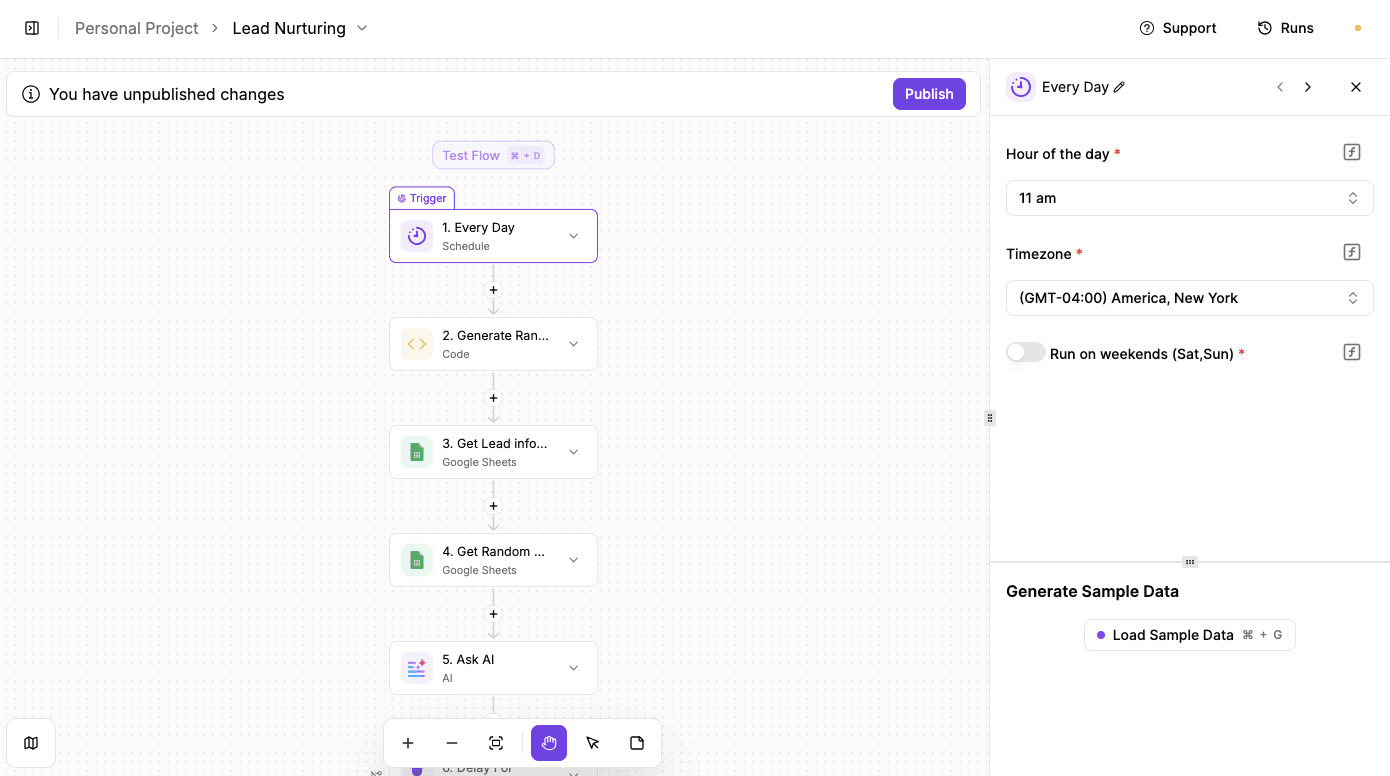
Lead nurturing often becomes repetitive reminders that feel forced. This workflow avoids that.
Each day, it sends one helpful article or resource to one lead. Over time, that keeps you present in someone’s inbox without annoying them or pushing for a reply.
Main parts of the workflow are as follows:
- Schedule trigger: The automation starts on a fixed schedule, set to run every day at 11:00 AM, so outreach stays consistent.
- Random number generator: An AI-written script creates a random number that adds variation to each run.
- Lead selection: The random number picks one lead from a spreadsheet, so only one person gets contacted per day.
- Content selection: The same number selects one article or resource from a curated list tied to your work or industry.
- AI email drafting: A text AI step writes a short, friendly email that explains why the article might be useful.
- Random delay: The number also sets a delay, sending emails at slightly different times, like 11:17 or 11:26.
- Email send: The system sends the email and logs the run for review.
Try this template: Lead Nurturing
Client Inquiry Reply
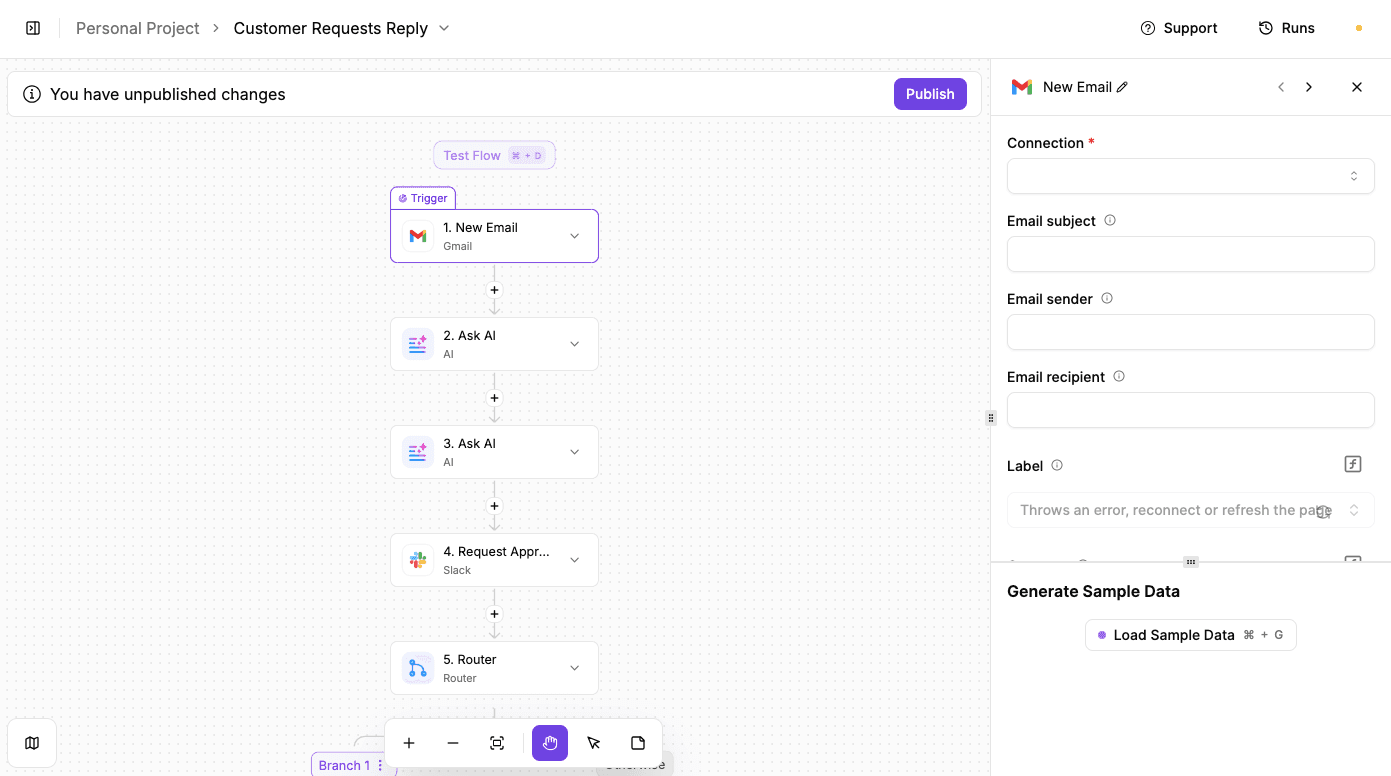
Sales conversations die when you reply too late. People expect answers fast, especially when they’re reaching out for the first time. The “Client Inquiry Reply” workflow fixes that by helping you reply to incoming emails in under ten minutes.
Every new message gets analyzed, drafted, and reviewed almost right away. AI handles the heavy thinking.
You still make the final call, so conversations stay warm, which directly improves your chances of closing the deal.
Main parts of the workflow are as follows:
- Email monitoring: The automation watches your inbox using a Gmail connection and reacts the moment a new email arrives.
- AI analysis step: The first AI component reads the email, determines the customer's intent, and recommends the appropriate action.
- AI reply writing: A second AI piece writes a clear, professional response based on prompts and examples you’ve already defined.
- Human approval: The drafted reply gets sent to Slack, where a team member can approve it with one click.
- Routing logic: Approval sends the email automatically. Rejection pauses automation and allows a manual reply.
- Email delivery: The approved message goes out and keeps the conversation moving while interest stays high.
Try this template: Client Inquiry Reply
VIP Lead Alert
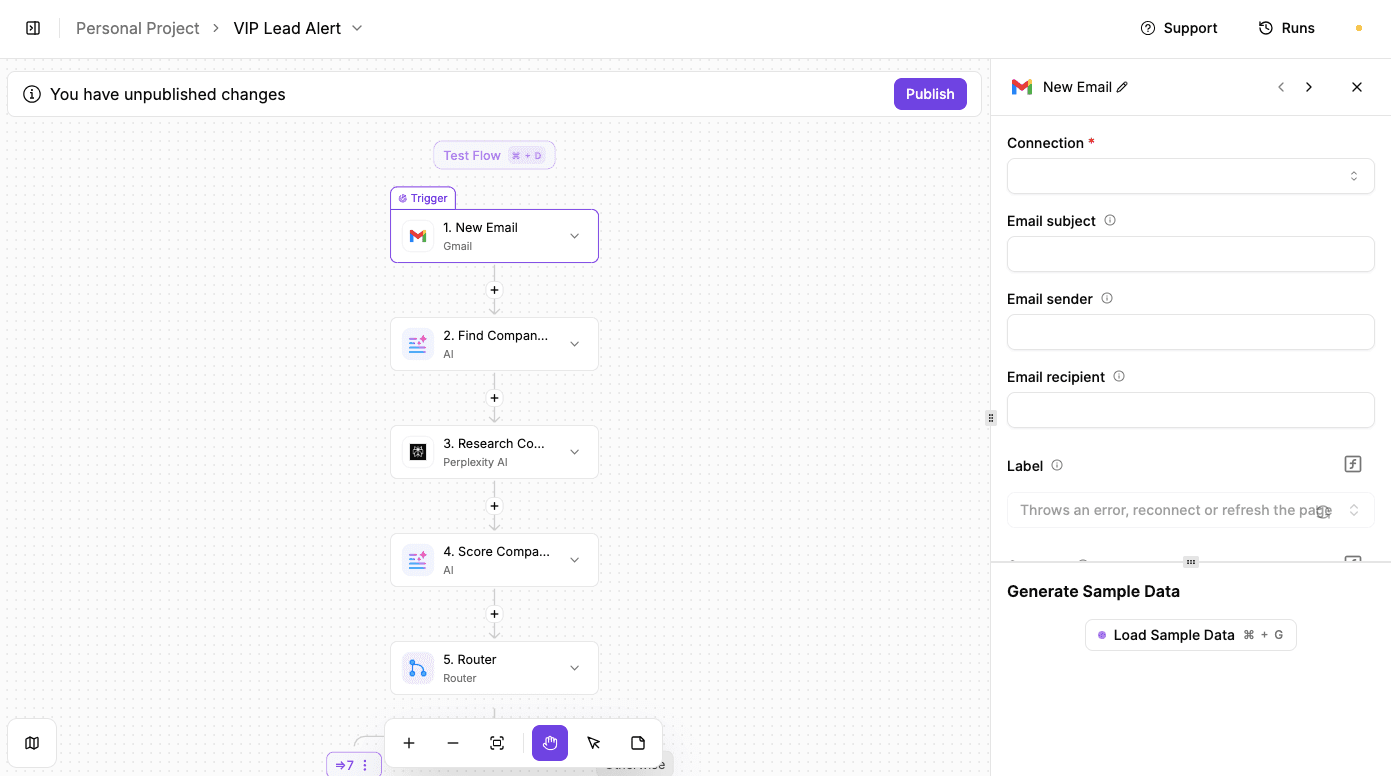
Missing a high-value lead hurts more than missing ten average ones.
Using the “VIP Lead Alert” makes sure that never happens. The moment a potential VIP reaches out, the system evaluates who they are, how big they might be, and whether they deserve immediate attention.
Then, instead of flagging every message as urgent, the workflow researches the sender, scores the lead, and only interrupts your team when it’s worth it.
Main parts of the workflow are as follows:
- Email trigger: The automation starts when a new email arrives, though the same logic can work with any customer touchpoint.
- Initial AI extraction: A text AI step reads the message and pulls details like sender name, company, and context.
- Company research: A second AI step uses external research to gather size, revenue, founders, and notable clients.
- Lead scoring: Another AI step reviews the research and rates the lead from 1 to 10 using clear examples.
- Decision logic: Scores of seven or higher trigger an instant Slack alert to the team.
- Fallback action: Lower scores can be logged or routed elsewhere for later follow-up.
Try this template: VIP Lead Alert
Weekly Business Review
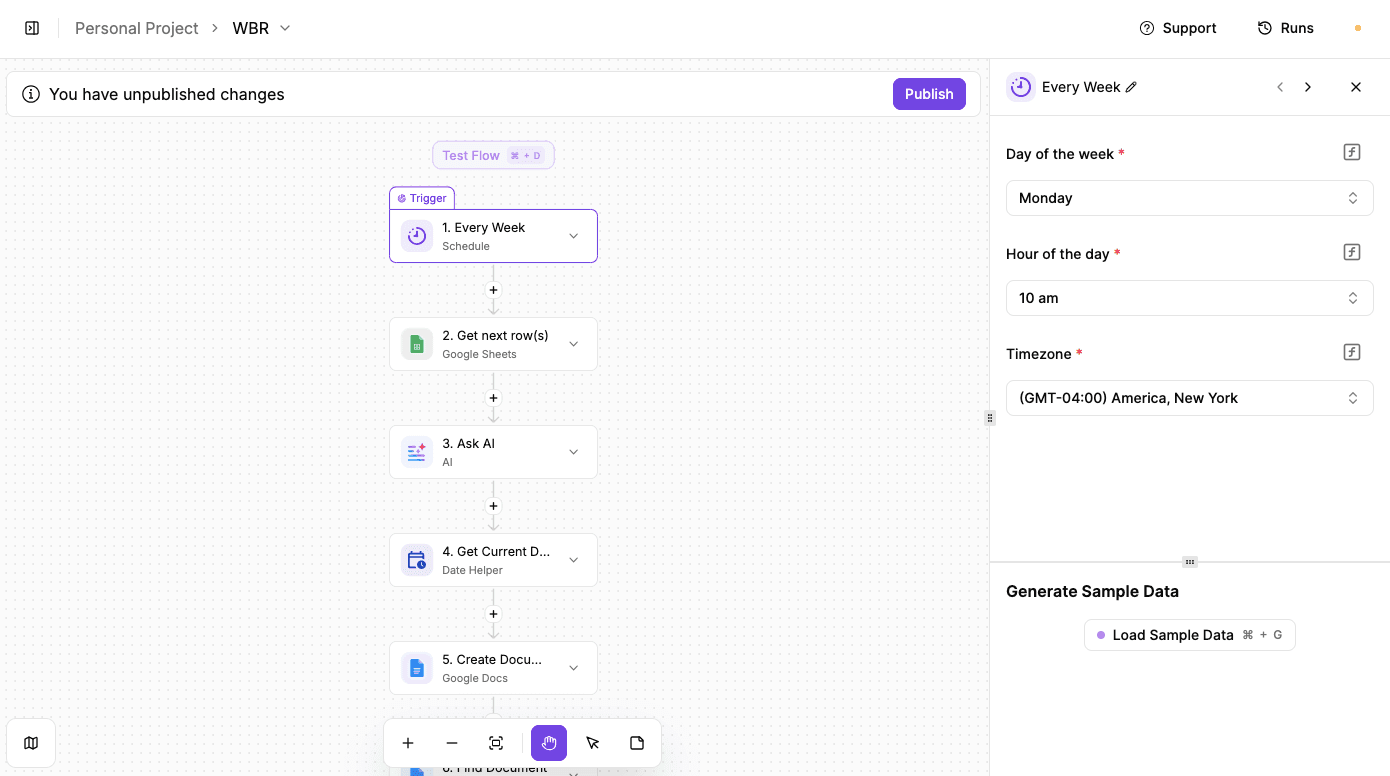
Numbers live in different places. Someone may forget to update a sheet, and the report gets rushed right before a meeting. This workflow creates a weekly business review without anyone manually writing or formatting anything.
Throughout the week, data gets logged into one tracking sheet.
On a set day, the system pulls everything together, reviews progress, summarizes tasks, and turns raw numbers into a report that leadership can actually read.
Main parts of the workflow are as follows:
- Weekly trigger: The automation runs on a schedule, set to start every Monday.
- Data collection: All tracked metrics, tasks, and notes get pulled from a Google Sheet used for weekly logging.
- AI analysis: A text AI step reads the data, interprets results, and writes a structured weekly business review.
- Report creation: The generated content gets saved as a formatted Google Doc with the current date in the title.
- Slack approval: The document is sent to Slack for review and approval by a lead or manager.
- Cleanup loop: Once approved, the system deletes last week’s data from the sheet to prep for the next cycle.
Try this template: Weekly Business Review
Weekly Industry Updates
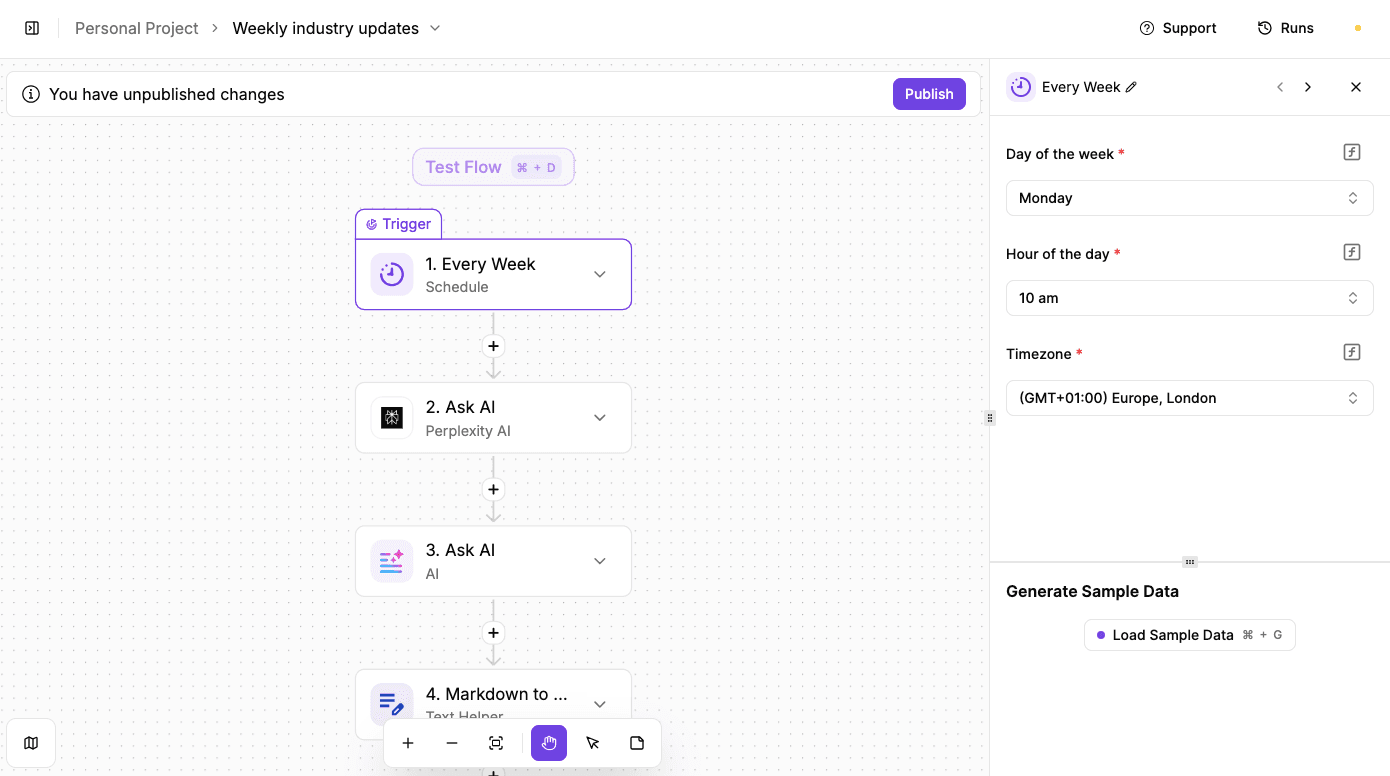
Keeping up with industry news sounds simple until it turns into ten tabs, half-read articles, and zero clear takeaways.
The Weekly Industry Updates workflow handles that for you every week. It gathers last week’s industry updates, connects them to your business, and delivers a short report you can actually act on.
Each Monday morning, fresh insights land in your inbox without manual research. Instead of raw summaries, you get context. The automation explains why the news matters, what deserves attention, and where to focus next.
Main parts of the workflow are as follows:
- Weekly trigger: The automation runs every Monday at 10:00 AM, right when the workweek settles in.
- Industry research: Perplexity AI searches the web and summarizes last week’s news for a chosen topic or industry.
- Business context analysis: An AI step reviews the news alongside your business details and website to explain impact and priorities.
- Report generation: AI turns those insights into a structured update meant for quick reading.
- Formatting cleanup: A helper converts raw markdown into clean HTML so the email looks polished.
- Email delivery: The final report lands in your inbox, ready to read or forward.
Try this template: Weekly Industry Updates
Build Connected CRM and Marketing Automation Systems With Activepieces

Once you start tying more tools into your CRM and marketing setup, the work usually gets disorganized. You add an email service, a form tool, maybe a social media scheduler. Each piece needs its own logic, which means manual glue code or constant maintenance.
Activepieces changes how that works by letting you link everything through a single system that enables real decision-making.
You build flows visually, so you can see how triggers lead to logic and then to actions. Because pieces are open and extendable, your developers can create or adjust connectors easily.
You can also let flows run independently, and human steps can pause work when needed.
Need custom flows, security controls, or embedding options? Contact the Activepieces sales team!
FAQs About CRM and Marketing Automation
What is CRM and marketing automation?
CRM and marketing automation work together to track contacts, manage relationships, and automate follow-ups without relying on memory. A CRM stores contact details and history, while automation handles repetitive marketing tasks like emails, reminders, and lead routing.
Together, they support sales automation and keep customer communication consistent from first touch to close.
What are the four types of CRM?
The four types are:
- Operational CRM focuses on day-to-day sales and service actions
- Analytical CRM looks at data and patterns
- Collaborative CRM helps teams share information
- Strategic CRM supports long-term planning across the entire sales funnel
How to integrate marketing automation with CRM?
Integration usually happens by connecting both systems through native connectors or workflow tools. Data flows between platforms, so updates in one reflect in the other.
That setup aligns marketing efforts with automation efforts and keeps the marketing technology stack working as one system with stronger marketing automation capabilities.
What is an example of CRM in marketing?
A common example is using a CRM to store lead details, then triggering automated emails when someone downloads content or visits pricing pages.
Those actions guide follow-ups, support better targeting, and connect activity to outcomes without manual tracking.
Build it
Set this up in minutes.
No code required. Connect your accounts, and Activepieces runs it from there.
Start free Talk to sales